
AI for Manufacturing: Practical AI Automation Ideas for Small Manufacturers
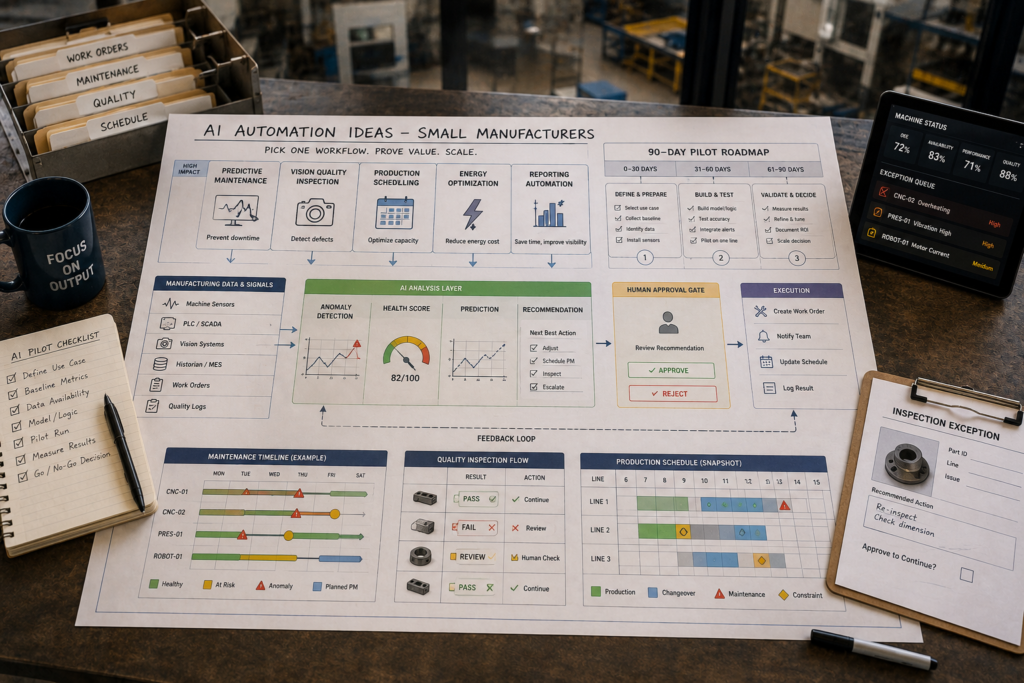
If you run a small factory, “AI for Manufacturing” can sound like an expensive smart-factory overhaul. In practice, many manufacturing AI initiatives can start much smaller: one operational problem (downtime, scrap, scheduling delays, or energy waste), one workflow, one pilot, and clear before/after metrics. That approach lets you test ROI without betting the plant on a transformation program.
Quick Answer (40–60 words): AI for manufacturing is most effective when it automates or improves a specific workflow—like predictive maintenance, visual quality inspection, scheduling, energy optimization, or production reporting. Small manufacturers should start with a 90-day pilot on one high-value process, measure outcomes (downtime, scrap, OEE), and scale only after the pilot demonstrates measurable value.
How Is AI Used in Manufacturing?
Most small manufacturers don’t need “AI everywhere.” They need tighter operations: fewer stoppages, less rework, more predictable schedules, and less supervisor time spent chasing information.
Artificial intelligence in manufacturing can improve maintenance, quality, production planning, inventory, energy management, reporting, and other operational workflows. The practical question for a small manufacturer isn’t whether AI can be used—it is where it can improve a measurable business outcome.
These applications are part of the broader field of industrial artificial intelligence, where AI techniques are applied to production, equipment, quality, planning, and other industrial workflows.
Modern manufacturing AI is usually one of these categories:
- Predictive / condition-based maintenance: detect abnormal equipment behavior and prompt maintenance before a breakdown.
- Computer vision inspection: use cameras and AI models to detect defects or missing components.
- Planning and scheduling optimization: generate better schedules using constraints like capacity, due dates, and setup time.
- Demand forecasting and inventory optimization: improve forecasts to reduce stockouts and excess inventory.
- Energy optimization: identify consumption patterns and reduce waste.
- Documentation and reporting automation: draft SOPs, shift summaries, and production notes for human review.
These applications are part of a broader smart-manufacturing shift involving industrial data, sensing, analytics, automation, and connected production systems. The NIST 2026 Roadmap for AI and Machine Learning in Smart Manufacturing provides a useful overview of current applications and implementation challenges. NIST 2026 Roadmap
Notice what’s missing: you don’t need to invent a custom model on day one. Many wins come from AI features embedded in tools you may already be using (or are ready to adopt), especially ERP/MRP and CMMS platforms.
AI for Manufacturing: Where Does It Create Business Value?
AI for manufacturing creates business value when it improves a measurable operational outcome—not simply because a company has deployed an AI tool.
For small manufacturers, the most relevant opportunities usually fall into five business outcomes:
| Business Outcome | AI Opportunity | What to Measure |
|---|---|---|
| Reduce downtime | Predictive maintenance and anomaly detection | Unplanned downtime, MTBF, maintenance response time |
| Reduce scrap and rework | Computer vision inspection and defect analytics | Scrap rate, rework rate, defect escape rate |
| Improve delivery | Production scheduling and constraint-aware planning | On-time delivery, schedule adherence, throughput |
| Reduce working capital | Demand forecasting and inventory optimization | Inventory turns, stockouts, excess inventory |
| Reduce administrative effort | Reporting, documentation, and workflow automation | Supervisor hours, reporting time, manual data entry |
NIST also identifies applications such as predictive maintenance, quality control, and demand forecasting among the areas where AI can support manufacturing operations. AI in U.S. Manufacturing — NIST
Energy optimization is another cross-cutting opportunity. AI can help identify abnormal consumption, inefficient production patterns, and opportunities to reduce energy waste.
The Business-First AI Principle
The objective isn’t to deploy AI. The objective is to improve a business process using AI where it creates measurable value.
That means starting with a problem you can already measure—downtime minutes, scrap rate, late shipments, inventory levels, energy consumption, or supervisor hours—and then selecting an AI workflow that can directly improve that metric.
This is the difference between a technology-first AI project and a business-first AI project:
Business problem → Workflow improvement → Right AI solution → Human oversight → Measurable outcome → Scale
This AI for manufacturing approach keeps technology tied to a measurable operational outcome.
Why Small Manufacturers Should Start With Workflows, Not AI Tools
AI should not be the starting point. The business problem should be.
For a small manufacturer, the goal is not to deploy the most sophisticated AI technology. It is to improve a workflow where the cost of the problem is already visible and the outcome can be measured.
Start with the business problem, improve the workflow, and introduce AI only where it creates additional measurable value.
A good AI candidate usually has three characteristics:
- The problem has a measurable business cost.
- The workflow is stable enough to improve.
- Someone owns the process and can act on the AI output.
For example, if supervisors spend 10 hours a week compiling production reports, document automation may be a better first AI project than predictive maintenance—even if predictive maintenance sounds more technologically advanced.
Business-First AI Insight: In small factories, the right AI project is rarely the most advanced. It is the one where the cost of the problem is already obvious, the workflow is stable enough to improve, and the success metric can be measured objectively.
The question is not:
“Where can we use AI?”
It is:
“Which business metric matters most, and can AI improve it?”
10 Practical AI Use Cases for Small Manufacturers
AI for manufacturing is most valuable when it improves a measurable business outcome—reducing downtime, scrap, scheduling delays, excess inventory, energy waste, or administrative effort.
The best starting point is not necessarily the most advanced AI application. It is the workflow where the cost of the problem is already visible, the process is stable enough to improve, and the result can be measured.
These AI use cases in manufacturing span both plant-floor operations and the business processes that support manufacturing. The most practical AI applications in manufacturing are connected to a measurable operational problem, usable data, and a clearly owned workflow.
Not every AI in factories initiative requires sensors, custom models, or a new production platform. Some useful applications can start with existing ERP, MRP, CMMS, quality, or reporting data.
Below are 10 practical manufacturing workflows where AI can create value, spanning both plant-floor operations and the business processes that support manufacturing.
1. Predictive Maintenance (Downtime Reduction)
Business problem: Unplanned downtime does more than stop a machine. It disrupts production schedules, triggers expediting, increases restart-related scrap risk, and forces maintenance teams into reactive work.
When AI helps: Predictive maintenance is most useful when a small number of critical assets routinely affect production and usable machine data is available—or can reasonably be added.
Workflow goal: Catch abnormal equipment behavior early and create a predictable maintenance response instead of waiting for failures.
Typical workflow steps:
- Collect machine data from existing PLC/SCADA signals, sensors, runtime data, vibration, temperature, or other available sources.
- Detect anomalies using rules-based thresholds or machine-learning pattern detection.
- Create an alert with context such as asset, time, signal, and suspected issue.
- Route the alert into the maintenance workflow through a CMMS work order or triage queue.
- Maintenance confirms the cause, performs the required action, and records the outcome.
Machine learning in manufacturing can identify patterns in equipment data that may indicate abnormal behavior or changing operating conditions.
Human oversight boundary: AI should recommend and prioritize; maintenance personnel decide and execute. Making AI the automatic trigger for maintenance without a review step can create false alarms and reduce trust.
Implementation considerations:
- Start with one critical asset that routinely disrupts production.
- Data readiness matters more than model sophistication. Unreliable signals produce unreliable recommendations.
- Define who reviews alerts and how quickly action should be taken.
- If breakdowns are mainly caused by obvious issues such as poor preventive-maintenance discipline, missing spares, or operator training gaps, fixing the maintenance workflow may deliver more value than predictive AI.
2. Computer Vision Quality Inspection (Scrap and Rework Reduction)
Business problem: Quality defects create losses across material cost, production capacity, rework, and customer satisfaction. Manual inspection can also consume significant operator time.
When AI helps: Computer vision is most useful when defects are visible—such as surface defects, missing components, incorrect assembly, labels, or print quality—and inspection is repetitive.
Workflow goal: Reduce manual inspection effort and identify defects earlier, when they are cheaper to correct.
Practical workflow steps:
- Capture images at a consistent inspection point with controlled camera positioning and lighting.
- AI classifies products as pass, fail, or needs review.
- Operator verifies ambiguous cases.
- Results are recorded in quality records.
- Recurring defect patterns can trigger investigation or corrective action.
Human oversight boundary: AI performs inspection or triage; operators and quality personnel handle ambiguous cases and quality decisions that require judgment.
Trade-offs: Vision systems require calibration and consistent image conditions. Materials, suppliers, lighting, or camera positioning can change over time, so periodic validation and recalibration may be required.
Best fit: Highly repetitive inspections where defect patterns are visible and inspection labor is significant.
3. Production Planning and Scheduling (Better Schedule Adherence)
Business problem: Spreadsheet-based scheduling can work at low complexity, but more SKUs, changeovers, capacity constraints, rush orders, and labor requirements can turn planning into a daily firefighting exercise.
When AI helps: Scheduling optimization becomes more useful when work orders are repeatable and constraints such as capacity, setup time, labor skills, material availability, and due dates are documented.
Workflow goal: Improve schedule adherence and reduce manual rescheduling caused by bottlenecks and changing priorities.
Production AI can help planners evaluate changing demand, capacity, material availability, setup constraints, and delivery priorities when creating or adjusting schedules.
Practical workflow steps:
- Pull orders, due dates, priorities, and production requirements from ERP/MRP.
- Apply constraints such as machine capacity, setup times, labor skills, and material availability.
- Generate a proposed production schedule.
- Supervisor or planner reviews and approves the schedule, particularly for exceptions and rush orders.
- Track schedule adherence and the reasons for deviations.
Human oversight boundary: AI proposes the schedule; planners and supervisors approve changes and manage business exceptions.
Implementation considerations:
- Start with one work center or product family.
- Maintain accurate routings and BOMs before introducing optimization.
- Record why schedules deviate from plan so the process can improve over time.
- If master data is unreliable, fix the underlying planning process before adding AI.
4. Demand Forecasting and Inventory Optimization
Business problem: Inventory errors create costs in both directions. Stockouts can cause production delays and late shipments, while excess inventory ties up working capital and warehouse space.
When AI helps: Forecasting can be valuable when demand is volatile, lead times fluctuate, customer patterns are difficult to predict, or service levels are consistently poor.
Workflow goal: Make purchasing and production planning more predictable while reducing stockouts and excess inventory.
Practical workflow steps:
- Pull historical demand from orders and shipments.
- Incorporate relevant customer patterns, promotions, seasonality, or other known demand factors.
- Generate a forecast with confidence ranges rather than relying only on a single number.
- Compare expected demand with current inventory and supplier lead times.
- Recommend reorder or production timing for planner review.
- Track forecast accuracy and inventory outcomes.
Human oversight boundary: AI provides forecasts and recommendations; planners decide purchasing and production actions.
Best fit: Manufacturers where inventory is expensive, lead times are long or volatile, or frequent expediting is creating avoidable costs.
5. Energy Optimization (Low-Disruption Cost Reduction)
Business problem: Energy is a controllable operating cost, but inefficient equipment operation, idle running, peak demand, compressed-air losses, and other patterns can be difficult to identify manually.
Why AI can help: Energy optimization can be relatively low disruption compared with changing core production processes, making it a potential first AI initiative when energy costs are significant and consumption can be measured.
Workflow goal: Reduce energy consumption per unit without compromising throughput or quality.
Practical workflow steps:
- Monitor facility-level and, where available, machine-level energy consumption.
- Identify patterns such as peak demand, idle running, unusual consumption, or inefficient operating periods.
- Identify potential actions such as runtime changes, load balancing, maintenance interventions, or shutdown policies.
- Review recommendations with operations and maintenance teams.
- Measure energy consumption against production output.
Human oversight boundary: AI identifies patterns and recommendations; operations teams approve changes and monitor their effect on production.
Best fit: Plants where energy costs are material and utility or machine-level data is available.
6. Production Summaries, SOP Drafting, and Reporting Automation
Business problem: Supervisors and operations leaders can spend significant time compiling shift reports, production notes, downtime summaries, and recurring updates. This is administrative work that should support decisions rather than consume management capacity.
Why AI can help: Document and reporting automation can provide relatively fast time-to-value with fewer OT/IT integration requirements than many plant-floor AI projects.
Workflow goal: Reduce manual reporting effort and improve the consistency of operational information.
Practical workflow steps:
- Gather shift notes, downtime reasons, production counts, and other relevant information.
- AI drafts a structured summary covering what happened, why it matters, and actions required.
- Supervisor reviews and edits the output.
- Publish the approved summary to the relevant team.
- Archive the report where appropriate for operational or audit purposes.
Human oversight boundary: AI drafts and organizes information; the responsible manager reviews and approves the final output.
Best fit: Small manufacturers where supervisors spend substantial time creating recurring reports and where the reporting format can be standardized.
7. Customer Service Automation
Business problem: Customer service and operations teams can spend significant time answering repetitive questions about products, specifications, lead times, order status, delivery updates, and common support issues.
Workflow goal: Handle routine customer inquiries efficiently while routing complex or sensitive issues to people.
Practical workflow steps:
- Customer submits an inquiry through email, website chat, or another supported channel.
- AI classifies the request as a product/specification question, order-status request, delivery update, FAQ, warranty/support request, or complex issue.
- For routine questions, AI drafts a response using approved product information, policies, and company knowledge.
- For order-status and delivery questions, AI retrieves relevant information from ERP/MRP or order systems where integration is available.
- Complex issues, complaints, warranty decisions, pricing issues, and custom requests are routed to a human with relevant context.
- Human reviews and approves the response where required.
Human oversight boundary: AI handles routine information requests; humans handle complaints, exceptions, warranty decisions, pricing, and relationship-sensitive conversations.
Trade-offs: The workflow depends on accurate product and order information. Start with one inquiry type or communication channel before expanding.
8. Supplier and Procurement Workflows
Business problem: Procurement teams can spend substantial time reading supplier quotations, comparing prices and lead times, following up on purchase orders, and tracking delayed deliveries.
Workflow goal: Reduce manual procurement effort while giving buyers better visibility into supplier information and exceptions.
Practical workflow steps:
- AI extracts information from supplier quotations, emails, or PDFs, including price, lead time, minimum order quantity, and terms.
- AI compares supplier quotations and highlights important differences.
- AI summarizes supplier communications and identifies pending actions.
- AI monitors purchase-order status and flags delayed or potentially at-risk deliveries.
- AI generates reorder recommendations using inventory, consumption, and lead-time information where appropriate.
- Procurement staff reviews the information, selects suppliers, negotiates terms, and approves purchase orders.
Human oversight boundary: AI prepares information and recommendations; procurement staff makes supplier selections, negotiates, and approves commitments.
Trade-offs: Reliable inventory, supplier, and purchase-order data are important. Start with quotation extraction and comparison before moving toward automated recommendations.
9. Sales and Order Processing
Business problem: Customer orders often arrive through different formats—email, PDF, spreadsheet, portal, or other channels. Manual order entry can consume time and introduce errors.
Workflow goal: Extract, validate, and route customer orders into the appropriate ERP/MRP workflow.
Practical workflow steps:
- Customer sends an order through email, PDF, spreadsheet, portal, or another channel.
- AI extracts customer information, products, quantities, requested delivery dates, and special instructions.
- AI checks the extracted information against business rules and available master data.
- Missing information, unusual quantities, pricing exceptions, or delivery conflicts are flagged.
- Clean orders can be prepared for ERP/MRP entry where integration is available.
- Sales or operations staff reviews and approves exceptions before production or fulfillment.
Human oversight boundary: AI extracts and validates information; humans approve pricing exceptions, unusual orders, customer commitments, and other decisions requiring business judgment.
Trade-offs: Product master data, customer records, pricing rules, and ERP integration need to be reliable. Start with one order channel before expanding.
10. Knowledge Management and Employee Support
Business problem: Critical manufacturing knowledge can become concentrated in a small number of experienced employees. Operators may repeatedly interrupt supervisors to find SOPs, machine procedures, troubleshooting guidance, or maintenance information.
Workflow goal: Help employees find approved operational knowledge quickly while keeping humans responsible for safety- and quality-critical decisions.
Practical workflow steps:
- Employee asks a question through an approved search or chat interface.
- AI searches approved knowledge sources such as SOPs, machine manuals, maintenance documentation, and training materials.
- AI provides an answer based on those sources and identifies the relevant document or section where possible.
- Questions involving safety, quality-critical procedures, or uncertainty are routed to a supervisor or subject-matter expert.
- Unanswered questions are logged to identify documentation gaps.
- Process owners periodically review and update approved knowledge.
Human oversight boundary: AI retrieves and summarizes approved information; humans validate safety-critical and quality-critical guidance and remain responsible for maintaining the knowledge base.
Trade-offs: Answer quality depends on the quality and currency of the underlying documentation. Start with high-value SOPs and machine procedures before expanding to broader company knowledge.
Choosing the Right Starting Point
For AI for manufacturing, the right first project is not necessarily the most sophisticated one. It is the workflow where the business problem is measurable, the data is usable, the process has a clear owner, and the team can act on the output.
A practical sequence is:
Business problem → Workflow improvement → Right AI solution → Human oversight → Measurable outcome → Scale
Start with one workflow, establish a baseline, define the human review boundary, and measure the outcome before expanding to the next process.
AI Automation vs. Traditional Automation
Not every manufacturing workflow needs AI. In many cases, traditional automation is simpler, cheaper, easier to maintain, and easier to audit. The same principle applies to AI for manufacturing: use AI where it adds capabilities that traditional automation cannot provide efficiently.
AI industrial automation becomes particularly useful when a workflow involves prediction, classification, interpretation, pattern recognition, or variable inputs rather than a simple predefined rule.
The business-first approach is to choose the simplest technology that reliably solves the problem.
| Traditional Automation | AI Automation |
|---|---|
| Follows predefined rules | Can interpret patterns and variable inputs |
| Best for predictable workflows | Useful when inputs vary |
| “If X, do Y” | Can classify, predict, summarize, or recommend |
| Usually requires structured inputs | Can often work with less-structured data |
| Deterministic and easier to validate | Probabilistic and requires testing and oversight |
| Example: If inventory falls below a threshold, create an alert | Example: Predict which purchase orders are at risk of delay |
When Traditional Automation Is the Better Choice
Use traditional automation when the workflow has clear, repeatable rules.
Examples include:
- Sending an alert when machine temperature exceeds a defined threshold
- Creating a purchase-order request when inventory falls below a reorder point
- Routing orders above a defined value to a manager
- Moving structured data from one system to another
- Generating a scheduled report from the same data fields
- Triggering a notification when a production milestone is missed
Manufacturing process automation does not always require AI. Many predictable workflows can be automated using rules, APIs, scripts, integrations, or existing software features.
Traditional production automation remains effective for deterministic tasks, while AI can extend automation into workflows involving variability, prediction, interpretation, and pattern recognition.
RPA in manufacturing can automate repetitive, rule-based office workflows such as moving structured data between systems, generating reports, updating records, and routing approvals. Robotic process automation in manufacturing is useful when the workflow is predictable and the inputs are structured. AI becomes more relevant when the process also requires interpretation, classification, prediction, or handling variable inputs.
If you can describe the workflow as a reliable “If X, do Y” sequence, you may not need AI.
When AI Adds Genuine Value
AI becomes more useful when the workflow involves interpretation, prediction, classification, natural language, or patterns that are difficult to capture with fixed rules.
For example:
- Interpretation: Extracting order information from emails, PDFs, or spreadsheets
- Classification: Identifying defects from product images
- Prediction: Forecasting demand or identifying potential equipment failures
- Natural language: Summarizing supplier communications or answering employee questions
- Pattern recognition: Detecting unusual machine behavior beyond simple thresholds
- Recommendation: Comparing supplier quotes and identifying options for procurement review
These workflows involve variability or ambiguity that can make a large collection of fixed rules difficult to maintain.
The Hybrid Approach: Rules + AI
In many manufacturing workflows, the strongest approach is not AI instead of automation, but AI combined with traditional automation.
AI can handle the interpretation, prediction, classification, or recommendation. Business rules can then enforce thresholds, approvals, permissions, and escalation paths.
For example:
AI: Predicts that a purchase order may be delayed.
Business rule: If the predicted delay exceeds the agreed threshold, create an exception for procurement review.
Human: Decides whether to contact the supplier, change the order, or accept the delay.
This combines AI’s flexibility with the predictability and control of traditional automation.
The Business-First Test
Before choosing an AI solution, ask:
Can this workflow be reliably automated with a rule, API, script, or existing software feature?
If yes, start there.
If the workflow requires interpretation, prediction, classification, natural-language processing, or pattern recognition, AI may provide additional value.
Don’t default to AI. Choose the simplest solution that reliably improves the business outcome.
Which Manufacturing Processes Should You Automate First?
Choosing the first manufacturing process to automate should be based on business impact, implementation complexity, data readiness, and the ability to measure results.
The goal is not to select the most advanced AI application. It is to identify a workflow where the business problem is already visible, the process has a clear owner, and improvement can be measured.
Use the matrix below to compare potential opportunities, then use the decision tree to narrow the list to a practical first pilot.
Use Case Selection Matrix
| Workflow | Typical Business Impact | Implementation Complexity | Data Readiness Requirement | Best First-Pilot Fit When… |
|---|---|---|---|---|
| Reporting & document automation | Medium — hours saved, better visibility | Low | Low to Medium | Supervisors spend significant time creating recurring reports and updates |
| Energy optimization | Medium — cost reduction | Low to Medium | Medium | Energy costs are meaningful and consumption can be measured |
| Customer service automation | Medium — time saved, faster responses | Low to Medium | Medium | Routine product, order-status, and delivery inquiries consume staff time |
| Knowledge management & employee support | Medium — time saved, faster onboarding | Low to Medium | Medium | Critical operational knowledge is concentrated in experienced employees |
| Supplier & procurement workflows | Medium to High — time saved, better purchasing visibility | Medium | Medium | Purchasing is reactive and supplier follow-up is largely manual |
| Sales & order processing | Medium to High — fewer errors, faster order handling | Medium | High | Orders arrive in mixed formats and manual entry is a bottleneck |
| Demand forecasting & inventory optimization | Medium to High — inventory and service improvement | Medium | Medium to High | Demand is volatile and inventory decisions have significant financial impact |
| Scheduling optimization | Medium to High — better schedule adherence and utilization | Medium | High | Routings, BOMs, capacity constraints, and execution data are reasonably reliable |
| Predictive maintenance | High — potential downtime reduction | Medium | Medium to High | Critical assets affect production and usable machine data is available |
| Computer vision inspection | High — scrap and rework reduction | Medium to High | Medium | Defects are visible, inspection is repetitive, and image capture can be controlled |
How to use the matrix: Start with the workflows where the business impact is high and the implementation conditions are realistic. A high-impact use case with poor data or unclear ownership may be a worse first pilot than a lower-complexity workflow that can demonstrate measurable value quickly.
Simple Decision Tree: Which Project Should You Start With?
Use this decision tree to narrow the matrix to one practical pilot. The right starting point is the workflow you can measure, implement, and operationalize—not necessarily the most advanced AI application.
1. Is supervisor or manager time being consumed by reporting, SOPs, and recurring updates?
- Yes → Start with production summary and document automation.
- No → Continue to Question 2.
2. Is downtime or breakdown-related disruption your biggest operational cost?
- Yes → First assess your maintenance foundation.
- If work orders, preventive maintenance, and maintenance records are poorly managed → start with CMMS and maintenance workflow modernization.
- If maintenance processes are already disciplined and usable machine data is available → consider predictive maintenance or anomaly detection.
- No → Continue to Question 3.
3. Is scrap, rework, or warranty risk a major source of loss?
- Yes → Consider computer vision inspection at one high-volume or high-risk inspection point.
- No → Continue to Question 4.
4. Are missed delivery dates driven by planning and scheduling complexity?
- Yes → Check your production master data first.
- If routings, BOMs, capacity constraints, and production data are reliable → consider scheduling optimization.
- If they are unreliable → improve the underlying planning and master-data process before introducing AI.
- No → Continue to Question 5.
5. Are stockouts, excess inventory, or frequent expediting creating significant cost?
- Yes → Consider demand forecasting and inventory optimization.
- No → Continue to Question 6.
6. Is energy consumption a significant and measurable operating cost?
- Yes → Consider energy optimization, particularly where machine- or process-level consumption data is available.
- No → Review the remaining workflows in the matrix, including customer service, supplier/procurement, sales/order processing, and knowledge management.
A Practical Rule for Choosing the First Pilot
If two or more use cases appear attractive, prioritize the one that scores well across these five questions:
- Is the business problem expensive or time-consuming?
- Can the current baseline be measured?
- Is the required data available and reasonably reliable?
- Does someone clearly own the workflow?
- Can the result be tested without disrupting production?
If the answer is yes to most of these, the workflow is a reasonable candidate for a pilot.
The objective is not to automate everything at once. It is to demonstrate that one workflow can produce a measurable business improvement, then use that experience to decide what should be automated next.
Choosing AI Tools for Manufacturing
When evaluating AI for manufacturing tools, start with the workflow and business requirement rather than the technology.
For small manufacturers, the “best” tool is usually not the one with the most AI features. It is the one that fits the company’s operational maturity, existing workflows, data availability, and integration requirements.
Before selecting a tool, identify the workflow you want to improve and the business outcome you want to measure. Then choose technology that supports that workflow.
The following comparison provides a business-focused starting point. Always confirm current capabilities, integrations, deployment requirements, and pricing on the official vendor website, as these details can change.
| Tool | Best For | Ease of Use | Time to Value | Business Size Fit | Notes |
|---|---|---|---|---|---|
| MRPeasy | ERP/MRP basics and production planning for small plants | High | Fast | Small manufacturers | Good entry point for ERP-first improvement; not a dedicated vision or predictive-maintenance platform |
| Katana | Visual production management and order-driven manufacturing | High | Fast to Medium | Small to SMB | Strong usability; verify fit for production complexity and required integrations |
| Odoo | Configurable ERP with modular manufacturing capabilities | Medium | Medium | Growing manufacturers | Flexible platform, but customization can increase complexity and governance requirements |
| Fiix | CMMS modernization and maintenance workflow automation | High | Fast | Small to SMB | Useful for maintenance-first improvements and structured work-order processes |
| MachineMetrics | Equipment monitoring, OEE visibility, and machine-data analysis | Medium | Medium | SMB to Mid-market | Requires reliable equipment connectivity and data; relevant for operations visibility and machine monitoring |
| Augury | Condition monitoring for critical equipment | Medium | Medium | SMB to Mid-market | May require sensor deployment; relevant where equipment health and downtime risk are significant |
| Instrumental | AI-based quality inspection and defect analytics | Medium | Medium | SMB to Mid-market | Vision projects require setup and calibration; strongest for repetitive inspection processes |
| Logility | Demand forecasting, inventory optimization, and planning | Medium | Medium to Slow | Mid-market+ | More substantial planning capability; better suited to organizations with greater planning complexity |
Match the Tool to the Workflow
The tool should follow the workflow—not the other way around.
For example:
- Maintenance problem → establish a CMMS foundation first; then consider equipment monitoring or predictive maintenance when the data and process are ready.
- Quality inspection problem → evaluate computer vision when defects are visible and inspection is repetitive.
- Scheduling problem → ensure BOMs, routings, capacity, and other planning data are reliable before introducing scheduling optimization.
- Inventory problem → improve demand and inventory data before relying on forecasting recommendations.
- Reporting problem → consider document and reporting automation where information is already structured and the output can be reviewed by a manager.
- Customer inquiry problem → start with a defined set of repetitive questions and approved information sources before expanding customer-service automation.
Start With Workflow Foundations When Needed
Not every manufacturer is ready for advanced AI.
If ERP/MRP processes are inconsistent, maintenance work orders are poorly managed, production data is unreliable, or critical information exists mainly in spreadsheets and individual employees’ knowledge, the first step may be workflow modernization rather than AI.
For example, a CMMS implementation can establish structured maintenance records, preventive-maintenance schedules, work orders, and failure history. That foundation can later support more advanced maintenance analytics.
Similarly, improving ERP/MRP master data can make later scheduling, inventory forecasting, and production-planning initiatives more reliable.
This leads to a simple rule:
Fix the workflow first. Add AI where it creates additional measurable value.
Don’t Choose a Tool Before Defining the Pilot
Before selecting a vendor, define:
- The business problem — What is costing the company money, time, capacity, or customer satisfaction?
- The workflow — What happens today, step by step?
- The baseline — What metric will establish the current performance?
- The human decision point — What will AI recommend, and what will a person approve?
- The integration requirement — Which ERP, MRP, CMMS, machine, CRM, or other system needs to connect?
- The pilot scope — Can the workflow be tested on one machine, line, product family, team, or process?
- The success criteria — What measurable improvement would justify scaling?
Only after these questions are clear should you compare tools.
The objective is not to buy an “AI platform.” It is to implement a solution that improves a specific manufacturing workflow and produces a measurable business outcome.
How to Start With AI in a Small Manufacturing Business
Start With a 90-Day Pilot
A pilot is where an AI for manufacturing initiative proves whether it can create real operational value. The goal is not to “prove AI works.” The goal is to prove that the workflow improvement is operationally adoptable and financially worth scaling.
The safest approach for a small manufacturer is to start with one workflow, one measurable problem, and a defined pilot period. A practical 90-day structure is:
Baseline → Deploy → Measure and Decide
Phase 1 (Days 1–30): Baseline and Define the Workflow
- Pick one workflow: One machine, one line, one inspection point, or one report type.
- Define the decision rule: What exactly will AI recommend, classify, predict, or automate—and who approves the action?
- Capture baseline metrics: Downtime minutes, scrap rate, inspection time, schedule adherence, energy per unit, order-processing time, or hours spent reporting.
- Document data sources: PLC/SCADA/MES/ERP/CMMS logs, quality records, energy meters, shift notes, or other relevant sources.
- Define the human-review boundary: Make clear which decisions remain with operators, supervisors, maintenance teams, or quality personnel.
Phase 2 (Days 31–60): Implement a Narrow Deployment
- Integrate lightly: Don’t connect every system on day one. Build the minimum data flow required to support the pilot.
- Start with a limited scope: One asset, product family, inspection point, team, or transaction type is usually enough.
- Train the users: Operators, maintenance teams, planners, or supervisors need to understand how to interpret the output and what action to take.
- Set review routines: Daily triage for maintenance alerts, per-shift review for inspection exceptions, or weekly planning reviews for schedules.
- Track exceptions: Record false positives, false negatives, data issues, overrides, and cases where the workflow does not behave as expected.
Phase 3 (Days 61–90): Measure, Stabilize, and Decide
- Compare results with the baseline: Focus on measurable operational outcomes, not simply whether the technology is running.
- Audit false positives and false negatives: Trust improves when misses and exceptions are identified, reviewed, and addressed transparently.
- Measure adoption: A technically successful solution that employees do not use consistently has limited business value.
- Calculate the business impact: Translate operational improvement into measurable financial or capacity impact where possible.
- Define scale criteria: Establish the threshold that makes it worthwhile to extend the solution to another machine, line, product family, or workflow.
At the end of the pilot, make one of three decisions:
Scale → Improve → Stop
If the workflow delivers measurable value and users adopt it, scale it. If the concept is promising but performance or adoption needs improvement, refine it and test again. If the expected business value is not demonstrated, stop rather than continuing simply because the technology has already been deployed.
Consultant Insight: AI pilots can struggle not because the model is weak, but because the workflow isn’t owned. If nobody has time to review alerts, validate inspection exceptions, or maintain the underlying data, the project becomes shelfware—no matter how accurate the technology appears to be.
Start Today
Start with the workflow where the business problem is easiest to see and measure.
Good candidates include:
- A recurring production report that consumes supervisor time
- A maintenance process with frequent manual follow-up
- A repetitive visual inspection
- A manual customer-order entry process
- A recurring supplier follow-up process
- A knowledge-search problem affecting operators or supervisors
The first step does not need to be an AI implementation. Document the current workflow, identify the bottleneck, and establish the baseline.
Improve Next
Once the first workflow is stable, use what you learned to identify the next opportunity.
Look for workflows that share:
- Similar data sources
- Similar users
- Existing system integrations
- Related business problems
- Reusable automation components
For example, a manufacturer that starts with production reporting may later automate downtime summaries, maintenance follow-up, or management reporting using some of the same data sources.
This is how individual pilots begin to become a broader manufacturing automation capability rather than isolated AI experiments.
Scale Later
Scale only after the workflow has demonstrated measurable value and operational adoption.
Scaling can mean:
- Expanding from one machine to multiple machines
- Extending from one production line to several lines
- Adding additional product families
- Connecting additional business systems
- Automating additional steps within the same workflow
- Applying the approach to another business process
Before scaling, confirm that the process is repeatable, the data remains reliable, employees understand the workflow, and the economics still make sense at a larger scale.
The practical sequence is:
One workflow → Baseline → 90-day pilot → Measure → Improve → Scale
How Do You Measure ROI From Manufacturing AI?
Measuring ROI is essential because AI for manufacturing should ultimately improve cost, capacity, quality, delivery, or employee productivity. Manufacturing leaders usually don’t need complex ROI spreadsheets. They need a defensible baseline, a short list of KPIs, and agreement on what success means.
Core KPIs to track by use case
- Downtime and maintenance: downtime minutes, mean time between failures (if tracked), maintenance response time, emergency work orders, planned vs unplanned maintenance ratio.
- Quality: scrap rate, first-pass yield, rework hours, warranty/return incidents (if available).
- Scheduling: schedule adherence, on-time completion, changeover time impact, queue time at bottlenecks.
- Inventory/forecasting: forecast accuracy (choose one method and stick to it), stockouts, expediting events, excess/obsolete inventory.
- Energy: energy per unit, peak demand costs (if applicable), runtime vs idle consumption.
- Admin/reporting: hours spent compiling reports, time to publish shift summaries, consistency/format compliance.
A practical KPI tracker table (copy into your pilot plan)
| KPI | Baseline (Last 4 Weeks) | Pilot Target | Data Source | Review Cadence | Owner |
|---|---|---|---|---|---|
| Downtime minutes (critical asset) | _____ | _____ | Machine logs / OEE tool | Weekly | Maintenance lead |
| Scrap rate / first-pass yield | _____ | _____ | Quality records | Weekly | Quality manager |
| Schedule adherence | _____ | _____ | ERP/MRP | Weekly | Planner |
| Energy per unit | _____ | _____ | Utility + production counts | Monthly | Ops leader |
| Supervisor reporting time (hours/week) | _____ | _____ | Self-reported time study | Weekly | Production manager |
Budget expectations (what the research suggests)
Manufacturing AI costs vary significantly depending on the workflow, integration requirements, sensors or other hardware, software licensing, implementation effort, and ongoing maintenance.
A focused workflow pilot can be substantially less expensive than a plant-wide transformation. Instead of relying on a generic AI price range, define the budget around the specific workflow, implementation requirements, expected operational improvement, and measurable business value.
The key question is not “How much does AI cost?” but “What is the economic value of improving this workflow, and what will it take to prove that value?”
Common Mistakes to Avoid (What Derails Small-Factory AI)
- Starting with tools instead of a problem: you end up with dashboards nobody uses. Start with downtime, scrap, scheduling delays, or energy waste.
- Skipping baseline metrics: without a “before,” every outcome becomes a debate.
- Over-scoping the pilot: trying to cover the whole factory kills momentum. One machine, one line, or one workflow is the point.
- Ignoring data quality and process discipline: AI can’t compensate for missing work orders, inconsistent defect codes, or unmaintained routings.
- No human-in-the-loop rule: if operators don’t know when to trust the system (and when to override), they won’t adopt it.
- Underestimating change management: the floor needs training, routines, and feedback loops—not just a new tool.
- Security and data handling as an afterthought: connecting operational systems to external services requires a deliberate risk review.
These mistakes can turn an AI for manufacturing project into an expensive technology exercise rather than a business improvement.
AI Implementation Checklists: Data, People, and Governance
Pilot readiness checklist
- We can name one workflow owner responsible for daily/weekly review.
- We can measure the pain today (baseline for downtime, scrap, adherence, energy, or hours).
- We can define what AI recommends vs what humans approve.
- We can run the pilot on one machine/line/workflow without disrupting everything else.
- We have an agreed success threshold that triggers scale (or stops the project).
Data readiness checklist
- We know where the data lives (PLC/SCADA/MES/ERP/CMMS/quality logs/energy meters).
- Key fields are consistent enough to analyze (asset IDs, defect codes, work order categories).
- We can access the data safely (permissions, network segmentation, vendor security review).
- We have a process to correct bad data and keep it clean.
Vendor/tool evaluation checklist (business-first)
- Time to value: can we implement a pilot in weeks, not quarters?
- Workflow fit: does it match how work actually happens on the floor?
- Integration effort: what data connections are required, and who builds/maintains them?
- Human oversight: can we route recommendations into an approval workflow?
- Total cost of ownership: beyond subscription, what’s the cost of calibration, sensors, training, and ongoing maintenance?
- Security: how is data handled, stored, and accessed?
For a broader framework for managing AI risks across design, deployment, evaluation, and ongoing use, manufacturers can also refer to the NIST AI Risk Management Framework. NIST AI Risk Management Framework
The accompanying NIST AI RMF Playbook provides practical actions around governing, mapping, measuring, and managing AI risks. NIST AI RMF Playbook
Industry-Specific Use Cases (How the Same Workflows Show Up Differently)
Even though the core workflows are similar, what “good” looks like varies by manufacturing context.
Discrete assembly (light assembly, electronics, kitting)
- Best first bets: vision inspection (presence/absence, labeling), scheduling optimization, production summaries.
- Watch-outs: frequent engineering changes can confuse inspection models unless change control is tight.
Machining and fabrication
- Best first bets: equipment monitoring and anomaly detection, maintenance workflow automation, energy optimization.
- Watch-outs: tool wear and job variation can look like “anomalies” unless you model normal operating ranges by job type.
Process manufacturing (mixing, batching, food/chemical-like operations)
- Best first bets: energy optimization, quality monitoring, demand forecasting (if shelf-life and variability matter).
- Watch-outs: compliance and traceability requirements often raise the bar for data governance.
Regulated manufacturing (medical device-like environments)
- Best first bets: document automation with strong review controls, inspection assistance, traceability improvements.
- Watch-outs: validation, audit trails, and controlled change processes may shape tool selection more than “AI capability.”
FAQ: AI for Manufacturing
What is AI for manufacturing?
AI for manufacturing applies methods like machine learning, computer vision, and automation to improve factory workflows—maintenance, quality inspection, planning, forecasting, energy management, and reporting. In small plants, the best results usually come from targeted workflow improvements with measurable KPIs.
What should a small manufacturer automate first with AI?
There is no single best first AI use case for every small manufacturer. The right starting point is the workflow with significant measurable pain, a manageable pilot boundary, usable data, and clear ownership. Common candidates include downtime on a critical asset, repetitive quality inspection, or documentation/reporting automation.
Is predictive maintenance worth it for small factories?
It can be, especially when downtime is expensive and you have (or can add) reliable machine data. If your maintenance process is still reactive and poorly documented, modernizing the CMMS workflow first may produce faster and more reliable gains.
Can AI improve quality control in a small factory?
Yes. Computer vision inspection can reduce manual inspection effort and catch defects more consistently—especially for visible defects and repetitive checks. Successful deployments typically include controlled lighting/camera setup and a human review step for ambiguous cases.
How much does manufacturing AI cost?
Manufacturing AI costs vary significantly by scope, integration requirements, sensors or other hardware, software licensing, implementation effort, and ongoing maintenance. A small workflow pilot can be substantially less expensive than a plant-wide transformation, so budget should be defined around the specific workflow and expected business value rather than a generic AI price range.
Do small manufacturers need custom AI models?
Not always. Many small manufacturers get meaningful value from standard software with embedded AI features in ERP/MRP, CMMS, and equipment monitoring platforms. Custom AI becomes more relevant when your workflow is unique and you have strong data discipline.
What data is needed for AI in manufacturing?
Common inputs include machine sensor data (from PLCs/SCADA), maintenance logs (CMMS), production counts (MES/ERP), quality records, inventory and order data (ERP/MRP), and sometimes energy meter data. The most important factor is consistency and accessibility, not volume.
How do we measure success for an AI pilot?
Use baseline and post-implementation metrics tied to the problem: downtime minutes avoided, scrap rate reduced, first-pass yield improved, schedule adherence improved, energy per unit reduced, and hours saved in reporting. Decide the success threshold before the pilot starts.
Expert Verdict: Start With the Workflow, Not the AI Tool
For small manufacturers, AI for manufacturing adoption should not begin with a search for the most advanced AI platform.
It should begin with a workflow that is costing the business time, money, capacity, or customer satisfaction.
If the workflow is poorly defined, fix the workflow first.
If a simple rule or automation can solve the problem, use it.
If the workflow requires prediction, classification, interpretation, or pattern recognition, AI may add value.
And if AI is appropriate, start with one measurable pilot rather than a plant-wide transformation.
The practical sequence is:
Business problem → Workflow improvement → Right solution → Human oversight → Measurement → Standardization → Scale
That is how small manufacturers can adopt AI without turning AI itself into another operational problem.
Conclusion: The Practical Way to Use AI in Manufacturing
AI for manufacturing is most valuable when it turns recurring operational chaos into a controlled, measurable workflow—maintenance that’s planned, quality checks that are consistent, schedules that are realistic, and reporting that doesn’t consume leadership bandwidth. Small manufacturers don’t win by doing “more AI.” They win by choosing one problem where the business case can be measured, piloting it with disciplined measurement, and scaling only after adoption is real.
If you want a clear next step, pick one workflow (one machine, one line, or one reporting process) and run a 90-day pilot with a baseline, a defined human review boundary, and a short KPI list. That approach creates confidence—because you’re not buying technology. You’re buying a better operational outcome.
Next step: If you’d like help narrowing to the highest-value pilot (downtime, quality, scheduling, energy, or reporting), request a manufacturing workflow review and we’ll map one process end-to-end, define KPIs, and outline a realistic pilot plan aligned to the Business-First AI Framework™.