
How to Choose the Right WhatsApp Automation Software for Your Business (2026 Guide)
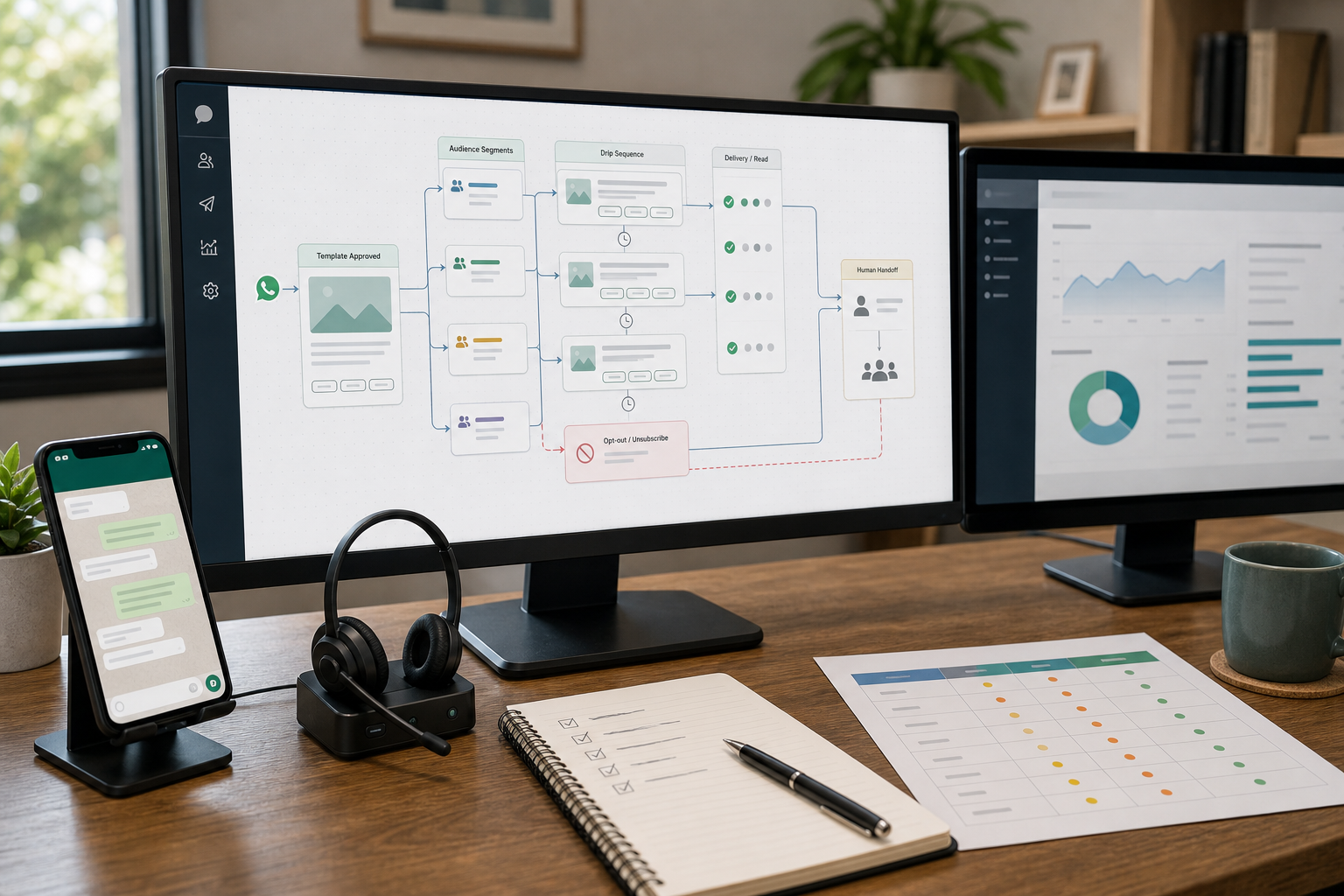
If WhatsApp is where customers actually reach you, then your response speed, routing, and follow-up discipline directly affect revenue and customer satisfaction. The problem is that many small businesses buy WhatsApp automation software based on features—then discover it’s either too limited to scale or too complex to manage. This guide helps you choose the simplest solution that fixes your real workflow first, with a clear path to scale.
Quick Answer (40–60 words): Choose WhatsApp automation software by starting with the workflow you need to improve: basic auto-replies, a shared team inbox, lead qualification, or API-driven automation (chatbots + CRM sync). Most small businesses should start with the WhatsApp Business App or a lightweight platform, and move to a WhatsApp Business Platform–based solution when multi-agent access, integrations, or scalable automation becomes necessary.
Key Takeaways for Buyers (Read This Before Comparing Tools)
- Start with the workflow, not the platform. Your best option depends on whether you’re solving FAQs, lead routing, bookings, or order updates.
- Most SMBs don’t need the WhatsApp Business API on day one. Many can get value from app-level automation or a shared inbox first.
- “WhatsApp automation” pricing isn’t one thing. Expect models like per-user, per-number, per-conversation, or usage-based infrastructure—and plan for hidden operational costs.
- AI helps when conversations aren’t predictable. Rules handle repetitive flows; AI becomes valuable for flexible Q&A, triage, and lead qualification—if you design human handoff.
- Scaling requires governance. As soon as multiple people touch one inbox, you’ll need routing rules, ownership, quality control, and basic reporting.
What Is WhatsApp Automation Software?
WhatsApp automation software is a tool or platform that reduces manual work in WhatsApp by automating tasks such as:
- Instant replies to common questions (FAQs, pricing requests, availability)
- Lead capture and qualification (asking a few questions before handing them to sales)
- Conversation routing (sending messages to the right person or team)
- Follow-ups and reminders (appointments, payments, missed replies)
- Syncing chat activity with a CRM (so WhatsApp conversations don’t disappear into a phone)
In practice, WhatsApp automation software can range from basic automation features such as quick replies in the WhatsApp Business App to API-driven automation platforms that connect WhatsApp with your CRM, calendar, ticketing system, or order management system.
WhatsApp Business App vs WhatsApp Business API (The Difference That Determines Everything)
Most buying mistakes happen right here—because “WhatsApp automation” looks similar in marketing pages, but the underlying operating model is completely different.
WhatsApp Business App (Best for simple, low-volume operations)
The WhatsApp Business App is the free official app designed for small businesses. It supports basic business features such as:
- Welcome messages and away messages
- Quick replies (saved responses)
- Basic labeling/organization
When it’s a great fit: solo operators, very small teams, low-to-moderate chat volume, and businesses that mainly need fast manual replies with a little structure.
Where it breaks: when one-person handling becomes the bottleneck, when multiple people need the same number, or when you need automation that connects to other systems. Many comparative guides also highlight device and multi-user limitations as a common reason teams outgrow the basic app.
WhatsApp Business API (Best for scaling, integrations, and advanced workflows)
The WhatsApp Business API is the foundation for scalable automation. It’s typically accessed through an official provider (often referred to as a BSP—a WhatsApp Business Solution Provider) or via platforms that bundle BSP access.
What the API enables:
- Multi-agent support on one number with a shared inbox
- Chatbot workflows (rules-based and, in some platforms, AI-assisted)
- CRM and automation integrations (lead creation, pipeline updates, tagging, follow-up)
- More robust routing, analytics, and operational controls
Trade-off: more setup, more governance, and often more complex pricing (for example, usage-based conversation costs depending on your provider/model).
Consultant Insight: If you can’t clearly describe what happens after a WhatsApp message arrives (who answers, how it’s routed, where it’s logged, what the follow-up is), buying an API platform won’t fix the chaos—it will automate it.
WhatsApp offers different business products depending on the size and complexity of your operation. See the official WhatsApp Business resources for an overview of available business solutions.
Does Your Business Need WhatsApp Automation?
Before comparing any WhatsApp automation software, first determine whether automation solves a real operational problem in your business.
Start With the Business Problem, Not the Tool
In small businesses, WhatsApp problems usually fall into one of four buckets:
| Problem You Feel | What’s Really Broken | Best Starting Point | What “Good” Looks Like |
|---|---|---|---|
| Same questions all day | No FAQ deflection | App quick replies or simple automation | Common questions answered instantly; humans handle exceptions |
| Slow replies / missed leads | No triage + no follow-up discipline | Lead capture + routing automation | Every new lead gets acknowledged and qualified fast |
| One number, multiple staff | No shared inbox + no ownership rules | Multi-agent inbox platform | Clear assignment, history visibility, and handoffs |
| WhatsApp not connected to sales/support systems | No CRM or workflow integration | WhatsApp Business API platform | Conversations create/update CRM records; reporting becomes possible |
A Simple Workflow Map You Can Do in 10 Minutes
Take your last 30 WhatsApp conversations and categorize them:
- FAQ
- Lead inquiry (pricing, availability, product/service fit)
- Booking/scheduling
- Support issue
- Order status / delivery
- Other
Then answer:
- Which 2 categories consume the most time?
- Which category causes the most missed opportunities?
- Where do you need a human every time? These are poor automation candidates.
When You May Not Need Automation Yet
WhatsApp automation is not automatically the right solution for every business. If your current workflow is simple and manageable, adding software may create more complexity than value.
You may not need WhatsApp automation yet if:
- WhatsApp volume is very low and only a small number of conversations arrive each day.
- One person can respond quickly without creating delays or missed opportunities.
- Most conversations are highly personalized and require individual judgment.
- There are few repetitive tasks that can be handled through standard workflows.
- There is no clear bottleneck to solve, such as slow response times, missed leads, excessive support workload, or manual follow-up.
In these cases, start by improving your existing WhatsApp process rather than immediately investing in advanced automation software.
The goal is not to automate WhatsApp simply because automation is available. The goal is to automate where it produces a measurable business improvement.
Decision Tree: App vs Multi-Agent Inbox vs WhatsApp Business API Platform
Use this to pick the right level of solution without overengineering.
- Is one person handling messages, and volume is manageable?
- Yes → Start with WhatsApp Business App automation (quick replies, welcome/away messages).
- No → go to step 2
- Do multiple people need to access one WhatsApp number and see full history?
- Yes → Choose a multi-agent inbox (often API-based under the hood).
- No → go to step 3
- Do you need CRM integration, lead routing, chatbot workflows, or automated updates?
- Yes → Choose a WhatsApp Business API platform (BSP-backed) or a CRM with WhatsApp API built-in.
- No → A lightweight WhatsApp-focused tool or app automation is usually enough.
Choosing WhatsApp Automation Software for Different Business Use Cases
The right WhatsApp automation software depends on the workflow you are trying to improve. Below are common small business scenarios, what usually works best, and what to avoid.
1) FAQ automation (reduce repetitive replies)
Best fit: WhatsApp Business App for very small volume; otherwise an SMB-friendly platform with a simple bot/flow builder.
Why it matters: FAQs create “invisible workload.” You feel busy, but you’re not moving the business forward.
- Use it when: a significant share of messages consists of the same questions (hours, location, price range, availability, delivery options).
- Don’t use it when: every inquiry requires deep personalization or complex diagnosis (some professional services and high-stakes support).
Implementation note: Your first automation should aim to deflect only the top 10 questions. If you try to automate everything, you’ll create a brittle system no one maintains.
2) Lead qualification (increase conversion by responding faster)
Best fit: a WhatsApp automation platform with a visual builder and routing (for example, SMB-focused WhatsApp platforms or omnichannel platforms if you also manage Instagram/Messenger).
Where WhatsApp AI helps: when lead questions vary and you want better triage than fixed buttons—while still ensuring a clean handoff to a human.
- Use it when: you’re losing leads because response times are slow or inconsistent, or you can’t prioritize high-intent inquiries.
- Don’t use it when: your sales process is not defined (no clear stages, no definition of a qualified lead).
3) Appointment booking + reminders (reduce admin load and no-shows)
Best fit: a no-code automation tool that can connect WhatsApp flows to a calendar/scheduling workflow.
Why it matters: booking is operationally simple but time-consuming—perfect for automation if you keep the flow tight.
- Use it when: your team spends significant time confirming, rescheduling, and reminding.
- Don’t use it when: appointments require manual approval every time due to complex eligibility rules (unless you design a hybrid flow).
4) Shared inbox for sales/support teams (multi-agent operations)
Best fit: a platform that offers shared inbox, assignment rules, tags, notes, and reporting. Omnichannel tools are especially useful when WhatsApp is one of many channels.
What changes operationally: you’re no longer “replying to messages,” you’re managing a queue. That requires ownership rules and basic quality control.
- Use it when: multiple people need access, conversations get dropped, or customers repeat themselves because context is missing.
- Don’t use it when: you’re a single operator and volume is low—shared inbox tools can add more process than value.
5) Order status updates (reduce “where is my order?” messages)
Best fit: API-driven automation that connects your order system to WhatsApp (often requiring WhatsApp Business API via a provider or developer-oriented stack).
Trade-off: this is usually an advanced workflow because it touches operational systems and depends on reliable data. It can deliver strong ROI when message volume is high and the underlying order data is reliable, but it’s not a good first automation if you’re still figuring out the basics.
Tool Categories and Who They’re Best For (With Business Trade-offs)
Instead of treating every vendor as a separate universe, evaluate them by category. This helps you make a decision that still makes sense a year from now.
| Category | Examples (from research) | Best For | Ease of Implementation | Time to Value | Main Trade-offs |
|---|---|---|---|---|---|
| WhatsApp Business App | WhatsApp Business App | Solo operators, basic automation | Easy | Same day | Limited scaling, limited automation depth |
| SMB WhatsApp-focused platforms | Wati, SendPulse (builder-style) | WhatsApp-first sales/support automation | Medium | Days to weeks | May be WhatsApp-centric; integration depth varies |
| Omnichannel messaging platforms | Respond.io | Teams managing WhatsApp + other channels | Medium–High | Weeks | More complexity than WhatsApp-only tools |
| CRM-first platforms with WhatsApp | Kommo, Clientify | Sales pipeline management + messaging in one place | Medium | Weeks | Great for CRM maturity; overkill if you just need a bot |
| Developer infrastructure | Twilio, 360dialog (API connectivity layer) | Custom builds, deep integrations, unique workflows | High | Weeks to months | Needs technical resources; not plug-and-play |
Expert Verdict (category-level)
Most small businesses should start with app-level automation or an SMB-focused WhatsApp platform because it delivers faster time-to-value and lower operational overhead. Move to an omnichannel platform when WhatsApp is just one channel you must manage centrally. Choose developer infrastructure only when you have a clear integration requirement and the capability to maintain it.
WhatsApp Automation Decision Matrix (Pick the Right Option in 5 Minutes)
Use this matrix to narrow down the type of WhatsApp automation software that fits your business. Score yourself honestly. The “best” platform is the one your team will actually run well.
| Decision Factor | App-Level Automation | SMB WhatsApp Platform | Omnichannel Platform | CRM-First (with WhatsApp) | Developer Stack (API) |
|---|---|---|---|---|---|
| Chat volume | Low | Low–High | Medium–High | Medium–High | Medium–Enterprise |
| Number of agents | 1 | 1–many | 2–many | 2–many | 2–many |
| Need CRM sync | Low | Medium (depends) | Medium–High | High | High (custom) |
| Need multichannel (IG, Messenger, email, SMS) | No | Usually no | Yes | Sometimes | Possible (custom) |
| Setup + maintenance capacity | Low | Low–Medium | Medium–High | Medium | High |
| Best “first automation” | Quick replies + away | FAQ + lead qualification | Routing + SLA management | Lead follow-up + pipeline updates | Order updates + deep integrations |
How to Choose the Right WhatsApp Automation Software: A 10-Step Buying Process
The decision matrix helps you identify the right solution category. Once you know whether you need app-level automation, a multi-agent inbox, or a WhatsApp Business Platform–based solution, the next question is: which software should you choose?
Use this 10-step process to evaluate WhatsApp automation software based on your business workflow, integration needs, usability, cost, and expected results—not simply the number of features a vendor offers.
Step 1 — Define your business objective
Start with one or two measurable business outcomes you want to improve.
Common objectives include:
- Reduce first response time
- Increase lead conversion
- Reduce repetitive support workload
- Improve appointment booking and follow-up
- Make lead follow-up more consistent
- Improve order and delivery communication
Why it matters: If you cannot identify the business outcome you want to improve, it is easy to compare software based on features rather than business value.
Step 2 — Map your current WhatsApp workflow
Before evaluating software, document how WhatsApp is used today.
Use the workflow categories from this guide—such as FAQs, lead inquiries, bookings, support, and order status—and identify:
- Which conversations consume the most staff time?
- Where are leads or customers being missed?
- Which tasks are repetitive?
- Where is human judgment required?
This gives you a baseline for deciding what the software actually needs to solve.
Step 3 — Decide what to automate, assist, or keep human
Not every WhatsApp conversation should be fully automated.
Classify each workflow into three groups:
Automate
Repetitive and predictable tasks such as:
- FAQs
- Appointment reminders
- Order status updates
- Basic lead qualification
Assist
Tasks where automation can help but a person should still make the final decision, such as:
- Complex product inquiries
- Pricing discussions
- High-value leads
- More nuanced support requests
Human
Sensitive, complex, or high-risk conversations such as:
- Complaints and escalations
- Refund or payment disputes
- VIP customers
- Situations requiring professional judgment
This prevents over-automation and helps you define clear human handoff points before choosing a platform.
Step 4 — Define your integration requirements
List the systems that WhatsApp automation needs to connect with today and potentially over the next 12 months.
For example:
- CRM or sales pipeline
- Helpdesk or ticketing system
- Calendar or scheduling system
- E-commerce platform
- Order management or ERP system
- Payment or invoicing system
Separate these into:
Must-have now → Required for the initial workflow
Nice-to-have later → Useful as your automation program expands
Your integration requirements may determine whether a simple WhatsApp automation tool is sufficient or whether you need a more flexible platform.
Step 5 — Define human handoff requirements
Before comparing vendors, decide exactly when automation should transfer a conversation to a person.
Common triggers include:
- Low-confidence or unanswered questions
- Frustrated or angry customers
- Payment or refund issues
- High-value leads
- Requests outside the automated workflow
Also define who receives the handoff and what information they need to see, such as conversation history, customer details, tags, notes, or CRM information.
A good WhatsApp automation system should make the transition from automation to human support clear and manageable.
Step 6 — Separate must-have from nice-to-have features
Create two lists before looking closely at vendor feature pages.
Must-have features might include:
- Shared inbox
- Conversation assignment
- Basic automation workflows
- CRM integration
- Human handoff
- Business-hours automation
Nice-to-have features might include:
- AI-assisted replies
- Advanced analytics
- Omnichannel messaging
- Custom API or webhook access
- Additional language support
This prevents feature-bloat buying—paying for capabilities that your business may not use for months or even years.
Step 7 — Shortlist 3–5 platforms
Shortlist 3–5 WhatsApp automation software options that meet your must-have requirements.
Consider platforms from the categories discussed earlier in this guide:
- WhatsApp Business App
- SMB-focused WhatsApp automation platforms
- Omnichannel platforms
- CRM-first platforms
- Developer/API-based solutions
For each candidate, check:
- Workflow fit
- Required integrations
- Ease of implementation
- Pricing model
- Human handoff capabilities
- Scalability
- Support and regional requirements
You can then use your shortlist for a more detailed product comparison.
Step 8 — Test the software with real workflows
Do not choose WhatsApp automation software based only on a product demo or feature list.
Run a small pilot using realistic scenarios from your own business.
At minimum, test:
- One common FAQ workflow
- One lead qualification workflow
- One human handoff
- One integration you consider essential
Evaluate:
- How easy workflows are to create and modify
- How clearly conversations are assigned
- Whether agents can see the required context
- How reliable notifications and message delivery are
- How easily non-technical staff can manage day-to-day operations
A short pilot can reveal usability and workflow problems that are difficult to identify from a sales demonstration.
Step 9 — Calculate the total cost
Compare the total cost of operating the solution, not just the advertised subscription price.
Consider:
- Monthly or annual subscription
- WhatsApp messaging or conversation charges, where applicable
- Additional users or seats
- Additional phone numbers
- AI or advanced automation charges
- Premium integrations
- Implementation and setup
- Internal training
- Ongoing workflow maintenance
A platform with a lower monthly subscription may still cost more if it requires significant setup, additional services, or technical support.
Use the Pricing Models and Hidden Costs section above as your checklist when comparing the final options.
Step 10 — Define success metrics before you commit
Finally, decide how you will measure whether the software is delivering value.
Tie the metrics directly to the objective you defined in Step 1.
For example:
- Reduce first response time from X minutes to Y minutes
- Increase lead-to-customer conversion by Z%
- Reduce repetitive support conversations by X%
- Improve appointment attendance by Y%
- Reduce missed leads by X%
- Increase the percentage of conversations resolved without human intervention
Review the results after 30, 60, and 90 days. Use the findings to decide whether to expand automation, change the workflow, or reconsider the software.
The goal is not simply to buy WhatsApp automation software. It is to choose a system that improves a measurable business process and continues to deliver value as your operation grows.
WhatsApp Automation Software vs. Building Your Own Automation
Once you know you need WhatsApp automation, the next decision is whether to use ready-made WhatsApp automation software, build a custom solution, or combine both approaches.
The right choice depends on your workflow complexity, existing business systems, technical resources, implementation timeline, and how much control you need over the automation.
When to use ready-made WhatsApp automation software
Ready-made WhatsApp automation software is usually the best starting point for small and mid-sized businesses because it provides pre-built capabilities without requiring a dedicated development team.
Good for:
- Small businesses and startups
- Standard workflows such as FAQs, lead capture, routing, and reminders
- Businesses with limited technical resources or no dedicated developers
- Teams that want to launch automation in days or weeks rather than months
- Businesses that need pre-built CRM, helpdesk, calendar, or e-commerce integrations
- Operations teams that want to manage workflows without relying on developers
Trade-off: You give up some control over workflow design and integration depth in exchange for faster implementation, lower upfront development costs, and ongoing platform maintenance from the vendor.
When custom WhatsApp automation makes sense
Custom automation becomes more appropriate when your workflows don’t fit standard patterns or require deep integration with internal systems.
Good for:
- Complex business logic such as multi-step approvals, conditional pricing, eligibility rules, or custom scoring
- Unique workflows that off-the-shelf software cannot model cleanly
- Deep integration with ERP, custom order management, proprietary CRM, billing, or other internal systems
- Large transaction or message volumes where platform pricing may become a significant cost factor
- Businesses with in-house technical resources or a committed development partner
Trade-off: Custom development provides greater flexibility and control, but it usually requires higher upfront investment, longer implementation time, and ongoing responsibility for maintenance, monitoring, security, and updates.
When a hybrid approach is best
A hybrid approach can be the best option when you want the convenience of ready-made WhatsApp automation software while retaining control over important business logic and data.
A typical setup might use WhatsApp automation software for:
- Shared inbox and conversation management
- FAQ and lead qualification flows
- Human handoff
- Template management
- Basic routing and automation
The software can then connect through APIs or webhooks to:
- CRM and sales pipelines
- ERP or order management systems
- E-commerce platforms
- Calendar and scheduling tools
- Internal business logic
- Custom pricing, eligibility, or lead-scoring systems
This approach gives non-technical teams a manageable interface for day-to-day operations while allowing technical systems to handle business logic that is too specific for a standard platform.
Quick decision guide: software vs. build vs. hybrid
| Approach | Best for | Complexity | Flexibility |
|---|---|---|---|
| Ready-made software | Most SMBs and standard workflows | Low–Medium | Medium |
| No-code/low-code | Flexible workflows and some custom logic | Medium | High |
| Custom development | Complex requirements and unique systems | High | Very high |
| Hybrid | Growing businesses with important system integrations | Medium–High | High |
Rule of thumb
- If your main goal is to reduce response time, prevent missed leads, or automate basic follow-up, start with ready-made WhatsApp automation software.
- If your main goal is to implement complex operational rules or deeply integrate internal systems, consider custom or hybrid automation.
- If you’re not sure, start with a flexible no-code or low-code platform, prove the workflow and ROI, and consider custom development only when your requirements justify it.
Questions to Ask Before Buying WhatsApp Automation Software
Once you have shortlisted a few platforms, use these questions during vendor demos and trials. The goal is to understand how each product will work in your actual workflow—not just what features appear on its website.
WhatsApp access and number ownership
1. Does the platform support the official WhatsApp Business Platform (commonly referred to as the WhatsApp Business API)?
Confirm how WhatsApp Business Platform access is provided and who manages the WhatsApp connection.
2. Can I use my existing WhatsApp number?
Ask whether your current business number can be connected or migrated, what the process involves, and whether there are any limitations or downtime.
Team management and automation
3. How many agents can use the shared inbox?
Check included users, additional-seat costs, conversation ownership, and whether the platform supports your expected team size.
4. Can conversations be automatically assigned?
Ask whether conversations can be routed based on team, agent, topic, lead source, customer type, or other business rules.
5. Can I create conditional workflows?
Confirm whether the platform supports branching, if/then conditions, triggers, and routing logic—not just simple linear automations.
Integrations
6. Can I connect my CRM?
Check whether your CRM is supported natively or through APIs, webhooks, Make, Zapier, or another integration method. Also ask what data can actually be synchronized.
7. Can I connect my calendar, e-commerce system, or other business applications?
If your workflows involve bookings, orders, payments, or internal systems, verify exactly how those integrations work and whether they require additional development.
AI and human handoff
8. What AI capabilities are actually included?
Don’t stop at “AI-powered.” Ask whether the platform provides AI for tasks such as customer conversations, intent detection, lead qualification, summaries, or suggested replies—and whether these capabilities cost extra.
9. Can AI conversations be handed to a human?
Ask what triggers human handoff and whether the agent receives the conversation history, customer information, tags, notes, and other relevant context.
Cost, reliability, and data
10. How are WhatsApp messaging costs calculated?
Understand the complete cost structure, including the software subscription, users, phone numbers, AI features, integrations, and applicable WhatsApp messaging charges.
11. What happens when automation or an integration fails?
Ask what happens when an automation reaches an unexpected condition, an integration becomes unavailable, or AI cannot provide a reliable answer. Look for clear retry, fallback, or human-escalation mechanisms.
12. What analytics and reporting are included?
Check whether you can measure metrics such as conversation volume, response time, resolution time, agent workload, automation performance, handoff rate, and lead conversion.
13. Can I export my data?
Confirm whether you can export contacts, conversation history, tags, notes, custom fields, reports, and other important business data.
Support and vendor lock-in
14. What support and onboarding are included?
Clarify support channels, support hours, response expectations, onboarding, training, implementation assistance, and any additional costs.
15. How easy is it to migrate away?
Ask what data can be exported, whether there are exit fees, how your WhatsApp number is handled, and how much of your workflow would need to be rebuilt if you change providers.
A simple vendor evaluation method
Don’t record only Yes or No for each question.
For every shortlisted platform, capture:
Requirement → Vendor answer → Evidence → Additional cost → Risk
If a vendor says a capability is supported, ask them to demonstrate it using one of your actual workflows. This makes it easier to distinguish between a feature that exists on paper and one that will work reliably in your business.
Key Features to Look for in WhatsApp Automation Software
Before choosing WhatsApp automation software, focus on the capabilities that affect daily operations. Feature lists are endless. These are the few that usually decide whether a WhatsApp automation rollout succeeds.
1) Shared inbox and conversation ownership
If more than one person will respond, you need:
- Assignment rules (manual or automatic routing)
- Conversation history visible to the full team
- Internal notes/tags (so handoffs don’t lose context)
Why it matters: without ownership rules, “multi-agent” turns into duplicated replies, missed messages, and inconsistent follow-up.
2) Automation builder: rules, flows, and escalation
At minimum, look for:
- Trigger-based automation (new message, keyword, business hours, status change)
- A clear handoff from bot to human
- Fallback logic when the user doesn’t follow the script
Trade-off to watch: sophisticated builders can be powerful—but only if someone on your team will maintain them.
3) WhatsApp AI capabilities (where it helps—and where it creates risk)
WhatsApp AI (AI-assisted responses or AI chatbots) is most valuable when:
- Customers ask the same thing in many different ways
- Your team needs faster first responses and triage
- You want consistent tone and completeness (especially for support)
When not to rely on AI:
- When answers must be perfectly precise (legal/medical/financial claims)
- When you don’t have a maintained knowledge base or approved answer set
- When you can’t supervise outputs (no QA process, no escalation rules)
Implementation consideration: AI should typically start as “assist” (suggest replies, classify intent) before it becomes “autopilot.” That keeps customer experience stable while you learn.
4) Integration depth (CRM and automation tools)
The most common high-value integration is WhatsApp → CRM:
- Create/update lead records from WhatsApp
- Log conversations against the right contact
- Trigger follow-ups based on stage changes
Why it matters: if WhatsApp activity isn’t tied to pipeline or support outcomes, you can’t measure ROI—and you can’t scale consistently.
5) Compliance and official access (don’t ignore this)
Choose a provider that uses official WhatsApp Business Platform access and supports compliant messaging practices, including opt-ins, approved templates, and appropriate controls. Review the official WhatsApp Business Messaging Policy before implementing automated messaging. From a business perspective, you want clarity on:
- Who provides your official API access
- How message templates/broadcasting are handled in a compliant way
- What controls exist for opt-ins and messaging practices
If a vendor is vague here, treat it as a risk—not a detail.
Pricing Models and Hidden Costs (How WhatsApp Automation Really Gets Expensive)
Buyers often compare sticker prices and miss the structural cost drivers. WhatsApp automation commonly shows up as one (or more) of these pricing models:
| Pricing Model | How It Works | Best For | Common Surprise Cost |
|---|---|---|---|
| Free (App) | No platform subscription | Solo, simple workflows | Your time (manual labor) becomes the real cost |
| Per user / seat | Pay for each agent | Teams where workload scales with staff | Costs jump when you add seasonal/part-time agents |
| Per number | Pay per WhatsApp line connected | Businesses with multiple departments/brands | Department expansion increases cost even if volume is stable |
| Usage-based / messaging charges | Costs can scale with message volume and the applicable WhatsApp pricing model, alongside the software provider’s own fees. | API-driven automation and high-volume operations | Campaigns or spikes can increase monthly costs unexpectedly |
| All-in-one bundles | Platform + automation + some integrations | SMBs wanting simplicity | Paying for modules you don’t actually adopt |
Hidden costs most SMBs discover later
- Operations time: someone must maintain flows, tags, routing rules, and templates.
- Training: a shared inbox fails when agents don’t follow the same process.
- Data quality: CRM sync is only valuable if contacts and stages are consistent.
- Complexity tax: omnichannel and highly flexible tools can slow adoption if your team just needs WhatsApp-first execution.
Business-First AI Insight (The Principle That Prevents Expensive Mistakes)
Business-First AI Insight: The ROI of WhatsApp automation is rarely about “having a chatbot.” It comes from fixing a measurable business bottleneck—such as slow response times, missed leads, excessive agent workload, or inconsistent follow-up.
Start with the business problem, identify the workflow causing it, then choose the right level of automation and AI. If you cannot clearly identify which business outcome or metric you are trying to improve, you are not buying an automation solution—you are buying complexity.
Implementation Checklist (Launch in Phases Without Breaking Customer Experience)
Commercial investigation is useful, but execution is where most small businesses lose momentum. Here’s a phased approach that matches real operational readiness.
Phase 1: Stabilize responses (1–2 days)
- Define business hours and set a clear away message
- Create 10–20 quick replies for top FAQs
- Create a simple message tagging scheme (Lead, Support, Booking, Urgent)
Success metric: first response time improves and repetitive typing drops.
Phase 2: Add workflow automation (days to weeks)
- Implement an FAQ flow and a lead capture/qualification flow
- Define escalation rules (when to hand off to a human)
- Decide what gets logged to a CRM (at minimum: name, intent, status, owner)
Success metric: fewer missed leads, more consistent follow-up.
Phase 3: Integrate systems (weeks)
- Connect WhatsApp to CRM and/or ticketing
- Automate follow-ups based on pipeline stage
- Implement reporting dashboards for KPIs
Success metric: you can attribute outcomes (sales/support) to WhatsApp activity.
Phase 4: Optimize and scale (ongoing)
- Introduce AI-assisted triage or reply suggestions where appropriate
- Expand automation to bookings, reminders, and proactive updates
- Standardize scripts and QA for consistent customer experience
KPIs to Measure (So You Know It’s Working)
If you don’t measure, you’ll end up debating tools instead of improving operations. Start with:
- First response time
- Resolution time (or time to booking/next step)
- Lead-to-customer conversion rate
- Conversations handled per agent
- Automation deflection rate (how many chats were resolved without a human)
- Missed lead rate (no response within X minutes/hours)
- Cost per conversation (especially for API usage-based models)
- Revenue attributed to WhatsApp (where your systems allow it)
Common Mistakes to Avoid (What Usually Goes Wrong)
Mistake 1: Buying an enterprise platform to solve a basic reply problem
Why it happens: feature marketing feels like “future-proofing.”
Consequence: slow adoption, unused features, and ongoing admin overhead.
Better approach: start with the smallest tool that improves one KPI fast, then scale when volume and workflow maturity justify it.
Mistake 2: Automating without a human handoff plan
Why it happens: teams focus on building the bot, not running the operation.
Consequence: frustrated customers, stuck conversations, brand damage.
Better approach: define handoff triggers (confidence low, angry customer, payment issue, VIP lead) and ensure ownership is clear.
Mistake 3: Treating CRM sync as “nice to have”
Why it happens: it feels like extra setup.
Consequence: you can’t measure ROI, leads disappear in chats, and sales follow-up becomes inconsistent.
Better approach: start with minimal fields and stages. You can expand later.
Mistake 4: Choosing a developer-first stack without capacity to maintain it
Why it happens: it looks flexible and powerful.
Consequence: brittle systems, stalled projects, expensive rework.
Better approach: if you don’t have developers (or a committed technical partner), prefer a no-code/low-code platform designed for operations teams.
Mistake 5: Not planning for language and local support needs
Why it happens: it’s overlooked during demos.
Consequence: low adoption, inconsistent replies, training issues.
Better approach: test real conversations in your team’s working languages and check support expectations before committing.
Start Today / Improve Next / Scale Later
Start Today (low effort, immediate value)
- Write 10 quick replies for your top FAQs
- Set welcome/away messages with clear expectations
- Track first response time and missed leads manually for one week
Improve Next (next 30 days)
- Implement a basic lead qualification flow (3–5 questions max)
- Adopt a shared inbox if more than one person responds
- Define escalation/handoff rules and ownership
Scale Later (after you prove ROI)
- Move to WhatsApp Business API workflows for CRM sync and advanced routing
- Add AI-assisted triage if conversation types are diverse
- Automate order/booking updates once your data sources are reliable
FAQs (Buyer Questions People Ask Before Choosing)
What is a WhatsApp automation software?
WhatsApp automation software is a tool or platform that automates repetitive WhatsApp tasks such as replies, lead qualification, conversation routing, reminders, customer support, and follow-ups. Depending on the platform, it can also connect WhatsApp with systems such as your CRM, calendar, helpdesk, e-commerce platform, or order management system.
What is the difference between WhatsApp Business App and WhatsApp Business API?
The WhatsApp Business App is a free, simple app with basic business features like quick replies and away messages. The WhatsApp Business Platform is designed for scalable business messaging, enabling integrations, automation, team workflows, and more advanced operational controls.
Do small businesses need WhatsApp Business API?
Not always. Many small businesses can start with the app or a lightweight platform. The API becomes important when you need multi-agent collaboration, CRM integration, chatbot workflows, or reliable automation at higher volumes.
Which WhatsApp automation tool is best for small business?
The best WhatsApp automation software is the one that matches your workflow: the WhatsApp Business App for simple solo use, an SMB-focused WhatsApp platform for automation and team inbox needs, an omnichannel platform if you manage many channels, and a CRM-first tool if your core goal is pipeline management and follow-up discipline.
Can I use AI with WhatsApp automation?
Yes—many platforms offer AI-assisted inbox features or AI chat capabilities. AI is most useful for triage and flexible Q&A, but you should design clear human handoff rules and avoid relying on AI for high-stakes or compliance-sensitive answers unless you have strong controls.
How much does WhatsApp automation cost?
Costs vary widely. The WhatsApp Business App is free, while platforms may charge per user, per number, per conversation, or through usage-based pricing. Also account for operational costs like setup time, training, and ongoing maintenance of automation flows and CRM data.
Should I choose a WhatsApp-only platform or an omnichannel platform?
Choose WhatsApp-only when WhatsApp is your primary channel and you want simplicity and speed. Choose omnichannel when you must manage WhatsApp alongside channels like Instagram, Messenger, Telegram, email, or SMS—and need consistent routing and reporting across all of them.
What’s the biggest risk of choosing the wrong solution?
The biggest risk is buying the wrong level of complexity: either paying for an enterprise-grade platform your team won’t use, or choosing a basic tool that can’t support multi-agent workflows, integrations, or automation once you scale. Both lead to rework and inconsistent customer experience.
Conclusion: Choose the WhatsApp Automation Software That Matches Your Workflow Maturity
The best WhatsApp automation software isn’t the one with the longest feature list—it’s the one that improves a specific bottleneck in your current operation and can be run consistently by your team. Start with the workflow (FAQ deflection, lead qualification, team inbox, CRM sync), pick the simplest tool that moves your KPIs, and scale into WhatsApp Business API automation only when the business case is clear.
Next step: If you want a practical way to decide quickly, create a one-page map of your WhatsApp workflow (message type → owner → next step → system of record → KPI). Once that’s clear, tool selection becomes straightforward—and your automation is far more likely to deliver measurable business outcomes.