
ChatGPT Review (2026): Features, Pricing, Pros & Cons
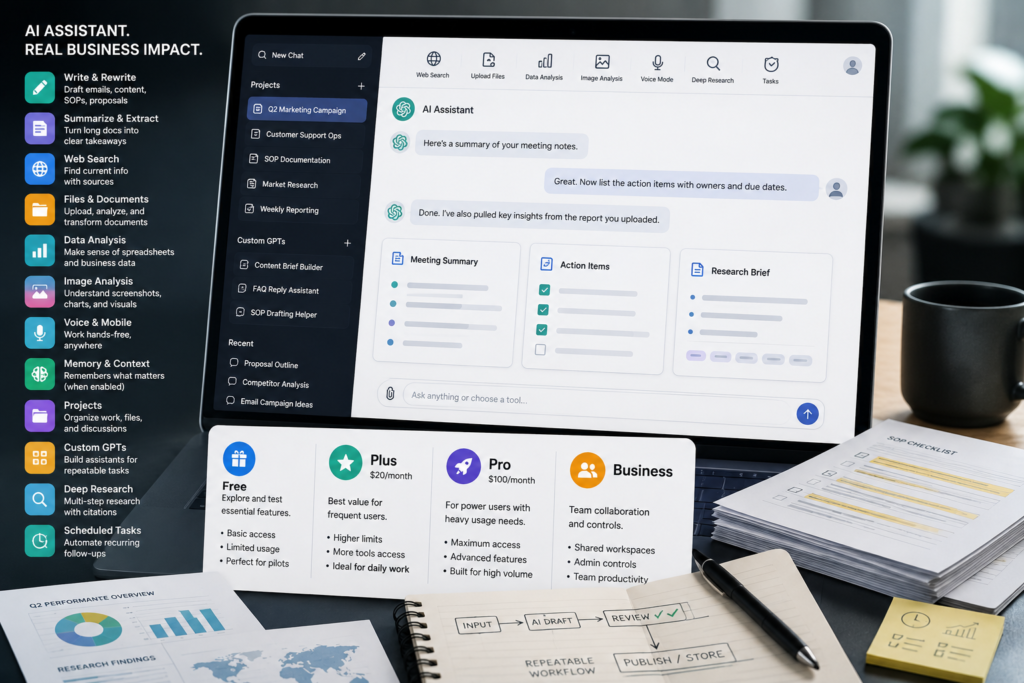
If you’re evaluating ChatGPT for work, the decision usually isn’t “Is it smart?” The real question is whether it will compress your workflow—turning drafting, research, summarization, and light analysis from hours into minutes—without creating new risks or messy processes. This ChatGPT Review breaks down what matters for small businesses in 2026: ChatGPT features, ChatGPT pricing, ChatGPT plans, ChatGPT for business, practical pros and cons, and how to decide which plan fits your team.
This ChatGPT Review is focused on practical business value rather than simply listing every available feature. The goal is to help small-business owners understand where ChatGPT can save time, where human oversight is essential, and when another AI tool may be a better fit.
Quick Answer (2026): ChatGPT remains one of the strongest general-purpose AI assistants for business because it combines writing, web-assisted research, file interpretation, image understanding, and data analysis in one tool. It’s worth paying for when you have repeatable knowledge-work tasks (content, support drafting, analysis) and you’ll standardize prompts and review steps. If you only need one narrow workflow, a specialized tool may be simpler.
What this ChatGPT review is (and isn’t)
This is a business-focused review designed for commercial investigation: you’re likely deciding whether to subscribe, which plan to choose, or whether ChatGPT should be your primary AI assistant.
- What you’ll get: business-relevant capabilities, plan decision guidance, workflow fit, implementation and governance considerations.
- What you won’t get: hype, made-up benchmarks, or “feature list for the sake of it.” Vendor capabilities and packaging change, so you should verify current details on OpenAI’s official ChatGPT pages before purchasing.
What is ChatGPT (in business terms)?
ChatGPT (OpenAI ChatGPT) is a general-purpose AI assistant designed to help people complete a wide range of knowledge-work tasks. For businesses, ChatGPT AI assistant capabilities can support writing, research, analysis, document interpretation, brainstorming, and other recurring workflows from one interface. For business users, the key point is that it’s not only a chat interface—it’s a single place where you can:
- Draft and rewrite text (emails, proposals, policy drafts, marketing copy).
- Summarize and extract insights from documents.
- Interpret and reason over files (like PDFs, docs, CSVs/spreadsheets in supported workflows).
- Analyze images (screenshots, charts, diagrams).
- Use web-assisted research for more current context (availability can vary by plan/region and rollout).
- Support more structured work through “project” organization and custom GPT-style assistants (names and packaging vary over time).
From a buying perspective, this ChatGPT Review treats these capabilities as parts of a broader business workflow. The important question is not how many things ChatGPT can do, but whether those capabilities solve recurring problems in your business.
This ChatGPT Review looks at that advantage from a business perspective: ChatGPT’s value isn’t one single feature. It’s that it can reduce context switching—jumping between a browser, a writing tool, a spreadsheet, and your notes—by handling multiple knowledge tasks inside one workflow.
This ChatGPT Review also considers how those capabilities translate into practical business workflows, rather than treating individual features as isolated benefits.
Business-First AI Insight: Don’t evaluate ChatGPT by feature count. Evaluate it by task category. If it meaningfully reduces cycle time on one or two repeatable tasks your team does every week, it’s likely worth it—even if you never use half the “advanced” features.
ChatGPT Review: Features That Matter Most for Small Businesses in 2026
OpenAI’s published capability overviews highlight a broad set of functions (with availability depending on plan and rollout). Here are the features that typically create the most business value, plus the trade-offs you should consider.
1) Writing, rewriting, and structured drafting
What it does: Produces first drafts, rewrites for tone, expands outlines, creates variations, and turns bullet points into polished copy.
Why it matters: Most small businesses are bottlenecked by writing: sales follow-ups, onboarding emails, SOPs, support replies, and marketing content. ChatGPT for writing can speed up these repetitive drafting tasks while giving teams a consistent starting point for human editing and approval.
Use it when: you want consistent drafts fast, and you have someone to review for accuracy and brand voice.
Don’t use it when: the text must be legally/medically exact without qualified review, or you don’t have a review step.
2) Web-assisted research (for current information)
What it does: Helps synthesize information from the web to support research and decision-making (capability/controls can vary).
Why it matters: A lot of “research” work is actually collecting and summarizing. ChatGPT for research can reduce the time spent opening dozens of tabs, extracting useful information, comparing sources, and turning findings into something usable. Web access can reduce time spent opening dozens of tabs and turning findings into something usable.
Trade-off: web-based answers can still be wrong or incomplete. For decisions that carry risk (compliance, financial, contractual), treat outputs as a starting point and verify with primary sources.
3) File uploads and file interpretation (docs, PDFs, spreadsheets/CSVs)
What it does: You can upload files and ask for summaries, extraction, comparison, and analysis. OpenAI also describes the ability to run code in a secure environment for structured data analysis (for example, CSV-style datasets) in supported modes.
Why it matters: This is a major differentiator for business users because it turns “read and interpret this file” into a guided workflow. Common wins include:
- Summarizing meeting notes, reports, contracts (with human review).
- Extracting action items, risks, deadlines, and key clauses.
- Analyzing exports from Shopify, Stripe, booking systems, or ad platforms (when data is clean and you ask the right questions).
Implementation consideration: Your results depend heavily on document quality. Messy PDFs, inconsistent columns, or missing context will produce messy outputs. File-based workflows need light “data hygiene.”
4) Data analysis (lightweight analytics and explanation)
What it does: Helps you explore datasets, answer questions, draft interpretations, and produce analysis narratives. It can be valuable for non-analysts who need “good enough” insight quickly.
Why it matters: Many teams have data but lack time (or skills) to interpret it. ChatGPT can speed up first-pass analysis—then a human validates conclusions before action.
Don’t use it when: you need audited, reproducible analytics without human oversight. For financial reporting or regulated reporting, use your BI/accounting tools and treat ChatGPT as a helper for explanation and investigation—not the system of record.
5) Image understanding (screenshots, charts, diagrams)
What it does: Interprets uploaded images such as charts, dashboards, UI screenshots, and diagrams.
Why it matters: In real operations, problems often arrive as screenshots: an error message, a confusing analytics graph, a competitor ad, a product label, a workflow diagram. Image understanding makes troubleshooting and interpretation faster.
Trade-off: It can misread small text or infer incorrectly. You still need a human check—especially when decisions depend on precise numbers.
6) Voice mode (useful, but not always essential)
What it does: Lets users interact via voice for dictation, brainstorming, quick Q&A, and hands-free drafting.
Why it matters: Voice is a productivity multiplier for some roles (founders, sales, field teams) because it reduces friction. But it’s not automatically ROI-positive for every team.
Use it when: your team thinks out loud, does quick ideation, or needs faster capture of rough drafts.
7) Memory (personalization) and the governance trade-off
What it does: When enabled, memory helps ChatGPT remember useful information to personalize future interactions.
Why it matters: Personalization can improve consistency (tone, preferences, recurring context). That can make outputs feel more “like your business.”
Business trade-off: memory creates governance questions: What should be remembered? Who controls it? How do you prevent sensitive information from being stored or reused improperly? Many small businesses benefit from restricting memory use to low-risk preferences (tone, formatting), not confidential details.
8) “Deep research” and agent-like, multi-step workflows
What it does: Newer capabilities increasingly support multi-step work: research, synthesis, and structured outputs across a longer task—closer to an “agent-like” workflow than a single prompt.
Why it matters: This can reduce managerial overhead for research and first drafts. But it also increases the importance of review, because longer tasks can create longer chains of small errors.
Consultant Insight: As assistants become more “agent-like,” the risk shifts from obvious single-answer mistakes to quiet compounding errors. Your control isn’t “better prompts”—it’s a workflow with checkpoints: sources, assumptions, and final approval.
ChatGPT Review: ChatGPT Pricing, Plans, and What You Should Verify
A useful ChatGPT Review should look at pricing in relation to actual usage rather than treating the most expensive plan as automatically better.
When evaluating ChatGPT pricing, don’t look only at the monthly number. Compare the ChatGPT cost with how frequently your team will use the product, which capabilities it needs, and whether a free or paid plan can support the workflow reliably.
ChatGPT pricing changes over time and can differ by region, packaging, and what OpenAI includes in each tier. Here’s what’s broadly supported by the research you provided:
- OpenAI states there is a free tier and paid plans with expanded limits and access to more advanced capabilities.
- Third-party reviews commonly cite ChatGPT Plus at $20/month, but you should verify the latest on OpenAI’s official pricing page before making a decision.
- OpenAI also offers ChatGPT Business for organizations that need business-oriented capabilities, administration, and governance. Exact inclusions can vary, so verify the current offering before purchasing.
Practical “plan selection” view (instead of a fragile feature checklist)
Because plan bundles change, the most stable way to choose is to map plans to usage patterns:
| Plan Type (conceptual) | Best For | Typical Value | Watch-outs |
|---|---|---|---|
| Free tier | Trying ChatGPT, occasional drafting, basic research | Fast adoption, no procurement friction | Lower limits; may not support sustained team workflows |
| Individual paid plan (ChatGPT Plus) | Solo owners, marketers, operators who use it daily | More consistent access and higher limits for real work | Still an individual workflow unless your team standardizes usage |
| Business/team plan | Teams needing shared governance, admin controls, consistent use | Better fit for repeatable departmental workflows | Requires rollout planning, policies, and ownership |
What about ChatGPT Pro pricing?
For heavier individual users, ChatGPT Pro pricing should be evaluated separately from the standard individual paid tier. The important question is whether your workload genuinely requires higher limits or advanced capabilities. Check OpenAI’s current pricing and plan details before subscribing because packaging and limits can change.
One of the most important conclusions from this ChatGPT Review is that plan selection should follow proven usage, not the number of features advertised.
Decision tree: which ChatGPT plan should you choose?
- Are you still unsure which workflow you’ll use weekly?
- Yes → start with Free and prove one workflow.
- No → go to step 2.
- Will one person use ChatGPT most days for drafting/research/file analysis?
- Yes → consider an individual paid plan for higher limits and smoother daily use.
- No → go to step 3.
- Do multiple people need consistent access, shared practices, and governance?
- Yes → evaluate a business/team plan.
- No → paid individual accounts may be enough short-term.
- Is the work regulated or sensitive (health, legal, finance, HR)?
- Yes → prioritize governance, data handling rules, and formal review. A business/team setup may be more appropriate than ad-hoc individual use.
- No → you can still use governance, but rollout can be lighter.
ChatGPT Review: Pros and cons for small businesses
Below is the practical trade-off picture for business use—not a generic “AI is amazing” list.
This part of the ChatGPT Review is especially important for small businesses because the biggest advantage is not simply access to more AI features; it is whether the tool improves an existing workflow without adding unnecessary complexity.
Pros
- All-in-one capability: writing, research, file interpretation, image understanding, and analysis in one place reduces tool sprawl and context switching.
- Improves ChatGPT productivity: compresses drafting and summarization work dramatically when used on repeatable tasks.
- Multimodal workflows: helps when information arrives as documents, screenshots, or spreadsheets—not just plain text.
- Flexible across departments: marketing, operations, support, sales, and leadership can all use it with tailored prompts.
- Meaningful value on free: enough capability to test workflow fit before committing to paid tiers.
Cons
- Hallucination risk: it can generate plausible but incorrect information. This is manageable only with review steps and primary-source verification.
- Not purpose-built for your workflow: it’s not a CRM, help desk, ERP, or project management system. You still need systems of record.
- ROI depends on process: without prompt standards, templates, and ownership, teams get inconsistent results and abandon it.
- Premium usage can get expensive: advanced access and heavier usage often require paid plans; exact pricing and limits must be verified.
- Governance overhead: memory/personalization and file handling require clear policies, especially for client data.
Best ChatGPT use cases for business (by department)
The highest ROI usually comes from repetitive, high-volume knowledge work. These ChatGPT use cases show where ChatGPT for business can create practical value across marketing, sales, customer support, operations, finance, and leadership.
The highest ROI usually comes from repetitive, high-volume knowledge work. Here’s a business-fit matrix you can use to identify “good first workflows.”
A useful ChatGPT Review should ultimately connect features to specific business use cases and measurable outcomes.
| Department | Best ChatGPT Use Cases | Why It Works | Human Oversight Needed |
|---|---|---|---|
| Marketing | ChatGPT for marketing: Content outlines, ad variations, landing page drafts, SEO briefs, repurposing long content into social/email | High volume, repeatable structure, and clear review criteria make these practical workflows for ChatGPT for marketers. | Brand voice, factual checks, compliance where relevant |
| Sales / Business Development | Follow-up emails, proposal drafts, call recap summaries, objection handling scripts | Speed matters; consistency improves pipeline hygiene | Accuracy on pricing/claims, personalization, approvals |
| Customer Support | Suggested replies, macro templates, knowledge base articles, multilingual responses | Reduces response time and improves consistency | Policy alignment, correctness, tone, escalation rules |
| Operations | SOP drafts, checklists, internal documentation, vendor comparison summaries | Turns tribal knowledge into repeatable process faster | Process owner must validate steps and exceptions |
| Finance / Admin | Explaining spreadsheet trends, summarizing invoices/notes, drafting client comms | Helpful for interpretation and drafting, not a system of record | Numbers must be verified; avoid automated decisions without review |
| Leadership | Decision memos, meeting action items, strategy drafts, competitive research summaries | Compresses thinking and communication time | Validate assumptions and sources; set final direction |
Practical examples: three workflows that usually deliver quick wins
Example 1: Blog drafting workflow (marketing)
- Collect inputs: target customer, offer, keyword, and 3–5 bullet points you want to include.
- Ask ChatGPT for an outline with sections that match search intent.
- Generate a first draft section-by-section (not all at once) to improve control.
- Human edit for brand voice, add real examples, remove unsupported claims.
- Fact-check any claims and add primary sources where appropriate.
Why it works: you’re using ChatGPT for speed and structure, while humans keep credibility and differentiation.
Example 2: Customer support drafting (support team)
- Paste the ticket (remove sensitive details).
- Ask for: a short reply, a detailed reply, and a “next step if customer says no.”
- Include tone guidelines (calm, direct, no blame) and policy constraints.
- Human approves and sends; add the best version to a macro library.
Why it works: the output becomes a reusable asset (macros), not a one-off chat.
Example 3: Spreadsheet investigation (ops/finance)
- Upload a cleaned CSV export (consistent columns, clear headers).
- Ask for 3–5 questions you should investigate first (anomaly checks, trends).
- Ask for a simple narrative summary: what changed, why it might matter, and what to verify next.
- Human verifies key numbers in the source system before acting.
Why it works: it accelerates exploration and explanation—without replacing your accounting/BI stack.
ChatGPT Review: Is ChatGPT worth it for business in 2026?
The central question in this ChatGPT Review is therefore simple: does ChatGPT create enough measurable workflow improvement to justify its cost, training time, and governance requirements?
ChatGPT for small business is usually worth it when you’re buying workflow speed, not novelty. The strongest “yes” signals look like this:
- You have recurring tasks that are mostly text and knowledge work (drafting, summarizing, researching, analyzing exports).
- Your team repeats the same type of work weekly (support tickets, proposals, SOP updates, content production).
- You can define “good output” (tone, structure, required fields, do/don’t claims).
- You’re willing to standardize prompts and introduce a review step.
It’s less worth it when:
- You want it to “run your business” without human oversight.
- Your bottleneck is actually approvals, unclear processes, or lack of ownership (AI won’t fix that).
- You only need one narrow capability (for example, only citations-based research, or only long-form writing), where a specialized tool may be simpler.
Consultant Insight: A common purchasing mistake is upgrading plans before proving a workflow. In most small businesses, better prompts + a simple template + a review checklist creates more ROI than “more model.”
ChatGPT Review: ChatGPT Alternatives and How They Compare
No ChatGPT Review is complete without considering alternatives. ChatGPT may be the strongest general-purpose option for many businesses, but the best choice depends on where your team’s work already happens and which tasks create the most value.
ChatGPT is strong as a generalist. But “best” depends on whether you want one flexible assistant or a tool optimized for a single job. This ChatGPT Review therefore treats alternatives as workflow-specific choices rather than direct substitutes in every situation.
If you’re specifically researching ChatGPT vs Claude, ChatGPT vs Gemini, or ChatGPT vs Copilot, the deciding factor should be workflow fit rather than a simple “which AI is smartest?” ranking.
| Tool | Best For | Ease of Use | Time to Value | Business Size Fit | Notes |
|---|---|---|---|---|---|
| ChatGPT | All-in-one assistant across writing, research, files, images, analysis | High | Fast (if workflow is clear) | Solo to SMB teams | Great generalist; ROI depends on governance and repeatable workflows |
| Claude | Long-form writing, careful drafting, document-heavy work | High | Fast | Knowledge teams | Strong writing style; verify current pricing/features on official sources |
| Google Gemini | Google-centric teams, search-connected productivity | High | Fast | Google Workspace users | Often fits best when your work lives inside Google apps |
| Perplexity | Research-first workflows with citations and source discovery | High | Fast | Researchers, SEO, analysts | Less flexible for creative drafting; excellent for “find sources fast” work |
| Microsoft Copilot | Microsoft 365 embedded workflows (Word/Excel/Outlook/Teams) | High | Fast | Microsoft-heavy orgs | Great when your work is already in Microsoft; may feel less like a standalone assistant |
Expert verdict: which should most small businesses start with?
Expert Verdict: For most small businesses that want one tool to cover multiple knowledge-work tasks, ChatGPT is still the most practical starting point in 2026 because of its breadth (text + web + files + images + analysis) and strong usability. Choose an alternative first only if your workflow is clearly narrower—e.g., research with citations as the primary requirement, or deep long-document drafting as the main job.
Security, limits, and real-world considerations (what to plan for)
Most ChatGPT disappointments in business aren’t about intelligence—they’re about risk, reliability, and operational fit. Here are the considerations to handle upfront.
1) Hallucinations: build a “trust boundary”
ChatGPT can produce incorrect statements confidently. The fix is not paranoia; it’s designing where AI is allowed to operate.
- Low-risk zone: drafts, brainstorming, rewriting, internal outlines.
- Medium-risk zone: summaries of your own documents (still reviewed).
- High-risk zone: compliance, legal/medical/financial claims, final policies—AI assists, humans decide.
2) Long-context and multi-step reliability
As tasks get longer (big documents, multi-step projects), small misunderstandings can propagate. Break work into stages:
- Stage 1: extract facts (quotes, numbers, clauses).
- Stage 2: summarize and interpret.
- Stage 3: produce the final deliverable.
3) Data handling and confidentiality
If you paste sensitive client data into any AI tool without a policy, you’re creating hidden risk. Minimum viable governance for small businesses:
- Define what data is never allowed (credentials, full card data, sensitive health details, etc.).
- Redact identifiers when you only need structure.
- Decide whether memory should be enabled, and what it can store.
- Document who can approve AI-generated customer-facing statements.
4) It’s not a system of record
ChatGPT is excellent for producing and interpreting content. It is not your CRM, ticketing system, accounting ledger, or project tracker. The best results come when ChatGPT supports those systems rather than replacing them.
ChatGPT Review: How to implement ChatGPT for business
Successful ChatGPT business use starts with a clearly defined workflow rather than broad experimentation. If you want ChatGPT to save time consistently, implement it like an operational improvement—not a novelty tool.
If you want ChatGPT to save time consistently (not just occasionally), implement it like an operational improvement—not a novelty tool. Here’s a simple rollout aligned to the Business-First AI Framework™.
Step 1: Start with a business problem (not “let’s use AI”)
Pick one painful, frequent workflow. Examples:
- Support team spends too long writing replies.
- Founder spends evenings drafting proposals.
- Marketing can’t ship content consistently.
- Ops can’t keep SOPs updated.
Step 2: Improve the workflow before adding features
Define:
- What “done” looks like (format, tone, required fields).
- Who reviews outputs.
- Where the final output lives (CRM, help desk, doc system).
Step 3: Choose the right solution level
Decide whether ChatGPT alone is enough or whether you also need:
- Templates and a prompt library
- A knowledge base (for consistent internal answers)
- An automation platform (to move data between apps)
Step 4: Implement with human oversight (a simple checklist)
- Is the output factually correct?
- Does it follow policy and brand rules?
- Are there any claims that require evidence?
- Is sensitive data removed or minimized?
- Is the final saved in the right system?
Step 5: Measure outcomes (so you know it’s working)
Use practical KPIs:
- Time per task (before vs after)
- First-draft acceptance rate
- Support response time
- Content throughput (pieces/week)
- Cost per deliverable (internal or outsourced)
Step 6: Standardize and scale
Only after one workflow succeeds, expand to the next department. This avoids tool sprawl and keeps governance manageable.
Implementation priority: what to do now vs later
Start Today (1–2 hours)
- Pick one workflow you do weekly (content draft, support macro, proposal draft).
- Create a single prompt template with required fields and tone rules.
- Define a human review checklist (5 items max).
Improve Next (next 30 days)
- Build a small prompt library per department (marketing/support/ops).
- Set a basic AI usage policy (data handling + approvals).
- Track two KPIs and review weekly.
Scale Later (after you can prove ROI)
- Move from ad-hoc prompting to structured workflows (projects, shared templates).
- Consider business/team plans if multiple users need consistent governance.
- Explore automation to push outputs into your systems of record.
Common mistakes businesses make with ChatGPT (and how to avoid them)
Mistake 1: Using it for everything
Why it happens: early excitement and “it can do anything.”
Consequence: inconsistent results, mistrust, and wasted time.
Better approach: choose one or two repeatable workflows and standardize them first.
Mistake 2: No prompt standards, so output quality varies by person
Why it happens: prompting feels informal, like chatting.
Consequence: the team can’t replicate results and can’t train new users.
Better approach: create templates: required inputs, tone rules, and output format.
Mistake 3: Skipping review because “AI is confident”
Why it happens: outputs read well.
Consequence: incorrect customer communication, risky claims, reputational damage.
Better approach: define trust boundaries and a lightweight review checklist.
ChatGPT Review 2026: Frequently Asked Questions
What is ChatGPT used for in business?
Common business uses include drafting and rewriting content, summarizing documents, brainstorming ideas, creating support macros, translating and simplifying text, and interpreting files like reports or spreadsheets (with human review for accuracy).
Is ChatGPT free?
OpenAI offers a free tier with meaningful functionality. Paid plans exist for higher limits and access to more advanced capabilities. Because packaging changes, confirm current details on OpenAI’s official plan pages.
How much is ChatGPT Plus?
Many third-party reviews cite ChatGPT Plus at $20/month, but pricing can change. ChatGPT subscription cost should always be checked against OpenAI’s current pricing because plans, limits, and included capabilities can change over time. Think of the ChatGPT monthly subscription as a workflow expense that should be justified by measurable time savings and business value.. For the most accurate number, check OpenAI’s official pricing page at the time you subscribe.
What are the best ChatGPT features for business?
The most business-relevant features are typically file uploads (document and spreadsheet interpretation), web-assisted research, data analysis, image understanding (screenshots/charts), and reusable structured workflows (such as projects or custom assistants where available).
Can ChatGPT analyze spreadsheets and CSV files?
OpenAI describes the ability to analyze structured data (such as spreadsheets and CSVs) by running code in a secure environment in supported modes. Results still require validation—especially for financial or operational decisions.
Can ChatGPT understand images?
Yes. It can interpret uploaded images like charts, diagrams, and screenshots, which is useful for troubleshooting, reporting explanations, and extracting meaning from visual information.
Does ChatGPT have memory, and is it safe for business?
ChatGPT can offer memory-based personalization when enabled, which can improve consistency. For business use, memory should be governed: limit what is stored, avoid sensitive client data, and define clear rules for who can use it and for what.
What are the biggest drawbacks of ChatGPT for business?
The main drawbacks are hallucination risk (confident mistakes), reliability issues on long multi-step tasks without checkpoints, and the fact that it’s not a system of record like a CRM or help desk. Premium capabilities may also require paid plans.
ChatGPT Review: Final verdict
This ChatGPT Review concludes that ChatGPT is still one of the strongest general-purpose AI assistants for small businesses in 2026—but the best results come from treating it as a workflow accelerator, not a magic employee. If you define one repeatable task, standardize prompts, add a review step, and measure outcomes, ChatGPT can reliably save time and improve throughput.
Your next step is simple: pick one workflow you do every week (support replies, proposal drafts, or content production), run a small pilot for 7–14 days, and track time saved. Once you can prove value in one lane, scaling becomes a business decision—not a guess. That is the core takeaway from this ChatGPT Review: start with the workflow, prove the value, and then decide how broadly ChatGPT should be adopted.
If you want help choosing the right workflows before choosing the plan, start with an AI workflow assessment: identify the bottleneck, redesign the process, and then decide whether ChatGPT (or a narrower tool) is the best fit.