
AI Workflow Automation Explained: Everything Small Businesses Need to Know
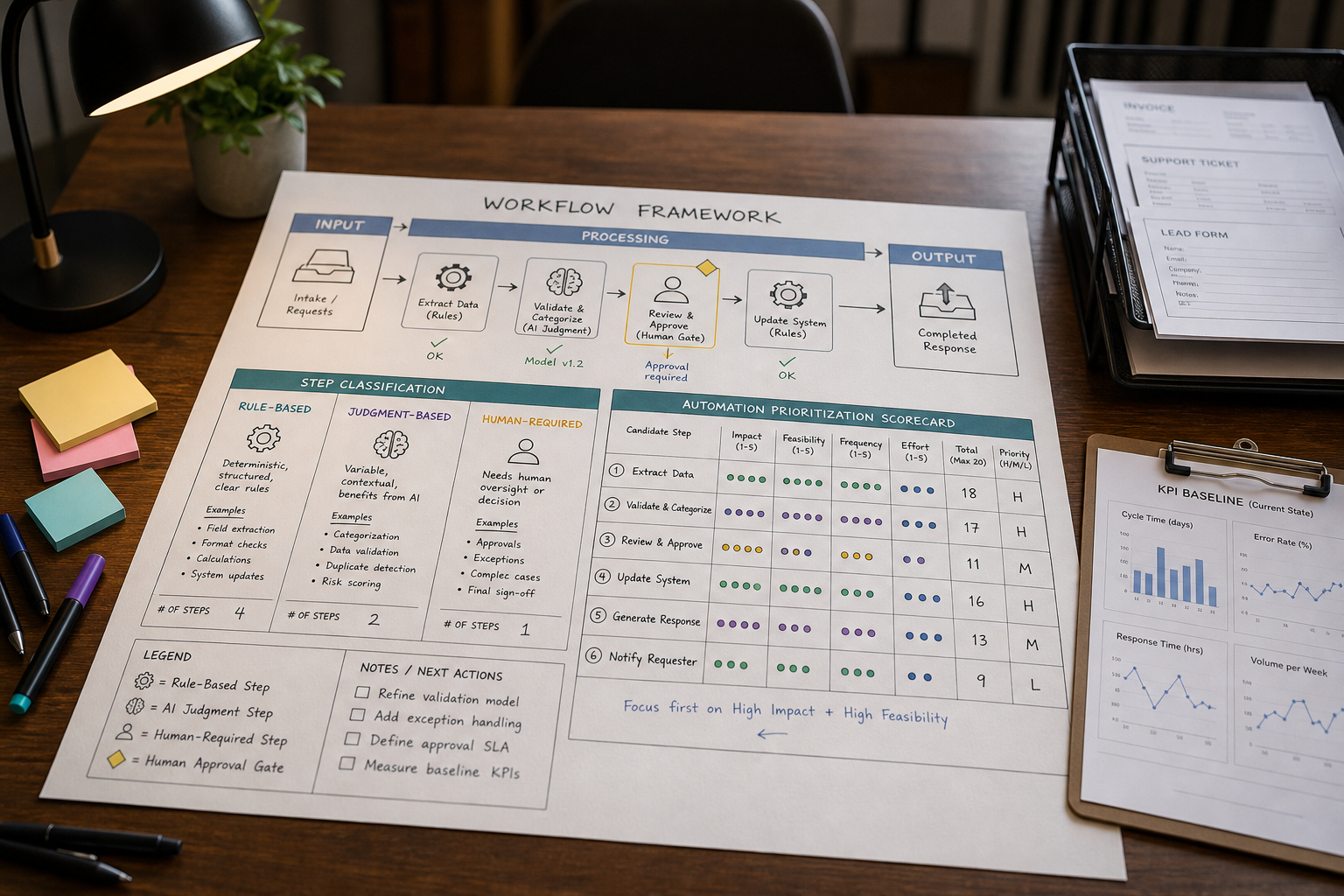
If your team is constantly copying data between tools, chasing approvals, or replying to the same customer questions, you don’t have an “AI problem.” You have a workflow problem. AI Workflow Automation matters because it can remove the manual, repetitive work and handle steps that require interpretation—like classifying requests, extracting meaning from emails, or drafting responses—so work moves faster with fewer handoffs.
Quick Answer (40–60 words): AI workflow automation combines traditional workflow automation (rule-based steps like routing, approvals, and notifications) with AI for judgment-like steps (interpretation, classification, drafting, and decision support). Small businesses get the best results by automating one high-volume workflow first, keeping human review for exceptions, and measuring time saved, errors reduced, and cycle time.
What Is AI Workflow Automation?
AI workflow automation is the use of AI to handle parts of a business process that require interpretation, classification, drafting, or decision support, while traditional automation handles the rule-based steps around it. It is a practical form of AI process automation and AI business automation that combines AI capabilities with workflow automation to improve how businesses handle repetitive processes.
Think of a workflow as a chain of steps that turns an input into an output:
- Input: a new lead form, an email, a support ticket, an invoice PDF, a new-hire request
- Processing: check required fields, classify the request, route it, draft a response, request approval
- Output: a qualified lead assigned to a rep, a ticket prioritized and queued, an invoice posted, onboarding tasks created
Traditional workflow automation is great when the rules are stable: “If X happens, do Y.” AI workflow automation becomes valuable when the workflow includes messy real-world inputs (free-text emails, scanned documents, inconsistent customer requests) where a human would normally interpret meaning before deciding what to do next.
For a broader technical explanation, IBM describes an AI workflow as a structured process in which AI technologies automate, coordinate, or enhance tasks within an organization.
How AI Workflow Automation Works
AI workflow automation follows a repeatable flow from an initial trigger to a measurable business outcome. Instead of using AI as a standalone tool, it combines AI processing with traditional workflow automation, business rules, human oversight, and performance tracking.
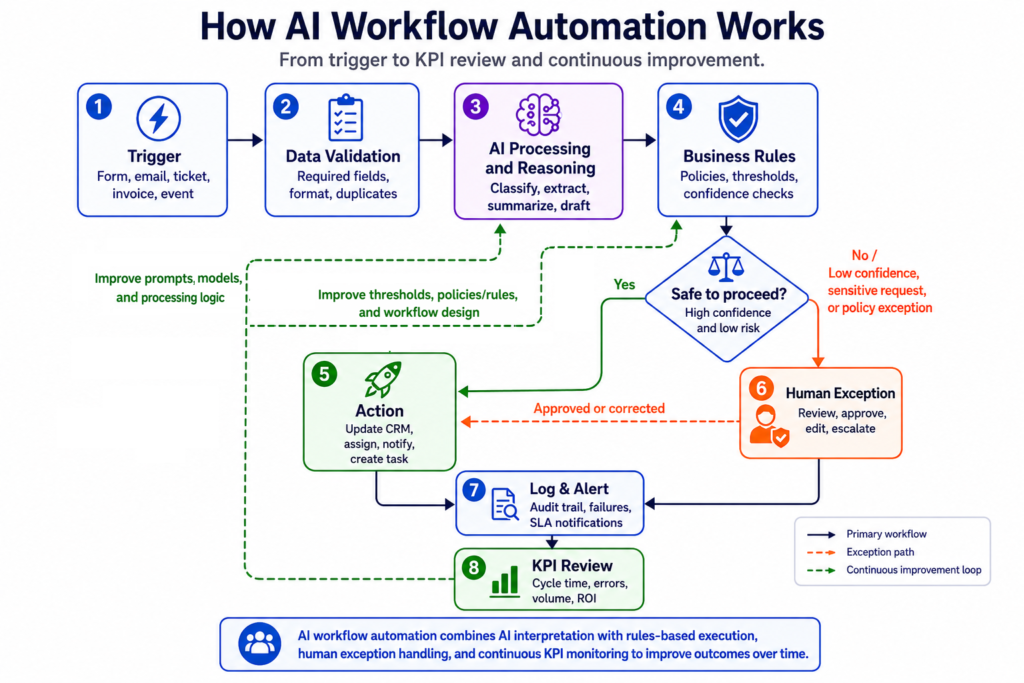
A practical AI workflow can be understood as eight connected stages:
Trigger → Data Validation → AI Processing/Reasoning → Business Rules → Action → Human Exception → Log & Alert → KPI Review
A practical AI workflow can be understood as eight connected stages, with human review used as an exception path when the workflow cannot safely proceed automatically:
1. Trigger
The workflow starts when a defined business event occurs. Examples include a new lead submitting a form, a customer sending a support email, an invoice arriving in a shared folder, a payment being received, or an employee onboarding request being approved.
A clear trigger gives the workflow a specific starting point and helps prevent unnecessary automation runs.
2. Data Validation
Before processing begins, the workflow checks whether the required information is available, complete, and in the expected format.
For example, a lead record might require a name, email address, company, and inquiry details. An invoice workflow might check for a supplier name, invoice number, date, and total amount.
If information is missing or invalid, the workflow can request correction, stop the process, or route the item to a review queue rather than allowing bad data to move downstream.
3. AI Processing and Reasoning
This is where AI adds value to the workflow.
AI can interpret information that is difficult to handle with simple rules, such as:
- Classifying a customer request as billing, technical, or sales-related
- Extracting information from invoices or other documents
- Summarizing customer conversations
- Detecting urgency or sentiment
- Classifying and prioritizing leads
- Drafting an email response
The goal is to turn messy or unstructured information into useful, structured information that the workflow can act on. AI can also be added directly into existing workflows for tasks such as classification, summarization, drafting, and data analysis. Zapier provides an example of how AI can be used as a step within an automated workflow.
4. Business Rules
After AI processes the information, explicit business rules govern what happens next based on the AI output and your business policies.
For example:
- If a lead meets the qualification criteria, assign it to the appropriate sales representative.
- If an invoice exceeds a defined amount, require manager approval.
- If a support request is classified as high priority, escalate it and apply the appropriate SLA.
- If AI confidence is below a defined threshold, send the item for human review.
This combination is important: AI can interpret information, while business rules provide predictable and auditable boundaries for decisions.
5. Action
The workflow then executes the appropriate action.
This could include:
- Creating or updating a CRM record
- Sending an email or notification
- Creating a customer support ticket
- Updating an accounting system
- Scheduling a task
- Adding information to a project management tool
- Triggering another automation
Traditional workflow automation is often responsible for this stage because deterministic actions are generally faster, easier to test, and more predictable.
6. Human Exception
Not every situation should be handled automatically.
When information is ambiguous, AI confidence is low, a rule is unclear, or the decision involves significant business risk, the workflow should pause and route the case to a human.
Examples include refunds above a certain amount, contract decisions, sensitive employee matters, unusual invoices, or customer complaints requiring management attention.
Human exception handling creates a practical safety net: automate the predictable work while keeping people responsible for important exceptions.
7. Log and Alert
The workflow should record important events, decisions, actions, exceptions, and failures.
Alerts can notify the appropriate owner when:
- A workflow step fails
- An exception requires review
- An SLA is approaching
- A backlog starts increasing
- Required data is missing
- An unusual condition occurs
Logging and alerting make the workflow easier to monitor, troubleshoot, and improve.
8. KPI Review
The final stage is measuring whether the workflow is actually improving the business.
Useful KPIs include:
- Cycle time
- Response time
- Error and rework rate
- Volume handled
- SLA compliance
- Staff time reclaimed
- Conversion or completion rate
These metrics help identify what is working and where the workflow needs improvement. You may need to adjust business rules, improve the AI instructions, change the human-review threshold, or redesign part of the process before scaling it.
The Key Idea
The most effective AI workflows do not simply replace every human step with AI. They combine different types of automation for different jobs:
AI interprets → Business rules govern → Automation executes → Humans handle exceptions → KPIs measure the result
That combination makes AI workflow automation more practical, controllable, and measurable for small businesses.
AI Workflow Automation vs Traditional Workflow Automation
Most small businesses don’t need to replace workflow automation—they need to upgrade it. Traditional workflow automation can streamline repetitive processes using rules-based logic, while AI can add interpretation and decision support where structured rules are not enough. IBM provides a useful overview of how workflow automation works in business processes.
The best implementations combine both:
- Traditional automation: routing, approvals, status changes, reminders, creating records, syncing fields, sending notifications.
For a practical example of trigger-and-action workflow automation, see Zapier’s guide to building workflows. - AI inside the workflow: classifying intent, extracting key details, drafting responses, summarizing, recommending next steps
| Category | Traditional Workflow Automation | AI Workflow Automation | What This Means for Small Businesses |
|---|---|---|---|
| Best at | Rule-based steps | Interpretation + decision support | Use AI only where the workflow needs “understanding,” not everywhere |
| Inputs | Structured (forms, fixed fields) | Structured + unstructured (emails, PDFs, chat text) | AI helps when customers and vendors don’t follow your “perfect form” |
| Failure modes | Wrong rule or missing condition | Misclassification, low-confidence output, ambiguous inputs | You need exception handling and human fallback paths |
| Governance | Auditable steps, clear logic | Needs monitoring, confidence thresholds, review loops | Start with a pilot where humans approve AI outputs until stable |
| Time to value | Often fast for simple workflows | Fast for drafting/classification, slower for complex end-to-end orchestration | Choose a workflow with clear inputs/outputs and limited edge cases first |
Consultant Insight: The strongest use cases usually combine AI judgment with deterministic automation. In practice, that means AI decides “what is this?” and “what should we do next?” while automation reliably executes “do it, route it, log it, notify it.”
Why Small Businesses Use AI Workflow Automation
AI automation for small businesses is most valuable when it improves a repetitive workflow with measurable business impact rather than simply adding another AI tool. AI workflow automation for small businesses is especially useful when repetitive work involves multiple systems, frequent handoffs, or decisions that require basic interpretation.
Effective small business workflow automation starts with processes that are repetitive, measurable, and relatively predictable. Small businesses typically adopt AI workflows for practical reasons—not because AI is trendy:
- Reduce manual admin work: less copy/paste, fewer repetitive emails, fewer status checks
- Fix bottlenecks and handoffs: routing and prioritization happen immediately instead of waiting for someone to notice
- Improve consistency: customers get timely, standardized follow-ups even when the team is busy
- Increase visibility: workflow status becomes trackable, making it easier to manage operations
- Lower error rates: validation checks and structured handoffs reduce rework
- Protect revenue: faster lead response and fewer dropped requests improve conversion and retention
One important framing: AI workflow automation is not only about “doing the work faster.” It also helps you run the business more consistently—because your process is explicit, measurable, and repeatable. The same approach applies to workflow automation for small business operations: prioritize processes that are repetitive, measurable, and relatively predictable.
The Business-First AI Framework™ (How to Think Before You Buy Tools)
If you remember one thing from this guide, let it be this: technology shouldn’t be the starting point. Small businesses get the best results when they follow a business-first sequence:
- Business Problem: Where are we losing time, speed, quality, or revenue?
- Workflow Improvement: What steps cause delays, errors, or inconsistency?
- Choose the Right Solution: Which steps need AI vs rules-based automation vs human judgment?
- Implement with Human Oversight: Pilot, validate, and add exception handling
- Measure Business Outcomes: Track cycle time, errors, response time, and reclaimed hours
- Standardize and Scale: Roll out to the next workflow only after the first one is stable
For more complex AI business process automation, the same principle applies: start with the business process, identify where AI adds judgment, and automate the predictable steps around it.
Business-First AI Insight: If you can’t clearly describe the workflow’s input, output, owner, and exceptions in plain English, adding AI usually increases chaos rather than reducing it. Process clarity is the “hidden prerequisite” that determines whether AI automation saves time or creates more rework.
Best AI Workflow Automation Use Cases for Small Businesses
The best opportunities are typically repetitive workflows with clear inputs and outputs—especially where there’s a judgment step that slows everything down. Below are common high-impact categories and what AI is doing inside them.
These AI workflow automation examples show how small businesses can combine AI with traditional workflow automation across sales, customer support, finance, operations, and administration. These AI automation use cases are most valuable when they reduce repetitive work while keeping humans responsible for important exceptions.
1) Lead qualification and routing (sales)
Why it matters: Lead speed-to-response affects conversions, but small teams can’t instantly read every form submission and email.
- Workflow example: Capture lead → AI scores/labels intent → route to the right person → draft follow-up → log to CRM
- AI does: interpret lead text, classify industry/need, suggest priority
- Automation does: create/update CRM record, notify rep, schedule tasks, send templated emails
2) Customer support triage and drafting (service)
Why it matters: When tickets pile up, the real damage is inconsistency—customers wait longer and urgent issues get buried.
- Workflow example: Ticket arrives → AI categorizes topic/urgency → route to queue → draft response → escalate if high risk
- AI does: classify, detect urgency, summarize the issue, propose reply
- Automation does: route, assign, set SLA timers, trigger escalation paths
3) Invoice processing (finance/ops)
Why it matters: Manual document handling slows down cashflow operations and increases errors.
- Workflow example: Receive invoice → extract fields → validate → approve → post to accounting system
- AI does: extract key details from documents, flag anomalies for review
- Automation does: route approvals, log status, sync to accounting/ERP
4) Employee onboarding coordination (operations)
Why it matters: Onboarding fails through missed steps and unclear ownership—not because people don’t care.
- Workflow example: New hire approved → create accounts → send forms → assign tasks → track completion
- AI does: draft onboarding emails/messages, summarize policy documents when needed
- Automation does: create tasks, update HR tracker, send reminders, record completion
5) Meeting follow-up and internal reporting (management)
Why it matters: Execution breaks when action items live in someone’s notes instead of a shared system.
- Workflow example: Meeting notes → AI summarizes + extracts tasks → assign owners → reminders → updates in project tools
- AI does: summarization and task extraction
- Automation does: create tasks, send reminders, update status fields
6) Content operations
Why it matters: Small teams lose momentum when content depends on ad‑hoc briefs, manual drafting, and scattered approvals. A repeatable content workflow keeps publishing consistent without burning out the team.
- Workflow example: Topic/research intake → AI generates content brief and outline → drafts first version → routes for human review → AI suggests metadata (title, meta description, tags) → automation enforces publishing checklist → logs performance for future planning.
- AI does: research angles, generate briefs and outlines, draft posts/articles/emails, propose metadata and CTAs, repurpose long‑form into social snippets.
- Automation does: route drafts for approval, update the content calendar, enforce checklist steps (SEO, links, images), schedule/publish, and log performance metrics.
7) Data entry and administrative tasks
Why it matters: Routine copy‑paste between email, forms, documents, and core systems consumes hours each week and creates avoidable errors. Automating these tasks frees staff for higher‑value work.
- Workflow example: Email/form/document arrives → AI extracts key fields (name, company, amount, dates) → automation updates CRM/ERP/HR tracker, creates records, moves data between systems, generates routine reports, and sends reminders for pending items.
- AI does: read unstructured text, extract structured fields, classify record type, flag anomalies for review, summarize data for reports.
- Automation does: create/update records, sync systems, generate and distribute reports, trigger reminders, and log all changes for auditability.
Rule-Based vs Judgment-Based vs Human-Required Steps (The Workflow Classification Method)
A practical way to design AI workflows is to tag each step in your process as one of three types:
- Rule-based: Can be expressed as “if/then” logic with predictable outcomes
- Judgment-based: Requires interpretation (reading, classifying, drafting, deciding with incomplete info)
- Human-required: Needs accountability, relationship nuance, or risk control (final approval, sensitive decisions)
This classification helps you avoid a common mistake: trying to force AI into steps where a human should remain responsible, especially in ambiguous or sensitive situations.
| Step Type | Good Automation Approach | Example | Risk If You “Over-Automate” |
|---|---|---|---|
| Rule-based | Traditional workflow automation | “If invoice total > X, require manager approval” | Incorrect routing if rules are incomplete |
| Judgment-based | AI + guardrails + confidence checks | Classify a customer email as billing vs technical support | Misclassification, inconsistent outputs without review |
| Human-required | Human decision supported by AI | Refund exceptions, contract approvals, sensitive HR actions | Compliance issues, customer trust damage, internal accountability gaps |
How to Choose the Right Workflow to Automate
Small businesses often get stuck because they brainstorm dozens of ideas and then can’t choose. The fastest path forward is to pick one workflow using a simple scorecard focused on business impact and implementation friction.
A simple workflow audit checklist (before tools)
- Define the trigger: What starts the workflow (form submit, email, new file, payment received)?
- Define the output: What “done” looks like (ticket resolved, lead assigned, invoice posted)?
- List the steps: Include handoffs, approvals, and exceptions
- Identify bottlenecks: Where does work sit and wait?
- Tag each step: rule-based, judgment-based, or human-required
- Document exceptions: What breaks the happy path?
- Capture baseline metrics: current cycle time, error rate, volume/week, and staff time
Workflow prioritization scorecard (use this to pick “what first”)
Score each candidate workflow from 1 (low) to 5 (high). Aim for the workflow with the highest impact and lowest complexity.
| Factor | What to Look For | Why It Matters |
|---|---|---|
| Volume | Happens daily/weekly | High volume creates compounding time savings |
| Time per instance | Minutes of repetitive work per item | Even small savings become meaningful at scale |
| Error/rework rate | Frequent mistakes, missing info, back-and-forth | Automation reduces rework and customer frustration |
| Business impact | Affects revenue, customer experience, or cashflow | Prioritize outcomes, not novelty |
| Clarity of inputs/outputs | Clear trigger and “done” state | Ambiguity makes automation brittle |
| Integration complexity | How many apps/systems involved | More systems = more failure points and maintenance |
| Exception complexity | How often edge cases occur | Exceptions determine the real operating cost |
For more technical workflows involving multiple services and APIs, Google Cloud Workflows provides an example of orchestrating services with retries, error handling, and event-driven execution.
Business Tip: A “boring” workflow that runs 50 times a week (lead routing, support triage, invoice capture) often beats a “clever” workflow that runs twice a month. Frequency is an ROI multiplier.
Top AI Workflow Automation Tools (How to Evaluate Without Getting Lost)
Because this is an informational guide, the most useful way to think about tools is by fit—not by feature lists. For small businesses, tool selection should prioritize:
- Workflow fit: does it support your trigger → steps → exception handling?
- Integrations: does it connect to your CRM, helpdesk, accounting, storage, email?
- Ease of adoption: can non-technical staff maintain it?
- Governance: can you add approvals, logs, and human review steps?
- Total maintenance: how often will it break when apps change?
When comparing AI workflow automation software or an AI workflow automation platform, focus on workflow fit, integrations, governance, ease of adoption, and ongoing maintenance rather than the number of AI features.
An AI automation platform is most useful when it can connect your existing business applications and reliably execute the actions surrounding AI-assisted decisions.
For businesses comparing business process automation tools, the same principle applies: prioritize workflow fit, integrations, governance, and maintenance over feature volume.
| Tool | Best For | Ease of Use | Time to Value | Business Size Fit | Notes |
|---|---|---|---|---|---|
| Zapier | Broad small-business automations (lead routing, notifications, lightweight workflows) | High | Fast | Solo to SMB | Great starting point; complex workflows still need careful design and testing |
| Activepieces | Simple automations for lean teams | High | Fast | Solo to SMB | Positioned around time/cost savings; details vary—verify current capabilities in official docs |
| Box AI | Document-centric workflows (review, approvals, knowledge work) in Box | Medium | Medium | Teams already using Box | Best if your workflow lives in files and folders; pricing wasn’t provided in the research |
| Aisera | Structured AI workflow orchestration (service and decision workflows) | Medium | Medium | SMB to larger orgs | Strong emphasis on data quality, testing, monitoring, and iteration |
| Celigo | Integration-heavy cross-system workflows | Medium | Medium | SMB to mid-market | Useful when multiple systems must stay in sync; confirm fit and pricing via official sources |
| NiCE | Customer support/service workflows with process discipline | Medium | Medium | Mid-market+ | Guidance may be more enterprise-oriented, but the process discipline is valuable |
| IBM (conceptual guidance) | Understanding workflow automation and AI workflows at a category level | Medium | N/A | Any (research) | Useful for definitions and framing; not a small-business buying guide on its own |
| Adobe Business (conceptual guidance) | Workflow automation benefits (visibility, speed, accuracy) | Medium | N/A | Any (research) | Useful business framing; verify tool-specific options separately |
Expert Verdict: what most small businesses should start with
Expert Verdict: Most small businesses should start with one primary automation platform that connects their existing apps (commonly a Zapier-like approach) and add AI only to the judgment-based steps (classification, drafting, summarization). Specialized orchestration tools become more relevant when you’re running multi-system, compliance-heavy processes with lots of exceptions.
Step-by-Step AI Workflow Automation Implementation Guide (Lean-Team Friendly)
Implementation succeeds when it’s treated like workflow improvement—not a one-time tool setup. A practical sequence looks like this:
Step 1: Pick one workflow and define success
- Choose one high-volume workflow with a clear trigger and clear “done” state
- Define success in business terms: time saved, faster response time, fewer errors, shorter cycle time
Why it matters: If success isn’t defined, “automation” becomes a never-ending experiment that no one trusts.
Step 2: Map the workflow and label each step
Document the steps and tag them as rule-based, judgment-based, or human-required.
Why it matters: This is how you decide where AI belongs—and where it doesn’t.
Step 3: Document inputs, outputs, and exceptions (don’t skip this)
- Inputs: where data comes from and what format it’s in
- Outputs: what must be created/updated, and where
- Exceptions: missing fields, unclear intent, duplicates, high-risk requests
- Approval rules: who signs off on what, and when
Why it matters: Most workflow failures happen on exceptions, not on the happy path.
Step 4: Add AI only where it’s needed
Use AI for the judgment-based steps, such as:
- Classifying an email or ticket topic
- Detecting urgency or sentiment signals
- Drafting a response for review
- Summarizing a document or conversation
Implementation consideration: Design for “confidence-based routing.” If the AI output is high confidence, proceed automatically. If confidence is low (or the content is sensitive), route to a human review step.
Step 5: Build guardrails and human fallback paths
- Human review during pilot: approve AI drafts before sending
- Escalation rules: define what triggers a manager review
- Audit trail: log decisions, approvals, and changes
- Rollback plan: know how to disable the automation quickly if needed
Why it matters: Guardrails are what make automation safe enough to trust.
Step 6: Pilot, test, and refine
Run a pilot for a defined period or volume (for example, “first 100 tickets” or “two weeks of new leads”), then review:
- Where did it misclassify or draft poorly?
- Which exceptions were missed?
- Which step is still the bottleneck?
Why it matters: AI workflow automation works best as continuous improvement, not a one-time launch.
Step 7: Standardize and scale to the next workflow
Only scale after you can confidently answer:
- Is the workflow stable week-to-week?
- Do we know our baseline and current KPIs?
- Can someone on the team maintain it?
ROI, KPIs, and Success Metrics (How Small Businesses Should Measure It)
You don’t need complicated analytics to measure business value. Start with a baseline and track a few KPIs that directly connect to time, speed, quality, and cost.
Core KPIs to track
- Cycle time: how long from trigger to “done”
- Response time: especially for sales leads and support tickets
- Error rate / rework: how often work needs correction
- Volume handled per week: throughput without adding headcount
- SLA compliance: whether customer commitments are met
- Staff time reclaimed: hours/week shifted from admin to higher-value work
Sample ROI calculation (simple and usable)
Use this structure (replace with your numbers):
- Weekly volume: 80 items (leads/tickets/invoices)
- Time saved per item: 4 minutes
- Weekly time saved: 80 × 4 = 320 minutes = 5.3 hours/week
- Monthly time saved: ~21 hours/month
Then decide what those hours are worth to you:
- Reduced overtime or contractor hours
- More capacity for revenue work (faster follow-ups, more proposals)
- Improved customer experience (faster resolution, fewer escalations)
Important: The research sources referenced benefits (productivity, lower errors, faster processes), but they did not provide universal pricing or benchmark ROI numbers. Treat ROI as a model you validate with your own baseline metrics.
Common Mistakes to Avoid (And What to Do Instead)
Mistake 1: Automating everything at once
Why it happens: Teams see many opportunities and assume a big rollout creates bigger returns.
What it causes: tool sprawl, unclear ownership, and brittle workflows no one trusts.
Better approach: pick one workflow, pilot it, measure results, then standardize before expanding.
Mistake 2: Buying tools before defining the business problem
Why it happens: tool demos are easier than process mapping.
What it causes: impressive features with no operational fit—and low adoption.
Better approach: document the trigger, outputs, exceptions, and owners first; then choose the platform that fits.
Mistake 3: Ignoring exception handling and human fallback
Why it happens: the happy path is easy to design; exceptions feel like edge cases.
What it causes: silent failures, customer frustration, and staff losing trust in automation.
Better approach: design exceptions explicitly and route low-confidence AI outputs to human review.
Mistake 4: Launching without baseline metrics
Why it happens: teams want to “just start.”
What it causes: you can’t prove value, prioritize improvements, or know if the workflow is getting worse.
Better approach: record baseline cycle time, error rate, volume/week, and time spent before the pilot.
Mistake 5: Using AI where humans should remain responsible
Why it happens: assumption that more automation is always better.
What it causes: risk in sensitive workflows (refunds, contracts, HR decisions) and accountability gaps.
Better approach: keep human-required steps manual, and use AI to support the human decision with summaries and recommendations.
Mistake 6: Automating a Broken Process
Why it happens: Teams assume automation will fix inefficiencies that have never been analyzed.
What it causes: The same unnecessary steps happen faster, while complexity and rework remain.
Better approach: Simplify and standardize the workflow first, then automate the repetitive parts that genuinely add value.
Start Today / Improve Next / Scale Later (A Practical Rollout Plan)
Start Today (1–2 hours)
- List 5 workflows that create the most repetitive admin work
- Pick one and write down: trigger, output, owner, top 5 exceptions
- Capture baseline: volume/week and estimated minutes per item
Improve Next (next 30 days)
- Map the workflow steps and tag them: rule-based, judgment-based, human-required
- Pilot automation for rule-based steps (routing, logging, reminders)
- Add AI for one judgment step (classification or drafting) with human review
- Track: cycle time, response time, rework
Scale Later (after measurable success)
- Standardize templates, approval rules, and exception handling
- Create a simple “workflow change log” so updates don’t break operations
- Roll the approach into the next workflow (finance, onboarding, reporting)
FAQs About AI Workflow Automation
What is AI workflow automation?
AI workflow automation combines AI with traditional workflow automation to handle business processes from trigger to outcome. AI handles tasks that require interpretation, classification, extraction, summarization, drafting, or decision support, while traditional automation handles rule-based actions such as routing, approvals, notifications, and record updates.
How is AI workflow automation different from workflow automation?
Traditional workflow automation generally follows predefined rules such as “if this, then that.” AI workflow automation adds AI to interpret less-structured inputs such as emails, documents, and customer messages and determine what should happen next. This makes it useful for workflows that include both predictable and judgment-based steps.
What are examples of AI workflow automation?
Common examples include lead qualification and routing, customer support triage and response drafting, invoice and document processing, employee onboarding coordination, meeting follow-up, internal reporting, content operations, and data entry or administrative workflows that move information between business tools.
What tasks can AI automate in a small business?
AI is particularly useful for judgment-based tasks within a workflow, such as classifying incoming requests, extracting information from documents, summarizing conversations, drafting responses, identifying patterns, and recommending next steps. Rule-based tasks such as routing, notifications, logging, and reminders are usually handled by traditional automation.
Can small businesses use AI workflow automation?
Yes. Small businesses can use AI workflow automation without building complex AI systems from scratch. The best starting point is usually one repetitive, high-volume workflow with clear inputs and outputs, such as lead routing, support triage, invoice capture, or meeting follow-up. After measuring the results, the workflow can be refined and expanded.
What should small businesses automate first?
Start with a repetitive, high-volume workflow that consumes significant staff time and has a clear business impact. Good candidates include lead routing, customer support triage, invoice processing, onboarding coordination, and meeting follow-up. Prioritize workflows where the inputs, outputs, exceptions, and success metrics can be clearly defined.
Do I need technical skills to implement AI workflows?
Not always. Many AI automation platforms are no-code or low-code. The more important skills are understanding the business process, mapping workflow steps, defining exceptions, setting appropriate human review points, and testing the automation before deployment.
Is AI workflow automation difficult to implement?
It depends on the workflow. Simple, single-system workflows can often be implemented with no-code or low-code tools. More complex workflows involving multiple systems, sensitive decisions, or large numbers of exceptions require more planning, integration work, testing, monitoring, and ongoing maintenance.
How do I measure ROI from AI workflow automation?
Track metrics such as time saved per task, cycle time, response speed, error and rework rates, throughput, SLA compliance, and staff time reclaimed. Then connect those improvements to business outcomes such as reduced operating costs, faster lead follow-up, higher productivity, or improved customer experience.
What are the biggest risks of AI workflows?
Common risks include poor input data, weak testing, incorrect AI outputs, missing exception handling, and automating the wrong process. For judgment-based steps, use safeguards such as confidence thresholds, human review, clear escalation paths, logging, and measurable performance checks.
Is AI workflow automation expensive?
Costs vary based on the automation platform, number of workflows, integrations, usage volume, and level of complexity. Simple workflows can often be started with relatively low-cost no-code or low-code tools, while advanced multi-system automation can require more investment. A small pilot is a practical way to validate business value before scaling.
Conclusion: The Real Goal Isn’t “More AI”—It’s a Better Operating System
AI Workflow Automation delivers value when it improves how work flows through your business: fewer handoffs, faster decisions, clearer ownership, and measurable performance. The best small-business results come from combining AI for interpretation and drafting with traditional automation for routing, approvals, and recordkeeping—then improving the workflow continuously based on real KPIs.
Next steps: choose one workflow that wastes time every week, map it, classify the steps, pilot automation with human oversight, and measure cycle time and rework. When the first workflow is stable and trusted, scaling becomes straightforward—because you’re building a repeatable operating model, not just installing another tool.
If you want help prioritizing the right first workflow, consider starting with a structured workflow audit and a simple ROI model so you can make the decision with confidence and avoid over-automation.