
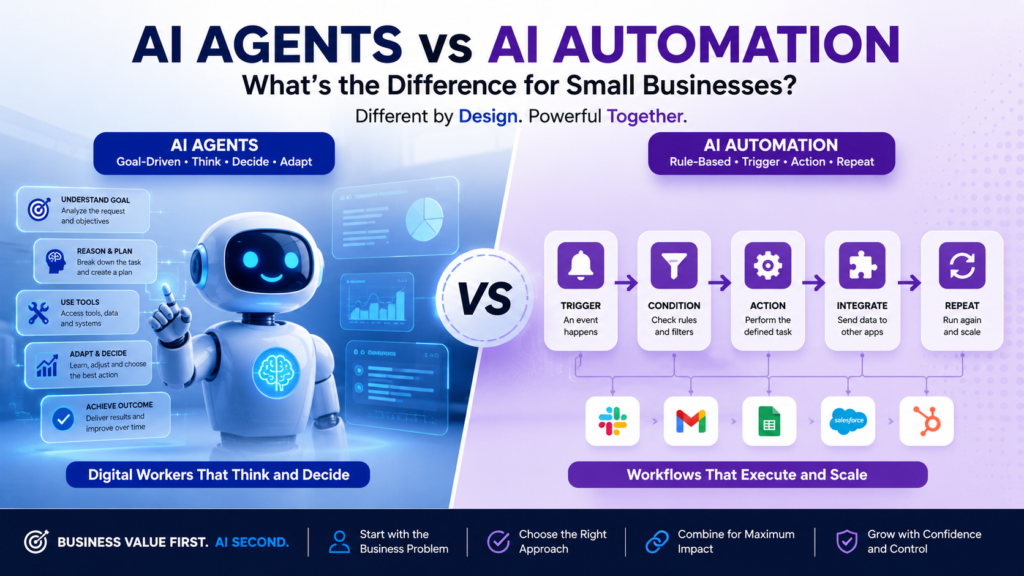
AI Agents for Business are becoming one of the most important AI technologies for small businesses in 2026. Unlike traditional AI automation that follows predefined rules, AI agents can understand goals, analyze context, make decisions, and take actions across multiple business systems. As more organizations accelerate AI adoption, understanding when to use AI agents versus AI automation has become a critical business decision.
For many small business owners, this raises an important question:
Do I need AI automation, AI agents, or both?
The answer isn’t about buying the latest technology—it’s about solving the right business problem.
One of the biggest mistakes businesses make is assuming that AI agents will replace every automation tool. In reality, AI automation and AI agents serve different purposes, and choosing the wrong approach can lead to unnecessary costs, complexity, and disappointing results.
At Intelligent AI Lab, we follow a simple principle:
Business Value First. AI Second.
Instead of asking “Which AI tool should I buy?”, start by asking:
“What business problem am I trying to solve?”
For example, a business that needs to send appointment reminders may only need a simple automated workflow. A business that needs to read customer inquiries, understand their requirements, recommend the next step, and prepare a personalized response may benefit from an AI agent.
Many of the most useful systems will combine both approaches. Automation can handle predictable tasks such as moving data, sending notifications, and updating records. An AI agent can handle tasks that require interpretation, personalization, or changing context. Human employees can review important decisions before they affect customers, finances, privacy, or the company’s reputation.
This guide explains the difference between AI automation and AI agents in plain English. It shows where each approach works best, compares their strengths and limitations, and provides a practical framework to help you decide which option is right for your business.
The goal is not to make your business use more AI. The goal is to help you use the simplest reliable technology to save time, improve decisions, serve customers better, and create measurable business value.
AI Automation vs AI Agents for Business: The Difference in One Minute
AI automation follows a predefined workflow. It uses fixed triggers, rules, and steps to complete repetitive tasks with predictable results.
AI agents for Business work toward a defined business goal. They interpret context, decide what to do next, use approved tools, and adapt their approach when situations vary.
| AI Automation | AI Agents |
|---|---|
| Follows a predefined workflow | Works toward a defined business goal |
| Uses fixed rules, triggers, and steps | Interprets context and decides what to do next |
| Produces relatively predictable results | May adapt its response or action to each situation |
| Best for repetitive, structured tasks | Best for variable, judgment-heavy tasks |
| Usually faster, simpler, and easier to control | More flexible, but usually harder to test and govern |
| Needs its workflow updated when the process changes | Can adjust its plan within the instructions and tools it has been given |
Here is an example for a small online retailer:
- AI automation: When a customer submits a refund request, create a support ticket, send an acknowledgement email, and assign it to the refunds team.
- AI agent: Read the request, check the order details and refund policy, determine the next step, draft a response, and escalate unusual cases to an employee.
Think of it this way:
Automation follows instructions. An AI agent pursues an objective by deciding which steps to take
For most small businesses, the choice is not always “automation or AI agents.” Start with automation when the process is repetitive, well-defined, and predictable. Consider an AI agent when the work involves interpretation, conversations, multiple possible outcomes, or context-based decisions.
In many cases, the most practical solution is to combine both: use automation for reliable triggers and controls, and use AI agents only where flexibility and judgment are genuinely needed.
Why This Difference Matters in 2026
AI Agents for Business are becoming a major topic as AI adoption moves quickly among small businesses. Companies are using AI across marketing, customer service, sales, accounting, and operations to save time, improve productivity, and reduce manual work.
But adopting AI does not automatically create business value.
Many small businesses still confuse AI automation with AI agents. This can lead to two costly mistakes:
- Buying an advanced AI-agent platform when a simple automation workflow would solve the problem.
- Using rigid automation for work that requires interpretation, judgment, or a response tailored to each situation.
The consequences can include:
- Unnecessary software costs.
- Low employee adoption.
- Frustrated teams.
- Poor customer experiences.
- Limited return on investment.
Consider a small professional-services firm. Automatically sending a meeting reminder, updating a CRM record, or generating an invoice after a project milestone is a good use of automation.
However, reviewing a client’s email, identifying the underlying issue, checking relevant account information, and recommending the next action may be better suited to an AI agent—with human approval for important decisions.
This distinction matters because small businesses usually have limited budgets, limited technical resources, and little room for expensive experiments. Choosing the simplest technology that can reliably solve the problem is often more valuable than choosing the most advanced technology available.
Before investing in an AI solution, ask:
- Is the process repetitive and predictable?
- Can the steps be written as clear rules?
- Does the work require interpreting messages, documents, or changing circumstances?
- What happens if the system makes a mistake?
- Can success be measured through time saved, revenue generated, costs reduced, or service improved?
As organizations accelerate AI adoption, understanding the difference between automation and agent-based systems becomes increasingly important. Recent research from McKinsey’s State of AI Report highlights that companies achieving the strongest results focus on business outcomes, workflow redesign, and organizational readiness rather than simply deploying new AI technologies.
The future is not about replacing automation with AI agents. It is about using each where it creates the most value:
Use automation for predictable processes. Use AI agents for variable, goal-oriented work. Combine them when a process needs both reliability and judgment
What is AI Automation?
AI automation connects your business applications and performs predefined actions whenever a specific event occurs.
Think of it as a reliable digital assistant that follows clearly defined instructions. It does not decide what to do from scratch; it executes the workflow you design.
Many companies begin their AI implementation journey with AI automation for business because it delivers measurable results quickly. AI workflow automation can eliminate repetitive manual work, improve consistency, and create a foundation for broader AI business automation initiatives.
A typical lead-management workflow might look like this:
Website form submitted
↓
Create lead in the CRM
↓
Send welcome email
↓
Notify the salesperson
↓
Create a follow-up reminder
Every step follows rules that you define in advance. If a new form is submitted, the automation performs the specified actions. If a condition is not met—for example, the form is incomplete or the lead is outside your service area—the workflow can route the case for review or stop it from continuing.
Key Components of AI Automation
Most AI automation workflows contain the following components:
- Trigger: The event that starts the workflow, such as a form submission, new email, payment, order, or scheduled time.
- Actions: The task performed after the trigger, such as creating a record, sending an email, updating a spreadsheet, or notifying an employee.
- Conditions: A rule that determines whether the workflow should continue, stop, or take a different path.
- Integrations: A connection between two or more business applications.
- API: The technical interface that allows different software systems to exchange information.
- Data mapping: Instructions that tell the workflow where to place information from one application into another.
- Error handling: Rules for what should happen if a step fails or the information is incomplete.
- Monitoring: Logs and notifications that help you check whether the workflow ran successfully.
For example, an online store could use automation to send an order confirmation, update inventory, create a shipping request, and notify the customer. No employee needs to copy the same information into several systems manually.
Popular automation platforms
Popular platforms for building business automations include:
- Zapier — A beginner-friendly platform for connecting applications through trigger-and-action workflows.
- Make — A visual platform for building detailed workflows with branching logic, data transformation, and multiple steps.
- n8n — A flexible workflow automation platform suitable for businesses that want more control, customization, or self-hosting options.
- Microsoft Power Automate — A strong option for businesses that already use Microsoft 365, Dynamics, or other Microsoft services.
- Workato — An integration and automation platform generally aimed at more complex business processes and larger organizations.
The best platform is not necessarily the one with the most features. Choose one that supports the applications your business already uses, fits your technical skills and budget, provides useful error logs, and allows you to control permissions and access.
Benefits of AI Automation
AI automation is most effective when a business process is repetitive, predictable, and governed by clear rules. It can help small businesses:
- Eliminate repetitive manual data entry between systems.
- Reduces human errors caused by manual copying, missed steps, or forgotten deadlines.
- Saves employees time on routine administrative work.
- Deliver consistent results, including outside normal working hours.
- Handle higher transaction volumes without increasing the team at the same rate.
- Improve response times for appointment confirmations, invoice reminders, order updates, and lead notifications
For example, a small consulting firm can automatically create a customer record when a lead fills out a website form, send a confirmation email, notify the sales owner, and schedule a follow-up task.
Limitations of AI Automation
Automation does not independently understand the wider business context. It executes the logic, triggers, and instructions built into its workflow.
It may not be able to determine:
- Which customer should receive priority when several cases arrive at once?
- How to respond appropriately to an emotional or unusual complaint?
- Which proposal best fits a prospect’s specific needs?
- What action to take when information is incomplete or contradictory?
- When an exception requires human judgment
It simply follows the workflow you’ve designed.
If the business process or its rules change, someone must review and update the workflow. Automation can also repeat mistakes at scale if the underlying process, data, or conditions are incorrect.
Before automating a task, make sure the process is clearly understood, the inputs are reasonably consistent, and the desired outcome can be defined. Keep human review for decisions involving sensitive customer issues, significant financial consequences, legal obligations, or exceptions that the workflow cannot handle confidently..
AI automation is best for making predictable work faster and more consistent—not for replacing judgment in every business decision.
What are AI Agents for Business?
AI Agents for Business are best understood as a digital worker with a defined role, rather than simply a workflow that follows fixed steps.
Many organizations are evaluating AI Agents for Business to improve productivity, reduce manual work, and support employees with decision-making tasks across sales, customer service, finance, and operations.
Instead of specifying every action, you give the agent a goal, relevant context, access to approved tools, and clear boundaries.
For example:
“Research potential suppliers and prepare a shortlist based on price, quality, delivery time, and reliability”
The AI agent determines how to accomplish that objective by:
- Planning tasks. Breaking the goal into smaller tasks.
- Search approved information sources
- Compare supplier data.
- Use business software or online tools.
- Evaluate options against defined criteria.
- Adjust its approach when information is incomplete.
- Prepare a recommendation for review.
- Ask for human approval before taking an important action.
The agent is not simply following one fixed path. It determines the next appropriate step based on the information it finds and the business rules it has been given.
How AI Agents for Business Work
Modern AI agents combine several capabilities:
- Large Language Models (LLMs): Understand instructions, documents, emails, and conversations.
- Reasoning: Interpret information and evaluate possible actions.
- Planning: Break a larger objective into manageable steps.
- Memory: Retain relevant information during a task and, where appropriate, across interactions.
- Tool usage: Work with approved applications, databases, websites, APIs, CRM systems, and business platforms.
- Knowledge retrieval: Find relevant information from company documents, policies, product databases, and other trusted sources.
- Human approval workflows: Pause and request approval before sending sensitive messages, making financial commitments, changing records, or completing other high-impact actions.
For example, a customer-service agent could read a support request, identify the customer’s issue, retrieve the relevant company policy, check the order history, draft a response, and route the case to an employee if the situation falls outside its authority.
An AI agent should not be treated as an unsupervised employee. Small businesses should define what the agent can read, what it can change, which actions require approval, and who is responsible for reviewing its performance.
An AI agent turns a business objective into a sequence of actions—but it still needs clear instructions, limited permissions, reliable information, and human accountability.
Popular AI Agent Platforms and Frameworks
The AI agent market includes general-purpose assistants, enterprise platforms, and developer frameworks. Examples include:
- ChatGPT Agent — A general-purpose agent experience that can reason through complex online tasks, use tools, work with files, and complete actions with user control.
- Claude — An AI assistant with capabilities that may support research, analysis, coding, document work, and computer-based tasks, depending on the plan and available features.
- Microsoft Copilot — An AI assistant within Microsoft’s ecosystem, with business capabilities that can work across approved Microsoft data and applications.
- Google Gemini — Google’s AI assistant, with capabilities and integrations that vary by product, account, and workspace configuration.
- CrewAI — A framework and platform for building workflows involving multiple specialized AI agents.
- AutoGen — A developer framework for creating applications in which AI agents can communicate and collaborate.
- Dify — A platform for building and deploying AI applications and agent-based workflows.
These tools are not interchangeable. Some are ready-to-use assistants, while others are development frameworks that require technical knowledge. Before choosing one, consider:
- Which business applications it can connect to.
- Whether it can access data securely.
- What actions it is allowed to perform.
- Whether human approval is available.
- Whether activity is logged.
- How pricing is calculated.
- Whether the business can export its data and workflows.
- What support and security controls are provided.
Instead of following a fixed workflow, an AI agent behaves like a junior digital employee: it understands a defined objective, determines the steps required to achieve it, and works within the instructions, tools, and approval limits set by the business.
For small businesses, the safest and most useful approach is to start with a narrowly defined task, provide only the access the agent needs, require approval for high-impact actions, and measure whether it improves a real business process. AI agents can add flexibility and decision support, but they should complement human judgment and reliable automation—not replace them completely.
AI Agents for Business vs AI Automation
AI automation and AI agents can both improve business operations, but they work in different ways.
The debate around AI agent vs automation has intensified as businesses explore new AI capabilities. However, AI automation vs AI agents is often the wrong comparison because both technologies solve different problems. Understanding agentic AI vs automation helps organizations select the right solution for each workflow.
When evaluating AI Agents for Business, leaders should focus on the type of work being performed rather than the technology itself. Some processes are better suited to AI automation, while others benefit from the reasoning and adaptability that AI agents provide.
AI automation follows a workflow that you define in advance. An AI agent receives a goal, interprets the available context, determines or adjusts the next steps, and uses approved tools to work toward an outcome.
Businesses researching AI agents vs RPA should understand that traditional robotic process automation excels at structured, rule-based activities, while AI agents are better suited to tasks requiring reasoning, context, and decision support.
When evaluating AI agent vs automation, small business owners should focus on the business outcome rather than the technology trend. The discussion around AI automation vs AI agents is not about choosing a winner but understanding where each approach creates value. This AI agent comparison shows that automation excels at predictable workflows, while AI agents handle reasoning, context, and decision-making. For organizations exploring agentic AI vs automation, the best solution is often a combination of both technologies.
| Feature | AI Automation | AI Agents for Business |
|---|---|---|
| Primary purpose | Execute predefined workflows | Work toward a defined business goal |
| How it works | Follows triggers, rules, and actions | Interprets context, plans steps, and uses tools |
| Logic | Mostly fixed and predictable | Dynamic and adaptable within defined limits |
| Planning | Planned by a person during setup | Generated or adjusted by the agent |
| Inputs | Usually structured data and known events | Structured and unstructured information, such as emails, documents, and conversations |
| Memory and context | Usually limited to the current workflow or connected records | Can maintain relevant context or state, depending on the design |
| Decision Making | Does not make independent business judgments | Can recommend or make limited decisions within guardrails |
| Adaptability | Low to moderate; exceptions require additional rules | Higher; can handle variation and select different steps |
| Human Oversight | Usually focused on setup, testing, and exception handling | Needed for sensitive, high-impact, or irreversible decisions |
| Best suited for | Repetitive, rule-based work | Complex knowledge work and variable multi-step tasks |
| Cost | Usually lower and easier to maintain | Usually higher because of model usage, integrations, testing, monitoring, and permissions |
| Business Value | Efficiency, speed, and consistency | Interpretation, decision support, personalization, and productivity |
The difference is not always absolute. A workflow may use automation for predictable steps and an AI agent for tasks that involve interpretation or changing context.
Example: Handling a New Sales Lead
A conventional automation might:
- Detect a website form submission.
- Create a contact in the CRM.
- Send a standard welcome email.
- Notify a salesperson.
- Create a follow-up reminder.
An AI agent could go further:
- Read and interpret the prospect’s message.
- Identify the customer’s needs and likely industry.
- Review approved company information and previous interactions.
- Recommend a lead priority.
- Draft a personalized response or proposal.
- Ask a salesperson for approval.
- Update the CRM and schedule the next step after approval.
In this example, automation handles predictable data movement and notifications. The AI agent handles interpretation, personalization, and recommendation.
A simple analogy:
Automation is the hands. AI Agents are the brain.
Automation performs the steps it has been instructed to follow. An AI agent can assess the situation, determine which approved steps may be needed, use connected tools, and adjust its approach within the limits set by the business.
The analogy is not perfect: AI agents do not think like human employees, and they can make incorrect assumptions. They need accurate information, clearly defined objectives, limited permissions, testing, monitoring, and human oversight for important decisions.
When Should Small Businesses Use AI Automation?
AI automation should be your first choice when a task is repetitive, predictable, and governed by clear rules. If the same input should reliably produce the same action, automation can complete the work faster and with fewer manual handoffs
Modern AI workflow automation is a key part of AI for business automation because it helps companies streamline repetitive tasks without increasing headcount. Many organizations use AI business automation and AI business process automation to improve efficiency, reduce manual work, and create more reliable operations.
Common examples include:
Lead Management
When a prospect submits a website form, automatically create a CRM record, assign the lead to the right salesperson, and send a confirmation message
Appointment Reminders
Send SMS, WhatsApp, or email reminders before an appointment, consultation, delivery, or service visit.
Invoice Processing
Generate an invoice when a project reaches a defined milestone, send it to the customer, and issue payment reminders when the due date approaches
Marketing Campaigns
Trigger welcome emails, newsletters, or promotional messages based on customer actions, such as signing up, making a purchase, or abandoning a shopping cart.
Employee Onboarding
Create user accounts, send required policy documents, assign onboarding tasks, and schedule training sessions when a new employee joins.
Data Synchronization
Keep customer information aligned across your CRM, accounting software, email platform, help-desk system, and other connected tools.
A Simple Test
Ask:
“If this happens, should the same action happen every time?”
If the answer is yes, automation is usually the right starting point.
For example:
- If a lead submits a form, create a CRM record.
- If an appointment is booked, send a confirmation message.
- If an invoice becomes overdue, send a payment reminder.
- If a new employee joins, create an onboarding checklist.
Before automating, document the current process, remove unnecessary steps, define what happens when something goes wrong, and assign someone to monitor the workflow. Start with one low-risk, high-frequency process, measure the results, and expand only after it works reliably.
Automate predictable processes first. Use AI agents when the task requires interpretation, judgment, or a different response for each situation.
When Should Businesses Use AI Agents for Business Growth?
AI agents become valuable when work requires more than following a fixed sequence. They are most useful when employees must interpret information, consider context, choose between possible actions, and work toward a defined business outcome.
For many organizations, AI Agents for Business create the greatest value when employees need support with research, analysis, decision-making, and personalized customer interactions.
For a small business, an AI agent can support growth by helping a limited team handle more research, communication, analysis, and preparation without adding the same amount of manual effort.
AI agents for small business are particularly valuable when employees need to interpret information, analyze situations, and determine the best course of action. Unlike AI automation for small business, which follows predefined rules, AI agents can adapt their approach based on context.
Typical use cases include:
Sales
Analyze incoming leads, identify promising opportunities, prioritize follow-ups, draft personalized emails, and recommend the next action based on customer history and engagement..
Customer Support
Understand the customer’s issue, review previous conversations and account details, retrieve relevant policies, draft a suitable response, and recommend a resolution or escalation path.
Executive Assistance
Summarize meetings, identify action items, organize priorities, prepare briefing notes, draft reports, and help manage schedules.
Financial Analysis
Summarize meetings, identify action items, organize priorities, prepare briefing notes, draft reports, and help manage schedules.
Recruitment
Organize resumes against defined job criteria, summarize relevant experience, suggest interview questions, and prepare a shortlist for human review. Final hiring decisions should remain with qualified people.
Proposal Writing
Read a client brief, retrieve relevant information from previous proposals and approved pricing documents, select an appropriate structure, and create a customized first draft for review.
A Simple Test
Ask:
“Does this task require someone to think before acting?”
If the answer is yes, an AI agent may add value. This is especially true when:
- The information arrives in different formats.
- Each customer or situation is slightly different.
- Several possible actions may be appropriate.
- The next step depends on what the system discovers.
- The work involves research, comparison, interpretation, or recommendation.
However, an AI agent should support—not automatically replace—human judgment. Human approval is important for decisions involving hiring, significant financial commitments, sensitive customer situations, confidential information, or actions that are difficult to reverse
Use AI agents when the goal is clear but the path to achieving it may vary.
Can AI Agents for Business and AI Automation Work Together?
Absolutely. In many businesses, the best results come from combining both technologies.
Combining AI agents with automation is becoming one of the most effective AI solutions for small business. By using business process automation with AI, companies can automate routine operational tasks while allowing AI agents to handle interpretation, recommendations, and complex decision-making.
In practice, the most successful AI Agents for Business are not deployed in isolation. They work alongside automation platforms to create more intelligent and efficient workflows.
Think of automation as the operational backbone and AI agents as the decision-support layer:
- AI agents interpret information, apply context, and recommend what should happen next.
- Automation carries out approved, repeatable actions across business systems.
For example: Handling a Refund Request
A customer sends an email requesting a refund.
Step 1: An AI agent reads the email, understands the customer’s issue, and determines whether it is a billing question, complaint, or refund request.
Step 2: It reviews the customer’s order details, previous interactions, and refund policy.
Step 3: The AI agent decides the appropriate next steps based on company policies.
Step 4: An automation platform updates the CRM, creates a support ticket, schedules a follow-up task, and records the interaction.
Step 5: The AI agent drafts a personalized response based on the customer’s situation for review.
Step 6: A team member reviews and approves the response when required.
Step 7: After human approval, automation sends the email and logs the activity.
In this model:
- AI Agents think.
- Automation executes.
This model combines flexibility with control. The AI agent handles interpretation and recommendations, while automation performs the structured actions consistently.
For a small business, this approach can be more practical than giving an AI agent unrestricted access to every system. Start by allowing the agent to read information and prepare recommendations. Then automate low-risk actions, while keeping human approval for refunds, discounts, sensitive complaints, financial commitments, and other high-impact decisions.
AI agents interpret and recommend. Automation executes and records. Humans remain accountable for important decisions.
Real Business Examples
Sales
Automation
- Capture website leads
- Update CRM
- Schedule follow-ups
AI Agent
- Qualify leads
- Personalize outreach
- Recommend next-best actions
Human Resources
Automation
- Employee onboarding
- Document collection
- Training reminders
AI Agent
- Screen CVs
- Compare candidates
- Draft interview questions
Finance
Automation
- Invoice generation
- Payment reminders
- Expense approvals
AI Agent
- Analyze financial trends
- Detect anomalies
- Prepare management summaries
Customer Support
Automation
- Create support tickets
- Route cases
- Send notifications
AI Agent
- Understand customer intent
- Draft tailored responses
- Recommend resolutions
Marketing
Automation
- Schedule campaigns
- Sync marketing data
- Generate reports
AI Agent
- Develop campaign ideas
- Write personalized content
- Suggest optimization opportunities
Common Mistakes to Avoid
Many businesses struggle with AI because they focus on acquiring technology instead of solving a clearly defined business problem.
Avoid these common mistakes:
Buying AI Agents for Simple Tasks
Do not use an expensive AI agent to send appointment reminders, copy form data into a CRM, or issue routine payment notifications. These tasks follow clear rules, so automation is usually faster, simpler, more affordable, and easier to monitor.
Using Automation When Judgment is Needed
Rigid workflows are not suitable for every situation. Customer complaints, proposal writing, lead qualification, and strategic analysis may require context, interpretation, and judgment. These tasks may benefit from an AI agent or a combination of an AI agent and automation.
Buying Tools Before Defining the Problem
Do not begin with, “Which AI tool should we buy?” Begin with, “Which business problem are we trying to solve?”
Define:
- The current process.
- The specific bottleneck.
- The desired business outcome.
- The people and systems involved.
- How success will be measured.
Technology should support a business objective—not become the objective.
Ignoring Governance
AI systems should not have unrestricted access to sensitive business or customer data. Give each tool or agent only the permissions it needs for its defined task. Establish clear rules for data access, approved tools, confidential information, record changes, and external communications
Removing Human Oversight
Humans remain accountable for important business decisions. AI should assist with analysis, recommendations, and preparation, but people should review high-impact actions involving money, hiring, legal matters, sensitive customer situations, or confidential data.
Automating a Broken Process
Automation can make a poor process run faster without making it better. Before automating, remove unnecessary steps, clarify responsibilities, standardize inputs, and decide how exceptions will be handled.
The most expensive AI tool is not always the one with the highest price. It is the one your team cannot trust, does not understand, or never uses.
Choose technology based on the problem, the level of judgment required, the potential risk, and the outcome you want to achieve.
Future Trends for AI Agents for Business (2026–2030)
Between 2026 and 2030, AI for business will likely become more capable, more specialized, and more deeply connected to the software companies already use.
The next generation of AI Agents for Business will become more specialized, autonomous, and deeply integrated into everyday business operations.
However, the most important change for small businesses will not be the arrival of a particular AI product. It will be the ability to delegate carefully defined business tasks to software while keeping people in control of important decisions.
Key trends to watch
AI digital workers
AI digital workers may increasingly handle defined business roles, such as:
- Responding to routine customer inquiries.
- Preparing quotes and proposals.
- Updating CRM records.
- Organizing documents.
- Creating reports.
- Summarizing meetings and conversations.
- Following up with leads.
- Checking information across multiple business systems.
For a small business, an AI digital worker may function like a virtual operations assistant. It can complete repetitive knowledge-work tasks, but it still needs clear instructions, access permissions, and human supervision.
Industry-specific AI agents
Generic AI tools are likely to be supplemented by agents designed for specific industries, including:
- Accounting and bookkeeping.
- Real estate.
- Healthcare administration.
- Legal services.
- Retail and e-commerce.
- Logistics.
- Construction.
- Marketing agencies.
- Professional services.
An industry-specific agent may understand sector terminology, common workflows, regulatory requirements, and the software used by businesses in that field.
Before adopting one, check whether it provides accurate industry-specific results, protects sensitive information, integrates with your existing systems, and allows human review when necessary.
Voice-enabled AI assistants
Voice-enabled AI assistants may become more common in customer service and daily operations. They may answer calls, schedule appointments, qualify leads, provide order updates, and transfer complex conversations to employees.
This could be particularly useful for businesses that receive many phone inquiries but do not have staff available to answer every call.
However, businesses should introduce voice AI carefully. Customers should know when they are speaking with an AI system, and there should always be an easy way to reach a human. Businesses should also consider call-recording rules, data privacy, incorrect answers, and escalation procedures.
Multi-agent systems
Some business workflows may use several specialized AI agents working together. For example:
- One agent researches a customer request.
- A second agent prepares a quotation.
- A third agent checks the quotation for missing information.
- A human approves the final response.
Multi-agent systems may be useful when a process involves several distinct capabilities. However, they can also be more expensive and harder to monitor than a single agent or a conventional automation workflow.
Small businesses should use multi-agent systems only when the additional complexity produces a clear business benefit.
More autonomous business workflows
AI agents may increasingly plan and complete multiple steps across applications such as email, CRM, accounting, help-desk, inventory, and project-management systems.
For example, an agent might identify a new sales inquiry, research the customer, create a CRM record, suggest a response, schedule a follow-up, and notify a salesperson.
This does not mean that businesses should give AI unlimited control. Important actions—such as issuing refunds, making payments, signing contracts, changing prices, hiring employees, or sending sensitive communications—should normally require human approval.
The most practical approach is to increase autonomy gradually:
- Assist: AI creates a draft or recommendation, and a person takes action.
- Execute with approval: AI prepares and performs the workflow after a person confirms it.
- Execute within limits: AI acts independently within predefined permissions and limits.
- Orchestrate: AI coordinates multiple tools or specialized agents.
Most small businesses should begin with assistance or approval-based workflows and move toward greater autonomy only after the process has demonstrated reliable performance.
AI operating layers
Vendors may increasingly offer broader AI platforms that can search business information, coordinate applications, and provide employees with a common AI interface.
These platforms are sometimes described as “AI operating systems.” The term is still evolving, so businesses should focus on the actual capabilities rather than the label.
Evaluate whether the platform can:
- Connect reliably with your existing software.
- Respect user permissions.
- Protect confidential information.
- Record the actions taken by the AI.
- Allow administrators to control what the AI can do.
- Provide a human fallback when something goes wrong.
Model Context Protocol integrations
The Model Context Protocol is helping create a more consistent way for AI applications to connect with external tools, data sources, and business applications.
For example, an AI application may use an MCP connection to access approved information from a CRM, document repository, project-management system, or internal database.
This could reduce some of the custom integration work required to connect AI tools to business software. However, MCP does not automatically guarantee secure permissions, accurate data, reliable actions, regulatory compliance, or long-term vendor support.
Before connecting an AI system through MCP or any other integration standard, confirm:
- AI digital workers
- Industry-specific AI agents
- Multi-agent systems
- Voice-enabled AI assistants
- Autonomous business workflows
- AI operating systems
- Model Context Protocol (MCP) integrations
What this means for small businesses
Small businesses do not need to adopt every new AI trend. The best starting point is a workflow that is:
- Frequent.
- Time-consuming.
- Repetitive or information-heavy.
- Relatively easy for a person to check.
- Valuable enough to justify improvement.
Suitable starting points may include converting website inquiries into CRM records, extracting information from invoices, summarizing customer conversations, preparing routine reports, or scheduling appointments.
A sensible adoption path is:
- Start with AI assistance, where an employee reviews the output.
- Move to approval-based automation after the workflow proves reliable.
- Allow limited autonomous actions within clear data-access, communication, and spending limits.
- Expand the system only when it delivers measurable benefits.
Track practical measures such as:
- Hours saved each week.
- Response time.
- Number of errors.
- Leads handled.
- Appointments booked.
- Customer satisfaction.
- Revenue generated.
- Cost per completed task.
Prepare your business first
AI agents are becoming more capable, but they still depend on accurate data, clear processes, reliable integrations, and appropriate permissions.
Before deploying an agent, make sure that:
- Customer and product records are reasonably accurate.
- Prices, policies, and procedures are up to date.
- Employees know who owns each AI-enabled workflow.
- The AI has access only to the information it needs.
- High-impact actions require human approval.
- Important actions are recorded in an audit log.
- Employees know how to report incorrect results.
- There is a manual fallback if the system fails.
AI can improve a well-designed workflow, but it can also make a poor workflow faster and harder to detect. If customer information is incomplete, pricing is outdated, or internal procedures are unclear, an AI agent may simply produce mistakes more quickly.
Questions to ask before adopting an AI agent
Before investing in an emerging AI system, ask:
- What specific business problem will it solve?
- How often does this problem occur?
- Which systems and data will it access?
- What is the cost of an incorrect action?
- When must a person review or approve its work?
- Can we see a record of what it did?
- What happens if the model or integration fails?
- Can access be limited or revoked?
- How will we measure whether it is creating value?
- Can we stop using it without losing access to our business data?
The businesses that benefit most from AI between 2026 and 2030 will not necessarily be the ones using the most advanced agents. They will be the ones that choose practical use cases, prepare their data, protect sensitive information, measure results, and introduce autonomy gradually.
Final Recommendation
Choosing between AI Agents for Business and automation should always start with a clear understanding of the business problem being solved. There is no universal winner between AI automation and AI agents.
The right choice depends entirely on your business problem. The right choice depends on the task, the level of variation, the cost of errors, the quality of your data, the systems involved, and how much autonomy your business can safely manage.
Choose AI Automation if:
- The task is repetitive and occurs frequently.
- The workflow follows clear, predictable rules.
- The inputs and outputs are structured.
- You need speed, consistency, and lower operating costs.
- The process is stable and easy to describe.
- You want a solution that is easier to test, monitor, and maintain.
- The cost of handling occasional exceptions is low.
Examples include:
- Sending appointment reminders.
- Creating a CRM record when a form is submitted.
- Moving a support ticket to the correct queue.
- Sending an invoice after a completed order.
- Notifying a team member when inventory falls below a specific level.
- Synchronizing customer information between two applications.
Automation is usually the better starting point when a process is predictable. It can provide a faster return on investment without the additional permissions and monitoring that an AI agent may require.
Choose AI Agents if:
- The task requires interpretation, judgment, or prioritization.
- Customer requests are written or spoken in different ways.
- The context changes frequently.
- The process involves unstructured information, such as emails, documents, conversations, or images.
- The workflow contains exceptions that are difficult to express as fixed rules.
- Personalized recommendations create measurable business value.
- The agent can securely access the information and tools it needs.
Examples include:
- Reading a customer inquiry and identifying what the person needs.
- Qualifying a lead based on its message, company information, and previous interactions.
- Summarizing a customer conversation and recommending the next step.
- Reviewing documents and identifying missing information.
- Preparing a personalized proposal using approved company information.
- Routing unusual customer issues to the appropriate employee.
An AI agent may be useful when the business problem is not simply “perform these steps,” but rather “understand this situation and decide what should happen next.”
However, do not give an AI agent unrestricted authority by default. Limit its access, define what it may do independently, and require human approval for high-impact actions such as refunds, payments, contracts, pricing changes, hiring decisions, or sensitive customer communications.
Use Both if:
Many real business processes contain both structured and unstructured work. In these cases, automation and AI agents can complement each other:
For example, a sales process may require:
- Automation handles predictable, repeatable steps.
- An AI agent interprets information, handles variation, or recommends an action.
- Automation completes approved downstream steps.
- A human reviews decisions that are sensitive, expensive, or difficult to reverse.
Example: A Sales Process
A small business could combine both technologies in one sales workflow:
- Automation captures a website inquiry and creates a CRM record.
- An AI agent reads the inquiry, identifies the customer’s needs, and summarizes the opportunity.
- The AI agent checks approved pricing, service information, and previous interactions.
- The AI agent recommends a lead priority and drafts a personalized proposal.
- A salesperson reviews and approves the proposal.
- Automation sends the approved proposal, schedules a follow-up, and updates the CRM.
- The AI agent summarizes the customer’s reply and recommends the next step.
This approach uses automation for consistency and AI agents for interpretation. It can reduce administrative work without allowing the AI to make every sales decision independently.
A Simple Decision Test
Before choosing a solution, ask:
- Are the steps predictable?
If yes, start with automation. - Do employees need to interpret language, documents, or changing context?
If yes, an AI agent may be useful. - What happens if the system is wrong?
The greater the financial, legal, privacy, or reputational impact, the more human review you need. - Is your data accurate and accessible?
If not, improve your records and processes before adding an AI agent. - Can the workflow be measured?
Define a baseline and track time saved, error rates, response times, conversion rates, customer satisfaction, or cost per transaction. - Is the extra complexity justified?
If simple automation solves the problem, do not use an AI agent merely because it is more advanced.
The Practical Rule
Start with the simplest solution that reliably solves the problem.
- Use automation for stable, rule-based work.
- Use an AI agent for work that requires interpretation, adaptation, or multi-step judgment.
- Use both when a process contains structured steps as well as variable or unstructured tasks.
- Keep a human involved whenever an incorrect action could significantly affect money, customers, compliance, privacy, or your reputation.
The best solution is not the one with the most advanced AI. It is the one that produces a measurable business benefit at an acceptable level of cost, complexity, and risk.
Businesses evaluating AI agents vs RPA should understand that traditional robotic process automation focuses on structured, rule-based activities, whereas AI agents can work with unstructured information, adapt to changing situations, and support more complex business workflows.
Conclusion
AI agents are one of the most promising developments in business technology, but they are not a replacement for automation. They extend automation by adding the ability to interpret information, handle variation, use business tools, and recommend or take the next step.
As AI Agents for Business continue to evolve, small businesses will have more opportunities to automate knowledge work, improve customer experiences, and increase productivity.
Automation is best suited to repetitive, rule-based tasks that require speed, consistency, and predictable results. AI agents are more useful when a workflow involves changing context, unstructured information, judgment, or several possible next steps
For most small businesses, the best solution will be a combination of both:
- Automation handles predictable steps, such as capturing leads, moving data between systems, sending reminders, and updating records.
- AI agents handle tasks that require interpretation, such as understanding customer requests, qualifying opportunities, summarizing conversations, and drafting personalized responses.
- Human employees review decisions that involve money, legal commitments, sensitive information, customer trust, or actions that are difficult to reverse.
The smartest businesses won’t choose one over the other—they’ll use each where it delivers the most value.
Before investing in any AI tool, pause and ask three simple questions:
- Is this task repetitive and rule-based?
Start with automation. - Does the task require judgment, interpretation, or changing context?
Consider an AI agent, preferably with appropriate permissions and human review. - Does the process include both structured and unstructured work?
Combine automation with an AI agent, using each technology for the part it handles best..
Start with a specific workflow rather than trying to transform the entire business at once. Measure the current process, choose a clearly defined improvement, limit the AI’s access, test it with real examples, and track results such as time saved, errors reduced, response speed, customer satisfaction, or additional revenue.
Successful AI implementation is rarely about choosing a single technology. The most effective AI solutions for small business often combine AI business process automation, business process automation with AI, and AI agents working together. Organizations that focus on AI adoption and implementing AI in business around measurable outcomes are more likely to achieve sustainable AI ROI.
The most effective AI Agents for Business will be those that complement human expertise, work within clear governance frameworks, and deliver measurable business outcomes.
The smartest businesses will not choose AI simply because it is new or advanced. They will choose the simplest reliable solution that solves a real business problem. Automation will provide the foundation, AI agents will add flexibility where they create value, and human oversight will help keep the process accurate, secure, and aligned with the business.