
General-Purpose AI Employees: The Complete Guide to Use Cases, Tools & Setup (2026)
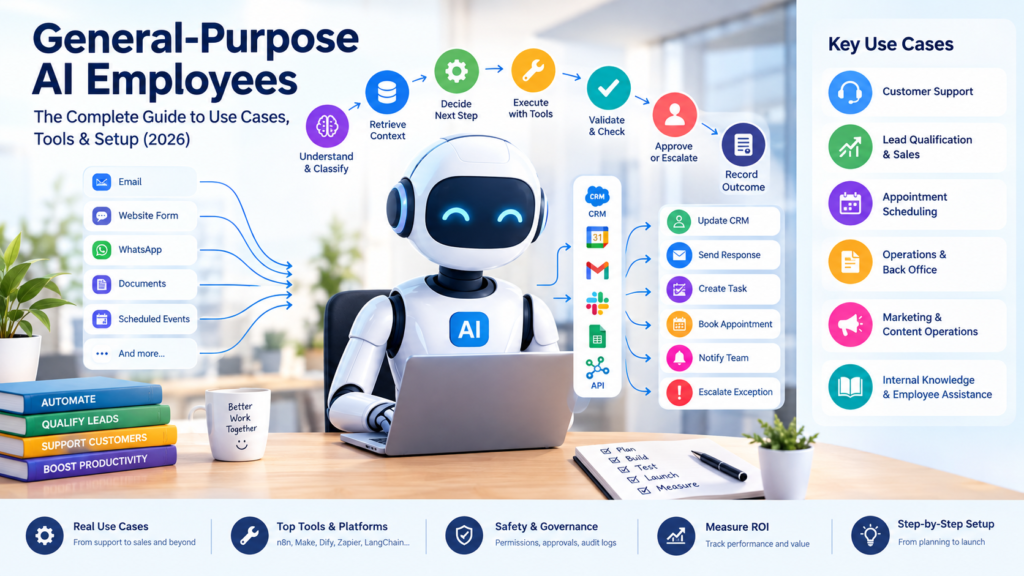
A general-purpose AI employee is an AI-powered system designed to carry out multi-step business tasks across connected software applications. It can interpret requests, retrieve approved information, use connected tools, update records, and coordinate follow-up actions within clearly defined boundaries.
For small businesses, the opportunity is not simply to introduce another AI tool. It is to improve how work gets done: responding to leads faster, reducing repetitive administration, supporting customers, and helping employees focus on activities that require human judgment.
However, an AI employee is not a human employee, and it is not automatically capable of completing every task independently. Its effectiveness depends on workflow design, access to reliable information, integration quality, testing, and appropriate human oversight.
This guide explains what general-purpose AI employees are, how they differ from chatbots and traditional automation, which business processes are suitable for them, and how to implement one with measurable business outcomes.
What Is a General-Purpose AI Employee?
A general-purpose AI employee is an AI-powered system that performs multi-step business workflows across connected tools. It can interpret requests, retrieve approved information, update systems such as a CRM, and escalate exceptions to a human when needed.
Unlike a basic chatbot that primarily answers questions, an AI employee can be configured to carry work forward across several stages. For example, it might receive an enquiry, identify the customer’s requirements, check approved business information, update a customer relationship management (CRM) system, prepare a response, and schedule a follow-up.
The term general-purpose AI employee describes a business-oriented approach rather than one standardized product or technical architecture. Actual capabilities vary by platform, AI model, integrations, permissions, and implementation.
Four Capabilities That Make an AI Employee Useful
1. Understanding business requests
An AI employee can interpret natural-language messages, extract information from documents, classify enquiries, and identify what a customer or colleague needs.
2. Using context to determine the next step
It can apply instructions, consult approved knowledge sources, and select from available actions. Its decisions still require clear rules and testing, particularly when information is incomplete or ambiguous.
3. Interacting with business software
With suitable integrations and permissions, it can retrieve CRM records, create support tickets, prepare emails, schedule appointments, or update workflow systems.
4. Coordinating a complete workflow
Rather than stopping after generating a response, it can move a task through several steps, check results, record outcomes, and escalate exceptions.
The practical objective is to complete a defined unit of business work—not merely generate convincing text.
Example: An AI Employee for Inbound Lead Qualification
Imagine a small business receives enquiries through its website and WhatsApp. Sales staff manually review each enquiry, ask qualifying questions, update the CRM, and arrange meetings.
A general-purpose AI employee could coordinate the following workflow:
- Receive a new enquiry from a website form or WhatsApp integration.
- Extract the prospect’s company, requirements, and contact details.
- Ask relevant follow-up questions if important information is missing.
- Classify the enquiry using predefined qualification criteria.
- Retrieve approved product or service information.
- Prepare a personalized response and send it only if the action is within its approved permissions.
- Create or update the CRM record.
- Offer meeting times using an approved calendar integration.
- Notify the appropriate sales representative.
- Escalate unusual requests, pricing exceptions, or high-value opportunities.
This workflow combines AI interpretation with deterministic automation and business rules.
The AI handles language, classification, and context-dependent tasks. The workflow handles required fields, routing rules, calendar operations, and logging. A human remains responsible for decisions that exceed the system’s authority.
The result can be a more coordinated process, provided the integrations work reliably and the AI’s decisions are sufficiently accurate.
AI Employee vs. AI Agent vs. Chatbot vs. Automation
These terms overlap, but they describe different aspects of a solution.
| Type | Primary purpose | Typical example |
|---|---|---|
| Chatbot | Respond to questions or guide conversations | Answering common customer questions |
| Traditional automation | Execute predefined rules and steps | Sending an invoice reminder after a due date |
| AI agent | Use a model, context, and tools to pursue a task | Classifying an enquiry and selecting an appropriate action |
| AI employee | Organize AI and automation around a broader business responsibility | Managing inbound enquiries through qualification, CRM updates, and follow-up |
An AI employee may contain one or more AI agents, traditional automation steps, integrations, and approval checkpoints.
This distinction matters because not every business problem needs an AI agent. If a process follows stable rules, conventional automation may be cheaper, easier to test, and more predictable.
AI becomes valuable when a workflow requires interpreting unstructured information, understanding intent, classifying exceptions, or adapting the next step to the available context.
Key Use Cases for AI Employees in Small Business
Small businesses should begin with one process that is repetitive, sufficiently well documented, and important enough to justify improvement.
1. Customer Support Employee
A customer support AI employee can classify enquiries, retrieve approved answers, summarize customer history, prepare responses, and create support tickets.
Example workflow
- A customer asks a question through the website or WhatsApp.
- The AI identifies the issue and searches approved support documentation.
- It provides a grounded answer when the information is available.
- If the issue requires investigation, it creates a ticket and summarizes the conversation.
- Billing disputes, complaints, policy exceptions, and uncertain answers are escalated to a person.
Business value: Faster first responses, fewer repetitive support requests, and more consistent answers—provided the knowledge base is accurate and regularly maintained.
Measure resolution quality and customer satisfaction alongside response speed. A fast but inaccurate response is not a successful outcome.
2. Lead Qualification and Sales Development Employee
An AI sales employee can collect missing information, categorize enquiries, prepare personalized follow-ups, and keep CRM records updated.
Example workflow
A prospect submits an enquiry. The system checks whether required details are present, asks relevant questions, applies predefined qualification criteria, and routes the lead to the correct sales owner.
It can prepare meeting options using calendar availability, but discounts, contractual commitments, and exceptional commercial terms should remain subject to authorized approval.
For businesses that use WhatsApp to communicate with customers, a carefully designed WhatsApp Business automation workflow can connect lead conversations with qualification, CRM updates, and sales follow-up.
Business value: Faster lead handling, fewer missed follow-ups, and improved visibility into the sales pipeline.
Track qualified leads, meeting attendance, conversion rates, and the time sales staff spend on administration.
3. Appointment and Scheduling Employee
Service businesses, agencies, property firms, and other appointment-based organizations can use AI to coordinate routine scheduling tasks.
The workflow can interpret appointment requests, check available calendar slots, offer valid options, confirm bookings, send reminders, and process permitted rescheduling requests.
The system should verify availability against the actual calendar rather than inventing open slots. Conflicting bookings and unusual requests should trigger a fallback process.
Business value: Less manual coordination, fewer scheduling errors, and fewer missed appointments.
4. Operations and Back-Office Employee
AI employees can assist with document processing, reporting, invoice-data extraction, meeting summaries, and internal task coordination.
For example, an invoice-processing workflow could:
- Receive an invoice through an approved channel.
- Extract supplier details, dates, invoice numbers, and amounts.
- Validate required fields and compare records against business rules.
- Flag missing information or mismatches.
- Prepare a draft accounting entry for approval.
- Route the entry to an authorized person before posting or payment, when required.
- Record the final status.
AI can assist with extraction and classification, but calculations, reconciliation rules, payment controls, and approval permissions should not depend solely on a language model.
Business value: Less manual data entry, faster exception identification, and improved consistency in routine administrative work.
5. Marketing and Content Operations Employee
A marketing AI employee can help research topics, organize content calendars, prepare briefs, repurpose approved material, and compile performance reports.
A controlled workflow might retrieve approved brand guidelines, draft a LinkedIn post from an article, prepare supporting social copy, and send everything to an editor for review.
Human review remains important for factual claims, brand-sensitive communications, and content that makes legal, financial, or performance promises.
Business value: Faster content preparation, more consistent publishing operations, and less repetitive coordination.
6. Internal Knowledge and Employee Assistance
An internal AI employee can help staff locate approved procedures, summarize documentation, explain internal processes, and prepare routine reports.
Its usefulness depends on access to current, authoritative information and permissions that prevent one employee from accessing another person’s restricted data.
Business value: Less time spent searching for information and more consistent access to internal knowledge.
How a General-Purpose AI Employee Works
A typical architecture combines an AI model with workflow orchestration, business data, connected tools, and monitoring.
Recommended architecture diagram:
Trigger → Understand → Retrieve Context → Decide → Execute → Validate → Approve or Escalate → Record Outcome
Image ALT text: Architecture of a general-purpose AI employee showing business triggers, AI reasoning, connected tools, validation, human approval, and outcome logging.
The Eight Stages
1. Trigger
A new form submission, customer message, support ticket, document, or scheduled event starts the workflow.
2. Understand the input
The AI identifies the request, extracts relevant details, and classifies the task.
3. Retrieve context
The system retrieves relevant CRM information, internal policies, product documentation, or other approved sources.
4. Select the next action
The AI determines which available action best fits the request, subject to the instructions and tools it has been given.
5. Execute through connected tools
An orchestration platform or application integration performs actions such as retrieving records, creating tasks, or preparing a response.
6. Validate the result
The workflow checks required fields, business rules, permitted values, and whether the action succeeded.
7. Request approval or escalate
Uncertain, sensitive, high-impact, or unauthorized actions are routed to a human.
8. Record the outcome
The system logs the result, exceptions, and relevant operational information for monitoring and improvement.
The important design principle is to use AI for tasks that benefit from interpretation and conventional rules for tasks that require predictable execution.
AI Agent Frameworks and Platforms Compared
These platforms solve different parts of the problem. n8n and Make are primarily suited to workflow orchestration, Dify focuses on LLM applications and knowledge-based assistants, while LangChain and LangGraph suit developer-led custom agent systems. The best choice depends on the workflow, integrations, data requirements, technical resources, and operating costs.
| Platform | Best suited to | Key considerations |
|---|---|---|
| n8n | Flexible workflows, technical users, and deployments where hosting and data-control choices matter | Requires thoughtful workflow design, integration configuration, and operational monitoring |
| Make | Visual workflow orchestration and connecting business applications | Evaluate scenario complexity, error handling, usage limits, and current AI-agent capabilities |
| Dify | LLM-powered applications, knowledge-based assistants, and retrieval-augmented workflows | Assess integration requirements and how the application will be deployed and maintained |
| Zapier Agents | Teams seeking agent-based workflows within the Zapier ecosystem | Check available actions, permissions, plan limits, and suitability for complex processes |
| LangChain / LangGraph | Developer-led applications requiring custom agent logic and control over execution | Requires engineering, testing, deployment, and ongoing maintenance |
These options are not all the same kind of technology. n8n and Make are workflow orchestration platforms; Dify focuses on LLM applications; LangChain and LangGraph provide developer-oriented components and orchestration capabilities. Product capabilities evolve, so verify current documentation before selecting a platform.
Which Platform Should You Choose?
- Choose n8n when you need flexible workflow logic, broad integration options, or control over deployment architecture.
- Choose Make when visual workflow construction and connecting business applications are central requirements.
- Choose Dify when your solution depends on an LLM application, knowledge retrieval, or a conversational interface.
- Choose Zapier Agents when your existing business processes already rely heavily on Zapier and the required integrations are available.
- Choose LangChain or LangGraph when developers need more control over custom agent behavior, state, and execution.
For most small businesses, a practical architecture may combine an orchestration platform, an AI model, a CRM or business database, and a customer-facing channel such as email, website chat, or WhatsApp.
Explore these official resources for current technical information:
- n8n documentation
- n8n human-in-the-loop documentation
- Make AI Agents
- Dify documentation
- LangGraph documentation
For more detail, read our AI Agent Frameworks Compared guide.
How to Build Your First AI Employee
The most reliable approach is to start with a business problem, not a platform.
This follows the Business-First AI principle: identify the desired outcome, improve the workflow, select an appropriate solution, implement it with human oversight, measure results, and standardize only after the process is working reliably.
Step 1: Identify a Measurable Business Problem
Choose a process where delays, repetitive effort, errors, or missed follow-ups create a clear business cost.
For example, a business might discover that staff spend several hours each week manually sorting enquiries and updating CRM records.
Document the current workload, delays, error rates, and customer impact before introducing AI.
Step 2: Map the Existing Workflow
Write down:
- What starts the process?
- What information is required?
- Which systems and employees are involved?
- Which decisions follow fixed rules?
- Which steps require judgment?
- What exceptions occur?
- What does successful completion look like?
Remove unnecessary steps before automating them. Automating a poorly designed process can reproduce its problems at greater speed.
Step 3: Decide Where AI Is Actually Needed
Separate the workflow into three categories.
AI tasks: Interpret messages, classify requests, extract information, summarize records, and draft responses.
Rule-based tasks: Check required fields, calculate totals, apply routing rules, verify dates, and send reminders.
Human tasks: Approve exceptional pricing, resolve sensitive complaints, authorize payments, and make decisions with significant commercial or legal consequences.
This separation helps control costs and reduces unnecessary dependence on AI.
Step 4: Select the Tools and Integrations
A simple lead-qualification employee might use:
- A website form or WhatsApp Business channel for incoming enquiries
- An LLM for interpreting messages and extracting information
- n8n or Make for workflow orchestration
- A CRM for lead records and follow-up status
- A calendar for appointment availability
- Email or an approved messaging integration for responses
- A monitoring mechanism for errors and escalations
Connect only the systems required for the first workflow. Confirm permissions, data-handling requirements, integration reliability, and ongoing operating costs.
Step 5: Define the Employee’s Instructions and Limits
A useful starting prompt could be:
You are the inbound lead assistant for [Company].
Your objective is to collect the information needed to qualify incoming leads, provide answers from approved company documentation, and keep CRM records accurate.
Ask concise follow-up questions when required information is missing. Use only approved tools and data sources. Never invent product details, availability, or pricing.
Do not approve discounts, make contractual commitments, or change sensitive customer records without the required authorization. Escalate uncertain cases and requests outside your scope to the designated human owner.
Instructions alone are not sufficient safeguards. Enforce permissions and approval requirements in the workflow and connected systems as well.
Step 6: Add Validation and Human Approval
Before launching, define the conditions under which the system must stop, retry, or escalate.
For example, require a valid CRM record before creating a follow-up task, verify calendar availability before confirming an appointment, and obtain human approval before sending a sensitive commercial commitment.
n8n documents human approval for selected AI tool calls, illustrating how an agent workflow can pause before performing a higher-risk action.
Step 7: Test Before Production
Build a test set using representative real-world scenarios, with sensitive information appropriately protected.
Include normal requests as well as incomplete information, duplicate records, ambiguous questions, incorrect documents, integration failures, angry customers, and requests outside the system’s authority.
A proposed initial test set of 20–50 scenarios can be a useful starting point for a small workflow, but it is not a universal guarantee of reliability. Higher-risk use cases require more extensive testing and monitoring.
Track factual accuracy, successful task completion, incorrect actions, escalation quality, and recovery from failures.
Step 8: Launch Gradually and Measure Outcomes
Start in assisted mode, where a human reviews drafts or approves important actions. Expand autonomy only when measured performance supports it.
Monitor the workflow after launch, review exceptions, and improve the instructions, rules, integrations, or knowledge sources where necessary.
Explore the Business-First AI Framework to understand how to turn business problems into practical AI implementation opportunities.
Risks, Governance, and Human Oversight
An AI employee should not receive unrestricted access to business systems merely because it can call tools.
A production deployment needs explicit permissions, reliable data sources, defined limits, and a process for handling failure.
Essential Safeguards
Least-privilege access: Grant only the permissions required for the assigned workflow.
Human approval: Require authorization for sensitive communications, financial transactions, exceptional discounts, record deletion, and other high-impact actions.
Grounded answers: Retrieve information from approved sources and define what happens when the answer cannot be verified.
Input and output validation: Check required fields, allowed values, and business rules before downstream actions occur.
Audit logs: Record material actions, outcomes, errors, and approvals in accordance with applicable privacy and retention requirements.
Failure handling: Define timeouts, retries, duplicate prevention, escalation paths, and recovery procedures.
Ongoing evaluation: Review performance and incidents regularly rather than assuming the initial configuration will remain reliable.
AI systems can still misunderstand requests, generate incorrect information, or select inappropriate actions. The NIST AI Risk Management Framework provides a useful reference for identifying and managing AI-related risks.
The goal is not to eliminate human involvement. It is to direct human attention toward decisions where judgment, accountability, or relationship management matters most.
How to Measure General-Purpose AI Employee ROI
Measure the improvement against a documented baseline. Do not assume that every task completed by AI creates an equivalent amount of financial savings.
Track the following metrics:
| Metric | How to measure it |
|---|---|
| Response time | Time from receiving a request to providing a useful response |
| Task completion rate | Percentage of eligible workflows completed successfully |
| Human intervention rate | Percentage of workflows requiring employee intervention |
| Cost per completed task | Total attributable operating cost divided by successfully completed tasks |
| Time saved | Baseline human effort minus the human effort remaining after implementation |
| Quality | Error rate, rework, complaints, and customer satisfaction |
| Business impact | Qualified leads, attended meetings, recovered opportunities, or other relevant outcomes |
Calculate the Potential Financial Return
Use a transparent calculation:
Net benefit = Value of time released + Incremental business benefit − Total implementation and operating costs
ROI (%) = Net benefit ÷ Total implementation and operating costs × 100
For example, suppose an AI-assisted workflow releases 30 hours of employee capacity each month. If the business assigns an internal value of ₹500 per hour to that time, the calculated capacity value is ₹15,000 per month.
If the workflow costs ₹8,000 per month to operate, the difference is ₹7,000 before accounting for implementation costs, maintenance, quality issues, and other benefits or expenses.
Now suppose implementation and initial setup cost ₹40,000, in addition to the ₹8,000 monthly operating cost. At an illustrative net monthly capacity benefit of ₹7,000, recovering the initial setup cost would take approximately six months, assuming the benefit remains consistent.
This is a simplified payback estimate, not a guaranteed financial saving. Maintenance, quality issues, and the actual value of released employee capacity can change the result. Time released becomes a financial saving only when it reduces actual costs or is productively redirected to valuable work.
A sensible pilot should establish a baseline, set measurable success criteria, track total costs, and compare outcomes over an agreed evaluation period.
Frequently Asked Questions
What Is a General-Purpose AI Employee?
A general-purpose AI employee is an AI-powered system configured to perform multiple related business tasks using instructions, business information, connected tools, and workflow logic. Its autonomy depends on its permissions, design, and safeguards.
How Is an AI Employee Different From a Chatbot?
A chatbot typically focuses on answering questions or managing conversations. An AI employee can be configured to coordinate a wider process involving information retrieval, tool use, record updates, follow-up, and escalation.
Can Small Businesses Use AI Employees?
Yes. Small businesses can begin with well-defined workflows such as lead qualification, customer support, appointment scheduling, document extraction, and reporting. Suitability depends on the workflow’s complexity, available integrations, risk, and operating budget.
Which Tools Can Build an AI Employee?
Options include n8n, Make, Dify, Zapier Agents, and developer frameworks such as LangChain and LangGraph. The right choice depends on whether you need workflow orchestration, an LLM application, or custom agent logic.
Do AI Employees Replace Human Employees?
AI employees can reduce repetitive coordination and information-processing work, but they do not remove the need for human accountability. People remain important for exceptions, approvals, relationship management, and consequential decisions.
Are General-Purpose AI Employees Fully Autonomous?
Not necessarily. Some are configured to perform approved actions independently, while others require approval at important stages. Autonomy should be determined by demonstrated reliability, business risk, permissions, and the consequences of failure.
How Much Does It Cost to Build an AI Employee?
Costs vary with platform subscriptions, model usage, integrations, implementation, monitoring, maintenance, and security requirements. Estimate the total cost of ownership for the specific workflow instead of relying on a single universal price.
Getting Started With General-Purpose AI Employees
Start with one workflow. Choose a repetitive business process with a measurable cost, map the current steps, identify where AI adds value, and pilot an AI employee with human approval and clear success metrics.
Explore the Business-First AI Framework to turn a business problem into a practical AI implementation plan.
Business Value First. AI Second.