
AI Agents vs AI Assistants: What’s the Difference?
If you’re a small business owner trying to “use AI,” understanding the difference between an AI agent vs AI assistant can help you avoid the most expensive mistake: picking the wrong category.The phrase AI Agents vs AI Assistants sounds like tech jargon, but it maps to a very practical operational question: do you want AI to help your team do the work, or do you want AI to get work done across your systems with less human involvement?
That difference determines everything that follows: implementation effort, risk, the need for approvals, integrations, and whether you’ll see meaningful time savings—or just create another tool your team has to babysit.
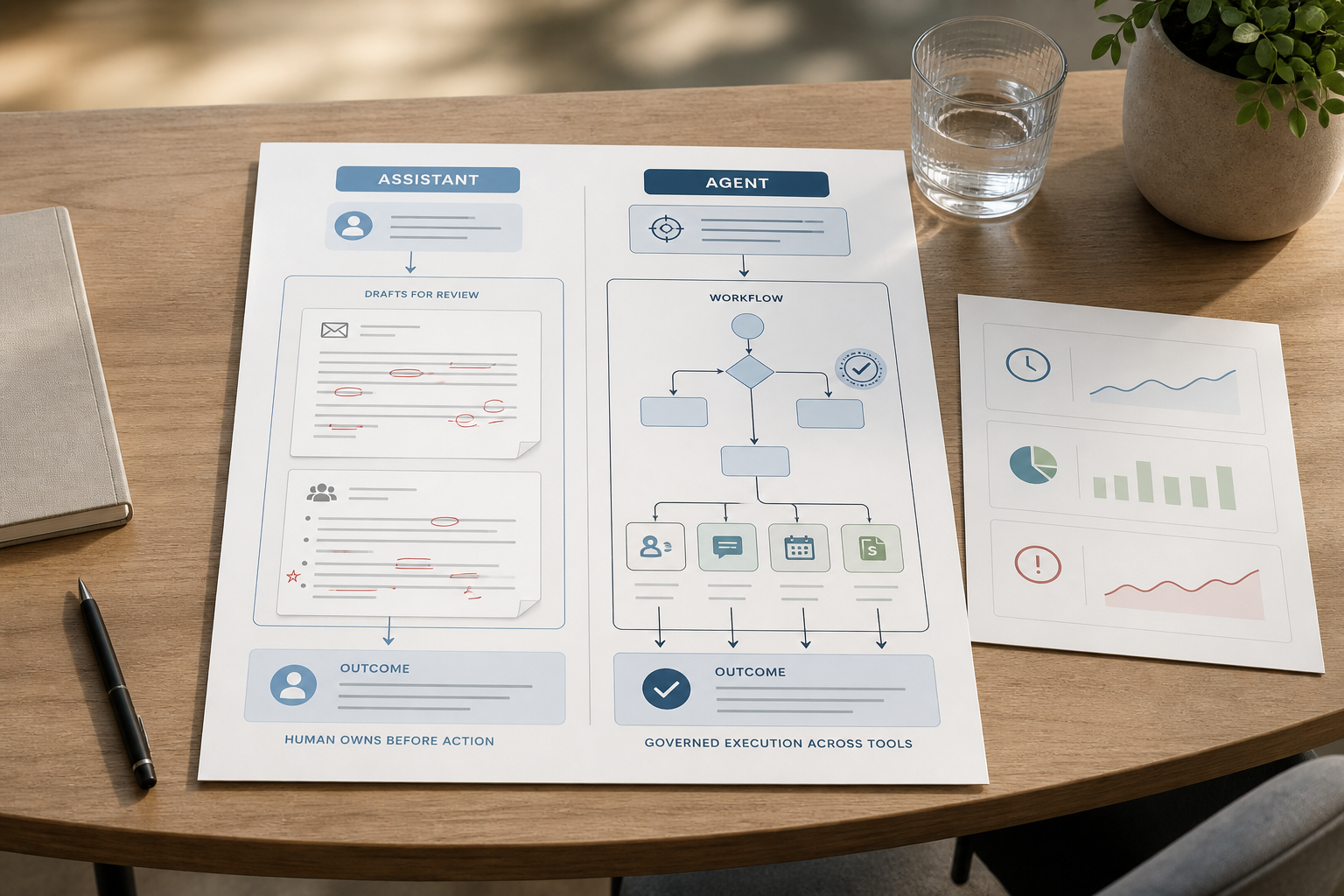
The difference between AI agents and AI assistants becomes especially important when you are deciding what to automate. An assistant can improve how a person performs a task, while an agent can take responsibility for executing a defined sequence of actions.
Quick Answer (40–60 words): AI assistants respond to prompts and help people produce outputs (drafts, summaries, answers). AI agents pursue a goal more autonomously by planning steps and executing workflows across tools (routing tickets, updating a CRM, sending follow-ups). Assistants help you work faster; agents help work get done.
What Is an AI Assistant?
An AI assistant is a prompt-driven system: you ask, it responds. In most business scenarios, an assistant is “reactive”—it waits for a user input and then generates text, recommendations, or a structured response.
Google Cloud describes AI assistants as applications designed to collaborate directly with users, responding to requests and helping complete tasks while the user remains involved in the decision-making process. Google Cloud: What are AI agents?
How AI Assistants Work
In a typical workflow, an AI assistant follows a simple pattern:
User request → AI interprets the request → AI generates an answer, draft, summary, or recommendation → Human reviews and acts
This prompt-driven model is also reflected in Microsoft’s description of Microsoft 365 Copilot, where users enter a prompt and receive AI-generated information in the context of the work they are doing. Microsoft 365 Copilot overview
The assistant may use provided context, connected data, or configured tools to improve its response. But in most cases, the person remains responsible for deciding what happens next—sending the email, updating the record, approving the recommendation, or taking action in another system.
Think of AI assistants as a smart teammate for knowledge work:
- Drafting an email reply based on your notes
- Summarizing a meeting transcript into action items
- Answering questions using provided context (policies, SOPs, product details)
- Generating a first-pass outline for a blog post or proposal
Why it matters: assistants usually deliver value quickly because they fit into work that already exists. Your team is already writing, reading, and deciding—an assistant speeds that up without requiring you to redesign an entire process.
Where small businesses get the most value: when the bottleneck is human time spent on drafting, researching, summarizing, and communicating—especially when the “next step” still needs a person to decide.
Assistants are great at “output,” not “ownership”
A useful way to frame it is workflow ownership:
- An assistant helps produce an output.
- A human still owns the workflow end-to-end.
This productivity-oriented role is also reflected in IBM’s AI assistant offerings, which position assistants around improving employee productivity, customer experience, and access to information while working with existing business systems. IBM AI Assistants
Even if an assistant gives excellent answers, your team often still has to copy/paste information between tools, remember follow-ups, and ensure the work is completed consistently.
Consultant Insight: Many teams “feel” busy using an AI assistant but don’t actually reduce operational load—because the assistant improves content quality, not process completion. If your pain is coordination (handoffs, follow-ups, routing), you’re already in agent territory.
What Is an AI Agent?
An AI agent is a goal-driven system: you give it an outcome, and it works toward that outcome with less ongoing human prompting. Google Cloud similarly describes AI agents as systems that use AI to pursue goals and complete tasks, with capabilities such as reasoning, planning, memory, and varying levels of autonomy. Google Cloud’s AI agent overview
Agents are typically described as more “proactive” because they can plan steps, use tools, and execute actions across systems. However, autonomy varies considerably between implementations, and many agents still operate within defined rules, approval checkpoints, and human oversight.
How AI Agents Work
An AI agent workflow works toward a defined outcome rather than responding only to one prompt:
Goal or trigger → Understand context → Plan steps → Use tools → Execute actions → Check results → Continue, retry, report, or escalate
The exact architecture varies by use case. Anthropic’s guidance on building effective agents covers patterns such as sequential workflows, parallel workflows, and evaluator-optimizer approaches, which are useful when deciding how much complexity an agent actually needs. Anthropic’s guide to building effective AI agents
A well-designed AI agent workflow defines more than the sequence of actions. It also specifies the trigger, required inputs, decision rules, available tools, approval points, exception paths, and what counts as successful completion.
For example, an agent handling a new lead might check the CRM for duplicates, assess lead details, route the lead to the right salesperson, create follow-up tasks, and flag exceptions for human review. The key difference is that the agent can manage the sequence of work within defined rules, permissions, and approval boundaries.
Instead of “Draft an email,” an agent use case looks like:
- “Qualify new inbound leads and route them correctly.”
- “Triage support tickets, assign priority, and escalate exceptions.”
- “Monitor overdue invoices and send reminders based on rules.”
- “Collect onboarding documents, update records, and send next-step messages.”
Why it matters: agents are how you get from “AI helps my staff” to intelligent automation—where work moves forward across tools without your team manually pushing every step.
Key capabilities commonly associated with agents
Vendors and industry sources describe agents using a few recurring concepts. Definitions vary, but these are the practical elements to look for:
- Planning: breaking a goal into steps or subtasks.
- Tool use: calling external tools (e.g., CRM, helpdesk, calendar, database) to fetch or update information.
- Workflow execution: completing multi-step tasks, not just generating an answer.
- Memory/context: retaining state across steps so the workflow doesn’t reset every time.
- AI agent human oversight: approvals and checkpoints for higher-risk actions.
Important nuance: not every tool marketed as an “AI agent” is truly autonomous. Autonomous AI agents can operate with greater independence, but real-world business deployments often use partial autonomy, approval checkpoints, permissions, and escalation rules. When evaluating a product, focus on what it can actually execute reliably rather than what it is called. Many products behave like advanced assistants with better integrations. That’s not automatically bad—but you should evaluate the reality: does it execute, or does it mostly recommend?
AI Agents vs AI Assistants: The Differences That Actually Matter in Business
Most comparisons get stuck in technical definitions. For small businesses, the clearest test is this:
Assistants generate outputs. Agents execute workflows.
This distinction is broadly consistent with Google’s current framework: AI assistants are generally centered on helping users with tasks and responding to their requests, while AI agents are designed for more autonomous, proactive, and complex workflows. Google Cloud’s AI agent and assistant comparison
The difference between an AI agent vs AI assistant is therefore less about the underlying AI model and more about who drives the workflow, whether the system can take actions, and how much human intervention is required.
Here are the business-relevant differences you can use to make a decision.
| Dimension | AI Assistants | AI Agents |
|---|---|---|
| Primary role | Respond to prompts; help a person complete a task | Pursue a goal; complete multi-step work with less prompting |
| Autonomy | Low to medium (human drives each step) | Medium to high (agent chooses steps, within constraints) |
| Best-fit work | Drafting, summarizing, Q&A, ideation, research support | Routing, follow-ups, updates across systems, structured multi-step processes |
| Tool integration need | Optional | Commonly required to create real end-to-end automation |
| Implementation effort | Usually lower (hours to days) | Usually higher (days to weeks), depends on process clarity and approvals |
| Risk profile | Lower (output is reviewed before action) | Higher (system takes actions), needs stronger governance |
| Where things break | Bad prompts, missing context, inconsistent usage by staff | Unclear workflows, edge cases, poor integrations, missing approval checkpoints |
| Time savings potential | High for writing/research-heavy tasks | Highest for repetitive multi-step processes that span systems |
AI Agent vs AI Assistant: The 7 Biggest Differences
The difference between an AI agent vs AI assistant is not simply whether the system can use AI, access tools, or take actions. Modern AI products increasingly overlap. The more useful distinction is how much workflow responsibility and autonomy the system has within defined rules, permissions, and human-approved boundaries.
1. Autonomy
An AI assistant usually waits for a person to ask for help and responds to that request. An AI agent can continue working toward a defined goal with less ongoing prompting. The level of autonomy can vary considerably. Microsoft distinguishes autonomous agents as systems that can operate with limited or no ongoing human involvement, while many business agents still use human checkpoints and predefined controls. Microsoft’s AI agent FAQ
2. Planning
Assistants typically focus on the immediate task, such as drafting an email or summarizing a document. Agents can break a larger objective into multiple steps and determine what needs to happen next.
3. Tool Use
Assistants can use connected tools or data sources when configured or instructed to do so. Agents use tools as part of a workflow—for example, checking a CRM, updating a ticket, creating a task, or retrieving information needed for the next step.
4. Decision-Making
Assistants primarily support decisions by providing information, analysis, or recommendations. Agents can make bounded decisions within predefined rules, such as routing a lead, assigning ticket priority, or escalating an exception.
5. Multi-Step Execution
Assistants are usually best suited to individual knowledge-work tasks. Agents coordinate sequences of actions across systems, such as qualifying a lead, updating the CRM, scheduling follow-ups, and escalating cases that require human attention.
6. Human Oversight
With an assistant, the person usually remains directly involved in asking, reviewing, deciding, and acting. With an agent, human involvement can shift toward oversight: setting permissions, approval thresholds, escalation rules, and monitoring requirements.
7. Business Impact
Assistants primarily improve individual productivity by helping people write, research, summarize, and analyze faster. Agents can improve workflow performance by reducing manual handoffs, delays, repetitive data entry, and missed follow-ups across systems.
The practical takeaway is simple: assistants help people complete work; agents take greater responsibility for moving work through a process.
AI agent vs AI assistant is ultimately a question of workflow responsibility. An assistant helps a person complete a task, while an agent takes greater responsibility for moving a defined process forward. The right choice depends on how repeatable the workflow is, how much autonomy is appropriate, and where human approval is required.
AI Agent vs ChatGPT: What most small businesses mean
Many people ask “AI agent vs ChatGPT” because ChatGPT is the most familiar interface. In typical small business usage, ChatGPT behaves like an assistant: it responds when prompted, and it doesn’t independently run your lead routing, update your CRM, or follow up on invoices unless you build or configure an agentic workflow around it.
How to use this insight: if your plan for “automation” still involves someone asking ChatGPT what to do next, you’re building a human-driven workflow with faster thinking and writing—not a system that executes. That can be a great first step, but set expectations correctly.
AI Agent vs AI Chatbot
When comparing AI agent vs AI chatbot, the key distinction is usually workflow responsibility. An AI chatbot is primarily designed to hold a conversation: it answers questions, provides information, and guides users through an interaction. An AI agent can also use a chat interface, but it is designed to go further by pursuing a goal, using tools, taking actions, and managing multi-step work.
The distinction is not always absolute. Modern chatbots may connect to knowledge bases, retrieve customer data, or trigger simple actions. But the key difference is usually the level of delegated responsibility. A chatbot mainly helps someone find an answer. An AI agent can use that information to move a workflow forward.
The distinction becomes clearer when an AI system can move beyond generating responses and take actions using tools and external data. Microsoft describes agents as systems that can reason about requests, use tools, access external data, and make decisions across multiple steps. Microsoft’s AI agent overview
For example:
- Chatbot: A customer asks, “What is your return policy?” The chatbot finds the policy and explains it.
- AI agent: A customer says, “I want to return my order.” The agent checks the order, verifies eligibility, creates the return request, updates the system, sends confirmation, and escalates exceptions if needed.
For small businesses, chatbots are useful for answering repetitive questions and improving customer self-service. AI agents become more valuable when the business wants to automate the work that happens after the conversation, such as updating records, routing requests, scheduling follow-ups, or processing routine actions.
AI Agents vs Automation
When comparing AI agents vs automation, it helps to separate fixed workflows from goal-driven workflows.
Traditional automation follows predefined rules:
Trigger → Rule → Action
For example:
A prospect submits a contact form → send a thank-you email → create a CRM contact → notify the sales team.
This kind of automation is reliable and efficient when the process is predictable. However, it does not usually interpret complex context or decide what should happen when information is incomplete, unusual, or ambiguous.
An AI agent adds a layer of reasoning within defined boundaries:
Goal or trigger → interpret context → choose next steps → use tools → execute → check outcome → escalate if needed.
For example:
A new lead arrives → agent reviews the form details → checks for duplicate records → identifies the relevant service line → assigns the correct salesperson → updates the CRM → prepares or sends a tailored first response → creates follow-up tasks.
AI agents do not replace all traditional automation. In most practical business workflows, the strongest design combines:
- Deterministic automation for predictable steps
- AI reasoning for classification, interpretation, and recommendations
- Human approval for exceptions or high-risk actions
Use traditional automation when the rules are clear and rarely change. Use AI agent automation when the workflow requires context, bounded decision-making, or multi-step coordination across systems.
AI Agents vs Generative AI
Generative AI and AI agents are related, but they are not the same thing.
When comparing AI agents vs generative AI, it helps to separate the capability from the system that uses it. Generative AI and AI agents are related, but they are not the same thing.
Generative AI is the capability that allows a system to create or transform content. It can draft emails, summarize meetings, analyze text, write code, generate ideas, answer questions, and produce marketing content.
An AI agent is a broader operational system that can use generative AI as part of a workflow. In addition to an AI model, an agent may use instructions, business rules, connected tools, memory or workflow state, permissions, data sources, and approval checkpoints to pursue a defined goal.
A simple way to think about it:
Generative AI helps create and reason.
An AI agent uses that capability, plus tools and workflow logic, to get work done.
For example, generative AI can draft a personalized sales follow-up email. An AI agent can identify which leads need follow-up, retrieve CRM details, decide which message template fits the lead stage, draft the email, queue it for approval or send it based on rules, log the activity, and schedule the next task.
This distinction matters because buying access to generative AI does not automatically create business automation. To get agentic AI value, a business still needs a clear workflow, connected systems, decision rules, risk controls, and measurable outcomes.
Can AI Assistants and AI Agents Work Together?
AI assistants and AI agents are not competing technologies. In many business workflows, they work best together.
An AI assistant can act as the conversational and decision-support layer. It helps a person understand information, explore options, create content, and review recommendations. An AI agent can act as the execution layer, handling repetitive multi-step actions across systems.
A simple workflow might look like this:
Human → AI Assistant → AI Agent → Business Systems → Human Review
For example, a sales manager asks an AI assistant why the team’s lead response time has increased. The assistant reviews available information, summarizes the likely causes, and recommends next steps. An AI agent can then check the CRM for unassigned or overdue leads, identify records that need attention, create tasks, prepare follow-up messages, update lead statuses, and send exceptions to the manager for approval.
This combination gives small businesses a practical balance:
- Assistants improve human judgment, communication, and decision-making.
- Agents reduce repetitive coordination and move structured work forward.
- Humans retain control at high-risk, customer-sensitive, or irreversible points.
The goal is not to replace every human task with an agent. It is to use assistants where people need support and use agents where repeatable workflows need reliable execution.
Which One Should a Small Business Use?
Most small businesses don’t need a blanket AI agent or AI assistant strategy. They need one thing: pick a workflow that matters, improve it, and measure outcomes. AI agents for business are most useful when that workflow involves repeatable, multi-step work across systems This business-oriented approach is increasingly reflected in commercial agent platforms, where agents are positioned around executing business processes rather than simply generating information. Microsoft’s AI agents for business overview. That’s the core of the Business-First AI Framework™:
Business Problem → Workflow Improvement → Choose the Right Solution → Implement with Human Oversight → Measure Outcomes → Standardize and Scale
AI agents for business are most useful when the goal is not simply to generate better outputs, but to move repetitive work through a defined process. Examples include lead routing, support triage, invoice follow-up, customer onboarding, and internal task coordination.
AI assistants for business are often the easier starting point when employees need help with writing, research, summarization, analysis, or decision support. They can deliver value without requiring the integrations and workflow controls that agent-based automation typically needs.
Here’s a practical way to decide whether an AI agent vs AI assistant is the better fit without overengineering it.
The “Prompt, Recommend, Execute” model (simple and surprisingly effective)
Map your use case to the maturity level you actually need:
- Prompt: “Help me create/understand something.” This is assistant territory.
- Recommend: “Suggest the next step and prepare it.” This can be an advanced assistant or a lightly agentic workflow with approvals.
- Execute: “Do the steps across systems and close the loop.” This is agent territory (with controls).
Use an AI assistant when…
AI assistants for business are particularly useful when employees need help with drafting, research, summarization, analysis, and other knowledge-work tasks without redesigning the underlying workflow.
- Your work is variable (different every time): proposals, customer emails, marketing copy.
- A person must judge quality before action (tone, brand, legal sensitivity, relationship nuance).
- You want fast adoption with minimal integration work.
- You’re still clarifying your SOPs and want AI to support humans, not replace decisions.
Trade-off: you’ll still have a lot of “last-mile” manual work: copying data, updating tools, remembering to follow up, and ensuring consistency.
Use an AI agent when…
AI agents for small business use cases are strongest when a repeatable workflow involves coordination, routing, follow-ups, or updates across multiple systems.
- The workflow is repeatable and has clear steps (even if exceptions exist).
- The biggest pain is coordination: routing, follow-ups, status updates, handoffs.
- You can define rules and guardrails (what to do, what not to do, when to escalate).
- You can measure success with operational KPIs like cycle time, response time, completion rate, and error rate.
Trade-off: autonomy increases risk. You’ll spend more time on process design, approvals, monitoring, and integration reliability than you would with an assistant.
Business-First AI Insight: If you can’t describe your process in plain English—inputs, steps, exceptions, and “done”—an AI agent won’t fix it. It will only execute the confusion faster. Assistants can still help in that stage by drafting SOPs, checklists, and templates while you standardize the workflow.
Real-World Business Examples (Manual vs Assistant vs Agent)
To make the difference concrete, here are a few common small business workflows, shown three ways: manual, assistant-supported, and agent-executed. The point isn’t that “agent” is always better—it’s that you should match the approach to the workflow and risk.
Example 1: Lead follow-up (service business, agency, real estate)
Manual: A lead fills a form → someone checks the inbox → someone copies details into CRM → someone sends a response → someone sets a reminder to follow up.
With an AI assistant: A salesperson pastes lead details → assistant drafts a personalized reply and suggested next questions → salesperson sends it and updates CRM manually.
With an AI agent: New lead triggers workflow → agent checks CRM for duplicates → routes lead by rules (service line, location, budget) → drafts and sends the first response (or queues for approval) → creates follow-up tasks and updates CRM fields.
Where agents win: speed-to-lead and consistency. Where assistants win: better messaging with minimal setup.
Example 2: Support ticket triage (SaaS, ecommerce, local services)
Manual: Inbox gets messy → someone reads each ticket → categorizes it → assigns priority → forwards to the right person → sometimes forgets to escalate.
With an AI assistant: Support rep asks the assistant to summarize the ticket and suggest a response. The rep still decides category/priority and assigns it.
With an AI agent: Ticket arrives → agent categorizes + sets priority → checks customer tier/SLAs → assigns to the right queue → escalates exceptions (refund keywords, legal terms, security concerns) → optionally drafts a reply and requests approval.
Oversight tip: keep humans in the loop for refunds, cancellations, compliance-sensitive issues, or anything that changes account access.
Example 3: Invoice follow-up (accounting, professional services)
Manual: Someone runs an aging report → emails clients → tracks replies in inbox → updates accounting tool → follows up again later.
With an AI assistant: Bookkeeper asks the assistant to draft polite reminders and handle tone variations. The bookkeeper still chooses who gets what and records status manually.
With an AI agent: Agent monitors invoice status → sends reminders based on rules (days overdue, amount thresholds) → logs activity → flags exceptions (disputes, partial payments) → routes exceptions to a human with context.
Risk control: require approval before sending messages to strategic accounts or for amounts above a defined threshold.
Example 4: Meeting actions → task creation (operations, project teams)
Manual: Meeting ends → someone writes notes → someone creates tasks later → tasks get missed or are vague.
With an AI assistant: Assistant summarizes meeting and extracts action items. A manager reviews and creates tasks in the project tool.
With an AI agent: Agent summarizes meeting → converts actions into tasks with owners/dates → creates tasks in your project tool → posts a recap to the right channel → reminds owners before deadlines.
Common pitfall: agents can create task clutter if you don’t define rules for what counts as a task vs a discussion point.
The Hidden Trade-Offs: Autonomy, Governance, and “Automation Debt”
Agents can create outsized value, but they also introduce a different class of operational responsibilities. If you’re comparing AI Agents vs AI Assistants, this is where the decision becomes real.
1) Autonomy increases both value and risk
When an assistant is wrong, it usually produces a draft you can correct. When an agent is wrong, it can:
- route a lead incorrectly
- update the wrong record
- send a message that shouldn’t be sent
- close a ticket prematurely
That’s why human oversight still matters—especially at critical points. As agents become more autonomous, governance becomes more important because the system has greater ability to take consequential actions. Anthropic’s research on trustworthy agents highlights human control, security, transparency, and privacy as important considerations for agentic systems. Anthropic’s framework for trustworthy agents
2) Agents require better process design than most teams expect
An agent needs clarity on:
- Inputs: what data starts the workflow?
- Rules: what decisions are allowed?
- Exceptions: what should be escalated?
- Definition of done: what does “completed” mean?
If your process is currently “tribal knowledge,” you’ll spend time documenting it before an agent becomes reliable.
3) Integrations and monitoring become part of the job
Assistants can deliver value even as standalone tools. Agents often depend on connected systems (CRM, helpdesk, calendar, accounting). That introduces practical operational work:
- handling integration failures
- reviewing logs and exceptions
- updating rules when your workflow changes
- managing permissions
None of this is “bad.” It’s just the real cost of moving from productivity support to automation.
Consultant Insight: Agents don’t eliminate work—they change the type of work. You’ll do less repetitive coordination, but more system design and exception handling. The ROI is strongest when exceptions are rare and the workflow is measurable.
A Practical Decision Tree: Should You Use an Assistant or an Agent?
If you want a quick way to decide, run your use case through this checklist in order. You can treat it like a lightweight decision tree.
- Is the work multi-step across tools?
- If no → start with an assistant.
- If yes → continue.
- Is the workflow repeatable and structured?
- If no (highly variable) → use an assistant + improve the SOP first.
- If yes → continue.
- Can you define “done” and success metrics?
- If no → you’re not ready for an agent. Start by defining cycle time, completion rate, error rate.
- If yes → continue.
- Is it safe to execute without human approval?
- If no → use an agent with approvals (human-in-the-loop).
- If yes → consider a more autonomous agent with monitoring.
Implementation Considerations (What Small Businesses Should Plan For)
Because search intent here is informational, you don’t need a full build guide—but you do need to know what implementation tends to involve so you can choose realistically.
For AI assistants: what implementation usually looks like
- Choose 1–2 high-frequency tasks (email drafting, proposal outlines, meeting summaries).
- Create prompt templates so results are consistent across staff.
- Define review standards (tone, compliance, approval needs).
- Track a simple KPI: time-to-first-draft, time-to-response, rework rate.
Common adoption issue: people use assistants inconsistently, so results vary. Templates and lightweight SOPs fix most of that.
For AI agents: what implementation usually looks like
- Map the workflow (steps, exceptions, owners, systems touched).
- Decide control points (where humans must approve vs where the agent can act).
- Connect tools (CRM/helpdesk/calendar/accounting) and define permissions.
- Start with a narrow scope (one workflow, one team) and measure outcomes.
- Monitor exceptions and refine rules before scaling.
Common adoption issue: teams automate too much too soon. The result is noisy automations and loss of trust. Start with a workflow where success is obvious and measurable.
When to keep human approval in the loop
Even with strong automation goals, AI agent human oversight remains important for actions involving money, sensitive information, customer commitments, security, or irreversible changes. Certain actions usually deserve explicit checkpoints:
- Money movement: refunds, discounts, invoice adjustments
- Compliance or legal sensitivity: healthcare, HR, regulated communications
- Account access/security: password resets, permission changes
- High-value relationships: strategic accounts, VIP customers, key partners
- Irreversible actions: deleting records, closing accounts, contract sends
Common Mistakes When Choosing AI Tools (and How to Avoid Them)
Mistake 1: Buying “agent” software when you really need workflow clarity
Why it happens: “agent” sounds like a shortcut to automation.
Consequence: the agent can’t execute reliably because the process is unclear, so humans step in constantly.
Better approach: document the workflow first, then automate only the steps that are stable and measurable.
Mistake 2: Using an assistant for coordination-heavy work
Why it happens: assistants are easy to adopt, so teams apply them everywhere.
Consequence: you still have context switching and re-entry across systems, so total cycle time barely improves.
Better approach: keep the assistant for drafting and summaries, and introduce an agent for routing/follow-up/status updates.
Mistake 3: Skipping approvals because “AI is usually right”
Why it happens: early demos look impressive, and teams want speed.
Consequence: one bad action can damage customer trust or create operational cleanup.
Better approach: start with approvals for risky actions, then relax controls only after monitoring shows low error rates.
Mistake 4: Measuring “usage” instead of outcomes
Why it happens: usage is easy to observe; outcomes require process metrics.
Consequence: you can have high AI activity and low business impact.
Better approach: measure cycle time, response time, completion rate, approval rate, and exception rate—then decide whether to scale.
For more advanced agent deployments, evaluation also becomes important because agents can take multiple actions, modify state, and adapt based on intermediate results. Anthropic recommends using evaluations to identify failures and behavioral changes before they reach production. Anthropic’s guide to evaluating AI agents
Start Today / Improve Next / Scale Later (Implementation Priority)
If you want momentum without overcommitting, use this prioritization.
Start Today (low effort, fast learning)
- Pick one workflow where time is clearly being wasted (e.g., lead follow-up or meeting recaps).
- Decide whether you need output (assistant) or execution (agent).
- Create two prompt templates for consistent assistant use (inputs + desired format).
Improve Next (next 30 days)
- Map one repeatable multi-step workflow and document exceptions.
- Define KPIs (cycle time, completion rate, error rate, hours saved).
- Add approval checkpoints where the risk is high.
Scale Later (once you can measure success)
- Standardize the workflow and reuse it across teams.
- Expand agent scope only after exception handling is stable.
- Build a lightweight governance routine: monthly review of exceptions, rules, and permissions.
FAQ
What is the main difference between AI agents and AI assistants?
AI assistants respond to prompts and help a person create outputs (drafts, summaries, answers). AI agents pursue a goal more autonomously by planning steps and executing multi-step workflows across tools and systems.
Are AI agents more advanced than AI assistants?
Often, yes—because agents typically add planning, tool use, and workflow execution. But “more advanced” also means more setup, more governance, and more risk if the workflow isn’t clearly defined.
Is ChatGPT an AI assistant or an AI agent?
ChatGPT can function as an AI assistant or support more agentic workflows, depending on how it is configured and what tools or actions it can access. In a typical business use case, however, ChatGPT is used primarily as an AI assistant: it responds to prompts and helps users create, analyze, or understand information.
Which is better for small businesses: an AI agent or an AI assistant?
Neither is universally better. If you need faster drafting, summarizing, or research, start with an assistant. If you need repetitive, multi-step work to run consistently across tools (routing, follow-ups, updates), an agentic workflow is usually the better fit.
Can an AI assistant become an AI agent?
Sometimes. Some platforms can be configured into more agent-like behavior by adding tool access, workflow rules, memory/state, and permissions. The shift from assistant to agent is less about the model and more about the workflow design and controls.
Do AI agents need human oversight?
Yes—especially at approval points, for exceptions, and for high-risk actions like refunds, compliance-sensitive messaging, or account/security changes. Oversight is a design feature, not a failure.
Are AI agents always fully autonomous?
No. Definitions vary across the industry, and many “agents” operate with partial autonomy and human checkpoints. When evaluating tools, focus on what the system can actually execute reliably, not what it’s called.
What business processes are best for AI agents?
Structured, repeatable, multi-step processes with clear rules and measurable outcomes—especially when the workflow spans systems (CRM, helpdesk, calendar, accounting) and the biggest pain is coordination and follow-up.
Conclusion: The Real Decision Is “Output vs Execution”
If you remember one thing from this AI Agent vs AI Assistant guide, make it this: understanding AI agent vs AI assistant comes down to the type of work you need to accomplish. Assistants are best when your bottleneck is creating or understanding information, while agents are best when your bottleneck is moving work through a repeatable process.
The smartest path for most small businesses isn’t to chase autonomy—it’s to pick one workflow that hurts, clarify it, and match the AI category to the outcome you want. When you do that, AI stops being “a tool your team plays with” and becomes a system that measurably reduces friction in how your business runs.
Next step: choose one workflow (lead follow-up, ticket triage, invoice reminders, onboarding) and write down the steps and exceptions. If it’s mostly drafting and summarizing, deploy an assistant with templates. If it’s routing and follow-up across tools, design an agentic workflow with approvals and clear KPIs before you scale.