
15 WhatsApp Automation Ideas Every Small Business Should Try
WhatsApp bot examples can help small businesses automate repetitive conversations without turning every customer interaction into a complicated chatbot. If your WhatsApp inbox feels like a second job—answering the same questions, following up with leads, confirming appointments, and sending routine updates—simple automation can take much of that work off your team’s plate.
The goal is not to automate every conversation. Instead, identify repetitive tasks where automation can save time, improve response speed, and make sure customers receive consistent follow-up while your team remains available for conversations that need human judgment.
Quick Answer (40–60 words): The best WhatsApp bot examples for small businesses are usually simple: instant acknowledgment, FAQ routing, lead qualification, booking reminders, order updates, and payment reminders. Start with high-volume, repeatable conversations, add a clear human handoff, and measure first response time, conversion rate, and no-show rate before expanding into more advanced AI automation.
What WhatsApp automation can do for small businesses (and what it can’t)
WhatsApp automation is the use of built-in WhatsApp Business features or external software to send messages, reply to customers, and move conversations forward automatically. In plain English: it’s how you stop typing the same things all day.
For small businesses, WhatsApp automation tends to deliver value in three places:
- Speed: every inbound message gets an immediate, helpful response (even after hours).
- Consistency: confirmations, reminders, and follow-ups happen the same way every time.
- Throughput: your team handles more chats because triage and routine questions are handled first.
But there are limits. WhatsApp is a personal channel with rules. Practical automation is constrained by things like opt-in expectations, the 24-hour customer service window, and the need for approved template messages in certain scenarios (especially when messaging outside that window). Good automation designs work within those constraints instead of fighting them.
The Business-First AI Framework™ for WhatsApp automation
Most WhatsApp automation projects fail for a simple reason: businesses start by picking a tool or building a “chatbot,” instead of fixing a workflow.
Use this Business-First AI Framework™ to choose the right WhatsApp workflow ideas:
- Business Problem: Are you losing leads due to slow replies? Getting no-shows? Spending hours on FAQs?
- Workflow Improvement: Map the current path from “message received” to “booking/order/payment resolved.” Identify bottlenecks.
- Choose the Right Solution: Start with rule-based automation first; add AI automation where it reduces real triage work.
- Implement with Human Oversight: Every flow needs a human handoff path for exceptions and high-value conversations.
- Measure Business Outcomes: Track first response time, conversion, resolution, no-show rate, payment recovery, repeat purchases.
- Standardize and Scale: Once one workflow is stable, replicate it across other conversation types.
Business-First AI Insight: The most profitable WhatsApp automations are usually “boring”: acknowledgment, routing, reminders, and follow-ups. They reduce leakage (missed leads, forgotten reminders, unchased invoices) before you invest in more complex AI experiences.
Before the 15 ideas: the basic WhatsApp workflow that most SMBs should standardize
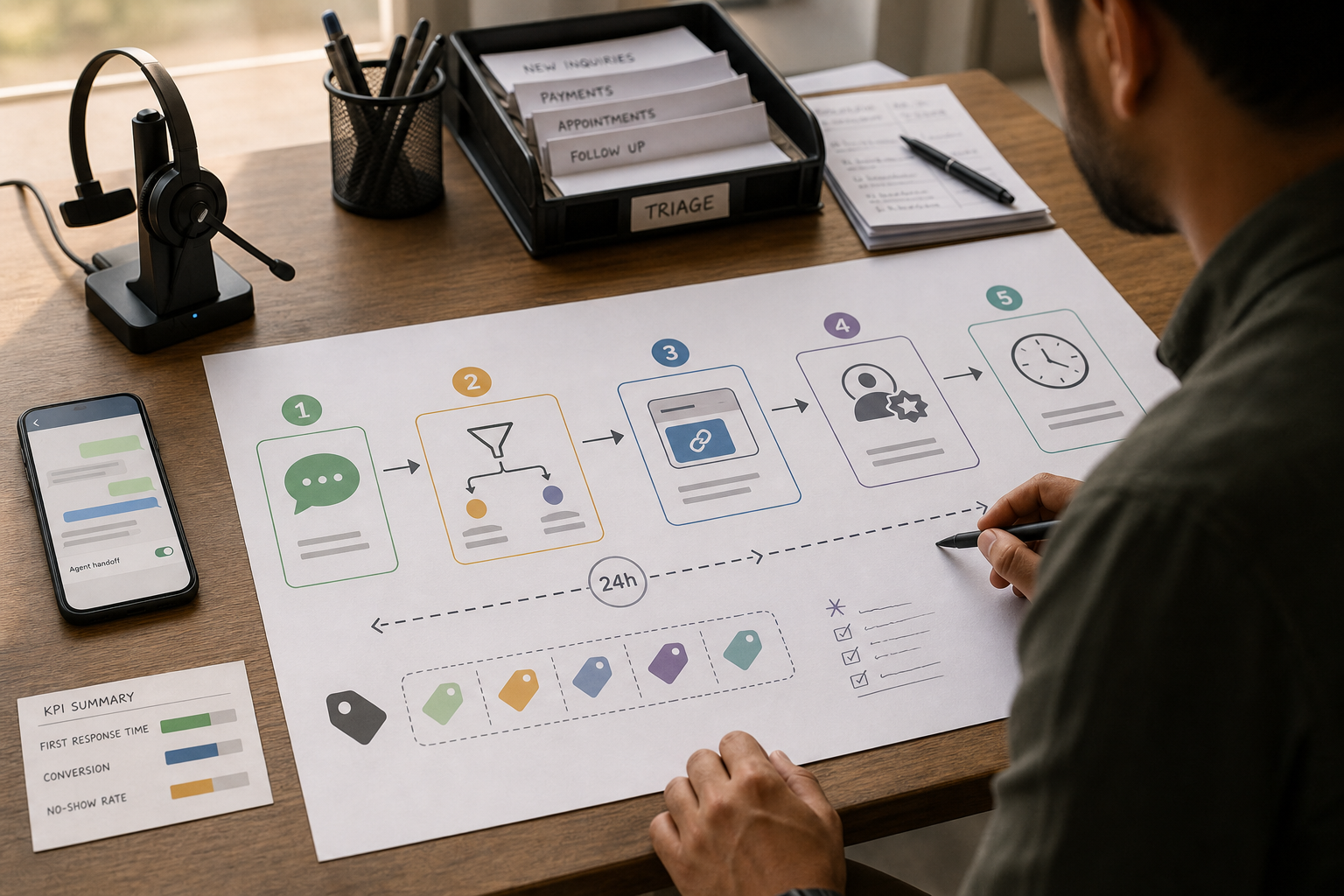
Nearly every small business WhatsApp conversation fits a simple pattern. If you design your automations around this, you’ll avoid messy “random chatbot” behavior.
- Inbound message → instant acknowledgment
- Triage → FAQ answer OR qualification questions
- Next step → booking link / quote request / order link / payment link
- Handoff → human takes over for exceptions, negotiation, complex cases
- Follow-up → reminder, status update, feedback request, re-engagement
Now let’s turn that into specific, copyable WhatsApp business examples.
15 WhatsApp Bot Examples for Small Businesses (Ideas with goals, triggers, and setup guidance)
These WhatsApp bot examples show how small businesses can automate repetitive conversations, follow-ups, bookings, customer support, payments, and internal notifications. Each WhatsApp bot example includes what it solves, when it’s worth doing, and what to watch out for. A WhatsApp chatbot for business can handle repetitive conversations while your team focuses on customers who need human assistance. These workflows can include WhatsApp automated messages, chatbot replies, reminders, lead follow-ups, appointment notifications, and customer support.
1) Instant acknowledgment for every inbound message
Business goal: reduce missed leads and calm customers immediately.
What to automate: the first response. Even if you can’t solve the issue instantly, you can confirm you received the message and give next steps.
- Trigger: new inbound WhatsApp message
- Automation: “Thanks for messaging. We can help with A, B, or C. Reply 1/2/3.” + business hours
- Human handoff: “Reply ‘agent’ anytime to talk to a person.”
Use it when: you regularly miss messages, respond late, or handle inquiries after hours.
Avoid it when: you can’t deliver on the promised response time. Don’t promise “we’ll reply in 5 minutes” if you can’t.
2) New-lead welcome flow (hours, location, links, and next step)
Business goal: move first-time contacts toward a clear next step.
This is one of the highest-return WhatsApp workflow ideas because it prevents “what now?” friction.
- Trigger: first message from a number or “new conversation”
- Automation: short menu: services, pricing range (if appropriate), address, booking link, catalog link
- Human handoff: offer “Talk to a person” option
Implementation note: Keep it short. WhatsApp is not email. Aim for one screen of text.
3) WhatsApp Auto Reply for Frequently Asked Questions
A simple FAQ flow is one of the easiest WhatsApp chatbot examples for a small business because it can answer common questions without requiring a team member to type every response.
Business goal: stop repeating answers and reduce interruptions.
FAQs are ideal for rule-based automation: hours, pricing basics, shipping times, service areas, required documents, cancellation policy.
- Trigger: customer taps a button or types a keyword (e.g., “price,” “delivery,” “refund”)
- Automation: pre-approved answer + one follow-up question to move forward
- Human handoff: “If this doesn’t answer it, reply ‘help’.”
Trade-off: keyword-only systems can miss variations. Buttons reduce ambiguity but require good menu design.
4) WhatsApp Lead Generation and Qualification
WhatsApp lead generation becomes more effective when new inquiries are qualified with two to four simple questions.
Business goal: qualify intent before a human invests time.
Qualification is where AI automation can help, but you don’t need AI to start. Often, a structured mini-intake is enough.
- Trigger: user selects “Get a quote” or “Book service”
- Automation: ask 2–4 questions (what they need, timeline, location, budget range)
- Routing: assign high-intent leads to a team member; send low-intent leads to self-serve info
Use it when: you get many “How much?” messages that never convert.
Don’t use it when: your offering is very simple and can be answered with one message—extra questions can reduce conversion.
5) Auto-routing by topic (sales vs support vs operations)
Business goal: stop everything going to the same person.
- Trigger: customer selects a topic button (“Sales,” “Support,” “Order status”)
- Automation: route the conversation or tag/label it for assignment
- Human handoff: ensure someone owns each category
Implementation consideration: routing only works if your team has an agreed ownership model (who handles what, and when).
6) WhatsApp Appointment Booking and Confirmations
WhatsApp appointment booking can reduce back-and-forth by letting customers choose or confirm a suitable time while automatically sending the relevant details.
Business goal: reduce confusion and last-minute cancellations.
- Trigger: booking created in your scheduling system (or manually marked “confirmed”)
- Automation: send date/time, address/meeting link, prep instructions, reschedule/cancel options
- Human handoff: exceptions go to staff
Why it matters: confirmations reduce the back-and-forth that drains small teams.
7) Appointment reminder sequence (to reduce no-shows)
Business goal: reduce no-shows and protect capacity.
- Trigger: time-based (e.g., 24 hours before, 2 hours before)
- Automation: reminder + “Confirm / Reschedule” options
- Trade-off: too many reminders can annoy customers; keep it minimal and useful
KPI to track: no-show rate before vs after automation.
8) Abandoned cart follow-up (ecommerce and invoice-based selling)
Business goal: recover lost sales without manual chasing.
- Trigger: cart abandoned event or “checkout started” but not completed
- Automation: short message: “Still interested?” + link back to cart or checkout
- Escalation: if high-value cart, alert a human to follow up personally
Compliance note: WhatsApp policies and template requirements may apply depending on timing and message type. Design with opt-in and approved templates where required.
9) Order status updates (placed → shipped → delivered)
Business goal: reduce “Where is my order?” support load.
- Trigger: order status change in ecommerce/ERP
- Automation: send status + tracking link (if applicable) + what to do if there’s a problem
- Human handoff: damaged/late deliveries route to support
Hidden cost: if your order data is messy, automation amplifies confusion. Fix data quality first.
10) Payment reminders for invoices and overdue balances
Business goal: reduce cashflow delays and awkward manual chasing.
- Trigger: invoice due, overdue, or failed payment
- Automation: friendly reminder + payment link + “Need help?” option
- Human handoff: disputes or hardship cases go to a person
Use it when: you frequently send reminders manually or lose track of follow-ups.
Don’t use it when: your payment process is inconsistent (wrong amounts, unclear terms). Fix billing clarity first.
11) Document collection reminders (intake, onboarding, compliance)
Business goal: reduce delays caused by missing documents.
Common in accounting, legal, clinics, real estate, and agencies.
- Trigger: onboarding started; document missing after X days
- Automation: checklist reminder + simple reply options (“Sent,” “Need help,” “Not available”)
- Trade-off: be careful with sensitive information; keep messages minimal and privacy-aware
12) Post-service feedback request (and review prompt)
Business goal: improve reputation and identify issues early.
- Trigger: service marked completed or delivery confirmed
- Automation: 1-question rating + optional review link
- Routing: low ratings trigger a human follow-up before asking for a public review
Why it matters: WhatsApp makes feedback frictionless—if you keep it short.
13) Re-engagement messages for dormant customers (opt-in, segmented)
Business goal: drive repeat revenue without blasting everyone.
- Trigger: no purchase / no booking in X days
- Automation: relevant check-in: “Need to restock?” “Ready for your next appointment?”
- Segmentation: segment by last product/service, not “all contacts”
Trade-off: over-messaging increases complaints. WhatsApp is not an email newsletter channel.
14) Promotional Broadcasts with WhatsApp Marketing Automation
WhatsApp marketing automation can help businesses send relevant offers, restock announcements, appointment openings, or event reminders to segmented, opted-in audiences.
Business goal: communicate offers and announcements responsibly.
Broadcasts can work, but they’re easy to misuse. The best approach is segmentation + genuine value (e.g., restocks, appointment openings, event reminders).
- Trigger: scheduled campaign
- Automation: send to a segmented list, with a clear call to action
- Safety: provide a simple opt-out instruction
When not to use: if you don’t have clear opt-in and contact expectations. Fix consent first.
15) Connect WhatsApp to Your CRM and Notify Your Team
A WhatsApp CRM workflow can capture conversation data, tag leads, assign ownership, and notify the right person when a high-value opportunity or urgent issue needs attention.
Business goal: speed up response for the conversations that matter most.
- Trigger: lead score high, keyword indicates urgency (“refund,” “complaint,” “today”), or VIP customer
- Automation: notify the right person in your internal tool (or create a task)
- Trade-off: too many alerts = ignored alerts. Use strict rules.
Impact vs difficulty: pick the right 3 automations to start with
Most small businesses don’t fail because WhatsApp automation doesn’t work—they fail because they launch too many flows at once, without measurement, and without operational ownership.
Use the table below as a practical starting point. It ranks each idea by typical SMB impact and setup difficulty (low/medium/high). Treat it as a planning tool—not a universal truth.
These WhatsApp bot examples range from simple auto-replies to more advanced workflows connected to CRM, booking, ecommerce, and customer-support systems. Start with the use cases that solve your most repetitive business problems.
| Automation idea | Primary outcome | Typical impact | Typical difficulty | Best for |
|---|---|---|---|---|
| Instant acknowledgment | Faster first response | High | Low | Any SMB with inbound messages |
| Welcome flow | More conversions | High | Low | Local services, retail, clinics |
| FAQ auto-replies | Less repetitive work | High | Low | High-volume question businesses |
| Lead qualification (2–4 questions) | Better lead handling | High | Medium | Professional services, agencies, real estate |
| Auto-routing by topic | Faster resolution | Medium | Medium | Teams with multiple roles |
| Appointment confirmations | Fewer back-and-forth messages | Medium | Medium | Service businesses |
| Appointment reminders | Lower no-show rate | High | Medium | Clinics, salons, consultants |
| Abandoned cart follow-up | Recovered sales | High | Medium | Ecommerce and product businesses |
| Order status updates | Lower support load | High | Medium | Ecommerce, manufacturing, logistics-light SMBs |
| Payment reminders | Faster collections | High | Medium | Invoice-based SMBs |
| Document reminders | Faster onboarding | Medium | Medium | Accounting, legal, clinics |
| Feedback + reviews | More reviews, better service | Medium | Low | Local businesses |
| Re-engagement (segmented) | Repeat revenue | Medium | Medium | Businesses with repeat purchases |
| Promotional broadcasts (segmented) | Campaign performance | Medium | Medium | Retail, restaurants, events |
| Internal notifications | Faster response on priority cases | Medium | Medium | Teams that miss urgent messages |
A simple decision matrix: which 3 should you automate first?
Pick your starting automations based on the business problem you feel weekly—not what sounds impressive.
| If your main problem is… | Start with these 3 | Measure these KPIs |
|---|---|---|
| Slow responses and missed leads | Instant acknowledgment, welcome flow, lead qualification | First response time, lead-to-booking (or lead-to-sale) conversion |
| Too many repetitive questions | FAQ auto-replies, welcome flow, auto-routing by topic | Resolution rate, time spent per conversation, handoff rate |
| No-shows and schedule chaos | Appointment confirmations, appointment reminders, internal notifications for urgent reschedules | No-show rate, reschedule rate, staff time spent on reminders |
| Order “Where is it?” support overload | Order status updates, FAQ auto-replies, internal notifications for delivery exceptions | Support volume by topic, resolution time |
| Cashflow and late payments | Payment reminders, invoice follow-up escalation, internal notifications for overdue thresholds | Payment recovery rate, days-to-pay, overdue balance count |
WhatsApp Business App vs WhatsApp Business Platform/API: what should you use?
This is a common turning point. Many SMBs try to force the WhatsApp Business app to behave like a full automation system. It works—until it doesn’t.
If your automation needs CRM integration, advanced workflows, or programmatic messaging, review the official WhatsApp Business Platform resources before choosing a tool or implementation approach.
| Option | Best for | Ease of use | Time to value | Business size | Notes |
|---|---|---|---|---|---|
| WhatsApp Business App | Basic auto-replies and quick replies | High | Fast | Solo to very small teams | Great starting point; limited automation depth and multi-agent workflow |
| WhatsApp Business Platform / API | Scalable automation, templates, integrations | Medium | Medium | Growing SMBs | More setup complexity; policies and templates matter; pricing varies by provider and message type |
| Automation layer (e.g., workflow builders) | Multi-step workflows, routing, webhooks | Medium | Medium | SMBs with systems (CRM, booking, ecommerce) | Best when you need cross-app workflows; requires process design and testing |
Practical guidance: when the app is enough vs when you should move on
- The app is enough if you mainly need greeting/away messages, quick replies, and a small set of FAQs—and one person can manage the inbox without chaos.
- Move to API/platform when you need integrations (CRM/booking/ecommerce), multi-agent routing, templated notifications at scale, or reliable tracking of workflow performance.
For growing teams, WhatsApp business automation becomes more useful when conversations connect with CRM, booking, ecommerce, or internal workflow systems.
Implementation checklist: how to launch WhatsApp automation without breaking trust
Automation can save time, but it can also create complaints if it feels spammy or traps customers in loops. Use this checklist to launch safely.
Start Today (low effort, high value)
- Write a one-screen instant acknowledgment message with clear options.
- Create 10 quick replies for your top questions (pricing basics, hours, location, booking link).
- Define “human handoff” words (e.g., agent, help) and ensure someone responds quickly.
Improve Next (next 30 days)
- Build a simple welcome flow for new contacts (menu + next step).
- Implement appointment confirmations and reminders if you run bookings.
- Create a lightweight lead qualification flow (2–4 questions) if sales time is being wasted.
- Decide your KPI baseline (first response time, conversion rate, no-show rate).
Scale Later (after you prove one workflow works)
- Add order updates, abandoned cart recovery, and payment reminders via integrated workflows.
- Introduce segmentation for re-engagement and broadcasts.
- Consider a WhatsApp automation tool or API/platform if you need multi-agent routing and system integrations.
For implementation guidance, use the official WhatsApp Business resources to understand the available platform options, business features, and requirements before selecting an automation solution.
Common mistakes to avoid (the ones that quietly kill ROI)
Before launching automated messaging, review the official WhatsApp Business Messaging Policy to understand requirements around user consent, messaging practices, and business-initiated conversations
- Automating before defining the business problem: you end up with a “cool bot” that doesn’t reduce workload or increase conversions.
- No human handoff: customers get stuck in loops, and the channel feels disrespectful.
- Over-messaging: WhatsApp is personal; too many promos increase complaints and opt-outs.
- Ignoring the 24-hour window and templates: your best workflow idea can fail if it violates channel rules. Design around the constraints.
- Using AI where rules would do: AI is best for triage and summarization; routine confirmations and reminders are usually better as deterministic workflows.
- Not assigning ownership: automation doesn’t replace responsibility. Someone must own each queue/category.
- Not measuring outcomes: if you don’t track first response time, conversion, and no-show rate, you’ll never know what’s working.
FAQs: WhatsApp automation for small businesses
What is WhatsApp automation?
WhatsApp automation is using built-in WhatsApp Business features or external software to automate WhatsApp messages, reply to common questions, and move customers through workflows like booking, order updates, and payment reminders—without a person typing every message.
What should a small business automate first on WhatsApp?
Start with instant acknowledgment, a simple welcome/menu flow, and FAQ auto-replies. These are high-volume, easy to standardize, and immediately reduce missed leads and repetitive work. Then add reminders (appointments, payments, order updates) based on your business model.
Does WhatsApp automation require AI automation?
No. Many of the best WhatsApp workflow ideas are rule-based (buttons, keywords, templates, time-based reminders). AI automation is most useful when it reduces triage work—like qualifying leads, categorizing requests, or drafting suggested replies—while still allowing easy human handoff.
Can WhatsApp automation increase sales?
It can, especially through lead qualification, abandoned cart follow-ups, and consistent post-purchase re-engagement. The sales impact usually comes from reducing leakage (missed leads and forgotten follow-ups), not from sending more promotions.
Is the WhatsApp Business app enough for automation?
Often yes for very small teams: greeting/away messages, quick replies, and basic FAQ handling can go a long way. You’ll likely outgrow it when you need multi-agent routing, integrations with CRM/booking/ecommerce systems, and scalable template-based notifications.
When do I need the WhatsApp Business Platform/API?
You typically need the WhatsApp Business Platform/API when you want integrated workflows (like order updates from your store), structured routing for a team inbox, or consistent template messaging at scale. Setup is more complex, and pricing varies by provider and message type—verify current details with official sources.
Can I message customers outside the 24-hour window?
In general, WhatsApp business messaging rules emphasize a customer service window and the use of approved template messages for certain outbound communications outside that window. Because requirements can vary by setup and provider, confirm your current rules in official WhatsApp Business documentation and your solution provider’s guidance.
What KPIs should I track to prove WhatsApp automation is working?
Track first response time, lead-to-booking (or lead-to-sale) conversion rate, resolution rate, no-show rate (for appointments), abandoned cart recovery rate (for ecommerce), payment recovery rate (for invoicing), repeat purchase rate, and opt-out/unsubscribe rate.
Conclusion: treat WhatsApp like a mini help desk plus conversion channel
The best WhatsApp bot examples don’t try to “replace humans.” They remove the repetitive steps that make your team slow, inconsistent, and overwhelmed—so humans can focus on the conversations that actually need judgment: exceptions, complex support, negotiations, and sensitive situations.
If you remember one thing, make it this: WhatsApp automation works best when you standardize the workflow first, then add tools. Pick three automations that match your biggest bottleneck, launch them with clear human handoff, and measure the result. Once you’ve proven value, scaling becomes a business decision—not a tech experiment.
Next step: choose one business problem (slow replies, no-shows, missed follow-ups, late payments) and implement the first automation that directly reduces it. If you want a faster start, create a one-page map of your WhatsApp workflow from first message to completed sale—and identify where customers get stuck.