
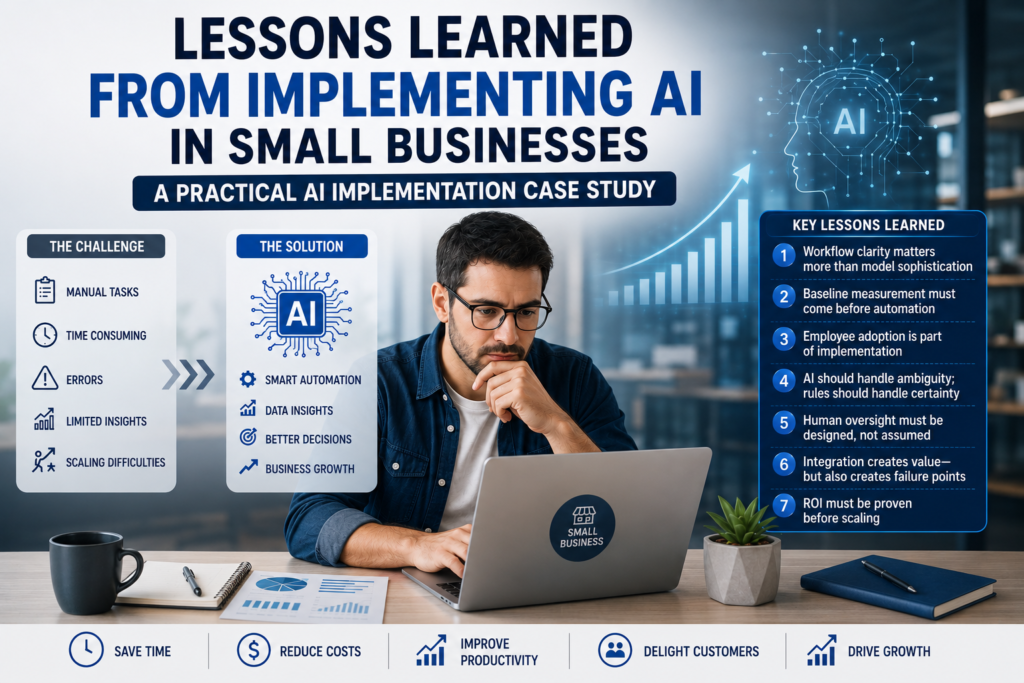
Case Study Classification & Snapshot
Scope & Assumptions
This is an illustrative SMB implementation lessons case study for India. The workflows, tools, timelines, costs, and outcomes described are examples for planning and decision-making, not verified results from a single identified business.
Implementing AI in a small business is rarely a technology problem. The harder questions are where to start, what to automate, how much human oversight is required, and whether the investment actually creates measurable business value.
This illustrative AI implementation case study examines a practical SMB adoption pattern—from assessing AI readiness and selecting the right workflow to running a controlled pilot, training employees, measuring results, and deciding whether to scale.
The central lesson is simple: successful AI implementation starts with workflow design, not tool selection.
Small businesses often face AI implementation challenges not because the model is “not smart enough,” but because the workflow is unclear, the data is messy, employees don’t adopt it, and success is never measured. This case study reconstructs a practical, business-first approach to AI adoption that prioritizes measurable operational value over tool experimentation.
| Item | Details |
|---|---|
| Evidence type | Illustrative SMB implementation lessons case study (India) |
| Business type | Small business (multiple industries) |
| Primary workflow | AI readiness assessment → workflow selection → pilot implementation → employee adoption → monitoring & optimization |
| Primary keyword | AI implementation challenges |
| Automation risk | Moderate (primarily operational and customer-communication risk; higher if sensitive data is included) |
| Implementation difficulty | Intermediate (depends heavily on process clarity, data quality, and integration constraints) |
Quick Answer
For small businesses, the biggest AI implementation challenges are usually not the AI tools themselves. They are choosing the right workflow, preparing reliable data, integrating with existing systems, getting employees to adopt the new process, and maintaining appropriate human oversight.
A practical approach is to start with one repeatable bottleneck, measure a 1–2 week baseline, and run a controlled pilot with clear human-review points for customer-facing messages and high-impact decisions. Track a small set of KPIs such as handling time, turnaround time, rework, escalation, and one relevant business outcome.
The goal is not to use more AI. It is to create measurable operational value before deciding whether to fix, stop, standardize, or scale the implementation.
Business Context & Workflow
This case reflects a common reality across Indian small businesses: the team is busy, processes live in WhatsApp/email/spreadsheets, and the “system of record” is often informal. Owners and operations managers want AI to reduce manual work and speed up execution, but they need a safe way to choose what to automate first.
Typical teams involved
- Owner/founder (sets priorities and approves risk boundaries)
- Operations manager (workflow owner; defines process and metrics)
- Sales/support/admin staff (daily users; provide feedback and handle exceptions)
- External consultant or internal technical lead (sets up automations and integrations, if any)
Typical systems involved (varies by business)
- Communication: email, WhatsApp, website forms
- System of record: spreadsheets, a simple CRM, or a ticketing tool
- Operational systems: accounting/invoicing, calendar, inventory, project boards
- Automation layer: a no-code workflow tool or simple scripts
- AI layer: a general-purpose AI assistant/API for classification, extraction, and drafting
The workflow chosen for this case study is deliberately broader than a single department task, but still practical: it’s a repeatable way to run AI adoption as a controlled operations program.
AI readiness assessment → workflow selection → pilot implementation → employee adoption → monitoring & optimization
The Problem & Business Impact
In many small businesses, the first AI attempt is tool-led: someone buys a subscription, tries a few prompts, and expects a transformation. The result is usually fragmented usage and unclear value.
What makes this a real business problem (not a tech curiosity)
| Impact area | What typically goes wrong | Why it matters operationally |
|---|---|---|
| Efficiency | Teams automate the wrong tasks or rebuild the same prompts repeatedly. | Time savings don’t materialize; “AI fatigue” grows. |
| Quality | Inconsistent outputs, missing context, and rework caused by unclear rules. | More checking and corrections can cancel out any speed benefit. |
| Customer experience | Slow response to leads/support, or wrong tone/answers in customer messages. | Lost leads, reduced trust, and escalation load on senior staff. |
| Financial impact | Spend occurs (tools + setup time), but value isn’t measured. | Owners can’t justify continuing or scaling. |
Choosing AI Use Cases for Small Business
The best AI use cases for small business are not necessarily the most advanced ones. A good starting point is usually a repetitive workflow where employees spend significant time handling information, classifying requests, preparing responses, extracting data, or updating records.
Before selecting a use case, the business should ask four questions:
- Is there a clear business problem? The workflow should address a measurable bottleneck rather than simply introduce an AI tool.
- Is the workflow repeatable? Tasks with reasonably consistent steps, inputs, and outputs are easier to automate and monitor.
- Can the business measure improvement? Define a baseline and identify KPIs such as handling time, turnaround time, rework, escalation, cost, or another relevant business outcome.
- Can the risks be controlled? Sensitive information, high-impact decisions, customer-facing actions, and unpredictable exceptions may require stronger human oversight or may not be suitable as a first AI use case.
The goal is to select a workflow where AI can provide useful assistance while the business can still maintain appropriate controls, accountability, and measurable outcomes.
For additional guidance on evaluating AI for small businesses, the U.S. Small Business Administration’s AI for Small Business resource discusses potential benefits and risks and encourages businesses to start small, test whether AI adds value, and monitor its use.
Decision gate: when this is a good automation candidate
- The business can name a bottleneck workflow (not “use AI everywhere”).
- The workflow has repeatable steps and stable rules.
- Inputs and outputs can be captured consistently (even if initially via a form or spreadsheet).
- Success can be measured with a small set of KPIs (time per task, response time, error/rework rate, conversion/completion rate).
When this is not a good first candidate
- The process is mostly exceptions, negotiations, or one-off decisions.
- The work requires high-stakes judgement (legal/medical/financial advice) without strong controls.
- Data is highly sensitive and the business has no policy or governance for handling it.
Before: Manual Workflow (How AI Pilots Commonly Start)
Before a disciplined implementation, AI adoption often looks like ad hoc experimentation with no baseline.
Owner hears about AI → team tries prompts → outputs copied into email/WhatsApp → no tracking → unclear value → usage drops
Common “before” characteristics
- No readiness assessment (data, process clarity, permissions, and risks are not checked).
- No workflow owner accountable for outcomes.
- No system of record for requests, responses, approvals, and exceptions.
- No baseline metrics (so “improvement” is based on perception).
Baseline discipline (what to measure before building)
If the business doesn’t have baseline numbers, it should measure for 1–2 weeks (or a fixed sample of transactions) before automating. Track only what is feasible and decision-relevant:
- Average handling time per task (minutes)
- End-to-end turnaround time (hours/days)
- Rework rate (how often outputs must be corrected)
- Escalation rate (how often a senior person must step in)
- Business outcome metric (e.g., lead-to-meeting rate, tickets resolved, invoice turnaround)
AI Automation Design (Business-First, Not Tool-First)
The goal is not “deploy AI.” The goal is to create a repeatable pilot method that forces clarity: what problem, which workflow, what controls, and what measurement.
The proposed AI role (kept narrow on purpose)
- Classification: identify request type (lead, support, invoice query, internal request).
- Extraction: pull key fields (customer name if provided, product/service, urgency, location, preferred time).
- Drafting: prepare a response or next-step message using approved templates.
- Summarization: produce a short handoff summary for the human owner.
Trigger, tasks, rules, and fallback (pilot pattern)
| Design element | Recommended pilot design |
|---|---|
| Trigger | New request arrives (form/email/helpdesk/CRM entry). For WhatsApp-heavy teams, start by routing messages into a structured intake step rather than letting AI read raw chats. |
| AI task | Classify the request and draft the next action (reply suggestion, routing suggestion, or data entry suggestion). |
| Business rules | Approved categories, approved response templates, escalation rules, and what data is allowed to be used. |
| Data access | Minimum necessary: what the requester submitted + limited internal reference data (price list/FAQ/service areas) if it is maintained and approved. |
| System actions | Create/update a record in the system of record; assign an owner; generate a draft response; schedule a follow-up task. |
| Human approval | Customer-facing responses and any irreversible actions should require review in early phases. |
| Fallback | If confidence is low, info is missing, or the request is outside approved scope: escalate to a human with a summary and questions to ask next. |
| Monitoring | Track exceptions, overrides, response times, and rework. Review weekly during the pilot. |
| Auditability | Log: input, AI output, human edits, final action taken, and reason for escalation/override. |
Why AI here (and what simpler automation can do)
Deterministic automation is often enough for routing and reminders after the input is structured. AI becomes proportionate when the input is variable (free text, multilingual messages, inconsistent phrasing) and the business still wants consistent categorization and drafts.
- Use rules-based automation first for: form validation, duplicate detection, status changes, reminders, task creation.
- Add AI selectively for: classifying messy text, extracting fields from unstructured messages, drafting first-pass responses.
Automate → Assist → Escalate
A practical way to design AI workflows is to separate work into three modes: Automate predictable tasks, Assist with tasks that benefit from AI interpretation, and Escalate cases that require human judgement.
| Mode | Appropriate for | Examples |
|---|---|---|
| Automate | Predictable, rules-based tasks with clear conditions and low risk | Form validation, duplicate detection, status updates, reminders, task creation, and fixed-field routing |
| Assist | Tasks where AI can interpret information or prepare an output, but a person may need to review it | Classifying free-text requests, extracting key information, drafting responses, and summarizing cases for handoff |
| Escalate | Ambiguous, sensitive, high-impact, or irreversible cases | Low-confidence classifications, policy conflicts, pricing exceptions, sensitive advice, and actions requiring explicit approval |
In practice, a workflow can move between these modes. Deterministic automation handles predictable steps, AI assists where interpretation is useful, and ambiguous or higher-risk cases are routed to a human with the relevant context and a clear reason for escalation.
This approach keeps accountability with people where it matters while allowing AI and automation to reduce manual effort in the parts of the workflow that are more predictable.
AI Implementation Challenges: What the Business Encountered
The main AI implementation challenges were not limited to model accuracy. The harder problems appeared around the workflow itself: unclear process definitions, inconsistent data, integration gaps, exceptions, employee adoption, and ongoing maintenance. These are common challenges of implementing AI in business because an AI workflow can appear technically successful while still creating additional checking, rework, exceptions, or operational risk.
These AI implementation challenges matter because an AI workflow can appear technically successful while still creating additional checking, rework, exceptions, or operational risk. The implementation therefore needs to be evaluated as a business process, not simply as an AI tool deployment.
Unclear Process Definitions
A workflow is difficult to automate when employees cannot clearly explain who owns a request, what steps it follows, which rules apply, and what constitutes a completed task.
Typical signs:
- No clearly assigned workflow owner.
- Important rules exist mainly in employees’ experience rather than documented procedures.
- Different employees handle similar requests differently.
- AI is expected to determine the process instead of supporting an established process.
Practical response: Map the workflow before automating it. Define ownership, standardize inputs and outputs, document business rules, and identify common exceptions.
Inconsistent or Incomplete Data
Small-business information is often spread across email, WhatsApp, spreadsheets, forms, CRM records, and other systems. Missing fields, inconsistent naming, outdated information, and duplicate records can reduce the reliability of an AI-enabled workflow.
Typical signs:
- Requests arrive without the information needed to process them.
- Reference data exists in multiple versions.
- Employees repeatedly correct or complete missing information.
- AI outputs require substantial manual cleanup.
Practical response: Introduce structured intake where appropriate, define minimum required information, and establish a reliable source for important reference data. Use deterministic validation for predictable checks before applying AI to less structured information.
AI Accuracy and Validation
Even with a well-defined workflow and reasonable data quality, AI can misclassify requests, extract incorrect information, or generate responses that require correction.
Typical signs:
- Incorrect categories, priorities, or assignments.
- Draft responses that conflict with business policies.
- Frequent human corrections or overrides.
- No systematic review of recurring AI errors.
Practical response: Define validation rules and human-review points. Route uncertain or out-of-scope cases to an exception process, and use logs of AI outputs, human corrections, and final actions to identify recurring problems.
Integration with Existing Systems
Connecting AI with existing email, messaging, CRM, accounting, spreadsheet, or workflow systems can remove manual coordination, but every integration introduces another potential failure point.
Typical signs:
- Records are not created or updated consistently.
- Notifications or follow-ups fail.
- Information becomes out of sync between systems.
- Problems are discovered only after a user or customer reports them.
Practical response: Keep the initial architecture simple. Add retries, alerts, reconciliation checks, and a manual fallback for important workflows. Expand integrations only after the core process is stable.
Exceptions and Edge Cases
Small-business workflows rarely follow the ideal path every time. Special requests, unusual customer requirements, missing information, policy conflicts, and urgent cases can quickly expose weaknesses in an AI workflow.
Typical signs:
- Employees frequently bypass the automated workflow.
- A large proportion of cases require manual intervention.
- Similar exceptions are handled differently.
- There is no clear rule for when a case should stop and move to a person.
Practical response: Categorize exceptions rather than treating them as random failures. Use recurring exceptions to improve intake fields, business rules, templates, and escalation criteria. Define clear conditions for fixing, stopping, or expanding the pilot.
Employee Adoption
A technically functioning workflow does not create business value if employees do not use it consistently. Adoption can suffer when the new process creates extra steps, requires duplicate data entry, or produces outputs employees do not trust.
Typical signs:
- Employees continue using the previous process.
- AI-generated outputs are routinely ignored or rewritten.
- Staff do not report errors or provide feedback.
- Usage declines after the initial pilot period.
Practical response: Treat employee adoption as part of implementation. Provide simple operating procedures, explain responsibilities clearly, collect feedback, and measure actual usage alongside process and business KPIs.
Ongoing Maintenance
AI workflows require ongoing attention. Business rules, policies, reference data, templates, integrations, and usage patterns can change after the initial implementation.
Typical signs:
- No one is responsible for maintaining the workflow.
- AI continues using outdated business information.
- Recurring errors are not reviewed systematically.
- Problems are attributed to “the AI” without an audit trail.
Practical response: Assign a process owner and establish a lightweight review cycle covering exceptions, overrides, turnaround time, adoption, and business outcomes. Treat maintenance and human oversight as part of the operating cost rather than as a one-time implementation task.
For organizations looking for a more formal governance approach, ISO/IEC 42001 provides requirements for establishing, implementing, maintaining, and continually improving an AI management system. For a small business, this does not mean adopting the full standard for every pilot, but it can provide useful context for thinking about ownership, governance, risk, and continuous improvement.
After: Automated Workflow (Controlled, Measurable, Human-Safe)
The “after” state is not a fully autonomous AI business. It is a workflow where AI reduces manual effort, while humans retain control of decisions, tone, and exceptions.
Request captured → AI classifies & extracts → Record created/updated → Draft prepared → Human review (as needed) → Sent/queued → KPI tracking → Exception handling
| Workflow element | Before (common) | After (proposed pilot pattern) |
|---|---|---|
| Intake | Messages scattered across channels. | Requests routed into a structured intake (form/CRM/helpdesk) when possible. |
| Triage | Manual reading and guessing urgency/owner. | AI suggests category/priority/owner; rules validate allowed routes. |
| Response | Manual drafting from scratch. | AI drafts using approved templates; human approves customer-facing messages in early phases. |
| Tracking | No consistent measurement; outcomes are anecdotal. | System-of-record captures timestamps, edits, escalations, and outcomes for review. |
| Exceptions | Handled ad hoc; no learning loop. | Exceptions are categorized, reviewed weekly, and used to improve templates/rules. |
What the AI does not do (boundaries that prevent harm)
- It does not make final high-stakes decisions (pricing exceptions, legal/medical guidance, credit approvals) without explicit human approval.
- It does not override business rules (service areas, refund rules, warranty terms, discount limits).
- It does not use unrestricted customer data “just because it could.” The pilot should enforce minimum necessary data.
- It does not handle ambiguous requests silently; it escalates with questions for a human to resolve.
- It does not execute irreversible actions (sending final contract language, issuing refunds, deleting records) in the first version.
Human Control, Risks & Safeguards
Human oversight should be specific: who reviews what, when, and what happens after intervention. “Human in the loop” is not a plan unless responsibilities are defined.
This emphasis on human responsibility also aligns with the OECD AI Principles, which provide an international framework for trustworthy AI and emphasize principles such as transparency, robustness, security, and accountability.
Where humans remain responsible (recommended)
- Process owner (ops/department head): defines categories, templates, rules, and approves changes.
- Frontline users (sales/support/admin): review drafts, correct errors, mark exceptions, and provide feedback.
- Owner/founder: sets risk boundaries (what can be automated, what must remain manual) and approves scaling.
Risk & safeguard table (pilot-ready)
| Risk | How it shows up | Safeguard (prevention/detection/containment) |
|---|---|---|
| Incorrect interpretation of requests | Wrong category, wrong urgency, wrong owner. | Confidence thresholds; escalation queue; “unknown” category; weekly review of misclassifications. |
| Hallucinated or off-policy replies | AI drafts claims not aligned to policies. | Approved templates; restricted knowledge sources; mandatory human review for customer-facing messages in early phases. |
| Privacy exposure | Sensitive data copied into prompts or stored incorrectly. | Minimum necessary data; redaction rules; staff training; documented AI usage policy; access controls. |
| Integration failure | Records not created, follow-ups not scheduled. | Retries; failure alerts; manual fallback checklist; daily reconciliation during pilot. |
| Low employee adoption | Users bypass the system and revert to old habits. | Training; simple UX; clear “what’s in it for me”; feedback loop; measure adoption rate and reasons for bypassing. |
| Unclear accountability | Errors blamed on “the AI.” | Named workflow owner; audit logs showing human edits and approvals; documented escalation rules. |
Technology, Implementation & Cost (Planning View)
This case is intentionally tool-agnostic: small businesses should choose tools that fit their current stack and skills. A practical architecture has three layers: (1) a system of record, (2) an automation orchestrator, and (3) an AI capability for classification/extraction/drafting.
Reference architecture (component roles)
| Component | Role in the workflow |
|---|---|
| Intake channel | Captures requests from form/email/helpdesk/CRM; reduces reliance on unstructured chat history. |
| System of record | Holds request records, statuses, owners, timestamps, and outcomes (spreadsheet/CRM/helpdesk). |
| Automation platform | Moves data between systems; applies rules; creates tasks; triggers AI steps; handles retries and notifications. |
| AI model/API | Performs classification, extraction, summarization, and drafting within defined boundaries. |
| Human review interface | Where staff approve/edit drafts, resolve exceptions, and mark outcomes. |
| Monitoring & logging | Tracks exceptions, overrides, turnaround time, and adoption metrics. |
Implementation difficulty (why “intermediate” is typical)
- Process mapping and rule definition usually take longer than connecting tools.
- Data cleanup and standardization is often the limiting factor.
- Change management is required even for “simple” automations.
Timeline (illustrative planning estimate)
Illustrative Scenario
A narrow pilot may take roughly 2–8 weeks from workflow selection to a stable first version, depending on data quality, approvals, and integration needs.
Cost structure (what owners should plan for)
Tool subscription price is not the total cost. A realistic plan separates software, setup, and ongoing operations.
| Cost category | What it includes | Notes (how to avoid surprises) |
|---|---|---|
| Software (recurring) | AI assistant/API, automation tool, CRM/helpdesk | Costs vary by usage volume and user seats; avoid locking into annual plans before the pilot proves value. |
| Implementation (one-time) | Process mapping, setup, integrations, templates, testing | Often the largest early cost; keep the first version small to cap effort. |
| Ongoing operations | Human review time, exception handling, weekly tuning | Plan for ongoing oversight; “zero-touch” is rarely realistic for SMB customer workflows. |
| Training & change management | Enablement sessions, SOPs, adoption support | Underinvesting here is a common reason pilots stall. |
| Governance & risk controls | AI usage policy, data handling rules, access controls | Keep it lightweight but explicit; define what data can and cannot be used. |
Results, Evidence & ROI (How to Prove Value Without Guessing)
No verified single-business results are available in this illustrative case. Instead, this section provides a measurement structure and an ROI planning model that a small business can apply to its own baseline data.
Verified Result
No verified results from a specific identified business are presented in this case study.
What to measure (pilot KPI set)
| KPI | How to measure | Direction of improvement |
|---|---|---|
| Average handling time per request | Time spent by staff to read/triage/draft/record (sample-based time tracking) | Down |
| End-to-end turnaround time | Timestamp from intake to first response / resolution | Down |
| Rework / correction rate | % of AI drafts requiring major edits or being rejected | Down |
| Human escalation rate | % of requests routed to exception queue | Down (but not to zero) |
| Business outcome metric | Choose one: lead-to-meeting rate, conversion rate, tickets resolved, invoice turnaround | Up (or down for turnaround) |
ROI planning model (use your baseline)
The AI implementation ROI should be evaluated against the workflow baseline, ongoing software and oversight costs, and the business outcome the pilot is expected to improve.
Use a simple model that ties benefit to a measurable workflow change. Avoid vague “AI productivity” claims.
- Current monthly process cost = Monthly transactions × Average manual handling time (hours) × Fully loaded labour cost per hour
- Estimated monthly benefit = Monthly transactions × (Baseline time − New time) × Labour cost per hour
- Net monthly value = Estimated monthly benefit − (Software + ongoing oversight cost)
- Payback (months) = One-time implementation cost ÷ Net monthly value
Illustrative ROI scenario (clearly hypothetical)
Illustrative Assumptions
- Monthly transactions: 600 requests (leads/support/admin combined)
- Baseline handling time: 6 minutes per request
- Post-pilot handling time: 3.5 minutes per request (after templates + routing + AI drafting)
- Fully loaded labour cost: ₹350/hour (example only; replace with your true cost)
- Recurring software + usage: ₹20,000/month (example only; varies widely)
- Ongoing human oversight: 10 hours/month (review exceptions, tune templates)
- One-time implementation: ₹1,50,000 (example only; varies by scope and consultant rates)
Calculated Estimate (from the illustrative assumptions)
- Time saved per request = 6.0 − 3.5 = 2.5 minutes = 0.0417 hours
- Monthly hours saved = 600 × 0.0417 ≈ 25 hours
- Estimated labour value = 25 × ₹350 ≈ ₹8,750/month
- Oversight labour cost = 10 × ₹350 = ₹3,500/month
- Net monthly value (labour only, excluding any revenue lift) = ₹8,750 − ₹3,500 − ₹20,000 = −₹14,750/month
This illustrative calculation shows a common reality: if a pilot only saves a small amount of time, software and oversight can outweigh labour savings. To justify costs, the business typically needs one or more of the following: higher transaction volume, larger time reduction, lower software cost, or measurable revenue impact (for example, improved lead conversion from faster response).
How to make the economics work (without hype)
- Pick a workflow with enough volume and repeatability to create meaningful time savings.
- Reduce software complexity in the first version (simpler stack, fewer paid seats).
- Measure a business outcome metric (e.g., lead response time and lead-to-meeting rate) rather than relying only on labour savings.
- Standardize inputs (forms/fields) so deterministic automation can do more work and AI does less.
Research findings (general, not a guaranteed outcome)
Research Finding
Guidance for Indian MSMEs and small-business AI adoption commonly emphasizes phased pilots, data readiness, employee training, and ROI measurement before scaling. This supports a workflow-first approach over tool-led rollouts.
7 Lessons Learned from Small Business AI Implementation
The most useful lessons from AI implementation challenges are not about which model, automation platform, or AI assistant a business chooses. They are about how the business changes the way work gets done.
Across small-business implementation patterns, the same themes repeatedly determine whether an AI pilot becomes a useful operating capability or another technology experiment. The lessons below bring the case study together into a practical framework for deciding what to automate, how to control it, and when to scale it.
Lesson 1: Workflow clarity matters more than model sophistication
The first lesson is that AI rarely fixes a poorly defined process. If employees cannot clearly explain how a request moves from intake to completion, adding an AI model usually creates another layer of complexity rather than removing it.
A better implementation starts by mapping the workflow, identifying repetitive steps, defining ownership, standardizing inputs, and establishing the business rules that should govern decisions. Once the process is clear, AI can be introduced selectively where it adds value.
Practical takeaway: Fix the workflow before optimizing the AI.
Lesson 2: Baseline measurement must come before automation
One of the easiest mistakes for a small business is to automate a process without first measuring how it performs manually. Without a baseline, the business may feel that the new workflow is faster without knowing whether it actually improved response time, reduced rework, increased throughput, or affected revenue outcomes.
A simple one- or two-week measurement period can establish the starting point. Depending on the workflow, this could include handling time, turnaround time, escalation rate, rework, conversion, or completion rate.
Practical takeaway: If you cannot measure the before state, it becomes difficult to prove the after state.
Lesson 3: Employee adoption is part of implementation
AI implementation is not complete when the workflow technically works. It is complete when employees actually use it consistently.
Small-business teams often return to familiar processes when a new system adds friction, requires duplicate data entry, or produces outputs they do not trust. Training, simple SOPs, clear responsibilities, and a feedback mechanism therefore need to be treated as part of the implementation itself.
The people using the workflow every day should also have a way to report incorrect classifications, missing information, poor drafts, and unnecessary steps.
Practical takeaway: Adoption is not a post-launch activity. It is one of the implementation deliverables.
Lesson 4: AI should handle ambiguity; rules should handle certainty
A recurring implementation lesson is that AI should not be used simply because it is available.
Deterministic automation is generally better for predictable tasks such as setting reminders, checking required fields, updating statuses, assigning tasks, and triggering notifications. AI becomes more useful when the input is variable or unstructured—for example, interpreting free-text requests, classifying intent, extracting information, or preparing a first-pass response.
This distinction can reduce both cost and risk.
Practical takeaway: Use rules where the answer is predictable and AI where interpretation is genuinely required.
Lesson 5: Human oversight must be designed, not assumed
Saying that an AI workflow will have a “human in the loop” is not enough. The implementation needs to define which decisions require human approval, who provides that approval, what happens when the AI is uncertain, and how interventions are recorded.
For a practical example of how human oversight can be incorporated into AI implementation, Microsoft’s Responsible AI guidance covers principles including reliability and safety, privacy and security, transparency, and accountability.
For small businesses, early pilots should generally keep humans responsible for sensitive customer communications, pricing exceptions, refunds, contractual commitments, and other high-impact or irreversible actions.
Over time, low-risk tasks may be automated further if the evidence shows that the workflow is reliable.
Practical takeaway: Human oversight should be an explicit workflow step, not an informal safety net.
Lesson 6: Integration creates value—but also creates failure points
Connecting WhatsApp, email, CRM records, spreadsheets, accounting systems, and automation platforms can eliminate significant manual coordination. But every additional integration introduces another potential failure point.
A workflow may appear automated while a message fails to create a CRM record, a reminder is not scheduled, or a synchronization error leaves staff working with outdated information.
For this reason, reliable automation requires retries, alerts, reconciliation checks, clear ownership, and a manual fallback process.
Practical takeaway: Do not measure automation only by what happens when everything works. Design for what happens when something fails.
Lesson 7: ROI must be proven before scaling
The final lesson is that a successful AI pilot does not automatically justify a larger AI program.
A workflow may save employee time but still have poor economics if software costs, implementation costs, and human oversight are too high. Conversely, a workflow with modest labour savings may become highly valuable if faster response times improve lead conversion or if better payment follow-up improves cash flow.
The decision to scale should therefore be based on measured evidence rather than enthusiasm about the technology.
Practical takeaway: Scale the workflow only when operational performance, adoption, reliability, and business value are demonstrably improving.
Common AI Implementation Mistakes to Avoid
The challenges described above can often be traced to a small number of implementation mistakes. Avoiding them does not require a large AI budget or complex technology. It requires a disciplined approach to workflow design, measurement, human oversight, and continuous improvement.
- Starting with the tool instead of the workflow
Choosing an AI tool before identifying the business problem can lead to fragmented usage and unclear value. Start with a bottleneck workflow and select the technology afterward. - Automating an unstable workflow
If the existing process is unclear or inconsistent, automation can make the problem harder to manage. Define the workflow, ownership, rules, and expected outcome before introducing AI. - Skipping baseline measurement
Without a baseline for handling time, turnaround time, rework, escalation, or another relevant KPI, the business cannot determine whether the implementation improved the process. - Ignoring data quality
Missing, inconsistent, outdated, or duplicated information can reduce the reliability of an AI workflow. Establish minimum input requirements and reliable reference data before scaling. - Removing human review too early
Customer-facing, sensitive, high-impact, or irreversible actions may require human approval, particularly during the early stages of implementation. - Ignoring exceptions and edge cases
Designing only for the normal workflow can leave employees dealing with an unmanageable exception queue. Track recurring exceptions and use them to improve the process. - Underestimating integration complexity
Connecting AI to CRM, email, messaging, accounting, or other systems introduces additional failure points. Start with a simple architecture and provide monitoring and manual fallback mechanisms. - Measuring activity instead of business outcomes
The number of AI-generated responses or automated tasks does not by itself demonstrate business value. Measure outcomes such as time saved, turnaround time, rework, conversion, completion, cost, or customer-service performance. - Scaling before validation
Expanding to additional workflows before the first pilot is reliable can multiply problems. Validate reliability, adoption, and business value before expanding. - Treating implementation as one-time work
AI workflows require ongoing ownership. Business rules, reference data, templates, integrations, and user behavior can change after launch. Assign a process owner and establish a regular review cycle.
The practical lesson is simple: avoid scaling a workflow that has not yet proved its value. A small, measured implementation with clear ownership and human oversight provides a stronger foundation for deciding what to improve, stop, standardize, or scale.
What We Would Do Differently
If we were to approach the implementation again, we would make several decisions earlier. The objective would not be to add more AI, but to reduce avoidable rework, improve control, and establish evidence for scaling.
- Define the baseline before designing the workflow.
We would measure the current process first—handling time, turnaround time, rework, escalation, and one relevant business outcome. This would ensure the pilot addresses a measurable bottleneck rather than an assumed one. - Stabilize the process before adding AI.
We would remove obvious process inefficiencies, standardize inputs, and clarify business rules before introducing AI. An inconsistent manual process is rarely a good foundation for automation. - Identify edge cases earlier.
We would collect real examples of incomplete requests, policy conflicts, unusual customer requirements, and other exceptions during the discovery phase instead of discovering them only after the pilot begins. - Define human approval points before launch.
We would specify in advance which actions require human review, particularly customer-facing messages, sensitive cases, policy exceptions, and irreversible actions. - Test with real-world examples.
We would test classification, extraction, and drafting against representative examples that include incomplete, ambiguous, and inconsistent inputs—not only ideal cases. - Assign workflow ownership from day one.
A named process owner would be responsible for reviewing exceptions, monitoring KPIs, updating rules and templates, and coordinating improvements. Accountability would remain with the business rather than being attributed vaguely to “the AI.” - Define the business outcome before calculating ROI.
We would identify the primary outcome the workflow is expected to improve and establish how it will be measured. Labour savings alone should not automatically justify an AI implementation if the overall economics do not work. - Delay expansion until reliability and adoption are demonstrated.
We would not add another workflow simply because the first pilot is technically working. Expansion would depend on stable KPIs, manageable exceptions, reliable integrations, employee adoption, and demonstrated business value.
The biggest change would be the mindset: treat AI implementation as a controlled operating improvement, not a technology deployment. The aim is to build a workflow the business can measure, manage, and trust before deciding whether to scale it.
Start Small, Learn, Then Scale
A small business does not need to automate an entire operation at once. A controlled AI implementation can progress through five stages:
Pilot → Validate → Improve → Standardize → Scale
- Pilot: Start with one defined workflow, limited scope, and appropriate human oversight.
- Validate: Compare results with the baseline and check whether the workflow is producing the expected operational and business outcomes.
- Improve: Address data issues, exceptions, integration problems, rework, and employee-friction points.
- Standardize: Document the improved workflow, ownership, business rules, controls, and operating procedures.
- Scale: Expand to additional users, transaction volume, or workflows only when performance, adoption, and business value are sufficiently stable.
What should not be automated initially
- Anything irreversible (refunds, cancellations, contract commitments) without human approval.
- High-stakes advice (legal, medical, financial) without strict controls and qualified review.
- Processes with unclear policy (if staff can’t explain the rule, AI can’t apply it safely).
Recommended starting version (minimum sensible pilot)
A strong starting version is a single workflow with structured intake, AI-assisted triage/drafting, and mandatory human approval for customer-facing messages.
- Automate first: request capture → categorization → record creation → owner assignment → draft preparation
- Keep human-controlled: final customer response, policy exceptions, and escalations
- Minimum data required: request text + category + owner + status + timestamps
- Review cadence: weekly review of exceptions, misclassifications, and rework reasons
30/60/90-day rollout (practical cadence)
- First 30 days: baseline measurement, readiness scoring, process mapping, templates, version 1 pilot with strict human approval
- Days 31–60: reduce exception rate via better categories/templates; add deterministic automation (follow-ups, reminders, routing)
- Days 61–90: expand to a second workflow only if KPIs are stable and users are adopting; tighten governance policy and audit logs
Suggested KPIs (3–5 to start)
| KPI | KPI owner (recommended) | Source (typical) | Review cadence |
|---|---|---|---|
| Turnaround time to first response | Ops manager / support lead | System of record timestamps | Weekly |
| Average handling time per request | Ops manager | Time sampling + activity logs | Biweekly |
| Rework rate on AI drafts | Team lead | Approve/edit/reject tracking | Weekly |
| Escalation / exception rate | Process owner | Exception queue counts | Weekly |
| Business outcome metric (choose one) | Owner + functional lead | CRM/ticketing/accounting system | Monthly |
When to expand (standardize & scale criteria)
- Exception rate is understood (not necessarily low, but explainable and improving).
- Rework rate is stable and templates are performing.
- Integrations are reliable (few silent failures; clear alerts exist).
- Users are adopting (measurable usage; fewer bypasses).
- Business value is demonstrated (time, throughput, or outcome metric improved vs baseline).
Practical next step: If you want a faster, safer start, use a readiness scorecard plus a pilot-planning worksheet before buying tools. Intelligent AI Lab’s Business-First AI Assessment™ can be used as a structured way to identify the best first workflow, define controls, and set measurable KPIs (no aggressive sales pitch required—treat it as an operations exercise).
Expert Verdict
The broader lesson from these AI implementation challenges is simple: successful AI adoption is not about automating as much as possible. It is about identifying the right workflow, introducing AI where it creates genuine leverage, keeping humans responsible for important decisions, and measuring whether the change improves the business. For small businesses, a focused and measurable pilot is a practical path to sustainable AI adoption, rather than a large technology rollout.