
Employee onboarding looks simple from the outside: collect the right information, prepare the employee, provide access to the tools they need, and help them get started.
For a small business, however, onboarding can create a surprising amount of administrative work.
HR or operations teams may need to collect documents, enter employee information into several systems, create checklists, request IT accounts, coordinate equipment, assign training, send reminders, and repeatedly check whether everything is ready for the employee’s first day.
Employee onboarding automation can reduce this coordination work by connecting these activities into one workflow. AI can add another layer by extracting information from documents, classifying files, identifying missing information, drafting routine communications, and helping HR manage exceptions.
This illustrative case study shows how a small business could automate employee onboarding while keeping HR and managers in control.
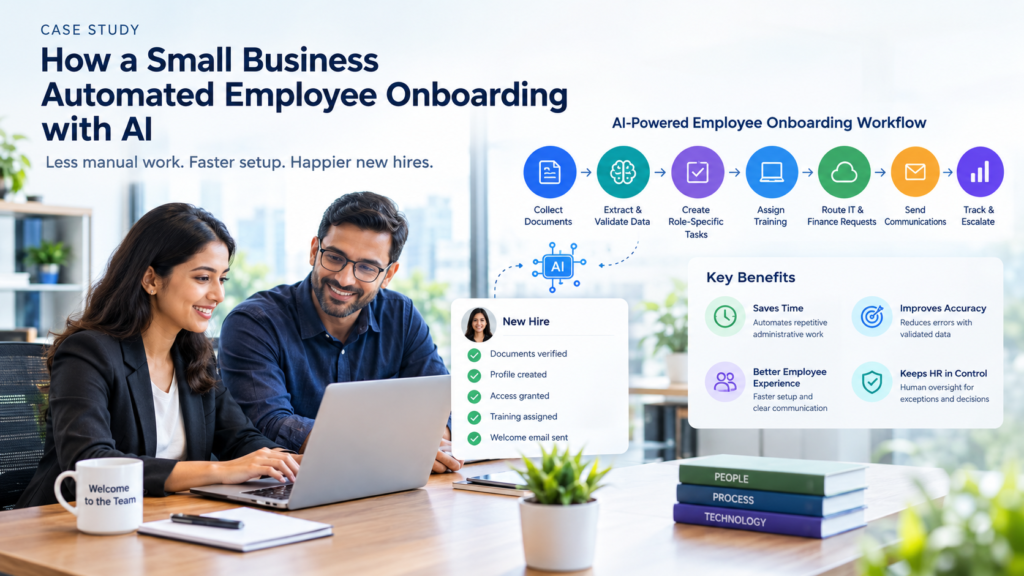
The example follows a workflow that collects new-hire documents, extracts employee information, validates records, creates role-specific tasks, assigns training, routes IT and Payroll/Finance requests, sends communications, monitors deadlines, and escalates exceptions to a human.
Important: This is an illustrative operating model, not a claim about a specific company’s implementation or results. Any example measurements should be replaced with verified internal data before being presented as actual business results.
Illustrative Business Context
Consider a small professional-services business with a limited administrative team and no dedicated onboarding specialist.
New hires may include:
- Client-service employees
- Finance and operations staff
- Account managers
- Technical specialists
- Part-time employees
- Remote employees
The business does not need a large HR technology stack. It may already use an employee database, email, shared document storage, IT ticketing, a learning platform, and task-management software.
The challenge is that these tools are often disconnected.
HR becomes the coordinator between the employee, manager, IT, Payroll/Finance, and other teams, manually checking whether each activity has been completed.
This makes the business a useful model for understanding how employee onboarding automation can work in a smaller organization.
Why the Business Changed the Process
The business identified four recurring problems in its onboarding process:
- New hires submitted documents through multiple channels.
- Employee information had to be copied into several systems.
- IT and equipment requests were sometimes created late.
- HR spent too much time checking status and sending reminders.
The business also wanted to make first-day readiness more predictable.
Completing the paperwork did not necessarily mean that a new employee was ready to work. The employee could still be waiting for an email account, equipment, application access, required training, or a first-week plan.
The goal was therefore not simply to automate individual HR tasks.
It was to create a connected onboarding workflow that could track dependencies, coordinate responsibilities, identify blockers, and give HR a clear view of readiness.
The Employee Onboarding Problem
Before automation, onboarding is often spread across email, spreadsheets, shared folders, HR systems, chat, IT ticketing, and learning platforms.
That may be manageable when a company hires only a few employees each year. As hiring increases, however, disconnected processes create more handoffs and more opportunities for work to be missed.
The problem is not necessarily that individual tasks are difficult. The problem is the amount of coordination required between them.
Document collection
A new hire may need to provide:
- Proof of identity
- Tax and payroll information
- Bank details
- Signed employment agreements
- Emergency contact information
- Certifications or licenses
- Background-check forms
- Policy acknowledgements
- Work authorization documents, where applicable
When these arrive through email attachments or separate uploads, HR has to determine whether the required information is complete.
Missing documents then create another task: follow up with the employee.
The process can become a cycle of checking, reminding, receiving another document, checking again, and updating a spreadsheet.
Data entry
The same employee information may also have to move between several systems, such as:
- HRIS or employee database
- Payroll software
- Benefits systems
- Identity and access management
- IT service management
- Learning management systems
- Internal directories
- Collaboration or project-management platforms
Repeated data entry creates opportunities for errors in names, dates, addresses, employee IDs, or other information.
The business problem is therefore bigger than typing. It is maintaining consistent employee information across multiple systems.
Checklist creation
Every new hire does not require the same onboarding process.
A salesperson may need CRM access and product training. A software engineer may require repository access, development tools, and security training. A remote employee may need equipment shipped to their home, while an office-based employee may require building access.
A static checklist does not account for these differences.
HR or managers must decide which tasks apply, assign owners, establish deadlines, and track completion.
Account requests
IT provisioning often depends on:
- Department
- Job role
- Location
- Manager
- Employment type
- Start date
- Required applications
- Access level
If HR sends these requests manually, IT may receive incomplete or inconsistent information.
That can delay email accounts, collaboration tools, business applications, laptops, or other resources the employee needs on day one.
A documented Microsoft case study of Epiq’s employee onboarding solution illustrates this type of problem. Its earlier process involved manual onboarding activities and limited visibility. Epiq subsequently connected its HCM and IT processes using Microsoft Power Automate, Microsoft Dataverse, and AI Builder.
Training assignments
Training requirements can vary by role, location, seniority, and responsibilities.
Common onboarding training includes:
- Company policies
- Information security
- Data protection
- Workplace safety
- Role-specific tools
- Product knowledge
- Compliance training
- Manager or leadership training
Manual assignment creates two risks.
Employees may receive training that is not relevant to their role, while required training may be missed altogether.
HR follow-up
The final problem is coordination.
HR may repeatedly need to ask:
- Has the employee submitted all required documents?
- Has the manager completed the first-week plan?
- Has IT created the required accounts?
- Has the equipment shipped?
- Has training been assigned?
- Is anything blocking first-day readiness?
This is where workflow automation can provide substantial value.
Instead of relying on people to remember every follow-up, the system can monitor status, send routine reminders, and escalate overdue tasks.
How the Employee Onboarding Automation Worked
The small business designed the process as an event-driven workflow.
The process started when a candidate accepted an offer or when HR created a new employee record.
From there, the workflow created a central onboarding record and determined which activities applied to that employee.
A simplified process looked like this:
HR creates new-hire record → Document collection → AI extraction → Validation → Role-based checklist → Task assignment → Training and communications → IT and Payroll/Finance requests → Deadline monitoring → Human exception handling → First-day readiness
The workflow included 11 major steps:
- HR creates or confirms the new-hire record.
- The system sends a secure document request.
- AI extracts relevant information from uploaded documents.
- Validation rules check completeness and consistency.
- The workflow creates a role-specific onboarding checklist.
- Tasks are assigned to the new hire, manager, HR, IT, and Payroll/Finance.
- Training and welcome communications are scheduled.
- Access and equipment requests are routed automatically.
- The system monitors deadlines and sends reminders.
- Exceptions are escalated to a human reviewer.
- A readiness view shows whether critical first-day activities are complete.
A central onboarding record is important because it prevents each department from maintaining its own spreadsheet.
Instead, HR has one place to see documents, tasks, ownership, deadlines, approvals, exceptions, and readiness.
Collect New-Hire Documents
The workflow begins by sending the new hire a secure, authenticated link to an onboarding portal or form.
The required document list should be generated from business rules rather than simply asking every employee for every possible document.
For example, requirements may differ according to:
- Location
- Employment type
- Department
- Job role
- Local requirements
A contractor may have different requirements from a full-time employee. An employee in one country may also require different documentation from an employee in another.
The portal can show:
- Required documents
- Acceptable file types
- Submission deadlines
- Upload instructions
- Successfully submitted documents
- Outstanding documents
A useful document-status model is:
Not requested → Requested → Uploaded → Processing → Accepted / Needs correction / Pending human review / Rejected → Escalated
The employee should receive a clear explanation when something needs correction.
Instead of:
“Upload failed.”
the system could explain:
“The uploaded image is difficult to read. Please upload a clearer image showing the complete document.”
The goal is not merely to automate document collection. It is to make the process easier for the employee while reducing repetitive HR follow-up.
Extract Employee Information with AI
After a document is uploaded, an AI document-processing service can identify and extract relevant fields.
Depending on the document and the business process, these might include:
- Full name
- Address
- Identification number
- Tax information
- Bank information
- Document expiration date
- Certification number
- Signature presence
The extracted information can then be converted into structured fields rather than remaining inside a PDF or image.
For example:
| Field | Extracted value | Validation |
|---|---|---|
| Employee name | Priya Menon | Matches HR record |
| Document number | Ending 4821 | Format check passed |
| Expiration date | 14 August 2031 | Valid |
| AI confidence | 98% | Above review threshold |
The important point is that AI extraction is not the same as approval.
OCR and document AI can make mistakes, particularly with blurry photographs, poor lighting, unusual layouts, handwritten information, or unfamiliar document formats.
The workflow should therefore preserve:
- Original document
- Extracted value
- AI confidence information
- Validation result
- Reviewer decision
- Timestamp
That creates an audit trail and makes corrections traceable.
A separate DIS Services case study describes an implementation involving Power Automate, Azure AI Document Intelligence, SharePoint, and an HRIS. The case illustrates how AI-assisted document processing can reduce manual data entry and support a more structured employee onboarding workflow.
Validate Required Documents
Validation should combine deterministic business rules with AI-assisted processing.
Rules are appropriate for straightforward checks such as:
- Is the required document present?
- Is the file readable?
- Is the document type correct?
- Does the name match the employee record?
- Is the document expired?
- Are mandatory fields present?
- Is the required signature present?
AI can help classify documents and identify likely inconsistencies, but ambiguous or sensitive cases should be routed to a human.
| Condition | Workflow action |
|---|---|
| Document present and fields match | Mark as accepted |
| Document missing | Send reminder |
| Low extraction confidence | Request re-upload or HR review |
| Name mismatch | Escalate to HR |
| Expired certification | Notify HR and manager |
| Potentially altered document | Hold for human review |
| Missing signature | Request corrected document |
Notifications should also avoid exposing sensitive information.
For example, an email reminder should say that an onboarding document needs attention rather than displaying bank, tax, or identity information.
Create the Onboarding Checklist
Once the employee record passes the required validation steps, the system creates a role-specific onboarding checklist.
For example:
If department = Sales
- Assign CRM training
- Request sales application access
- Schedule product training
If employment type = Remote
- Request laptop shipment
- Send remote-work setup guide
- Schedule virtual welcome meeting
If location = Bengaluru
- Assign applicable local payroll tasks
- Notify the relevant facilities team
- Apply location-specific policy training
If role level = Manager
- Assign people-management training
- Schedule leadership orientation
- Create team-planning tasks
Each task should contain more than a name.
A useful onboarding task record includes:
- Task name
- Owner
- Department
- Due date
- Dependency
- Priority
- Status
- Completion evidence
- Escalation rule
For example, creating an email account may depend on the employee record being approved.
Application access may depend on manager approval.
This turns the checklist into a workflow, rather than simply a list of things to remember.
Assign Tasks and Training
Once the checklist is created, the system assigns tasks according to predefined ownership rules.
For example:
- HR owns document validation.
- The manager owns the first-week plan.
- IT owns account and equipment setup.
- Payroll/Finance owns payroll configuration.
- The employee owns personal information and acknowledgements.
- The learning platform owns training completion.
Training can also be personalized.
A finance employee might receive accounting-system, security, and expense-policy training.
A customer-support employee might receive ticketing, product, customer-data, and escalation training.
The automation can then monitor completion and trigger appropriate reminders.
For example:
- Employee receives a reminder when a document is due.
- Manager receives a reminder when the first-week plan is incomplete.
- IT receives a notification when an access request is blocked.
- HR receives an escalation when a critical task becomes overdue.
The objective is not to send more messages.
It is to reduce the number of manual coordination messages people have to send.
Manager responsibilities
Automation should also make the manager’s responsibilities more visible rather than attempting to automate them away.
The workflow can remind managers to:
- Prepare the employee’s first-week plan.
- Schedule introductory and recurring check-ins.
- Introduce the employee to the team and key stakeholders.
- Explain role expectations and priorities.
- Assign a buddy or peer contact where appropriate.
- Review 30-, 60-, and 90-day goals.
These activities require context and human interaction. The workflow should coordinate them, provide reminders, and track completion without replacing the manager’s role.
Send Welcome Communications
Employee onboarding automation should not turn onboarding into a completely robotic experience.
The value of automation is to remove administrative coordination so HR and managers have more time for the human side of onboarding.
Routine communications can include:
- Offer-acceptance confirmation
- Document-submission instructions
- Welcome message
- First-day schedule
- Manager introduction
- Office or remote-work instructions
- Equipment delivery updates
- Training schedule
- Policy reminders
- First-week check-in
- 30-, 60-, and 90-day reminders
A simple automated message could be:
Subject: Your first day at [Company]
Hi [Name],
We are looking forward to welcoming you on [Date].
Your first day will begin at [Time]. You will meet [Manager], receive an introduction to the team, complete your setup, and review your first-week plan.
Before your start date, please complete the remaining items in your onboarding portal:
- [Outstanding item]
- [Outstanding item]
If you need help, contact [HR contact].
Routine confirmations and reminders are good candidates for automation.
Sensitive, personal, or potentially upsetting communications should remain subject to human review.
Route Requests to HR, IT, Payroll/Finance, Managers, and Facilities
The onboarding workflow acts as an orchestration layer between departments.
When an employee reaches a particular stage, the system creates the appropriate requests.
HR receives:
- Document tasks
- Policy acknowledgements
- Compliance activities
IT receives:
- Account requests
- Application access
- Hardware requests
- License requirements
Payroll/Finance receives:
- Payroll information
- Cost-center assignments
- Expense-related setup
Managers receive:
- First-week planning
- Team introductions
- Role-specific approvals
Facilities receives:
- Office access
- Equipment requirements
The routing logic should be based on approved business rules.
AI should not be given unrestricted authority to decide which employees receive privileged access.
For example:
If role requires CRM access: Create CRM request → Assign to IT applications queue → Require manager approval.
If role requires privileged production access: Create security review → Require security-owner approval → Do not provision automatically.
If employee is remote: Create laptop shipment request → Add delivery deadline → Notify manager when tracking is available.
The Epiq implementation documented by Microsoft provides a real-world example of this type of cross-functional onboarding architecture. Its workflow connected employee information with account creation, license assignment, mailbox creation, hardware requests, and status visibility.
Escalate Exceptions to a Human
A reliable automation workflow needs to be designed for exceptions, not only the normal path.
Examples include:
- Employee name does not match a submitted document.
- Identity document is unreadable.
- Certification has expired.
- Background check is delayed.
- Employee changes department before starting.
- Manager becomes unavailable.
- Equipment cannot arrive on time.
- Payroll information is incomplete.
- Unusual system access is requested.
- AI confidence falls below the approved threshold.
Each exception should contain:
- The issue
- Affected task
- Relevant evidence
- Recommended next action
- Responsible owner
- Deadline
- Escalation history
For example:
Exception: Name mismatch detected
Employee record: Priya Menon
Uploaded document: Priya Nair Menon
AI confidence: 91%
Recommended action: Confirm whether the document reflects a legal name change
Owner: HR Operations
Automation status: Paused pending review
This is an important principle of employee onboarding automation:
The workflow should know when to stop.
Human review is particularly important when the process involves sensitive personal information or actions affecting employment, access, pay, or compliance.
NIST’s AI Risk Management Framework provides a useful reference for incorporating risk-management and trustworthiness considerations into AI system design and operation.
How to Automate Employee Onboarding
A small business does not need to automate everything at once.
A staged approach can reduce implementation risk and make it easier to measure business value.
Step 1: Map the current process
Document the process from offer acceptance through the first 30, 60, or 90 days.
For every step, identify:
- Who performs it
- Which system is used
- What information is required
- How long it takes
- What commonly goes wrong
- What happens when the task is late
- Whether the task requires judgement or approval
This often reveals hidden work.
A process that appears to contain ten onboarding tasks may actually involve dozens of handoffs, reminders, spreadsheet updates, and status checks.
Step 2: Separate tasks from decisions
Automate repetitive tasks first.
Examples include:
- Sending forms
- Creating records
- Extracting document fields
- Assigning standard training
- Creating IT tickets
- Sending reminders
- Updating statuses
- Generating reports
Keep decisions with named owners.
Examples include:
- Approving unusual access
- Resolving identity discrepancies
- Reviewing sensitive documents
- Handling legal or payroll exceptions
- Approving policy deviations
- Deciding whether an employee is ready to start
This distinction prevents an AI recommendation from being treated as an approval.
Step 3: Create a central employee record
A central record should connect HR, IT, Payroll/Finance, training, and manager activities.
It can contain:
- Employee ID
- Name and contact details
- Role and department
- Manager
- Location
- Employment type
- Start date
- Document status
- Task status
- Training status
- Access status
- Equipment status
- Exception status
- Approval history
The purpose is simple: one source of onboarding status instead of multiple disconnected trackers.
Step 4: Build role-based templates
Create templates for common employee groups, such as:
- Office-based employees
- Remote employees
- Contractors
- Sales employees
- Customer-support employees
- Developers
- Managers
- Executives
- Temporary or mass-hire workers
Each template can define standard documents, systems, training, approvals, equipment, and first-week activities.
This is where onboarding automation becomes more useful than a generic checklist.
Step 5: Connect existing systems
Depending on the business, integrations may include:
- HRIS
- Payroll system
- Identity provider
- Email and calendar
- IT service desk
- Learning management system
- Document storage
- E-signature platform
- Collaboration tools
- Hardware or procurement systems
Do not integrate a system simply because an integration is technically possible.
The receiving system must be able to accept the information securely and reliably.
Where a direct integration is unavailable, a controlled export, API, or approval-based process may be safer than creating another uncontrolled copy-and-paste process.
Step 6: Add AI where it improves the workflow
Good AI use cases include:
- Extracting fields from documents
- Classifying uploaded files
- Identifying missing information
- Summarizing onboarding status
- Drafting routine reminder messages
- Answering routine questions from approved HR content
- Recommending relevant training
- Identifying stalled workflows
- Normalizing inconsistent data formats
Less suitable use cases include:
- Making employment decisions
- Automatically rejecting an employee
- Granting privileged access without approval
- Interpreting ambiguous legal or payroll situations
- Deciding whether a document is fraudulent without appropriate human review
- Inferring sensitive personal characteristics
- Providing policy answers from unapproved or outdated sources
The key question is not:
Where can we put AI?
It is:
Where does AI improve a business workflow without creating unacceptable risk?
Step 7: Add confidence thresholds
The workflow should define what happens when AI is confident and what happens when it is not.
| Result | Action |
|---|---|
| High confidence + rules pass | Continue automatically |
| Medium confidence | Request clarification or secondary verification |
| Low confidence | Route to HR |
| Conflicting information | Pause workflow |
| Sensitive/high-impact decision | Require human approval |
These thresholds should be tested using the organization’s real documents and workflows.
A confidence score that performs well in a vendor demonstration may behave differently with the company’s actual document formats, languages, image quality, and edge cases.
Step 8: Test normal and unusual cases
Do not test only the happy path.
Test:
- Complete documents
- Missing documents
- Blurry images
- Duplicate uploads
- Name changes
- Multiple surnames
- Different date formats
- International addresses
- Delayed start dates
- Manager changes
- Remote employees
- Office employees
- Bulk hiring
- Employees who withdraw before starting
The objective is not simply to prove that the workflow works.
It is to ensure that the workflow fails safely and clearly tells a human what requires attention.
Step 9: Launch in stages
A practical rollout could be:
- Automate document requests and reminders.
- Add AI extraction and validation.
- Add role-based checklist creation.
- Connect IT and equipment requests.
- Add training assignments.
- Add dashboards and exception management.
- Extend the workflow into 30-, 60-, and 90-day onboarding.
This creates opportunities to measure value before adding more complexity.
Operating the Workflow After Launch
Employee onboarding automation needs ongoing ownership. It is not a build-once-and-forget process.
HR should own the process design and onboarding templates. IT or the implementation owner should maintain integrations, permissions, and technical reliability. Managers and functional teams remain accountable for their assigned activities.
The business should periodically review the workflow for:
- Failed integrations
- Repeated AI extraction errors
- Overdue tasks
- Unclear ownership
- Outdated training
- Changes to document requirements
- Excessive manual exceptions
- Employee feedback
- Access and privacy issues
AI-assisted steps should also be reviewed using real onboarding records. If extraction errors occur repeatedly, the business can update document instructions, validation rules, confidence thresholds, or human-review requirements.
A workflow that is not maintained can gradually recreate the inconsistency it was designed to remove.
Extending Onboarding Beyond Day One
First-day readiness is only one part of employee onboarding.
A workflow that ends when documents are approved and accounts are activated may complete the administrative process without fully supporting the employee’s transition into the role. The workflow can be extended through the first 30, 60, and 90 days to coordinate follow-up activities after the employee starts.
This can include manager check-ins, role-specific goals, training, feedback collection, and identification of access or process problems that emerge after the employee begins working.
Days 1–30: Learn and Orient
During the first 30 days, the new hire can:
- Complete required training.
- Meet the team and key stakeholders.
- Learn company processes and tools.
- Review role expectations.
- Complete initial role-specific tasks.
- Attend an early manager check-in.
- Raise questions or blockers.
The workflow can support this phase by assigning training, scheduling meetings, sending reminders, and recording completion status.
Days 31–60: Contribute
During days 31–60, the employee can:
- Take ownership of defined responsibilities.
- Complete role-specific goals.
- Receive manager feedback.
- Identify access, training, or process gaps.
- Begin producing independent work.
- Review progress against the initial role plan.
At this stage, the workflow can remind managers to review progress and alert HR when required check-ins or training remain incomplete.
Days 61–90: Operate Independently
During days 61–90, the employee can:
- Complete measurable role objectives.
- Demonstrate independent use of core tools.
- Review performance and development goals.
- Complete a 90-day manager check-in.
- Provide feedback about the onboarding experience.
- Confirm any remaining training or access needs.
The same onboarding record can schedule 30-, 60-, and 90-day check-ins, track training, collect survey responses, and flag overdue activities.
This extended workflow does not mean that AI should independently evaluate employee performance. Managers should remain responsible for feedback, role expectations, performance discussions, and decisions affecting the employee.
Security and Privacy Requirements
Employee onboarding can involve sensitive information such as identity documents, addresses, tax details, bank information, employment agreements, and access-related data. Automation should therefore include basic security and privacy controls as part of the workflow design.
Limit Access by Role
Not everyone involved in onboarding needs access to every employee record.
For example:
- HR can manage employee documents and onboarding status.
- Payroll/Finance can access information required for payroll setup.
- IT can access information needed for accounts, devices, and applications.
- Managers can see role-related tasks, start dates, and first-week plans.
- Vendors should receive only the information required for their service.
Use least-privilege access so that completing one onboarding task does not automatically expose unrelated employee information.
Protect and Track Sensitive Information
The business should verify that onboarding systems use appropriate security controls, including:
- Encrypted connections and storage
- Multi-factor authentication for users with sensitive access
- Restricted document storage
- Audit logs for important actions
- Controlled data exports
- Defined retention and deletion rules
For AI-assisted document processing, the workflow should retain enough information to understand what happened: the original document, extracted values, confidence information where available, validation result, and any human correction or approval.
Keep Sensitive Data Out of Ordinary Messages
Email and chat can be used for reminders, but sensitive information should normally be accessed through controlled systems.
For example:
An onboarding document requires your attention. Sign in to the onboarding portal to review the request.
Avoid sending bank details, identity-document numbers, passwords, access tokens, or full sensitive documents through ordinary email or chat.
Review Vendors and Handle Exceptions
If employee information passes through AI, HR, payroll, document-storage, or other third-party platforms, the business should understand what data each provider receives, how it is processed and retained, and what security and privacy controls apply.
The workflow should also provide a clear path for correcting inaccurate information and escalating security or privacy incidents to the appropriate person.
Privacy requirements vary by jurisdiction. Businesses should verify applicable employment-data and privacy requirements before deploying the workflow rather than treating this article as legal advice.
Security is therefore not a separate technical layer added after automation. It is part of deciding what data moves through the workflow, who can access it, where it is stored, and how long it is retained.
Before vs. After Employee Onboarding Automation
The following comparison illustrates how the process can change. These are workflow examples, not measured results from a specific company.
| Activity | Before automation | After automation |
|---|---|---|
| Document collection | HR sends emails and tracks replies manually | Personalized secure document request |
| Data entry | HR copies information between systems | AI extracts fields and passes validated data to connected workflows |
| Missing documents | HR manually checks and follows up | Workflow identifies missing items and sends reminders |
| Checklist creation | HR creates a checklist for each hire | Role-based template creates the checklist |
| IT requests | HR or managers send separate requests | Structured access and equipment requests are created automatically |
| Training | HR manually selects courses | Training is assigned according to predefined rules |
| Status visibility | Stakeholders ask HR for updates | Dashboard shows ownership, progress, and blockers |
| Exceptions | Issues remain in inboxes or spreadsheets | Workflow pauses the relevant step and assigns an owner |
| First-day readiness | HR manually confirms readiness | Readiness view shows critical outstanding items |
| Reporting | Results are assembled manually | Workflow data can support cycle-time and completion reporting |
The important change is not that every task becomes fully autonomous.
The change is that routine coordination moves from people’s memory and inboxes into a structured workflow.
What AI Should—and Shouldn’t—Automate
AI should automate work that is repetitive, structured, and reasonably easy to verify.
It should support—not replace—human accountability.
Good candidates for automation
AI and workflow automation can be useful for:
- Extracting structured information from documents
- Classifying documents
- Checking whether required fields are present
- Matching records against defined rules
- Creating standard onboarding tasks
- Assigning routine training
- Sending reminders
- Summarizing progress
- Answering routine questions from approved HR content
- Detecting stalled or overdue tasks
- Generating status reports
- Normalizing inconsistent data formats
These activities can reduce administrative effort without requiring the system to make high-impact decisions.
Tasks that need human oversight
A human should review situations involving:
- Identity or document mismatches
- Suspected document tampering
- Payroll or tax exceptions
- Accommodation requests
- Sensitive personal-data issues
- Unusual access requirements
- Conflicting employee information
- Legal or policy interpretations
- Employment-impacting decisions
- Low-confidence AI outputs
- Complaints or emotionally sensitive communications
The reviewer should be able to see the relevant evidence, extracted information, reason for the exception, and recommended next action.
The U.S. Equal Employment Opportunity Commission’s guidance on AI and employment discrimination explains that existing federal employment-discrimination protections can apply when employers use automated systems in employment-related processes.
Even when an onboarding workflow is not making hiring decisions, businesses should avoid using AI to infer protected characteristics or make unsupported judgements about employee suitability.
Measuring the Business Value
The business case for employee onboarding automation should not be based on the number of AI features implemented.
Measure whether the process actually improves business operations.
1. HR time saved
Measure the HR time spent per new hire before and after automation.
HR time saved per hire = Previous HR time per hire − Current HR time per hire
Where possible, measure individual activities:
- Document chasing
- Data entry
- Checklist preparation
- Status updates
- Reminder emails
- IT coordination
- Training assignment
- Exception handling
This helps determine whether automation is actually reducing work or simply moving it somewhere else.
2. Onboarding cycle time
Measure the time between meaningful milestones, such as:
- Offer acceptance to document completion
- Offer acceptance to employee-record creation
- Offer acceptance to account readiness
- Offer acceptance to first-day readiness
- First day to mandatory-training completion
Use the median as well as the average because a small number of unusually delayed cases can distort the average.
3. Missing-document rate
A useful measure is:
Missing-document rate = Onboarding records missing one or more required documents ÷ Total onboarding records × 100
Track this at multiple points:
- Before the first reminder
- Before the start date
- On the first day
- After the first week
The goal is not to send more reminders.
The goal is to improve completion with less manual intervention.
4. Task completion
Track:
- Overall checklist completion
- On-time completion
- Completion by department
- Completion by task owner
- Overdue tasks
- Reopened tasks
- Time spent in each status
Also distinguish between tasks completed automatically and tasks requiring manual intervention.
This helps identify where the automation is genuinely working and where the process still needs redesign.
5. First-day readiness
First-day readiness should be defined rather than treated as a vague status.
For example, an employee might be considered ready when:
- Required documents are accepted or approved
- Payroll information is complete
- Core accounts are active
- Required equipment is available
- The manager has completed the first-week plan
- First-day information has been sent
- Required access has been approved
- No critical exception remains unresolved
A simple readiness measure could be:
Readiness score = Completed critical items ÷ Total critical items × 100
The business should define which items are actually critical.
A missing welcome video should not have the same importance as missing payroll information or required system access.
6. Manual communication volume
Track how many manual messages HR and managers send for each hire.
For example:
- Manual reminder emails
- Status-check messages
- Repeated questions
- IT follow-ups
- Manager requests for updates
- Escalation messages
A reduction is useful only if employees still receive timely and useful information.
The objective is not fewer messages at any cost.
It is fewer repetitive coordination messages.
7. Time to productivity
Time to productivity measures how long it takes a new employee to reach a defined level of independent contribution.
The definition should be role-specific.
For example:
- A salesperson completes a first qualified opportunity.
- A support representative resolves tickets independently.
- A developer ships an approved change.
- A finance employee completes a reporting cycle accurately.
- A manager completes the first team-planning cycle.
This metric needs careful interpretation.
If productivity improves after automation, it does not automatically mean automation caused the improvement. Manager support, training quality, workload, role clarity, and other factors can also influence the result.
8. Employee experience
Measure the employee experience at consistent points, such as:
- End of first day
- End of first week
- Day 30
- Day 60
- Day 90
Questions can include:
- Did you know what to expect before your first day?
- Were your accounts and equipment ready?
- Were the instructions easy to follow?
- Did you know whom to contact for help?
- Did the onboarding content match your role?
- What part of the process caused friction?
A successful employee onboarding automation workflow should make the process more reliable for HR and less confusing for the new employee.
9. 90-Day Retention
A real implementation can also monitor 90-day retention, which measures how many employees remain with the business 90 days after their start date.
A simple formula is:
90-day retention rate = (New hires still employed after 90 days ÷ Total new hires in the onboarding cohort) × 100
Track this by onboarding cohort where the sample size is meaningful.
Early retention can provide a useful downstream indicator of the onboarding experience, particularly when employees receive clearer expectations, faster access to tools, and more consistent support.
However, retention should not be treated as proof that automation caused an improvement. Compensation, role fit, manager quality, workload, company culture, hiring decisions, and other factors can affect whether an employee remains with the business.
10. Manager Feedback
A real implementation can also collect manager feedback to assess whether the onboarding process helped managers prepare new employees and support their transition into the role.
Useful questions include:
- Was the employee ready to begin work on the first day?
- Were required accounts and equipment available?
- Did the employee receive the right training?
- Was the first-week plan easy to manage?
- Did the workflow provide visibility into outstanding tasks?
- How much manual follow-up was required?
The business can collect feedback at consistent points, such as the end of the first week, Day 30, Day 60, and Day 90.
Manager feedback is particularly useful for identifying problems that process metrics may miss. For example, HR may spend less time sending reminders, while managers may still experience excessive notifications, unclear ownership, or inaccurate employee information.
Like 90-day retention, manager feedback is a supporting indicator rather than proof of causation. The objective is not to remove managers from onboarding, but to reduce unnecessary coordination work and give them better visibility into what needs their attention.
The Business Value First, AI Second Perspective
The most important lesson from this case study is that employee onboarding automation is not primarily an AI project.
It is a workflow improvement project.
The business first needs to understand:
- Where onboarding creates unnecessary manual work.
- Which activities are repetitive.
- Which decisions require human judgement.
- Where systems need to exchange information.
- Where employees experience friction.
- Which outcomes should improve.
Only then should the business decide where AI belongs.
For some activities, traditional workflow automation may be enough.
For example:
New employee record created → Create IT ticket → Notify IT → Set due date
There may be no reason to introduce AI.
For another activity, AI may provide meaningful value:
Document uploaded → Classify document → Extract fields → Check confidence → Validate against business rules → Accept or escalate
The distinction matters because AI should not be added merely because it is available.
The objective is better business performance.
Frequently Asked Questions
What is employee onboarding automation?
Employee onboarding automation uses workflow software, integrations, business rules, and, where appropriate, AI to coordinate the new-hire onboarding process.
It can automate activities such as document collection, employee-data entry, checklist creation, training assignments, IT and equipment requests, reminders, approvals, and first-day readiness.
The goal is not to remove HR or managers from the process. It is to reduce repetitive coordination work and give everyone a clear view of responsibilities, deadlines, and outstanding tasks.
How can AI help with employee onboarding?
AI can support employee onboarding by processing information that would otherwise require manual review or data entry.
Useful applications include:
- Classifying uploaded documents.
- Extracting fields from PDFs and images.
- Identifying missing information.
- Comparing extracted information with employee records.
- Flagging possible inconsistencies.
- Summarizing onboarding status.
- Drafting routine reminders.
- Recommending role-specific training.
- Identifying overdue or stalled tasks.
- Answering routine questions using approved HR content.
AI should work within defined business rules. Low-confidence results, conflicting information, and sensitive cases should be routed to a human reviewer.
What tasks can be automated during employee onboarding?
A business can automate many repetitive onboarding tasks, including:
- Sending document requests.
- Tracking document submissions.
- Creating employee records.
- Extracting information from documents.
- Checking whether required fields are complete.
- Creating role-based checklists.
- Assigning task owners.
- Scheduling training.
- Creating IT, equipment, and Payroll requests.
- Sending reminders and escalations.
- Updating task statuses.
- Scheduling manager check-ins.
- Sending first-day communications.
- Generating onboarding reports.
Tasks involving judgement should remain subject to appropriate human approval, particularly where they involve identity discrepancies, payroll exceptions, unusual system access, accommodation requests, suspected document problems, or other employment-impacting decisions.
Can a small business automate employee onboarding without an HR platform?
Yes. A small business can begin with a combination of forms, workflow automation, secure document storage, task management, email or calendar integrations, and an access-controlled central employee record.
A basic setup might include:
- A new-hire form.
- A central onboarding database or table.
- A secure document-upload process.
- Role-based checklist templates.
- Automated reminders.
- IT and Payroll request workflows.
- A dashboard showing task status.
- A human-review process for exceptions.
A dedicated HR platform may become more useful as hiring volume grows or when the business needs payroll, benefits, compliance, employee records, reporting, and onboarding in a more integrated system.
The important requirement is not the number of tools. It is whether the workflow connects the right information reliably while protecting employee data.
Should AI make employee onboarding decisions?
AI should generally support onboarding decisions rather than make sensitive or high-impact decisions independently.
For example, AI may identify a missing field, extract information from a document, or flag a possible mismatch. A defined business rule or human reviewer should make the final decision when an issue affects identity verification, payroll or tax information, employment status, accommodation requests, sensitive system access, legal or compliance requirements, or conflicting employee information.
A practical model is:
AI processes information → Business rules validate the result → Routine high-confidence cases continue → Ambiguous or sensitive cases pause → A named human reviews and decides
The workflow should preserve relevant evidence, the AI confidence or processing result where available, validation results, reviewer decisions, and timestamps.
How should businesses measure employee onboarding automation?
Businesses should measure both operational efficiency and employee or manager outcomes.
Useful metrics include:
- HR time spent per hire.
- Onboarding cycle time.
- Missing-document rate.
- Task completion rate.
- First-day readiness.
- Manual communication volume.
- Time to productivity.
- Employee experience.
- 90-day retention.
- Manager feedback.
The business should establish a baseline before automation and compare it with results after implementation.
It is also useful to measure individual activities such as document chasing, data entry, checklist preparation, IT coordination, training assignment, and exception handling. This helps determine whether automation is actually reducing work or simply moving it to another team.
The objective is not to maximize the number of AI features. The more important question is whether new hires receive the information, access, equipment, training, and support they need with less repetitive administrative effort.
What security considerations apply to automated onboarding?
Automated onboarding can process sensitive employee information, including identity documents, addresses, tax details, bank information, payroll records, and employment agreements.
Important controls include:
- Role-based access.
- Least-privilege permissions.
- Encryption in transit and at rest.
- Multi-factor authentication.
- Audit logs.
- Document-retention and deletion rules.
- Vendor and AI-provider reviews.
- Secure document-upload and storage processes.
- A process for correcting inaccurate information.
- Incident-response procedures.
- Appropriate privacy notices.
- Restrictions on sending sensitive information through ordinary email or chat.
The business should also understand which systems and third-party vendors receive employee information, how long the information is retained, where it is processed, and how it is deleted.
For businesses operating in India, applicable privacy and data-protection requirements should be assessed based on the organization’s role, the information being processed, and the systems and vendors involved.
Does employee onboarding automation replace HR?
No. Automation handles repetitive coordination, while HR and managers remain responsible for judgement, communication, support, and accountability.
Automation can send a document reminder, create an IT request, or flag a missing field. It does not replace the manager’s responsibility to welcome the employee, explain the role, provide feedback, and help the person become productive.
The practical model is:
Automation handles coordination. AI handles suitable information-processing tasks. People handle judgement.
Final Takeaway
A small business does not need an elaborate AI platform to improve employee onboarding.
It needs a well-designed workflow.
The strongest starting point is usually to map the existing process, identify repetitive coordination work, create a central employee record, define role-based onboarding templates, connect the necessary systems, and establish clear human ownership for exceptions.
AI can then be introduced where it provides a specific advantage—such as document extraction, classification, information checking, status summarization, or routine communication.
The resulting model is not:
AI replaces HR.
It is:
Automation handles coordination. AI handles suitable information-processing tasks. People handle judgement.
That division creates a more practical path to employee onboarding automation.
The measure of success is not how much AI the business deploys.
It is whether new employees receive the information, access, equipment, training, and support they need with less repetitive administrative work—and whether HR and managers have more time for the parts of onboarding that actually require people.