
AI Agents for Small Business: When to Use Them (And When Not To)
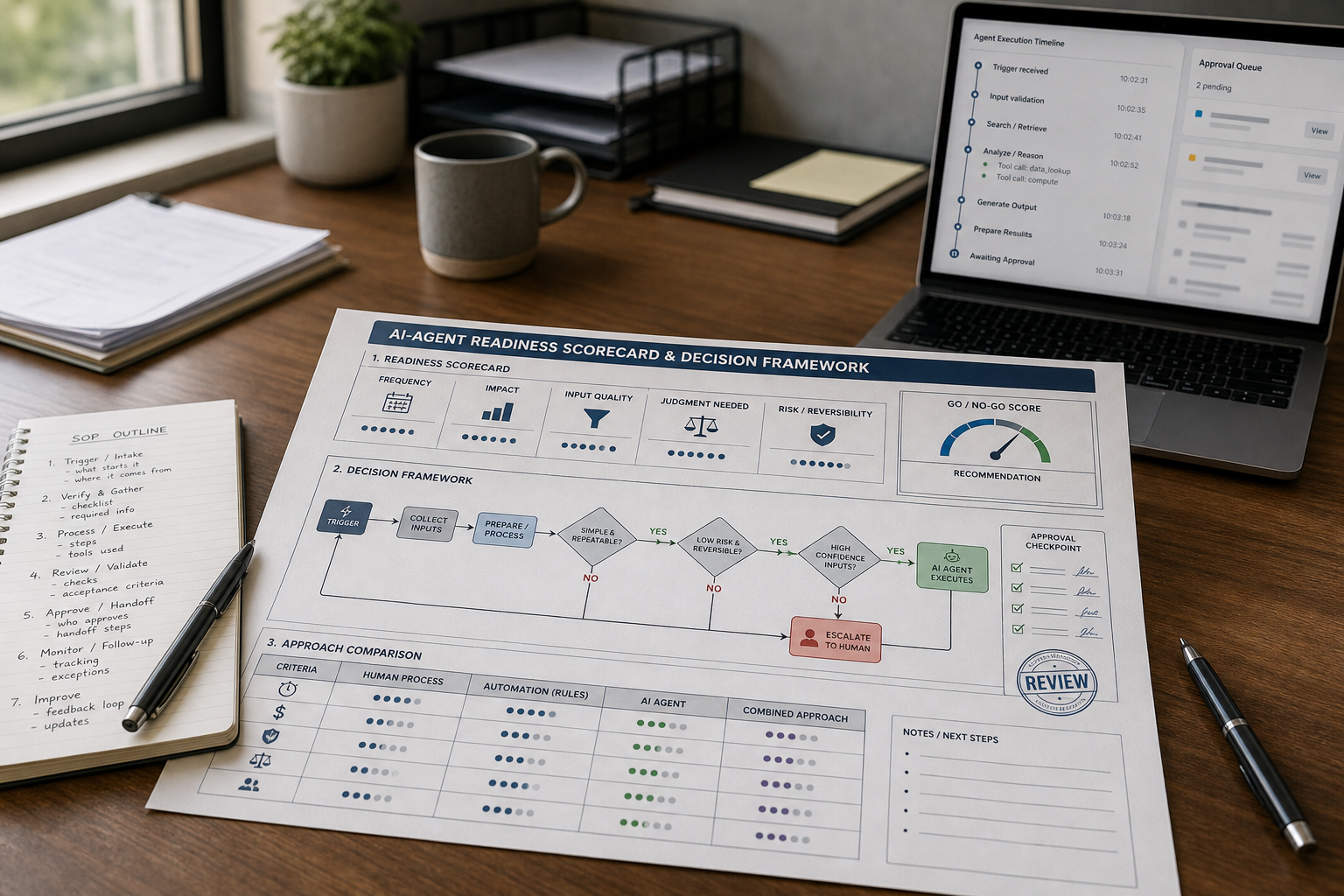
When should a small business actually use an AI agent—and when is a simpler automation, AI assistant, or human process better?
If you are evaluating AI agents for small business, you may be facing a familiar problem: too many enquiries, too much administration, inconsistent follow-up, and not enough time to respond quickly. AI agents can help, but only when the workflow is the right fit. Used in the wrong place, they add cost, risk, and complexity without producing meaningful business value.
Quick answer: Use AI agents when a workflow is repeatable, high-value, and runs daily or weekly; requires several steps plus some judgment; and has a clear cost when work is delayed. Avoid them when the process is unclear, volume is low, tasks are fully rules-based, or a mistake would be expensive or difficult to reverse.
What Is an AI Agent?
An AI agent is a goal-driven AI system that can take actions across multiple steps and tools, rather than only answering questions in a chat window. Google Cloud’s AI agent overview
For example, instead of simply drafting an email, an agent could:
- Categorize an inbound request
- Ask relevant follow-up questions
- Create or update a CRM record
- Suggest or schedule a meeting
- Route an exception to a team member
- Log the activity and next action
The business value comes from moving work forward, not just generating intelligent-sounding text. For small businesses, this commonly applies to lead handling, scheduling, support triage, CRM administration, document preparation, and selected marketing operations.
AI Agents vs. Chatbots vs. Automation
| Option | What It Does | Best Use |
|---|---|---|
| Chatbot | Answers questions or holds a conversation | FAQs, basic website support, information lookup |
| Workflow automation | Follows fixed rules you define | Notifications, routing, record creation, reminders |
| AI agent | Handles multi-step work using context and limited judgment | Qualification, triage, next-step decisions, workflow coordination |
| Human team member | Uses judgment, relationships, accountability, and expertise | Sensitive issues, complex exceptions, strategic decisions |
A practical rule: if the process is simply “when X happens, do Y,” use automation first. If the process requires interpreting a request, choosing a next step, and coordinating multiple actions, an AI agent may be useful. This distinction is also reflected in modern agent architectures, where agents can use knowledge, tools, actions, and workflows to complete tasks. Microsoft Learn’s introduction to AI agents
Why Small Businesses Consider AI Agents
Small businesses rarely need an “AI transformation.” They need a few important workflows to stop breaking as demand grows.
Common problems include:
- Missed calls and delayed lead responses
- Inconsistent customer follow-up
- Repetitive manual CRM updates
- Scheduling back-and-forth
- Scattered customer information
- Admin tasks that reduce time for sales and service delivery
AI agents become attractive when speed affects bookings, conversions, retention, collections, or customer experience. They can also help a small team manage more workflow volume without immediately adding headcount.
However, the same features that make agents useful—autonomy, system access, and decision-making—also create risks. An agent can repeat mistakes at scale, act on incomplete information, or expose sensitive data if access and oversight are not controlled.
Business-first insight: If you cannot describe a workflow in five to seven clear steps, you are probably not ready for an agent. You are ready for workflow design. An agent will amplify the process you already have, whether that process is efficient or messy.
Benefits of AI Agents for Small Business
When applied to a suitable workflow, AI agents can create practical operational benefits:
- Faster response times: Respond to appropriate leads and customer requests without waiting for manual handling.
- Less repetitive administration: Reduce manual CRM updates, scheduling, routing, follow-up, and document preparation.
- More consistent follow-up: Help ensure that leads, enquiries, and tasks do not fall through the cracks.
- Greater team capacity: Help a small team handle more workflow volume without immediately adding headcount.
- Improved workflow visibility: Capture summaries, actions, statuses, and next steps inside business systems.
- Appropriate out-of-hours coverage: Handle intake, qualification, and routing outside normal business hours.
These benefits are not automatic. They depend on workflow volume, process quality, reliable integrations, clean information sources, and appropriate human oversight.
Deciding When an AI Agent Fits
The most reliable way to decide when to use AI agents for small business is to evaluate the workflow—not the novelty of the tool.
Use an AI Agent When the Workflow Is Repeatable and Frequent
Frequency is a useful indicator of potential ROI. Workflows that occur every day or every week usually provide enough volume to justify the effort of designing, testing, monitoring, and improving an agent.
A task that only happens once a month may still matter, but it is often harder to justify setup and maintenance costs. In that case, a template, checklist, trained employee, or simple automation may be more appropriate.
Use an AI Agent When the Workflow Is High-Value
The strongest candidates are tied to revenue, retention, customer experience, or operational capacity.
Common examples include:
- Lead qualification and follow-up
- Appointment booking and rescheduling
- Customer support triage
- CRM updates and next-step creation
- Recurring proposal or onboarding document drafts
Use an AI Agent When There Are Multiple Steps and Some Judgment
“Multi-step plus judgment” is the sweet spot.
If the task is one simple action, a template or basic automation usually wins. If it has multiple steps but is completely rules-driven, workflow automation is usually more predictable and easier to test.
For small businesses, judgment often means:
- Classifying intent, such as sales, support, billing, or an urgent complaint
- Choosing a suitable next step, such as answering, asking a question, booking, or escalating
- Personalizing communication using approved business context
- Determining whether a request fits a predefined rule or needs human review
Use an AI Agent When Delays Have a Visible Cost
Agents are especially useful where slow responses cause lost opportunities or unnecessary work. This may include missed bookings, delayed lead responses, slow support routing, or overdue follow-up actions.
Use an AI Agent When Inputs Are Structured Enough to Trust
Agents work better when they receive consistent information through forms, CRM fields, knowledge bases, product data, policy documents, and standard operating procedures.
Messy data does not only reduce output quality; it increases the time your team spends correcting work and handling exceptions.
Consultant insight: Many apparent AI-agent failures are actually data-shape failures. If your team cannot quickly locate the current price list, policy, service area, or product information, the agent will struggle too—and may present incorrect information confidently.
When You Should Not Use AI Agents
AI agents for small business can be the right tool at the wrong time. Avoid them, or limit them to a human-reviewed role, in these situations.
Your Process Is Not Standardized
If different employees handle the same request differently, define the SOP before introducing an agent. Otherwise, you may spend time constantly adjusting prompts instead of improving operations.
Basic Automation Can Handle the Task
If the workflow is fixed and rules-based, automation is usually cheaper, safer, and easier to maintain than an agent.
Volume Is Too Low
Even if an agent could handle the task, you still need to design, test, monitor, and maintain it. For low-volume workflows, the overhead may outweigh the time saved.
The Cost of an Error Is High
Do not give an agent full autonomy over high-stakes financial, legal, healthcare, regulatory, safety, or sensitive customer decisions. Agents are best where mistakes are easy to catch, fix, and escalate. For a broader framework for identifying and managing AI risks, see the NIST AI Risk Management Framework.
You Are Trying to Replace a Role Rather Than Improve a Workflow
Agents work best when they reduce friction in a defined process. People should still handle relationships, exceptions, approvals, accountability, and strategic decisions.
Business Information Changes Without Clear Governance
If pricing, policies, service details, offers, or product information change frequently without a trusted source of truth, the agent can quickly become unreliable.
Limitations of AI Agents for Small Businesses
Risks describe the potential harm an agent may cause. Limitations are the practical boundaries that determine whether an agent is useful in the first place.
Common limitations of AI agents for small business include:
- Agents can make incorrect decisions when context is missing, conflicting, or ambiguous.
- They depend on accurate data, current knowledge sources, and clearly defined instructions.
- They require monitoring, maintenance, testing, and ownership.
- They may behave inconsistently when a request falls outside familiar patterns.
- Integrations with CRMs, calendars, inboxes, payment systems, or help desks can create additional failure points.
- More autonomy increases the consequences of mistakes.
- Complex agent systems can cost more to build and maintain than the workflow is worth.
The right question is not, “Can we automate this?” It is, “What level of autonomy does this workflow actually need?”
AI Agents vs. Automation vs. Human Process
Most small businesses get better results by treating agents as an added layer on top of a reliable automation foundation—not as a replacement for operations.
| Option | Best For | Time to Value | Risk Level | Typical Trade-off |
|---|---|---|---|---|
| Human-only process | Low volume, high nuance, relationship-based work | Immediate | Low, when staff are trained | Does not scale easily; response speed may vary |
| Workflow automation | Fixed routing, notifications, reminders, record creation | Fast | Low to medium | Breaks when interpretation or judgment is needed |
| AI agent | Multi-step workflows requiring classification and next-action decisions | Medium | Medium to high | Needs quality inputs, oversight, and testing |
| Automation plus agent | End-to-end workflows with structure plus judgment | Medium | Medium | More moving parts, but often the most practical design |
The strategic principle is simple: buy the smallest amount of autonomy that solves the problem.
AI Agent Examples for Small Businesses
Here are practical examples of what an AI agent can do inside a small business:
| AI Agent Example | What It Does |
|---|---|
| Lead qualification agent | Reviews enquiries, asks qualifying questions, identifies fit, and routes promising leads |
| Appointment agent | Suggests available slots, confirms bookings, sends reminders, and handles rule-based rescheduling |
| Customer support agent | Answers approved FAQs, gathers missing information, and escalates complex issues with a summary |
| CRM agent | Summarizes calls or email threads, updates records, and creates next-step tasks |
| Document agent | Produces first drafts of proposals, onboarding packs, recurring letters, or internal summaries |
| Marketing operations agent | Organizes requests, prepares content briefs, repurposes approved content, and creates campaign reporting summaries |
These do not need to be fully autonomous systems. In many small businesses, the most practical design combines an AI agent for interpretation, automation for predictable actions, and human approval for important decisions.
Best AI Agent Use Cases for Small Businesses
AI agents for small business are most useful when repetitive work is combined with decisions that would otherwise require a person to review, classify, or route each case.
AI Agents for Sales: Lead Qualification and Follow-Up
AI agents for sales can help small businesses respond to new enquiries, qualify prospects, maintain follow-up, and route high-value opportunities to a salesperson.
AI agents for lead generation can help capture inbound prospects, enrich available customer information, qualify leads against predefined criteria, and route promising opportunities to the right salesperson. They can also trigger follow-up when a lead meets agreed conditions, such as requesting a consultation, downloading a service guide, or submitting a high-intent enquiry.
For high-value prospects, keep a human involved before major commitments, pricing decisions, or personalized sales outreach.
A lead-handling agent can:
- Capture enquiries from forms, email, chat, or social channels
- Identify a customer’s service or product interest
- Ask one to three approved qualifying questions
- Draft a tailored response and propose a next step
- Create or update a CRM record
- Notify the owner or salesperson when review is needed
Appointment Booking and Reminders
Scheduling can consume substantial time through back-and-forth messages. An appointment agent can collect preferences, suggest available slots, confirm bookings, send reminders, and handle reschedules within predefined rules.
Keep human review for exceptions such as high-value consultations, sensitive customer situations, unusual availability requests, or appointments involving complex pricing.
Customer Support Triage
Customer support agents are often best used for triage rather than fully autonomous support.
A safe boundary is to let the agent answer approved FAQs, collect details, and route complex cases to the correct person with a concise summary. It can identify whether an issue relates to billing, delivery, technical support, or an account problem; request order numbers or screenshots; and create a support ticket.
CRM Updates and Next-Step Creation
Many small businesses have CRMs that are underused because updates feel optional or time-consuming. A CRM agent can summarize call notes, analyze email threads, update approved fields, assign priorities, and create follow-up tasks.
Humans should still review sensitive notes, major deal-stage changes, and information that affects contractual or financial decisions.
Document Drafting
Agents can assemble first drafts of proposals, onboarding packs, follow-up emails, recurring letters, and internal summaries from structured forms and CRM information.
The agent should use approved templates and current source information. A human should review factual accuracy, pricing, legal language, and persuasive messaging before anything is sent externally.
AI Agents for Marketing Operations
Marketing is another useful area, especially for workflow coordination rather than replacing strategy or creative leadership.
An agent can help with:
- Turning approved campaign information into structured content briefs
- Classifying incoming campaign or content requests
- Repurposing approved content into channel-specific drafts
- Organizing content assets, topics, tags, and metadata
- Preparing campaign performance summaries
- Identifying follow-up actions from agreed performance thresholds
Keep people responsible for brand positioning, factual claims, final creative approval, sensitive audience communications, and strategic marketing decisions.
AI Agent Readiness Scorecard
Before choosing a platform, score one workflow—not your entire business.
Score each factor from 1 to 5, where 1 means poor fit and 5 means strong fit. Add the six scores for a total between 6 and 30.
This AI agents for small business readiness scorecard helps you decide whether a workflow is ready for agent-based automation or whether a simpler approach makes more sense.
| Readiness Factor | What a Strong Score Looks Like | Score |
|---|---|---|
| Frequency | The workflow happens daily or weekly | 1–5 |
| Business impact | It affects revenue, retention, or a core operation | 1–5 |
| Process clarity | You can document the steps and common exceptions | 1–5 |
| Input quality | Forms, CRM fields, and knowledge sources are reliable | 1–5 |
| Judgment needed | It requires classification or next-step selection, not just rules | 1–5 |
| Risk and reversibility | Errors are easy to detect, correct, and escalate | 1–5 |
Use the total as a practical go/no-go guide:
- 24–30: Strong candidate for an AI agent pilot
- 18–23: Potential candidate, but improve SOPs, inputs, or human-review controls first
- Below 18: Start with workflow redesign, team training, or basic automation
How to Measure AI Agent ROI
ROI from AI agents is usually about time recovered, leads captured, better response speed, or reduced rework—not simply “using AI.”
Track outcomes that matter to the workflow:
- Response time from enquiry to first meaningful reply
- Completion rate without human intervention
- Error rate, including wrong routing, incorrect information, or missed steps
- Staff hours saved
- Lead-to-booking or lead-to-sale conversion rate
- Customer satisfaction, complaint rate, or repeat contacts
- Number of leads or requests that would otherwise have been missed
For a simple ROI check, estimate:
- Weekly workflow volume
- Average minutes spent per case today
- Percentage of cases the agent can safely handle
- Cost of agent software, integrations, monitoring, and maintenance
If the workflow saves only a few minutes per week, an agent is unlikely to be the right first move. If it saves hours while improving response speed or conversion, a pilot may be worthwhile.
Common AI Agent Mistakes to Avoid
- Choosing an agent before defining the business problem: Start with a measurable pain point, such as missed leads, delayed bookings, or support overload.
- Automating a messy process: Simplify and standardize the SOP before adding an agent.
- Using an agent when basic automation is enough: Build a reliable automation backbone before introducing AI-based judgment.
- Giving an agent too much autonomy too soon: Begin with human approval and increase autonomy only for stable, low-risk actions.
- Measuring AI activity instead of business outcomes: Track response time, completion rate, error rate, bookings, and customer satisfaction.
The best way to avoid these mistakes is to start with one workflow, define clear boundaries, use human approval where appropriate, and measure the result.
Safe AI Agent Implementation Plan
- Choose one workflow with a visible business impact, preferably linked to lead response, booking, support triage, or admin capacity.
- Document the current workflow in five to seven steps, including common exceptions.
- Define boundaries: what the agent can do, what needs approval, and what must always be escalated. For additional guidance on managing generative-AI-specific risks, see the NIST Generative AI Profile.
- Standardize inputs through forms, CRM fields, approved templates, and one trusted knowledge source.
- Choose the simplest tool that can complete the workflow. Do not force an agent where automation is sufficient.
- Start in shadow mode, where the agent drafts actions or recommendations while a human approves them.
- Review KPIs each week and correct the largest recurring failure pattern.
- Increase autonomy only for stable, low-risk steps.
- Assign an owner responsible for monitoring, exception handling, knowledge updates, and process changes.
The hidden cost is not setup alone—it is operations. If nobody owns monitoring and maintenance, performance can drift as pricing, offers, policies, staff roles, and connected tools change.
FAQs
What Is an AI Agent?
An AI agent is a goal-driven AI system that can take actions across multiple steps and tools. It can ask questions, classify requests, update a CRM, schedule meetings, route work, and trigger follow-up actions rather than only producing a chat response.
When Should a Small Business Use an AI Agent?
Use one when a workflow is repeatable, high-value, multi-step, and requires some judgment. It is particularly useful when delays cost leads, bookings, customer satisfaction, staff time, or revenue.
When Is Automation Better Than an AI Agent?
Automation is usually better when a process is fixed and rules-driven, such as sending notifications, assigning a ticket, creating a record, or delivering a reminder. It is generally more predictable, easier to test, and less costly to maintain.
What Are the Benefits of AI Agents for Small Businesses?
Potential benefits include faster lead and customer responses, reduced repetitive administration, more consistent follow-up, improved workflow visibility, additional team capacity, and appropriate out-of-hours intake or routing.
What Are the Limitations of AI Agents?
AI agents depend on good inputs, current knowledge, reliable integrations, and defined rules. They can make mistakes in ambiguous situations, require ongoing monitoring, and may not be cost-effective for low-volume or simple workflows.
What Are the Best AI Agent Use Cases for Small Businesses?
Strong use cases include lead qualification, appointment booking, customer support triage, CRM updates, document drafting, and marketing operations. The best use cases are repeatable, measurable, and connected to revenue, customer experience, or team capacity.
Do Small Businesses Need Developers to Implement AI Agents?
Not always. Many businesses can begin with built-in AI features, no-code automation platforms, or ready-made agent tools. Custom-built systems may be valuable for unique or high-control workflows, but they usually require technical expertise and ongoing maintenance.
How Do You Measure ROI From AI Agents?
Track response time, completion rate, error rate, hours saved, customer satisfaction, and conversion metrics such as lead-to-booking rate. A successful agent improves a measurable business outcome, not merely the amount of activity in a workflow.
What Is the Biggest Mistake When Adopting AI Agents?
The biggest mistake is choosing the technology before defining the business problem. Start with one standardized workflow, clear outcomes, strong inputs, and appropriate human oversight.
Conclusion: Use AI Agents to Fix Bottlenecks—Not to Add AI
The most practical approach to AI agents for small business is simple: use them to remove a real bottleneck in a repeatable, high-impact workflow—especially where speed and consistency affect revenue or customer experience.
If the process is messy, low-volume, rules-only, or high-risk, start with workflow improvement, team training, or basic automation instead.
For most small businesses, the winning design is an automation backbone for reliability, an agent layer for limited judgment, and people for exceptions, approvals, relationships, and accountability.
Start with one workflow, run a shadow-mode pilot for two weeks, and measure response time, completion rate, and error rate before expanding. That single pilot will reveal more than months of AI tool research.