
CrewAI Review (2026): Is It the Best Framework for Multi-Agent AI?
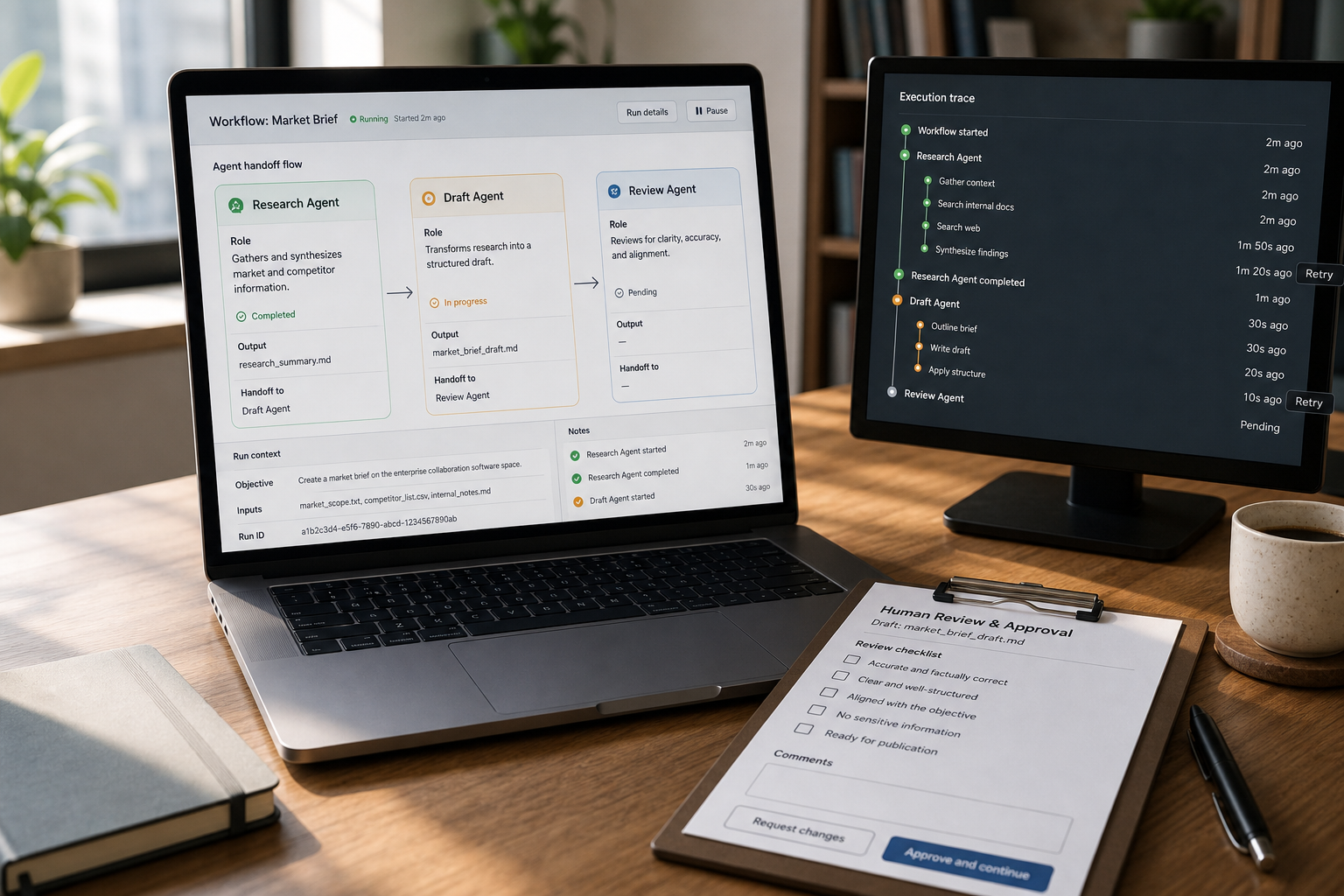
You can build a multi-agent demo in a weekend—and then spend months trying to make it reliable, observable, and safe enough to run as real AI software. That gap is exactly why “which framework should we pick?” has become a serious engineering decision. In this CrewAI review, we’ll evaluate CrewAI—an open-source, Python-based CrewAI agent framework for orchestrating multi-agent workflows—and answer the real question: is it the best option for your workflow, your controls, and your path to production?
The 2026 consensus across comparison sources is consistent: CrewAI is one of the strongest choices for fast multi-agent prototyping in Python, especially when your problem maps cleanly to role-based collaboration. But for systems needing explicit state control, auditability, checkpoints, and complex routing, many teams favor LangGraph instead.
Quick Answer (commercial verdict in 55 words): CrewAI is an excellent framework if your multi-agent workflow looks like a small team with defined roles handing work off (research → draft → review → validate). It’s not automatically the best for production systems that require strict state machines, replayable execution, and deep audit trails—those often fit LangGraph better.
Key takeaways for developers and AI engineers
- CrewAI shines in role-based workflows: if you can describe the work as specialist agents with clear responsibilities, it tends to be fast to implement and easy to reason about.
- LangGraph tends to win on control: when correctness, checkpoints, and explicit state transitions matter more than speed-to-prototype.
- “Best framework” is usually the wrong question: decide whether you have a crew problem (collaboration/handoffs) or a state-machine problem (explicit routing/state).
- Production readiness is an architecture, not a library: you’ll still need observability, evaluations, retries, and governance around the framework you choose.
- Pricing is mixed in secondary sources: treat any numbers as unverified until you confirm on CrewAI’s official pricing page—especially for managed platform tiers.
CrewAI Review: What is CrewAI (and what it is not)?
CrewAI is an open-source, Python-based framework for orchestrating multiple AI agents as a role-based “crew”. Each agent is typically defined by a role, a goal, and a scope of tasks, and the framework helps you structure collaboration patterns and handoffs.
This CrewAI review focuses not only on what the framework can do, but also on where its abstractions make sense—and where another architecture may be a better choice.
What matters for engineers is the mental model:
- CrewAI is “team-shaped” orchestration: you define specialists and a workflow that resembles delegation.
- It is not a graph-first framework by default: CrewAI emphasizes role-based agent collaboration through Crews, while its Flows layer adds event-driven routing, state management, persistence, and execution control when needed. The practical question is whether your team prefers a crew-first abstraction or wants to model the system explicitly as a low-level graph from the start.
This distinction sounds philosophical until you ship. The “team-shaped” model can reduce glue code during early development. The “graph-shaped” model can reduce ambiguity when you need deterministic control and auditability.
Key CrewAI Features
CrewAI’s core value is not simply that it supports multiple agents. Its value is that it gives teams distinct primitives for collaboration, task execution, workflow control, context, and external actions.
| Feature | What it does | Why it matters |
|---|---|---|
| Agents | Define specialized AI workers with roles, goals, tools, and behavioral instructions | Makes responsibilities easier to separate, test, and improve |
| Tasks | Specify the work an agent must complete and the expected output | Creates clearer completion criteria and handoffs |
| Crews | Coordinate groups of agents working together on a shared objective | Supports role-based collaboration and delegation |
| Flows | Control event-driven steps, routing, state, and execution paths | Useful when workflows need more predictable control |
| Tools | Let agents interact with search, APIs, databases, files, and business systems | Turns an LLM workflow into a system that can use real data and take bounded actions |
| Memory | Retains useful context across interactions or workflow steps | Reduces repetitive prompting and improves continuity |
| Knowledge | Connects agents to relevant domain information and reference material | Helps ground outputs in business-specific context |
The most important architectural choice is usually between Crews and Flows, not between “simple” and “advanced” usage. Use Crews when collaboration, delegation, and specialist roles are the primary source of value. Use Flows when execution order, branching, state, and predictable recovery behavior need to be designed more explicitly.
In production systems, the two often work together: a Flow can coordinate deterministic business logic while triggering a Crew for a research, analysis, drafting, or review step.
CrewAI memory helps agents retain relevant context across interactions or workflow steps, which can be useful for longer-running workflows and tasks that depend on information gathered earlier in the process.
This section aligns tightly with CrewAI’s current documentation, which covers agents, tasks and processes, Crews, Flows, tools, memory, knowledge, guardrails, structured outputs, and observability.
CrewAI Tools and Integrations
Tools are the boundary between an AI agent and the systems it needs to work with. In CrewAI, agents can use tools to retrieve information, query databases, search the web, call APIs, read files, trigger workflows, or interact with business platforms such as CRM, support, collaboration, and productivity systems.
For a small-business automation workflow, tools might allow an agent to:
- Look up an order, customer, or account record before drafting a support response
- Search a knowledge base before answering a product question
- Pull lead data from a CRM for sales research
- Retrieve analytics data before generating a weekly performance summary
- Send a drafted result to a human approval queue rather than performing an irreversible action automatically
The key design principle is least privilege. Do not give every agent access to every tool. Give each agent only the systems and actions it needs to complete its task, and add approval gates before sensitive actions such as sending customer communications, modifying account records, issuing refunds, or triggering financial workflows.
CrewAI’s official tools documentation lists capabilities for connecting agents and automations to external services, including business systems and data sources.
The Business-First AI Framework™ lens (yes, even for developer tool choices)
Engineering teams often start tool-first: “CrewAI vs LangGraph—who’s better?” A more reliable decision starts workflow-first:
- Business Problem → What operational outcome are you improving (cycle time, support throughput, lead qualification speed, etc.)?
- Workflow Improvement → Where are the handoffs, bottlenecks, and failure modes?
- Choose the Right Solution → Pick the orchestration model that matches the workflow style.
- Implement with Human Oversight → Put approvals and escalation in the right places.
- Measure Business Outcomes → Track completion rate, retry rate, time-to-resolution, and cost per task.
- Standardize and Scale → Only after you have a stable “golden path” workflow.
Business-First AI Insight: Multi-agent systems fail in production less because the LLM is “not smart enough” and more because the workflow lacks clear ownership: no one can explain why an agent did something, where state changed, and what should happen on retries. Choose an agent framework based on the level of control your business workflow requires—not based on how quickly you can demo it.
CrewAI pricing (2026): what we can and can’t say confidently
Pricing is a common evaluation point for commercial-intent readers, so this CrewAI review also looks at what you can and cannot say confidently about the framework’s current costs.
- Open-source framework: CrewAI is released under the MIT License, so teams should still review the license terms and their own compliance requirements before standardizing on it.
- Managed offering (AMP): Sources describe a managed platform called AMP that adds capabilities like visual studio, deployment, tracing, guardrails, and enterprise security.
- Third-party pricing reports vary: Some review sites publish different CrewAI pricing tiers and enterprise estimates, but these figures can become outdated quickly. For the most accurate information, check CrewAI’s official pricing page for the current plans and enterprise options.
Implementation reality: even if the framework is free, production cost shows up elsewhere—compute, model/API usage, vector storage, observability tooling, and engineering time to build guardrails.
How CrewAI Works: Agents, Crews, and Flows
CrewAI’s differentiator is not “it can call tools” (most frameworks can). It’s that the framework pushes you toward a readable, role-based structure that many Python teams can adopt quickly.
CrewAI Multi-Agent Architecture
CrewAI uses two complementary building blocks: Crews and Flows. Crews model role-based collaboration among specialized agents, while Flows provide event-driven workflow control for cases where you need explicit steps, routing, state handling, persistence, or long-running execution.
The CrewAI multi-agent system organizes specialized agents into collaborative workflows, with each agent handling a defined responsibility. CrewAI AI agents are typically given distinct roles, goals, tools, and responsibilities so they can contribute to a larger workflow. A typical crew might include a researcher, analyst, writer, reviewer, and validator, with tasks passed between them through a defined process.
CrewAI gives these agents defined responsibilities, tools, and tasks so the overall workflow can be organized around clear handoffs.
This distinction matters because CrewAI does not force every system into a graph-first mental model. Its crew abstraction emphasizes delegation and collaboration; its Flow layer gives developers more control when workflows need conditional logic, durable state, or predictable execution paths.
How CrewAI typically structures work
- Agents as specialists: each agent owns a responsibility (researcher, summarizer, validator, reviewer, triage agent, etc.).
- Tasks as deliverables: tasks are assigned with expected outcomes and boundaries.
- Handoffs as workflow: outputs from one agent become inputs for another.
This becomes powerful when your workflow is naturally decomposable. For example: “collect sources → extract facts → draft output → review against constraints → produce final response.” In many teams, that’s already how humans collaborate—CrewAI is essentially trying to give you that pattern as code.
Where the abstraction can break down
The same abstraction can become limiting when:
- you need explicit state transitions and the ability to replay execution deterministically,
- you have branch-heavy routing (lots of conditional paths),
- you need a clear answer to “what state is the workflow in?” at all times for audit/compliance.
Those are common reasons sources cite LangGraph as preferable for certain production systems.
CrewAI Pros and Cons
| CrewAI Pros | CrewAI Cons |
|---|---|
| Clear role-based model for multi-agent collaboration | Crew abstractions can be less direct for workflows dominated by complex branching and recovery logic |
| Fast to prototype in Python | Production reliability still requires deliberate evaluation, observability, retries, and governance |
| Supports both collaborative Crews and controlled Flows | More agents can increase latency, cost, and debugging complexity if task boundaries are weak |
| Good fit for repeatable research, support, sales, and content workflows | Not every workflow benefits from multiple agents; some should remain a single agent or deterministic process |
| Supports tools, memory, knowledge, structured outputs, and human review patterns | Teams must still design permissions, data handling, and side-effect controls carefully |
| Can combine autonomous agent work with explicit business logic | A graph-first runtime may remain easier to reason about when state transitions are the core complexity |
From a CrewAI review perspective, its biggest advantage is that it lets teams begin with understandable role-based collaboration and introduce more explicit workflow control through Flows as requirements grow. Its main risk is not lack of capability; it is overusing multi-agent patterns for problems that would be more reliable, cheaper, and easier to operate as a single-agent or deterministic workflow.
Is CrewAI Production-Ready in 2026?
A useful CrewAI review cannot treat “production-ready” as a binary property of a framework. It’s the intersection of your workflow risk, your required controls, and your operational tooling. Sources generally position CrewAI as strongest for prototyping, while noting that production suitability depends on architecture and supporting systems.
Use CrewAI in production when these conditions are true
- Your workflow is role-based and mostly sequential/hierarchical with clear handoffs.
- You can tolerate probabilistic behavior with human-in-the-loop approvals for higher-risk steps.
- You can add observability and evaluations early (tracing, logs, prompt/version control, regression tests for outputs).
- Failure modes are manageable: retries don’t cause financial or compliance harm; idempotency is designed.
Avoid CrewAI (or be cautious) when these production constraints dominate
- Strict auditability and replay are mandatory (e.g., regulated workflows needing deterministic reconstruction).
- Complex routing and checkpoints are core to the workflow, not edge cases.
- High-stakes side effects (payments, account changes, irreversible actions) are automated without strong gating.
- State persistence is central and must be explicit, inspectable, and recoverable across long-running executions.
Production checklist (practical, not theoretical)
If you’re evaluating CrewAI for a deployable system, validate these items in a pilot:
- Observability: can you trace each agent step, tool call, and model response end-to-end?
- Error handling: do you have consistent retries, fallbacks, and timeouts? What happens on partial failures?
- State strategy: where does shared state live (DB, cache, event store), and how do you prevent conflicting writes?
- Evaluation: do you have automated checks for output quality (schema, constraints, policy rules) before actions execute?
- Governance: who can change prompts/tools? How are changes reviewed and rolled back?
- Security/privacy: what data is sent to models, and what is stored? (Especially if handling sensitive business data.)
CrewAI vs LangGraph (the decision most teams actually need)
A practical CrewAI review should compare the framework against LangGraph because the two approaches make different trade-offs between role-based collaboration and explicit workflow control.
CrewAI and LangGraph can both support production agent systems, stateful execution, human oversight, and workflow control. The more meaningful distinction is their default abstraction. CrewAI starts from collaborative agents, roles, tasks, Crews, and optional Flows. LangGraph starts from explicit nodes, transitions, shared state, and graph execution. The more your workflow resembles a governed state machine, the more naturally LangGraph tends to fit; the more it resembles structured delegation among specialist agents, the more naturally CrewAI tends to fit.
| Dimension | CrewAI | LangGraph |
|---|---|---|
| Primary strength | Role-based agent collaboration, with Crews for autonomy and Flows for event-driven control | Low-level graph orchestration for long-running, stateful, explicitly modeled agent systems |
| Best workflow shape | Sequential/hierarchical handoffs between specialists | Graph/state-machine flows with branching, loops, and recoverability |
| Learning curve | Generally lower (more “readable” for many Python teams) | Generally higher (more explicit modeling) |
| Production governance fit | Strong when teams deliberately design state, tracing, validation, permissions, and failure handling | Strong when explicit state transitions and graph-level control are the primary governance requirement |
| When it’s the wrong fit | When the central problem is modeling every state transition, branch, loop, and recovery path explicitly | When you mainly need a readable role-based prototype and do not need to model workflow mechanics at graph level |
Expert verdict: CrewAI vs LangGraph
Pick CrewAI when your system’s success is driven by delegation quality and iteration speed (getting to a working multi-agent workflow quickly). Pick LangGraph when your system’s success is driven by control quality—explicit state, checkpoints, and auditability that you can defend during incidents, reviews, or compliance checks.
CrewAI vs LangChain
CrewAI and LangChain overlap because both help developers build AI agents that use models, tools, prompts, and external systems. However, they begin from different defaults.
CrewAI is designed around multi-agent orchestration, especially role-based collaboration through Crews and controlled execution through Flows. LangChain is a broader agent-development framework centered on a configurable agent harness: model, tools, prompt, and middleware. Its agents are built on LangGraph, which gives LangChain users access to durable execution, persistence, human-in-the-loop patterns, and lower-level orchestration when required.
| Question | CrewAI | LangChain |
|---|---|---|
| Primary mental model | Specialized agents collaborating as a crew | A configurable agent harness built from models, tools, prompts, and middleware |
| Best starting point | Multi-agent workflows with defined roles and handoffs | Custom agent applications that need flexible composition |
| Multi-agent focus | Central to the framework’s crew abstraction | Possible, but not the primary abstraction |
| Workflow control | Crews for collaboration; Flows for event-driven control | Agent layer built on LangGraph primitives |
| Best fit | Repeatable team-shaped workflows | Broad agent applications, custom tool use, and middleware-driven behavior |
| Choose it when | You can describe the workflow as specialist roles completing related tasks | You want to compose an agent around a particular model, toolset, prompt, and middleware stack |
Choose CrewAI when your workflow is naturally a team of specialists with clear responsibilities. Choose LangChain when you need a highly customizable agent harness and want to assemble the model, tools, prompt, and middleware around your own application architecture. If you need low-level graph orchestration, evaluate LangGraph directly rather than treating LangChain as the final layer.
CrewAI vs AutoGen (structured crews vs conversational collaboration)
AutoGen is often framed as a strong choice for open-ended conversational collaboration and research-heavy, dynamic agent interactions. CrewAI tends to emphasize structured collaboration and role/task design.
| Question | If “yes,” CrewAI is often a better fit | If “yes,” AutoGen is often a better fit |
|---|---|---|
| Do you want clear roles and deliverables? | Yes—role/task boundaries are central | No—roles may emerge dynamically through conversation |
| Is the workflow mostly repeatable? | Yes—same pipeline, many runs | No—each run is exploratory and different |
| Do you need a “team process” in code? | Yes—handoffs resemble a process | No—interaction resembles a discussion |
Expert verdict: CrewAI vs AutoGen
If you’re building a repeatable business workflow (support triage, sales research summaries, content QA), CrewAI’s structure is often easier to operationalize. If your primary value is emergent exploration (multi-agent research dialogues, brainstorming, investigative tasks), AutoGen may feel more natural—just be careful about taming that flexibility for production reliability.
CrewAI Alternatives: OpenAI Agents SDK, Google ADK, Pydantic AI and More
If you’re shortlisting AI agent frameworks, you should at least sanity-check ecosystem fit and lock-in risk. Here’s a business-focused comparison that avoids pretending we can fully evaluate pricing and enterprise features without official confirmation.
| Framework | Best for | Ease of use | Time to value | Notes for evaluation |
|---|---|---|---|---|
| CrewAI | Role-based multi-agent workflows in Python | Medium | Fast | Strong for prototyping and team-shaped workflows; validate production controls and observability |
| LangGraph | Stateful, auditable workflows and complex routing | Lower | Medium | Often preferred for explicit state, checkpoints, replay; higher modeling overhead |
| AutoGen | Conversational multi-agent collaboration | Medium | Medium | Great for dynamic research collaboration; can be harder to standardize |
| OpenAI Agents SDK | Teams committed to OpenAI’s stack | High | Fast | Simple path to working agents; evaluate ecosystem dependence and model/provider flexibility needs |
| Google ADK | GCP-aligned agent workflows (including multimodal in comparisons) | Medium | Medium | Best when you’re already deep in Google’s ecosystem; verify current integrations and deployment model |
| Pydantic AI | Type-safe agents and structured outputs | Medium | Medium | Excellent when correctness and validation matter; not primarily a “crew” abstraction for multi-agent orchestration |
CrewAI Use Cases: Where It Works Best
CrewAI’s value is highest when work can be decomposed into distinct specialist agents. In practical terms, that means:
- each step has a clear definition of “done,”
- handoffs are meaningful (not just redundant agents repeating the same work),
- you can add a review/validation role to reduce hallucinated or non-compliant outputs.
Pattern 1: research → synthesis → review pipelines
Example workflow: gather sources → researcher extracts key points → synthesizer drafts summary → reviewer checks constraints and gaps → final output.
Why it works with CrewAI: roles are obvious, and the workflow resembles a small editorial team.
Pattern 2: customer support triage and drafting (with escalation)
Example workflow: classify ticket → fetch account/order context → draft response → route to human approval for certain categories → send.
Why it works with CrewAI: clear division of responsibilities. The “human approver” can be treated as a gate in the workflow (human-in-the-loop), which is often essential for real small-business support operations.
Pattern 3: sales enablement summaries and outreach drafts
Example workflow: account research agent → persona agent → summarizer → outreach drafter → compliance/style reviewer.
Why it works with CrewAI: specialization reduces cognitive load and makes prompt/tool design more modular.
Pattern 4: content production workflows (brief → draft → edit → QA)
This is one of the most common “crew-shaped” workflows cited in comparisons: tasks are naturally staged and reviewable.
CrewAI Examples
The best way to understand CrewAI is to view it as a set of workflow patterns, not as a collection of agents that simply talk to each other.
| Example workflow | Example crew structure | Human oversight point |
|---|---|---|
| Content QA crew | Researcher → Writer → Fact Checker → Editor → Final Output | Approve the final publish-ready draft |
| Customer-support crew | Triage Agent → Context Retrieval Agent → Response Drafter → Policy Reviewer | Approve refunds, complaints, and sensitive replies |
| Sales-research crew | Account Researcher → Persona Analyst → Insight Summarizer → Outreach Drafter | Approve outbound messaging before it is sent |
| Market-intelligence crew | Data Collector → Analyst → Contradiction Checker → Executive Summary Writer | Validate source quality and recommendations |
A useful rule is that every agent should have a distinct purpose. If two agents receive the same information, use the same tools, and produce nearly identical outputs, you probably do not need two agents. Better results usually come from clearer task boundaries, structured outputs, and validation gates—not simply from adding more agents.
When not to use CrewAI (and what to choose instead)
Trustworthy reviews need a real “no” section. CrewAI is not the best choice if the abstraction is mismatched to the workflow.
- If you need explicit state machines, checkpoints, and replay: strongly consider LangGraph. This is the most common alternative recommendation in 2026 comparisons for compliance-sensitive or complex stateful workflows.
- If your multi-agent work is primarily open-ended conversation and exploration: consider AutoGen for conversational collaboration patterns.
- If you’re OpenAI-first and want the lightest path to functional agent tooling: evaluate the OpenAI Agents SDK, while explicitly reviewing provider lock-in trade-offs.
- If your main pain is correctness and schema-validated outputs: evaluate Pydantic AI as a type-safe approach, potentially alongside other orchestration.
- If you’re deeply on Google Cloud and want native alignment: evaluate Google ADK and confirm how it fits your deployment and identity model.
Decision matrix: “crew problem” vs “state-machine problem”
Use this table to classify your workflow quickly. You can treat it as a shortlist generator, not a final decision.
| Workflow characteristic | Signals a “crew problem” (CrewAI-leaning) | Signals a “state-machine problem” (LangGraph-leaning) |
|---|---|---|
| Primary complexity | Role specialization and handoffs | State transitions, routing, and recovery |
| Failure tolerance | Some uncertainty is acceptable with review gates | Failures must be deterministic, recoverable, and auditable |
| Audit needs | Nice-to-have traceability | Mandatory audit trails and replayability |
| Workflow shape | Mostly sequential or hierarchical delegation | Many branches, loops, long-running steps |
| Change rate | Iterate quickly; optimize developer experience | Stabilize execution semantics; optimize control and governance |
Prototype-to-production roadmap (pragmatic steps for teams evaluating CrewAI)
Most teams don’t fail because they picked the “wrong” framework. They fail because they scale complexity before they standardize the workflow and operational controls.
Phase 1: validate the workflow (hours to days)
- Pick one workflow with a measurable outcome (e.g., reduce support first-response time, speed up research summaries).
- Define roles and “done” criteria for each task before you write prompts.
- Start with a minimal tool surface (few tools, clear contracts). Tool sprawl is an early source of chaos.
- Add a reviewer/validator role early; it’s often cheaper than debugging downstream errors.
Phase 2: make it reliable (days to weeks)
- Instrument traces and logs so you can answer: which agent did what, with what input, and what output?
- Add evaluation checks (schema validation, policy rules, required citations/fields) before outputs trigger actions.
- Design retries intentionally: decide what gets retried, what escalates to humans, and how you avoid duplicate side effects.
- Decide where state lives and how shared context is persisted across steps.
Phase 3: scale safely (weeks to months)
- Standardize prompts and tool interfaces so multiple workflows share patterns and governance.
- Introduce access control and change management: who can modify prompts, tools, and agent definitions?
- Add cost and performance monitoring (per task, per workflow, per customer/account if applicable).
- Expand to the second workflow only after the first is stable with known KPIs and incident playbooks.
Common mistakes teams make with CrewAI (and how to avoid them)
Mistake 1: choosing CrewAI before defining the workflow problem
Why it happens: frameworks are exciting; workflows are messy. Teams pick the tool they like and then force the process into it.
Consequence: you end up with agents that talk a lot but don’t reliably deliver measurable outputs.
Better approach: write the workflow as a plain-language SOP first, then map roles and handoffs to agents.
Mistake 2: adding more agents instead of improving orchestration
Why it happens: when outputs are weak, teams add another agent (fact checker, rewriter, critic) without fixing inputs and constraints.
Consequence: higher cost, longer latency, and more failure points—without better reliability.
Better approach: tighten task boundaries, add structured output requirements, and implement validation gates.
Mistake 3: underestimating observability and evaluation needs
Why it happens: prototypes “work” without instrumentation—until they don’t.
Consequence: debugging becomes guesswork; teams lose trust and roll back the project.
Better approach: adopt tracing and basic evaluation early, before you increase workflow breadth.
Who should use CrewAI (practical buyer guidance)
CrewAI is typically a strong choice for:
- Python-first teams that want multi-agent capability without heavy orchestration modeling.
- Builders creating repeatable pipelines (research/synthesis, support triage, sales research, content QA) where roles and deliverables are stable.
- Teams in the “evaluation/shortlist” stage who want to validate whether multi-agent design is worth investing in before building a more controlled workflow engine.
CrewAI may be a poor fit for:
- Compliance-heavy production teams where workflow state and auditability are non-negotiable and must be modeled explicitly.
- Systems with complex branching logic where the workflow’s primary complexity is routing and recovery rather than role specialization.
Implementation considerations that matter for small-business automation (even when you’re the engineer)
This site focuses on practical AI automation for small businesses. For engineers, that translates into a few priorities that are easy to overlook:
- Time-to-value matters more than elegance: a crew-style workflow that is “good enough” and monitorable may outperform a perfect architecture that ships late.
- Human oversight is a product feature: small businesses often need approval steps because one mistake can harm customer trust.
- Maintenance is the hidden cost: the best framework is the one your team can debug at 2 a.m. with clear traces and predictable behavior.
Start Today / Improve Next / Scale Later (implementation priority)
Start Today (low effort, high signal)
- Pick one workflow and write it as a 10-step SOP with clear handoffs.
- Prototype it in CrewAI using 2–3 agents with narrow roles.
- Add one validation step (a reviewer agent or schema check) before final output.
Improve Next (next 30 days)
- Introduce tracing/observability so you can debug agent behavior quickly.
- Add retry and escalation rules for the top 3 failure modes.
- Measure basic KPIs: task completion rate, tool-call success rate, latency, and cost per run.
Scale Later (after you have a stable “golden path”)
- Standardize role templates and tool contracts across workflows.
- Add governance: prompt/version review, access control, and rollback procedures.
- Expand to additional workflows only after the first is operationally boring.
CrewAI Review FAQs
These CrewAI review FAQs address the practical questions developers and business teams are most likely to ask before adopting the framework.
What is CrewAI used for?
CrewAI is used to orchestrate multi-agent workflows in Python where tasks can be delegated to specialist agents with clear roles—common examples include research-to-summary pipelines, content drafting and review, support ticket triage, and sales research workflows.
Is CrewAI open source?
Sources describe CrewAI as an open-source, MIT-licensed Python framework. Always verify the current license terms in the official repository before standardizing for commercial products.
Is CrewAI production-ready in 2026?
It can be used in production, but sources commonly position it as strongest for prototyping and structured collaboration. Production readiness depends on your observability, evaluation, retry strategy, governance, and state persistence design—not just the framework.
Is CrewAI better than LangGraph?
Neither is universally better. CrewAI is often better for fast implementation of role-based collaboration. LangGraph is often better when you need explicit state control, checkpoints, replay/audit patterns, and complex routing that you can reason about deterministically.
How does CrewAI compare to AutoGen?
CrewAI emphasizes structured, role-based workflows and task handoffs. AutoGen is often described as more conversation-driven and dynamic, which can be great for open-ended research collaboration but can be harder to standardize for repeatable production workflows.
Does CrewAI support enterprise features?
CrewAI AMP is the managed platform offering, with capabilities such as deployment, tracing, guardrails, human-in-the-loop workflows, governance, and enterprise deployment options. Confirm current capabilities because the platform evolves quickly. Confirm current capabilities in official documentation, as platform features evolve quickly.
What does CrewAI cost?
The open-source framework can typically be used without licensing fees, but your operational costs still include model usage and infrastructure. Some review sources mention managed-tier pricing up to $120,000/year, but pricing details vary across sources—verify current plans on the official pricing page.
What are the best CrewAI alternatives?
Commonly compared alternatives include LangGraph (stateful graph workflows), AutoGen (conversational collaboration), OpenAI Agents SDK (OpenAI-centric builds), Google ADK (Google ecosystem alignment), and Pydantic AI (type-safe structured outputs). The best alternative depends on whether your workflow is a crew problem or a state-machine problem.
Is CrewAI Worth It in 2026?
CrewAI is worth considering in 2026 if your workflow benefits from role-based multi-agent collaboration and you want to move quickly from prototype to a working Python implementation. Its combination of Crews, Flows, tools, memory, knowledge, and observability makes it more than a simple multi-agent demo framework.
However, CrewAI is not automatically worth choosing just because you need multiple agents. If your workflow is dominated by complex state transitions, branching, recovery, or strict audit requirements, LangGraph may be a better starting point.
For most teams, the practical decision is to prototype one representative workflow in CrewAI and compare it with the alternative that best matches your control requirements. Measure development time, reliability, observability, cost, and ease of maintenance before committing to a broader architecture.
Final verdict: Is CrewAI the best framework for multi-agent AI?
This CrewAI review finds that CrewAI is one of the best choices in 2026 for fast, role-based multi-agent prototyping in Python.—and for many practical automation workflows, that’s exactly what you need. But it’s not automatically the best framework for every production system. If your success depends on explicit state, checkpoints, and auditability, you should evaluate LangGraph early rather than hoping you can retrofit control later.
The strategic way to decide is simple: don’t buy a framework—buy a workflow. If you can describe your system as a team with roles, CrewAI is a strong bet. If you must describe it as a state machine with strict transitions, start with a graph-first approach.
Next steps: shortlist CrewAI and one control-first alternative (usually LangGraph), implement the same single workflow in both, and compare (1) time to prototype, (2) debuggability, (3) ability to add governance, and (4) operational clarity under failure. That evaluation will tell you more than any feature checklist.
If you want help choosing the right framework for your workflow style and production requirements, consider a framework selection audit or a multi-agent workflow review—the goal is to make your system operationally dependable, not just impressive in a demo.