
WhatsApp Business API Explained for Small Businesses (2026 Guide)
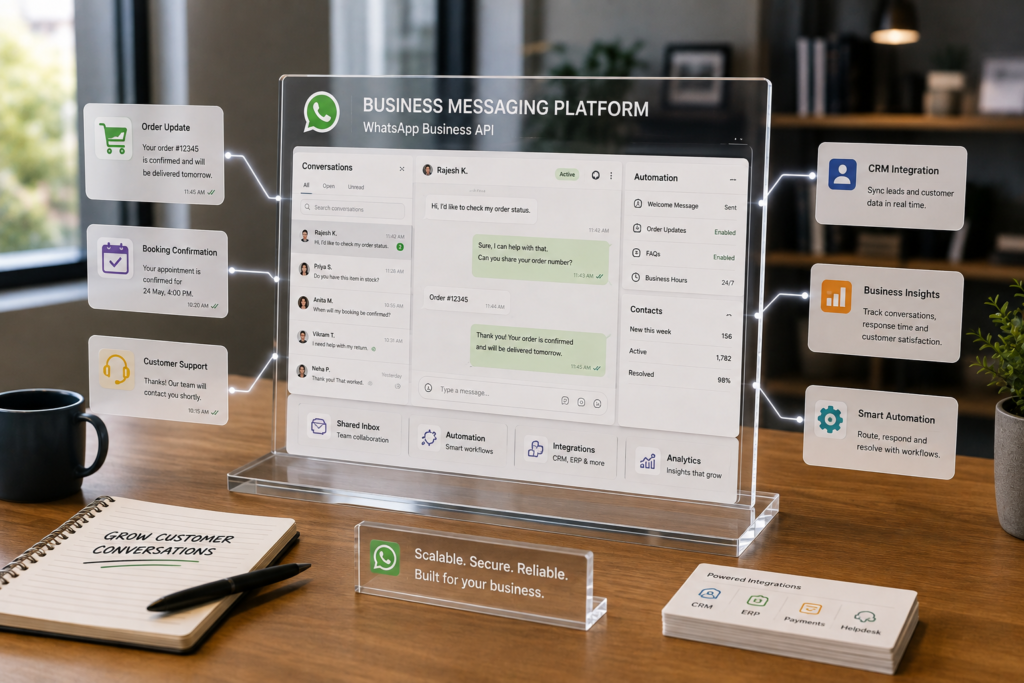
If WhatsApp is already where your customers message you, the problem usually isn’t “how do we get more messages?” It’s “how do we keep up without living inside a phone all day?” That’s exactly the gap the WhatsApp Business API is designed to solve: it turns WhatsApp into a scalable, trackable workflow that can support automation, multiple agents, and CRM/help desk integration.
Quick Answer (40–60 words): The WhatsApp Business API (also called the WhatsApp Business Platform, commonly implemented via the Cloud API) lets small businesses send and receive WhatsApp messages through software instead of a single phone. It’s best when you need automation, multi-agent inboxes, templates for outbound messaging, and integrations with CRM/support systems—while staying compliant with opt-in rules.
Why small businesses get stuck on WhatsApp (and why the API matters)
Most small businesses start on WhatsApp because it’s fast and familiar. Then volume grows, and WhatsApp becomes a bottleneck:
- Slow response times during busy periods or after hours, which costs leads and frustrates customers.
- Repeated questions (pricing, hours, availability, order status, booking links) that drain your team’s time.
- No clean handoff or tracking—conversations live in individual phones, not your CRM or help desk.
- Scaling limits—multiple agents, routing, reporting, and structured automation are hard or impossible in the app.
The API matters because it shifts WhatsApp from “manual chat” to a business messaging workflow: messages can be routed, tagged, logged, automated, measured, and improved.
What is WhatsApp Business API (in plain English)?
The WhatsApp Business API is Meta’s official business messaging API that lets approved businesses send and receive WhatsApp messages programmatically. In practice, you don’t “use the API” like an app—you connect WhatsApp to a system such as:
- a shared team inbox (so multiple staff can respond)
- a CRM (so leads and conversation history are stored properly)
- a help desk (so cases and resolution are managed)
- a chatbot or automation builder (so repetitive requests are handled automatically)
- custom software built by a developer (for deep workflow integration via webhooks)
Meta commonly refers to the overall platform as the WhatsApp Business Platform. Many modern implementations use the WhatsApp Cloud API (hosted by Meta). Recent guides also describe older on-premise approaches as deprecated, so most small businesses should plan around Cloud API or a provider layered on top of it.
WhatsApp Business API vs WhatsApp Business App (what actually changes)
This is the most important decision for small businesses: do you need the API yet, or is the WhatsApp Business App still enough?
| Question | WhatsApp Business App | WhatsApp Business API |
|---|---|---|
| Primary use | Manual messaging from a phone (and limited linked devices) | Messaging through software (inbox/CRM/bot/custom app) |
| Team workflow | Hard to run as a true multi-agent system | Designed for multi-agent access via shared inboxes |
| Automation | Basic auto-replies and quick replies | Rule-based automation, routing, chatbots, webhooks, integrations |
| Tracking & reporting | Limited business reporting | Better analytics potential (varies by BSP/tooling) |
| CRM/help desk integration | Not the core workflow | One of the main reasons to adopt the API |
| Best for | Low volume, simple operations, one-person or very small teams | Growing SMBs needing structure, speed, compliance, and scale |
Consultant Insight: Many small businesses assume the API is automatically “better.” It’s only better when you’re ready to operate WhatsApp like a managed channel—defined message categories, clear ownership, escalation rules, and measurable outcomes. Without that, you’ll pay for complexity before you get value.
How WhatsApp Business API works (the model you should understand before you build)
To make good decisions, you need the basic operating model:
- Your WhatsApp number becomes connected to the WhatsApp Business Platform.
- Customers message you on WhatsApp like normal.
- Your software receives messages via the platform (commonly through webhooks).
- Automation rules or a bot can respond, ask qualifying questions, or route the conversation.
- Humans take over when needed via a shared inbox or CRM.
- Outbound messages often require templates (pre-approved message formats) depending on the type of outreach.
Conceptually, it’s less like “installing WhatsApp” and more like connecting a business messaging API to your workflow stack.
Templates: why they matter for small businesses
WhatsApp template messages are pre-approved message formats typically used for business-initiated outreach (for example: appointment reminders, order updates, follow-ups). Templates exist to reduce spam and keep messaging predictable and compliant.
Practically, templates force a useful discipline: if you can’t write an outbound message clearly enough to submit for approval, your workflow probably isn’t ready for automation at scale.
Human handoff: the difference between “automation” and “good automation”
The best WhatsApp automation doesn’t try to replace your team. It protects their time by handling repetition and routing. You’ll want a clear handoff rule such as:
- handoff when the customer asks a complex question
- handoff when sentiment is negative
- handoff when the bot fails twice
- handoff for high-value leads
If you can’t describe your handoff logic in one paragraph, pause and redesign the workflow before choosing tools.
What small businesses can use WhatsApp automation for (high-ROI use cases)
WhatsApp automation works best when it targets repetitive, high-volume interactions and turns them into structured workflows.
1) Lead capture and qualification (sales)
Problem: Leads message after seeing an ad or referral, but go cold if you reply late.
Workflow: inbound message → instant reply → 3–5 qualifying questions → create/update lead in CRM → route to sales.
Why it matters: Speed-to-lead is often a bigger lever than “better marketing.”
2) FAQs and support triage (customer service)
Problem: Your team answers the same questions every day.
Workflow: user question → intent category (simple menu or AI-assisted) → answer from approved content → escalate when needed.
Trade-off: FAQ bots reduce workload, but poorly maintained content creates wrong answers fast. Ownership matters.
3) Order, delivery, and status updates (ops + support)
Problem: “Where is my order?” messages interrupt your team constantly.
Workflow: customer asks status → system checks order/shipping system → returns update → logs interaction.
Implementation note: This is where direct integrations (webhooks/API calls) create real ROI—copy/pasting order numbers is what you want to eliminate.
4) Appointment reminders and confirmations (clinics, services, consultants)
Problem: No-shows and last-minute cancellations hurt revenue and waste time.
Workflow: booking created → reminder scheduled → customer confirms/reschedules → updates calendar.
When to avoid: If your scheduling system is messy or frequently “double books,” automate the scheduling data first, then the messages.
5) Post-purchase follow-ups (retention)
Problem: Customers buy once and disappear.
Workflow: purchase complete → feedback request → support check-in → targeted reactivation later.
Compliance reminder: Be careful with broadcast-style messaging; segment and message with restraint.
How to set up WhatsApp Business API (two realistic paths)
There are two common setup routes for small businesses:
- Path A: Use a BSP (Business Solution Provider). Best when you want faster onboarding, a shared inbox, template management, and less technical overhead.
- Path B: Use the WhatsApp Cloud API directly. Best when you have developer capacity and need deep custom workflows.
Setup checklist (applies to both paths)
- Define the business goal (support deflection, faster lead response, fewer no-shows, etc.).
- Log your top message categories for at least 1–2 weeks (pricing questions, booking, order status, returns, etc.).
- Decide what to automate first (choose one workflow with high volume and low risk).
- Prepare compliance basics: opt-in language, privacy handling, escalation rules.
- Complete Meta business verification where required and set up your WhatsApp business account.
- Register/attach the phone number you plan to use (this step is often where teams discover operational constraints—like who “owns” the number today).
- Set up templates for your outbound messages and plan an approval workflow.
- Connect inbox/CRM/help desk and define routing and handoff.
- Go live with a pilot and measure outcomes for 2–4 weeks before expanding automation.
Path A: BSP-led setup (recommended for most small businesses)
A BSP is a Meta-approved provider that layers software and onboarding on top of the API. For many SMBs, this is the most practical way to get value quickly.
You’ll like a BSP if:
- you need a shared inbox immediately
- you want no-code automation and routing
- you don’t want to build webhook logic from scratch
- you want vendor support for onboarding and templates
Trade-offs to understand: BSPs can introduce vendor lock-in (moving providers later may take effort), and pricing/features vary widely. Verify what’s included: number management, template tools, automation limits, analytics, integrations, and support responsiveness.
Path B: Direct Cloud API setup (best for developer-led builds)
Direct Cloud API integration gives you the most flexibility. It’s the right move when WhatsApp must tightly integrate with internal systems (inventory, ERP, proprietary scheduling, custom lead scoring) or when you want full control of workflow logic.
Implementation considerations:
- You’ll need engineering time for webhooks, message handling, retries, logging, and monitoring.
- You’ll need to build or adopt an agent interface (a shared inbox doesn’t appear automatically).
- You’ll need governance: who approves templates, who updates FAQ content, who monitors failures.
Recent guides describe Cloud API as the modern supported path and older on-premise approaches as deprecated. If you find older tutorials, treat them cautiously and confirm current documentation in Meta’s official resources before building.
WhatsApp API pricing and costs (what you can say confidently)
Small businesses often ask “Is WhatsApp Business API free?” The most accurate answer is:
- Many recent guides describe API access as available without a separate “license fee,” but
- messaging is billed (commonly described as per delivered message in recent guides), and
- your total cost depends on message volume, templates, and the software/provider layer you choose.
Some sources describe pricing changes since mid-2025 (for example, moving to per delivered message rather than per conversation). Pricing models can change, so don’t build ROI math on assumptions—confirm the current structure on official Meta documentation and your BSP’s pricing page before committing.
Total cost of ownership (TCO): what many SMBs forget
Even when message fees are reasonable, WhatsApp automation has real operational costs:
- Setup and integration effort (one-time and ongoing)
- Template operations (writing, approval, versioning)
- Bot/content maintenance (keeping answers correct)
- Monitoring and escalation (catching stuck conversations)
- Team training (how to take over smoothly, how to tag outcomes)
The businesses that win with WhatsApp automation treat it like a managed channel, not a one-time tech install.
Best tools and providers (how to choose without getting trapped in features)
The tooling landscape can be confusing because many platforms “support WhatsApp,” but they solve different problems. Start with what outcome you need most.
| Option | Best For | Ease of Use | Time to Value | Business Size | Notes |
|---|---|---|---|---|---|
| Cloud API (direct) | Custom builds and deep integrations | Low (technical) | Medium | Growing SMBs with dev support | Most flexible; you must build/choose an inbox, routing, analytics |
| BSP platform | Fast go-live with inbox + automation | High | Fast | Most SMBs | Watch for lock-in and extra fees; verify integrations and limits |
| WhatsApp-first SMB platforms (e.g., WhatsApp-focused inbox + automations) | Running sales/support primarily on WhatsApp | High | Fast | Small teams | Great for WhatsApp operations; may be less ideal if you need true omnichannel |
| Omnichannel conversation platforms | WhatsApp + Instagram + web chat + more | Medium | Medium | Growing SMBs | Best when you genuinely manage multiple channels, not just WhatsApp |
| CRM-first platforms | Sales pipelines where WhatsApp is the main outreach channel | Medium | Medium | Sales-led SMBs | Strong for lead tracking; support-heavy teams may prefer help desk workflows |
| Automation connectors (e.g., Zapier with WhatsApp-enabled tools) | Simple cross-app workflow glue | High | Fast | Small ops teams | Depth depends on the WhatsApp tool you connect; great for lightweight automations |
Selection criteria that matter more than feature lists
- Workflow fit: Is your primary need support, sales, operations updates, or bookings?
- Shared inbox quality: Assignments, internal notes, tags, SLA tracking, auditing.
- CRM/help desk integration depth: Real sync vs shallow notifications.
- Template lifecycle management: Drafting, approvals, version control, performance tracking.
- Handoff and routing: Rules, escalation, working hours, language routing.
- Governance and compliance tools: Opt-in capture, audit trails, access controls.
- Portability risk: If you leave, can you migrate your number, templates, and history cleanly?
Expert Verdict: what most SMBs should do first
Expert Verdict: Most small businesses should start with a BSP-led setup (shared inbox + basic automation) before attempting a direct Cloud API build. It usually delivers faster time-to-value, reduces technical risk, and forces better operational discipline. Direct Cloud API becomes the better choice when you have stable workflows and need deeper integrations or custom logic.
A practical decision tree: App vs API vs API + automation platform
Use this as a quick business decision aid:
- Are you handling WhatsApp messages comfortably with one person (or one device) and low volume?
- Yes → Stay on the WhatsApp Business App for now.
- No → Continue.
- Do you need multiple agents, routing, tags, reporting, or a shared inbox?
- Yes → You likely need the WhatsApp Business API via a BSP or platform.
- No → App may still be enough; consider process changes first.
- Do you need CRM/help desk integration and automated workflows (reminders, order status, lead qualification)?
- Yes → Choose API + BSP/platform (fastest) or API direct (deepest).
- No → API may be unnecessary overhead right now.
- Do you have developer capacity and a clear integration plan?
- Yes → Consider direct Cloud API.
- No → Use a BSP.
Business-First AI Framework™: how to implement WhatsApp automation without tool sprawl
Business-First AI Insight: The WhatsApp Business API isn’t the strategy—your workflow is. The highest ROI comes from choosing one high-volume message category, designing a clean end-to-end flow (including human handoff and CRM logging), and only then selecting the platform and automation approach that fits that workflow.
Here’s how to apply a business-first approach:
- Business Problem: Define what’s failing today (slow response time, missed leads, repetitive support, no-shows).
- Workflow Improvement: Map the “from message to outcome” journey (who owns what, what counts as resolved).
- Choose the Right Solution: App vs BSP vs direct API based on complexity and readiness.
- Implement with Human Oversight: Routing rules, escalation, and QA for automation responses.
- Measure Business Outcomes: Response time, resolution time, conversion rate, booking rate, handoff rate, cost per resolved conversation.
- Standardize and Scale: Expand to the next message category only after the first one is stable.
Common mistakes to avoid (and the better approach)
Mistake 1: Automating before you know your top message categories
Why it happens: Teams jump straight into chatbot building because it feels productive.
Consequence: You automate edge cases and miss the real volume drivers.
Better approach: Log and categorize messages for 1–2 weeks, then automate the top category first.
Mistake 2: Ignoring opt-in and template compliance
Why it happens: Compliance feels like “red tape.”
Consequence: Messaging restrictions, template rejections, customer complaints, reputational risk.
Better approach: Treat opt-in language and template management as part of the workflow design, not an afterthought.
Mistake 3: No human fallback
Why it happens: Overconfidence in automation quality.
Consequence: Customers get stuck, repeat themselves, or churn.
Better approach: Clear escalation rules and a visible “talk to a person” path.
Mistake 4: Choosing a platform based on features instead of operations
Why it happens: Demos look similar; feature checklists dominate.
Consequence: You buy complexity that your team won’t use.
Better approach: Evaluate tools on routing, reporting, CRM depth, template operations, and portability.
Start Today / Improve Next / Scale Later (implementation priorities)
Start Today (low effort, high clarity)
- Create a list of your top 10 WhatsApp questions and tag each as Sales, Support, Bookings, or Ops.
- Pick one metric to improve first (for example, first response time).
- Write draft responses for the top 3 repetitive questions (these often become your first templates or bot answers).
Improve Next (next 30 days)
- Choose your setup path: App (for now) vs BSP vs direct Cloud API.
- Design one pilot automation: lead qualification OR appointment reminders OR order status.
- Set up a shared inbox workflow (ownership, handoff, working hours, tags).
Scale Later (after the pilot proves value)
- Add CRM/help desk logging and reporting discipline.
- Expand to the next message category and standardize template governance.
- Introduce more advanced routing (language, region, product line) and QA monitoring.
FAQs
What is WhatsApp Business API?
The WhatsApp Business API is Meta’s official business messaging interface that lets you send and receive WhatsApp messages through software—enabling automation, multi-agent inboxes, templates, and integrations with CRMs and help desks.
What is the difference between WhatsApp Business App and WhatsApp Business API?
The app is a manual tool primarily for small-scale messaging. The API is designed for scalable operations: multiple agents, automation, routing, templates, and integrations with business systems.
Can small businesses use WhatsApp Business API?
Yes. Small businesses typically adopt it when they need a shared inbox, faster response automation, CRM syncing, or structured workflows (appointments, order updates, lead qualification) that the app can’t handle well.
Do I need a BSP to use WhatsApp Business API?
Not always, but many small businesses benefit from a BSP because it simplifies onboarding and provides an inbox and automation tools. Direct Cloud API is better when you have developer capacity and need custom integrations.
Is WhatsApp Business API free?
Guides commonly describe API access as available without a separate license fee, but messaging is billed (often described as per delivered message in recent guides). Because pricing models can change, confirm current pricing on Meta’s official documentation and your provider’s pricing page.
Do I need message templates for WhatsApp automation?
In many cases, yes—especially for business-initiated outbound messaging like reminders and follow-ups. Templates must typically be approved, so plan for writing, approval, and version control as part of ongoing operations.
Is WhatsApp Cloud API the same as WhatsApp Business API?
The Cloud API is a common modern implementation path for the WhatsApp Business Platform. Many recent guides describe Cloud API as the supported approach, while older on-premise options are described as deprecated.
What’s the best first WhatsApp automation for a small business?
Start with your highest-volume repetitive category (often FAQs, appointment reminders, or lead qualification). Build one workflow end-to-end—including human handoff and logging—then measure results before adding more automations.
Conclusion: treat WhatsApp like a workflow, not a chat
The real shift with the WhatsApp Business API is operational: you stop treating WhatsApp as a series of one-off conversations and start treating it as a managed business channel—with defined workflows, clear ownership, automation where it helps, and humans where it matters.
If you’re deciding what to do next, don’t start by picking a platform. Start by identifying the single message category that consumes the most time (or loses the most revenue when delayed). Design that workflow first, then choose the simplest WhatsApp API setup that can run it reliably.
Next step: Run a 7–14 day “message-type audit” (tag every inbound WhatsApp message by category). Once you know your true volume drivers, the App vs BSP vs direct Cloud API decision becomes much clearer—and your first automation is far more likely to pay off.