
Automate Appointment Booking Using WhatsApp (Step-by-Step Guide)
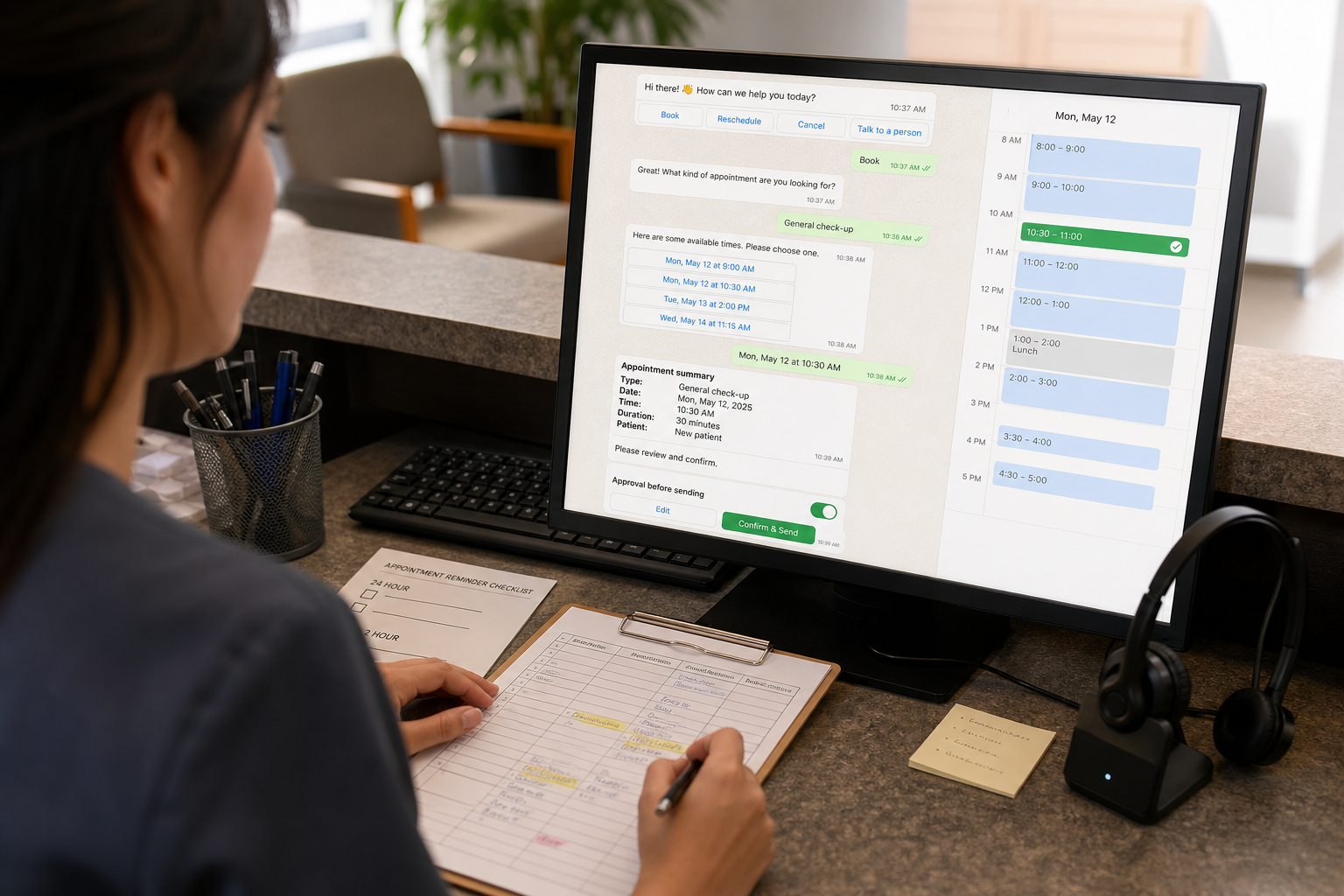
If your team is spending hours replying to “What times are available?” or chasing confirmations, WhatsApp Appointment Booking can act like a lightweight 24/7 receptionist. Done well, it reduces scheduling back-and-forth, confirms appointments faster, and automates reminders so fewer slots go to waste—without forcing customers to download yet another app.
Quick Answer (40–60 words): To automate WhatsApp appointment booking, map your booking workflow (service → availability → confirmation → reminders → reschedule/cancel), choose the simplest setup (link-based or conversational), connect a live calendar to prevent double bookings, and use approved WhatsApp message templates for confirmations and reminders. Add AI only if you need flexible conversation handling or lead qualification.
What is WhatsApp appointment booking (and what “automation” actually means)
WhatsApp appointment booking is when customers can request and confirm an appointment directly inside a WhatsApp chat thread. Automation means the system can collect key details, show available slots, confirm the booking, and send reminders (and handle reschedules/cancellations) with minimal staff involvement.
It helps to separate three levels of “WhatsApp booking,” because many businesses jump straight to “AI” when they mostly need workflow basics:
- Level 1: Manual WhatsApp booking — staff chats with customers and manually checks a calendar.
- Level 2: Assisted booking — WhatsApp sends a booking link (or form) and the calendar system handles availability/confirmation.
- Level 3: Automated conversational booking — a WhatsApp workflow (chatbot/flow) collects details, checks live availability, confirms, and triggers reminders and updates.
The best starting point is rarely the most advanced one. The best starting point is the one that removes your biggest bottleneck with the least operational risk.
Why automate booking on WhatsApp (business outcomes, not hype)
Businesses choose WhatsApp booking automation because it reduces friction at the exact moment a customer is trying to commit. In practical terms, it can improve operations in five ways:
- Faster response time — leads don’t wait for office hours or a call back.
- Less back-and-forth — fewer “what about Tuesday at 4?” loops.
- Fewer double bookings — when availability is pulled from a live calendar (instead of memory or spreadsheets).
- Fewer no-shows — confirmations and reminders can prompt customers to confirm, reschedule, or cancel early.
- Reduced admin load — staff focus on exceptions (special requests, complex cases, VIP clients) instead of repetitive scheduling.
Clinics and other appointment-based businesses often feel this most at the front desk: scheduling interruptions stack up quickly, and after-hours inquiries get lost or delayed.
Manual booking vs automated booking (quick comparison)
| Area | Manual WhatsApp booking | Automated WhatsApp booking |
|---|---|---|
| Speed | Depends on staff availability | Near-instant for common requests |
| Accuracy | Higher risk of errors/double booking | Lower risk when synced to a calendar |
| After-hours | Messages wait until opening hours | Bookings can happen 24/7 |
| No-show prevention | Reminders often inconsistent | Scheduled confirmations + reminders |
| Staff workload | High repetitive effort | Staff handle exceptions only |
How WhatsApp booking automation works (end-to-end flow)
Most successful WhatsApp booking automations follow a simple backbone. The details vary by industry, but the structure stays consistent:
- Entry point (customer starts chat): website button, QR code in-store, Click-to-WhatsApp ads, Instagram, or Google Business Profile.
- Qualification (collect minimum viable details): service type, preferred staff (optional), location (if multi-site), and timing preference.
- Slot selection: show available times from a live calendar (or route to a booking page that does).
- Confirmation: confirm the slot, capture name + contact details, and write the appointment into the calendar/CRM.
- Reminders: send reminders (commonly 24 hours and 2 hours before) with simple options: Confirm / Reschedule / Cancel.
- Updates: if the customer reschedules/cancels, update the calendar and optionally notify staff.
- Fallback to human: when the request is complex or sensitive, assign to staff with context.
This is the core idea: WhatsApp is the conversation layer. Your calendar and CRM are the source of truth. Automation is the glue that keeps them in sync.
Business-First AI Framework™ for WhatsApp booking (use this before choosing tools)
Before you evaluate platforms, use a business-first lens so you don’t buy complexity you won’t maintain:
- Business problem: missed leads, slow responses, admin overload, no-shows.
- Workflow improvement: shorten booking time, standardize reminders, reduce calendar errors.
- Choose the right solution: start simple (links/templates) and add conversational automation only when needed.
- Implement with human oversight: clear handoff rules, audit logs, staff notifications.
- Measure business outcomes: response time, conversion rate, no-show rate, reschedules, staff time per booking.
- Standardize and scale: replicate across services/locations only after one flow works reliably.
Business-First AI Insight: Most small businesses don’t have an “AI problem” in scheduling—they have a workflow consistency problem. Calendar sync, short booking flows, and clear reschedule/cancel handling usually deliver the majority of ROI. AI becomes valuable later, when you need flexible conversation handling or lead qualification at scale.
Step-by-step: automate WhatsApp appointment booking (a practical build plan)
This tutorial is written to be tool-agnostic. The exact clicks differ by platform, but the implementation decisions are the same.
Step 1: Define your booking rules (keep it short)
Start by deciding what the system must know to book correctly. For many businesses, that’s:
- Service (e.g., consultation, follow-up, treatment type)
- Duration (15/30/60 minutes)
- Staff member (optional)
- Location (if multi-site)
- Customer name + contact details
- Notes (optional, short)
Implementation tip: Don’t ask for everything. Every extra question increases drop-off. If you need more data (especially in clinics), collect it after the slot is confirmed or route to a secure intake form.
Step 2: Choose your automation level (link-based vs conversational)
Use this decision logic:
- Start with link-based booking if your goal is “reduce back-and-forth” and you already have a booking calendar page.
- Use conversational automation if your goal is “book inside chat,” route by service/provider, or handle reschedules/cancellations without staff.
- Add AI scheduling only if customers ask in messy natural language (e.g., “any time after my school run next week”) and you want the system to interpret it reliably.
Step 3: Pick WhatsApp infrastructure: Business App vs Business API (Cloud API)
This is where many teams get stuck. The WhatsApp Business app is great for manual messaging and basic quick replies. True automation typically requires the WhatsApp Business API (often via WhatsApp Cloud API) and a platform to manage workflows and templates.
| Option | Best for | What you can automate | Key trade-off |
|---|---|---|---|
| WhatsApp Business App | Solo owners, very small teams | Quick replies, labels, basic organization | Limited true automation and integrations |
| WhatsApp Business API / Cloud API | Teams needing workflows + integrations | Automated flows, templates, routing, system messages | Setup complexity and ongoing management |
Rule of thumb: If you need calendar sync + automated reminders at scale, plan on API-based automation.
Step 4: Connect a live calendar (the “no double booking” foundation)
Calendar sync is the difference between “messages” and “booking automation.” Your automation should either:
- Read availability from a calendar/scheduling tool, then write confirmed appointments back, or
- Send users to a booking page that controls availability and confirmations, while WhatsApp handles messaging and reminders.
Implementation considerations:
- One source of truth: decide whether Google Calendar, a scheduling tool, or your CRM calendar is authoritative.
- Buffer times: add buffers between appointments where needed (common in clinics and on-site services).
- Time zones: critical for consultants/agencies with remote clients.
- Staff calendars: if customers choose a provider, availability must be provider-specific.
Step 5: Build the WhatsApp booking conversation (minimum viable flow)
A practical “minimum viable” conversational flow looks like this:
- Greeting + intent: “Book / Reschedule / Cancel / Ask a question.”
- Service selection: 3–7 clear options (avoid huge menus).
- Collect constraints: preferred day/time window (today/tomorrow/this week), staff preference (optional).
- Show slots: offer 3–5 valid times (not an entire calendar).
- Confirm details: “Confirm appointment for [Service] on [Date/Time]. Reply 1 to confirm.”
- Create appointment: write to calendar/CRM and store the WhatsApp contact mapping.
Why this structure works: it reduces cognitive load. Customers pick from a few clear choices, the system only shows valid times, and confirmation becomes a single action.
Step 6: Add confirmations and reminder automation (24h / 2h pattern)
Reminder timing depends on your business (and local norms), but a common, effective structure is:
- Instant confirmation right after booking
- Reminder 1 at ~24 hours before (gives time to reschedule)
- Reminder 2 at ~2 hours before (reduces forgetfulness)
- Optional follow-up after the appointment (review request, rebook prompt, care instructions—only if appropriate)
What matters most is not the exact timing. It’s giving customers a frictionless way to confirm, reschedule, or cancel—so your calendar stays accurate.
Step 7: Design reschedule/cancel flows (where most automations break)
A strong WhatsApp booking automation treats rescheduling and cancellations as first-class flows, not edge cases.
Reschedule flow (recommended):
- Customer replies “Reschedule” (or taps a button if supported)
- System asks for preferred window (e.g., “this week” / “next week”)
- System shows 3–5 available slots
- Customer chooses
- System updates the calendar event (not creating duplicates)
- System confirms new time and updates reminders
Cancel flow (recommended):
- Customer replies “Cancel”
- System confirms cancellation intent (to avoid accidental cancels)
- System updates calendar + notifies staff (if needed)
- System optionally offers to rebook later
Implementation tip: Always include a “Talk to a person” option. Some reschedules are complicated (multi-appointment treatment plans, insurance constraints, urgent changes).
Step 8: Add a human handoff rule (non-negotiable for real businesses)
Automation should handle the predictable 80%. Humans handle exceptions. Define handoff triggers such as:
- Customer asks a complex question beyond booking (especially medical/legal/financial)
- Customer requests an unavailable time repeatedly
- Customer is flagged as VIP/high-value lead
- Multiple cancellations/reschedules in a short period
- Any compliance-sensitive message (common in clinics)
Consultant Insight: The fastest way to lose trust is forcing customers into a loop. If the bot can’t solve the problem in 2–3 turns, escalate with context so staff can finish the job quickly.
Step 9: Track KPIs that reflect business value (not chatbot activity)
Don’t measure success by message counts. Measure what changes operational outcomes:
- Median first response time (before vs after)
- Booking conversion rate (WhatsApp conversations → confirmed appointments)
- No-show rate
- Reminder confirmation rate (how many explicitly confirm)
- Reschedule rate (and whether reschedules keep the slot filled)
- Staff time per booking (rough estimate is fine to start)
Which setup do you need? (decision matrix)
If you’re unsure whether you need a dedicated platform, a CRM workflow tool, or a custom build, use this matrix:
| Scenario | Recommended approach | Why | Watch-outs |
|---|---|---|---|
| Solo consultant with simple availability | Link-based booking + WhatsApp quick replies | Fast to implement, low maintenance | Limited automation for reschedules/reminders at scale |
| Clinic front desk overloaded | WhatsApp booking platform with templates + calendar sync + reminders | Standardizes intake and reduces repetitive work | Compliance and sensitive messages need strict handoff rules |
| Agency running many discovery calls | CRM-driven WhatsApp flows (lead → booking → follow-up) | Tracks pipeline and improves speed-to-lead | Requires clean CRM processes or it becomes messy fast |
| Multi-staff business with different services and durations | Conversational booking workflow connected to staff calendars | Prevents double bookings and misrouted appointments | More setup: services, rules, buffers, staff routing |
| Custom requirements (unique rules, multiple systems) | Custom automation stack (e.g., automation platform + WhatsApp API + calendar) | Maximum flexibility and extensibility | Higher technical effort and ongoing maintenance |
Best tools for WhatsApp booking automation (business-focused comparison)
There isn’t one “best” tool for everyone. The right choice depends on whether you need structured workflows, a CRM-first approach, clinic-specific features, or a custom build.
| Tool | Best For | Ease of Use | Time to Value | Business Size | Notes |
|---|---|---|---|---|---|
| HighLevel | Agencies/consultants wanting CRM + booking flows | Medium | Fast if you already use a CRM | Small to mid-sized | Strong if your booking is part of a broader lead-to-client workflow |
| Respond.io | Teams needing structured WhatsApp workflows and routing | Medium | Medium | Small to mid-sized | Good for operational control across conversations and staff handoff |
| AiSensy | Clinics and medical centers running acquisition + booking journeys | Medium | Medium | Small to mid-sized | Often positioned for clinic workflows and Click-to-WhatsApp funnels |
| WhatAClinic | Clinics wanting a purpose-built WhatsApp receptionist layer | Low to Medium | Fast | Small clinics | Narrow focus can be a strength if you match the use case |
| n8n (custom build) | Custom workflows, technical teams, advanced routing/AI | High effort | Slower | Any (with capacity) | Most flexible; requires engineering/ops maturity |
| Infobip | Larger businesses or multi-location messaging needs | Medium | Medium | Mid-sized to larger | Established provider; evaluate fit and required integrations carefully |
Expert Verdict (what most small businesses should do first)
Expert Verdict: Most small businesses should start with a template-driven WhatsApp booking flow plus calendar sync and reminder automation before investing in a custom AI scheduling agent. You’ll usually capture most of the value (speed, fewer no-shows, fewer admin hours) with less risk and less maintenance. Move to AI only when conversation variability becomes your bottleneck.
Practical templates: booking, confirmation, and reminder scripts
Below are examples you can adapt. Keep them short, clear, and action-oriented.
Booking start message
- Message: “Hi! I can help you book an appointment. What do you want to do? Reply: 1) Book 2) Reschedule 3) Cancel 4) Talk to a person”
Confirmation message
- Message: “Confirmed: [Service] on [Day, Date] at [Time]. Reply CONFIRM to confirm, RESCHEDULE to change time, or CANCEL to cancel.”
24-hour reminder
- Message: “Reminder: you have [Service] tomorrow at [Time]. Reply CONFIRM, RESCHEDULE, or CANCEL.”
2-hour reminder
- Message: “Quick reminder: your [Service] is today at [Time]. Need to change it? Reply RESCHEDULE or CANCEL.”
Reschedule options message
- Message: “Sure—choose a new time: 1) [Slot A] 2) [Slot B] 3) [Slot C]. Reply with 1, 2, or 3.”
Note on WhatsApp templates: If you’re using the WhatsApp Business API, certain outbound messages (especially outside the customer service window) may need approved message templates. Plan your reminders and confirmations accordingly in your platform.
Common mistakes to avoid (and what to do instead)
- Mistake: Automating without calendar sync.
Why it happens: teams try to “start fast” with a chatbot only.
Consequence: double bookings, manual clean-up, lost trust.
Better approach: make live availability the foundation—even if everything else is simple. - Mistake: Over-automating sensitive conversations (especially in clinics).
Why it happens: automation feels like it should handle “everything.”
Consequence: compliance risk and poor patient experience.
Better approach: automate scheduling logistics; escalate medical questions to staff. - Mistake: No clear human fallback.
Why it happens: teams focus on the “happy path.”
Consequence: customers get stuck in loops and drop off.
Better approach: define escalation rules and notify staff with context. - Mistake: Long, complicated booking flows.
Why it happens: businesses try to replicate their full intake process in chat.
Consequence: drop-offs before confirmation.
Better approach: confirm the slot first, then collect extra details (or use a secure form). - Mistake: Measuring the wrong things.
Why it happens: dashboards highlight messages, not outcomes.
Consequence: “busy” automation that doesn’t improve revenue or efficiency.
Better approach: track conversion, response time, no-shows, and staff time per booking.
Use cases: how different small businesses should implement WhatsApp booking
Clinics
Best starting workflow: booking + reminders + reschedule/cancel. Keep medical questions out of automation and route them to staff.
- Why it matters: front-desk overload and no-shows are common operational drains.
- Implementation watch-outs: privacy/compliance, sensitive content, and clear disclaimers about what the chat can and can’t handle.
- Good add-on later: structured intake for visit type (new vs returning), preferred doctor, and basic administrative details.
Consultants and coaches
Best starting workflow: WhatsApp entry → qualification question or two → booking link with pre-filled context → confirmation + reminders.
- Why it matters: response speed impacts whether leads book a call or disappear.
- Good add-on later: AI qualification to route high-intent leads to priority slots (only if your lead volume justifies it).
Agencies
Best starting workflow: Click-to-WhatsApp lead capture → brief qualification → calendar booking → CRM update → follow-up reminders.
- Why it matters: agencies often lose leads due to slow follow-up, not lack of demand.
- Implementation watch-outs: keep qualification short; don’t turn booking into an interrogation.
Local businesses (salons, repair services, fitness, home services)
Best starting workflow: service selection → location (if needed) → slots → confirmation → reminders.
- Why it matters: customers prefer messaging over calls, especially during work hours.
- Good add-on later: post-appointment follow-up and rebooking prompts (only if it fits your brand experience).
Start Today / Improve Next / Scale Later (implementation priority)
Start Today (low effort)
- Write your minimum booking rules (services, durations, buffers).
- Create WhatsApp entry points: website button and a QR code at the front desk/counter.
- Standardize 5 quick replies: availability, booking link, location, reschedule, cancel.
Improve Next (next 30 days)
- Add calendar sync (or move to a booking system that provides live availability).
- Implement automated confirmations and at least one reminder (start with 24-hour).
- Define human handoff rules and staff notifications.
- Track baseline KPIs: response time, no-shows, and booking conversion.
Scale Later (after one workflow is stable)
- Add reschedule/cancel automation that updates calendar events correctly.
- Route by service/provider/location for multi-staff operations.
- Consider AI scheduling for flexible natural language requests and qualification—only if it reduces staff workload measurably.
FAQs
How does WhatsApp appointment booking work?
A customer messages you on WhatsApp, the system collects the required details (service, preferred time, optional staff member), shows available slots from a connected calendar, confirms the appointment, and then sends reminders. Good setups also support rescheduling and cancellations directly in the same chat.
Do I need AI for WhatsApp booking automation?
No. Many businesses can automate booking using structured workflows, booking links, templates, and calendar sync. AI becomes useful when customers frequently write messy, ambiguous requests and you want the system to interpret intent, qualify leads, or handle varied conversation paths without expanding your menu endlessly.
Can WhatsApp send appointment reminders automatically?
Yes. Automated reminder workflows commonly send messages around 24 hours and 2 hours before the appointment, often with simple options to confirm, reschedule, or cancel. The key is ensuring the reminder system is tied to your real appointment record so changes stay consistent.
Can I sync WhatsApp booking with Google Calendar?
In many setups, yes—either directly through a booking tool that syncs with Google Calendar or through an automation layer that reads/writes calendar events. The important requirement is that availability stays live so you don’t offer slots that are already taken.
Is WhatsApp appointment booking suitable for clinics?
Yes, it’s a common use case because it reduces front-desk scheduling load and supports confirmations and reminders. Clinics should be especially careful with privacy, message content, and handoff rules—automation should focus on scheduling logistics, not medical advice.
What’s the simplest WhatsApp booking automation for a small business?
Usually: WhatsApp entry points (button/QR) + a booking link to a scheduling page + automatic confirmation and at least one reminder. That approach reduces back-and-forth immediately and is easier to maintain than a fully conversational bot.
Can customers reschedule or cancel through WhatsApp?
Yes, if you design the flow. The best practice is to let customers reply with clear keywords (CONFIRM/RESCHEDULE/CANCEL) and have the system update the calendar event rather than creating duplicates. Always provide a “talk to a person” option for edge cases.
What are the biggest mistakes with WhatsApp booking automation?
The most common issues are skipping calendar sync, building overly long booking flows, not planning human handoff, and trying to automate sensitive conversations that require staff review (especially in healthcare). A short flow with reliable data sync usually beats a “smart” bot that can’t update records correctly.
Conclusion: the real goal isn’t “booking on WhatsApp”—it’s a dependable scheduling system
WhatsApp is a powerful booking channel because customers already live there. But the business win comes from workflow control: live availability, consistent confirmations, automated reminders, and reliable reschedule/cancel handling that keeps your calendar clean.
If you remember one principle, make it this: don’t automate conversation first—automate correctness first. When your calendar sync, reminder logic, and human fallback are solid, WhatsApp appointment booking becomes a genuine operational advantage instead of another inbox your team has to manage.
Next steps: Map your current booking workflow, identify where the back-and-forth and no-shows happen, then implement the simplest WhatsApp booking automation that fixes those points. If you want help pressure-testing your workflow and picking the right setup level (link-based, conversational, or AI-assisted), consider requesting a WhatsApp booking workflow review.