
AI Automation vs Traditional Automation: Which Should Small Businesses Use in 2026?
If your team is drowning in admin work, it’s tempting to assume the “most advanced” automation is automatically the best choice. This guide explains AI automation for small business in practical, workflow-first terms.
But in 2026, the real decision behind AI vs traditional automation is simpler: does your workflow run on clear rules, or does it require interpretation? Pick the wrong approach and you’ll either overpay for complexity—or end up babysitting brittle automations that break every time an email format changes.
Quick Answer: Which One Should You Choose?
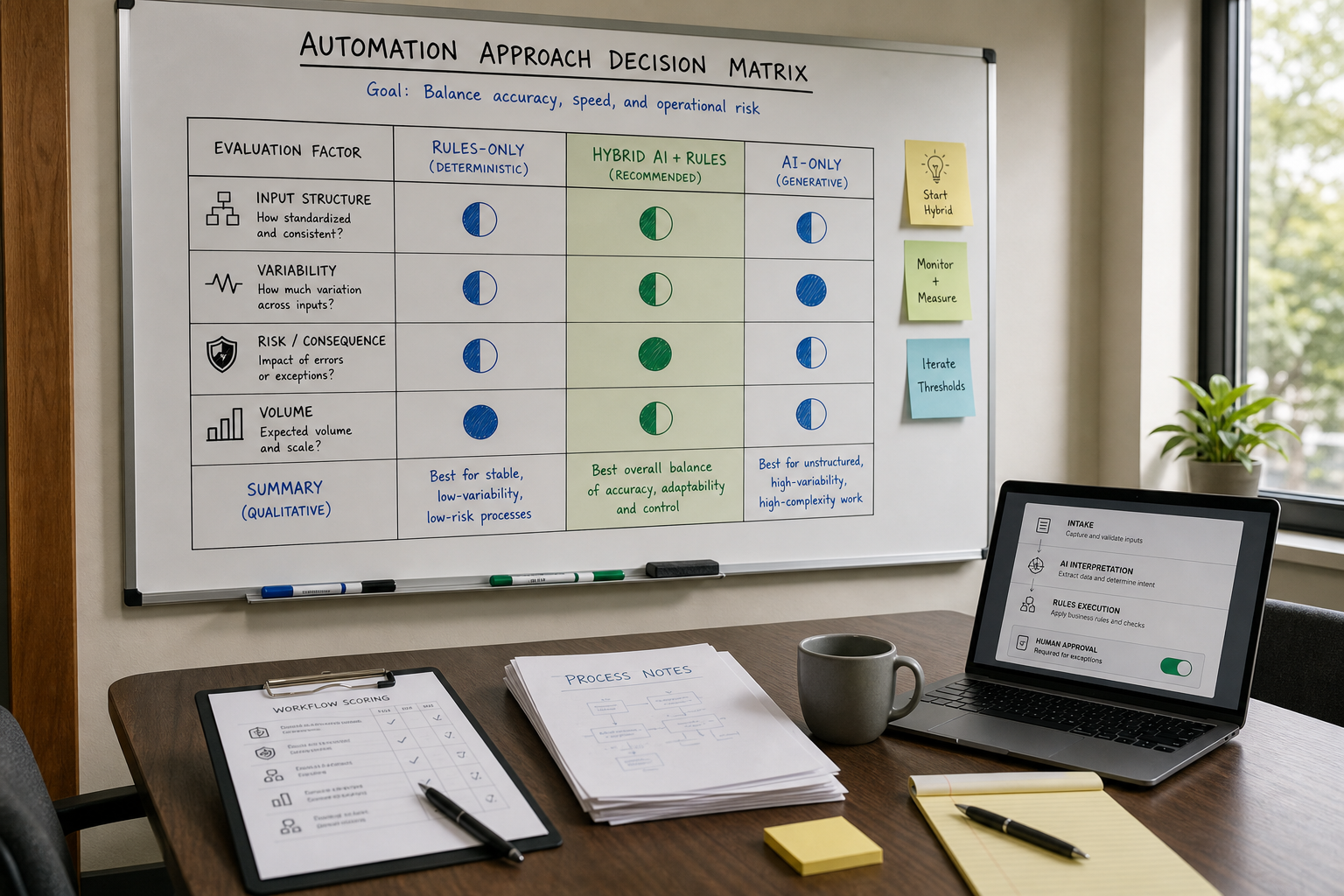
Traditional automation is best for stable, rules-based processes (think: “if X, then do Y”). AI automation is best when inputs are messy or variable (emails, PDFs, free-text requests) and the workflow needs classification, extraction, summarization, or drafting. For most small businesses in 2026, the strongest approach is a hybrid stack: rules-based automation executes predictable steps, and AI interprets context and unstructured inputs, while rules and human review control exceptions and consequential actions.
Why This Decision Matters for Small Businesses (Not Just “Tech Teams”)
Automation decisions don’t fail because the tools are bad. They fail because businesses automate the wrong part of the workflow—or pick a tool category that doesn’t match how work actually shows up day to day. The right automation for small business should reduce repetitive work without creating unnecessary technical or governance complexity.
- If you choose rules-based automation for messy work, you’ll spend your time maintaining edge cases, building workarounds, and fixing broken handoffs.
- If you choose AI for purely structured work, you may introduce avoidable risk (inconsistent outputs), governance overhead, and higher costs than necessary.
Small businesses usually need fast time-to-value, low operational disruption, and measurable outcomes like faster customer responses, fewer errors, and more time back for revenue-generating work. Small businesses are increasingly using AI to support productivity and growth, but adoption alone does not guarantee ROI. The value comes from matching the technology to the workflow, controlling risk, and measuring outcomes against a baseline.
Start With the Business-First AI Framework™ (Before You Pick Tools)
At Intelligent AI Lab, we push a simple sequencing rule because it prevents expensive mistakes:
- Business Problem (what’s slowing growth or wasting time?)
- Workflow Improvement (can you simplify the process before automating?)
- Choose the Right Solution (traditional vs AI vs hybrid)
- Implement with Human Oversight (approvals, monitoring, exception handling)
- Measure Business Outcomes (hours saved, response time, error rate, conversion)
- Standardize and Scale (templates, governance, training)
Business-First AI Insight: The highest ROI in small business automation usually comes from cleaning up the workflow boundary (what triggers the process, what “done” means, and who approves exceptions) before adding AI. AI can handle variability—but it can’t rescue a process with unclear ownership, missing data, or inconsistent rules.
Is Your Workflow Ready for Automation?
Before choosing AI automation or traditional automation, make sure the workflow itself is ready.
Automation cannot fix unclear ownership, inconsistent source data, undefined exceptions, or a process that changes every week. In fact, automating an unstable process usually makes the problem harder to spot because the mistakes happen faster and at a larger scale.
Use this quick readiness check before you invest in a tool:
- Is there a clearly defined trigger that starts the workflow?
- Is there a clearly defined outcome or “done” state?
- Does one person own the workflow and its exceptions?
- Is there a known system of record for the required data?
- Is the data reasonably clean, complete, and accessible?
- Are the most common exceptions documented?
- Which actions can happen automatically?
- Which actions require human approval?
- What should happen if the workflow cannot proceed?
- Who receives an alert if the workflow fails?
Business-First AI Insight: If you cannot explain the workflow on one page—including its trigger, steps, owner, exceptions, and outcome—you are probably not ready to automate it yet.
Start by simplifying the process. Then decide where rules-based automation, AI automation, or human review belong.
What Is Traditional Automation?
Traditional automation (often called workflow automation or business process automation) uses pre-defined rules to move work forward. It’s typically “trigger → conditions → actions,” such as:
- When a lead form is submitted, create a CRM record and notify sales.
- When an invoice is marked “approved,” prepare the payment record, notify the authorized payer, and archive the PDF.
- Every Monday at 8:00 AM, generate a report and email it to managers.
Why Traditional Automation Still Wins in 2026
Traditional automation is “boring” in the best way: it’s deterministic and repeatable. For structured work, that reliability is a feature—not a limitation.
- Predictability: the same input produces the same output.
- Governance: easier to audit, approve, and explain.
- Speed to implement: great for quick wins in stable workflows.
Where Traditional Automation Breaks Down
Rules-based flows struggle when the world isn’t predictable:
- Emails arrive in different formats.
- Customers describe the same problem in 50 different ways.
- Invoices have inconsistent layouts.
- Exceptions require judgment (“is this urgent?” “is this a valid refund?”).
Where RPA Fits in Traditional Automation
Traditional automation is broader than no-code “trigger → action” workflows.
It can include scheduled jobs, scripts, APIs, integration platforms, business rules, approval workflows, and robotic process automation (RPA).
RPA is useful when software needs to interact with an application through its user interface rather than through a direct API. For example, an RPA bot might copy information from one legacy system into another when the systems cannot integrate directly.
For most small businesses using modern cloud tools, API-based or no-code workflow automation is usually easier to maintain than RPA. Use RPA when a critical system has no practical API or integration option—not simply because it sounds more advanced.
RPA and AI can also work together: RPA handles deterministic UI-based actions, while AI interprets unstructured information before the action is executed.
What Is AI automation?
AI automation adds a layer of language understanding and probabilistic reasoning to a workflow. Instead of relying only on rigid rules, AI can help with tasks like:
- Classification: identify intent (billing question vs technical support vs sales inquiry).
- Extraction: pull fields from unstructured text or documents.
- Summarization: turn long email threads into concise notes.
- Drafting: generate first-draft replies, proposals, or internal updates.
- Semantic matching: map “messy” customer language to known categories.
This combination of AI capabilities with structured workflow controls is often described as intelligent automation.
What AI Automation Is Not
AI automation is not a guarantee of perfect accuracy. It’s best thought of as:
- a speed layer for interpretation-heavy work, and
- a flexibility layer for variation and exceptions.
That’s why human oversight matters—especially in finance, compliance-sensitive industries, and customer-facing workflows where tone and policy matter.
AI Automation vs Traditional Automation: Key Differences That Actually Affect ROI
Feature lists don’t help you choose. Operational trade-offs do. Here’s the comparison that tends to matter most for small businesses.
| Dimension | Traditional Automation (Rules-Based) | AI Automation | What it means for a small business |
|---|---|---|---|
| Best input type | Structured (forms, database fields, consistent templates) | Unstructured (emails, PDFs, chat messages, call notes) | Match the automation type to how work arrives today—not how you wish it arrived. |
| Handling variation | Low (breaks when formats change) | Higher (can interpret different phrasings and layouts, but needs testing and guardrails) | If exceptions are common, rules-only automation becomes a maintenance job. |
| Output reliability | Very high (deterministic) | Variable (probabilistic; needs evaluation) | Use approvals/guardrails where errors are costly. |
| Governance & auditability | Easier (clear logic) | More involved (output quality can change when models, prompts, connected data, policies, or edge cases change) | Plan who owns quality control and how you test changes. |
| Time to value | Often faster for simple workflows | Faster for messy workflows once set up correctly | Quick wins usually start rules-first, then add AI where needed. |
| Typical risk profile | Lower for structured tasks | Higher if used without oversight in sensitive workflows | Risk isn’t “AI is bad”; it’s “AI without controls is fragile.” |
Two-Axis Decision Framework: Ambiguity vs Consequence
Instead of asking, “Should we use AI or traditional automation?”, evaluate the workflow on two separate dimensions:
- How predictable is the input?
- What is the consequence if the workflow gets it wrong?
This matters because high risk does not automatically mean “use more AI.” High risk means you need stronger controls, validation, and human approval.
| Workflow type | Low consequence if wrong | High consequence if wrong |
|---|---|---|
| Structured and predictable input | Use traditional automation. Example: appointment reminders, internal notifications, CRM field updates, and scheduled reports | Use traditional automation with approval controls. Example: payment preparation, high-value discount routing, or finance approvals |
| Unstructured or variable input | Use AI-assisted automation with monitoring. Example: inbox classification, ticket summarization, document extraction, or lead categorization | Use AI-assisted interpretation with mandatory human approval. Example: refund requests, complaints, contracts, financial exceptions, or policy-sensitive customer replies |
The practical rule is simple:
Use AI to interpret information. Use rules to control execution. As the consequence of an error increases, increase human oversight, output validation, and approval controls.
For example, AI can read an incoming email and identify that it is a refund request. But the final decision to issue a refund should follow your policy rules and, where necessary, require a human approver.
Which Workflows Belong in Each Category? (Practical Mapping)
Use the Two-Axis Decision Framework above to choose the right automation approach: traditional automation, AI-assisted automation, or a hybrid workflow.
Then decide which suitable workflow should be automated first. The best starting point is usually a process with high volume, clear ownership, measurable friction, reliable data, and a low-to-moderate consequence of error.
Before prioritizing a workflow, check these factors:
- Volume: How often does the workflow happen each week or month?
- Manual effort: How much time does each task take, including follow-ups, rework, and handoffs?
- Variability: How often do exceptions or unusual cases occur?
- Process ownership: Is one person responsible for the workflow and its exceptions?
- System of record: Is the required data stored in a reliable system, such as a CRM, help desk, accounting platform, spreadsheet, or project-management tool?
- Data quality: Is the information complete, consistent, and available when the workflow needs it?
- Business impact: Will faster execution, fewer errors, or better follow-up create a meaningful operational or revenue benefit?
- Consequence of error: What happens if the automation is wrong, delayed, incomplete, or applied to the wrong customer or record?
A high-volume workflow is not automatically the best first automation. Prioritize workflows where repetitive manual effort is high, the process is stable enough to document, and the business can measure an improvement in time, quality, response speed, or conversion.
Best Fits for Traditional Automation (Rules-Based)
Use traditional automation when you can describe the process as a checklist with clear conditions and predictable outcomes.
- Status updates and notifications: Order shipped → send customer message; ticket closed → request feedback.
- Data syncing: Form submission → CRM → email list → task manager.
- Scheduled reporting: Weekly KPI email, daily inventory snapshot, or monthly sales report.
- Structured approval routing: Purchase request below a defined threshold → route according to policy; above the threshold → send to a manager for review.
- Invoice workflows with strict controls: Match a purchase-order number, check required fields, route for approval, and archive the document.
- Appointment reminders: Booking confirmed → send reminder → create follow-up task if the customer does not respond.
- Employee or customer onboarding: Completed form → create checklist → assign tasks → send approved welcome information.
Best Fits for AI Automation
Use AI automation when the work starts with interpretation rather than a clean, structured data field.
- Email triage: Classify intent, identify urgency, summarize the request, and suggest the next action.
- Customer support: Summarize ticket history, propose a response, suggest knowledge-base articles, and identify cases that need escalation.
- Document intake: Extract fields from varied PDFs, identify missing documents, and draft a “next steps” email.
- Lead qualification support: Summarize an enquiry, identify relevant needs, suggest follow-up questions, and categorize fit signals for human review.
- Meeting follow-up: Summarize meeting notes, identify action items, and draft follow-up tasks or emails.
- Marketing support: Generate first drafts, create personalization variants, summarize campaign performance, and propose subject lines for testing.
- Knowledge search: Help employees find relevant information across approved internal documents, policies, and customer records.
Where AI Agents Fit (and When They’re Overkill)
An AI automation uses AI for a defined task inside a controlled workflow, while an AI agent usually has greater autonomy to choose steps, gather information, and call connected tools.
AI agents are increasingly positioned as a “reasoning layer” that can plan multi-step work and call tools (like your CRM, help desk, or automation platform). They make sense when the workflow is dynamic:
- Multiple possible paths depending on context
- Frequent exceptions
- Tasks require gathering information across systems
They’re often overkill for “single-path” workflows (send reminders, create tasks, move fields) where traditional automation is cheaper, faster, and easier to govern.
When a Hybrid Approach Is Best (the 2026 Default)
Most real workflows mix structured steps and messy steps. A hybrid design is simply acknowledging reality: let AI do interpretation, then let traditional automation do execution.
This is the foundation of AI workflow automation: AI handles interpretation and variability, while rules control execution and human review manages exceptions.
A simple hybrid blueprint you can reuse
- Intake: new email/message/form/PDF arrives.
- AI layer: classify intent, extract key fields, detect urgency, draft response notes.
- Rules layer: route to the right queue, create tasks, update CRM/help desk, send templated messages.
- Human oversight: approve sensitive actions (refunds, payments, policy responses, contract language).
- Monitoring: track exceptions, error rates, and drift (where the AI starts misclassifying).
For small business workflow automation, this hybrid model is particularly useful because it keeps predictable execution under rules while allowing AI to handle messy customer and document inputs.
Detailed Hybrid Workflow Example: Customer Inquiry Triage
A hybrid workflow works best when customer enquiries arrive in different formats but the follow-up process needs to be consistent.
| Workflow component | Example: customer inquiry triage |
|---|---|
| Business problem | Slow response times, inconsistent handling, and missed enquiries outside business hours |
| Trigger | A prospect submits a website form, sends an email, messages on WhatsApp, or creates a support request |
| AI task | Classify the enquiry, summarize the request, extract service needs, identify urgency, and detect relevant buying signals |
| Rules-based task | Create or update the CRM record, assign an owner, create a follow-up task, add the correct tags, and send an approved acknowledgement |
| Human approval | Review high-value, unclear, sensitive, complaint-related, legal, finance, or low-confidence enquiries before a tailored response is sent |
| Fallback path | Route uncertain or incomplete cases to a shared review queue instead of allowing the AI to guess |
| Key KPIs | First-response time, routing accuracy, human-review rate, exception rate, meetings booked, and time saved per enquiry |
| Business outcome | Faster replies, fewer leads lost, more consistent customer handling, and less time spent manually sorting messages |
The AI does the interpretation work. Traditional automation makes sure the right systems are updated, the right person is assigned, and no enquiry disappears into an inbox.
Department-Specific Examples (How This Looks in Real Operations)
These examples are intentionally practical: they show where AI adds value and where rules still win.
Customer support
- Traditional automation: ticket creation, tagging based on form fields, SLAs, routing, status notifications.
- AI automation: intent detection from free-text, summarizing the conversation, drafting replies, suggesting knowledge base articles.
- Hybrid sweet spot: AI proposes the response; rules-based automation routes and sends only after approval for sensitive categories.
Sales and lead intake
- Traditional automation: create CRM deal, assign owner, schedule follow-up tasks, send templated sequences.
- AI automation: summarize inbound inquiry, categorize by use case, suggest next questions, draft personalized first reply.
- Hybrid sweet spot: AI enriches and clarifies; rules handle routing and reminders so no lead falls through.
Finance and invoicing (use caution)
- Traditional automation: approval routing, payment preparation, audit trails, and structured validation rules.
- AI automation: extract fields from invoices with varied layouts, flag anomalies for review.
- Hybrid sweet spot: AI extracts and flags; rules enforce controls; humans approve exceptions.
Marketing operations
- Traditional automation: segment syncing, campaign triggers, scheduled reports, lead capture → list updates.
- AI automation: content drafts, personalization variants, summarizing performance insights into plain-English action items.
- Hybrid sweet spot: AI produces drafts and options; humans approve; rules publish, tag, and track.
Cost, Risk, and ROI Considerations (What Owners Should Evaluate)
Most small businesses make the cost decision too narrowly—by looking only at subscription fees. The bigger cost drivers are implementation effort, maintenance, and risk of wrong outcomes.
Total Cost of Ownership (TCO): What’s Different Between the Two?
- Traditional automation TCO is often driven by: number of workflows, complexity of branching, and ongoing maintenance when apps change fields/APIs.
- AI automation TCO is often driven by: evaluation/testing, prompt/guardrail maintenance, human review time, and governance (especially for customer-facing or finance workflows).
Risk: Where Small Businesses Get Hurt
Risk isn’t just “data privacy” (though that matters). It’s also operational risk:
- Silent failure: automation stops routing leads, and nobody notices for a week.
- Wrong execution: a workflow sends a customer the wrong status update or applies the wrong tag.
- Policy mistakes: AI drafts an answer that violates your refund policy or regulatory requirements.
ROI: What to Measure (and What Not to Guess)
Some public sources and surveys report meaningful time savings and productivity improvements from automation and AI, but exact numbers vary widely by workflow and by how “clean” the process is. Instead of relying on generic benchmarks, measure ROI with your own baseline.
A Simple ROI Calculator (Good Enough for First-Pass Decisions)
Use this to compare a workflow before you invest heavily:
- Weekly time saved (hours) = (tasks per week) × (minutes saved per task) ÷ 60
- Weekly labor value = weekly time saved × blended hourly cost
- Error savings (weekly) = (errors avoided per week) × (average cost per error)
- Revenue upside (optional) = (extra leads contacted) × (conversion rate lift estimate) × (average deal value)
For AI-assisted workflows, track three additional operational metrics:
- Human-review rate = workflow cases requiring human intervention ÷ total workflow cases
- Exception rate = workflow cases that do not follow the normal path ÷ total workflow cases
- Automation-failure rate = workflow runs that fail because of broken integrations, missing data, invalid outputs, or system errors ÷ total workflow runs
These metrics show whether the workflow is genuinely reducing manual work or simply moving manual effort into exception handling.
Practical tip: For investment decisions, it is fine to estimate revenue upside conservatively—but do not use optimistic assumptions to justify risky automations. Most small businesses get cleaner ROI by measuring hours saved, response-time improvements, rework reduction, and exception rates first.
How to Test AI Automation Before Going Live
Traditional automation and AI automation need different types of testing.
With traditional automation, the main question is:
Does the workflow execute the intended logic correctly every time?
With AI automation, you must also ask:
Is the AI output accurate, safe, relevant, and useful enough for this business task?
Before using AI in a live workflow, follow these steps:
- Collect representative examples from the current process.
- Include routine cases, incomplete inputs, ambiguous requests, and difficult edge cases.
- Define the correct expected output before testing the AI.
- Test whether the AI can classify, extract, summarize, or draft accurately enough for the intended task.
- Track false positives, false negatives, incorrect extractions, unsafe recommendations, and unnecessary escalations.
- Check whether the AI’s confidence signals match real-world accuracy, then define when the workflow should proceed, request review, or stop.
- Start with AI assistance or approval-based execution rather than fully autonomous action.
- Review the first batch of real-world cases manually.
- Re-test whenever you change the AI model, prompt, connected data source, workflow logic, or business policy.
Use Confidence and Validation Gates
Do not allow an AI workflow to continue automatically just because it produces an answer.
Set a confidence-and-validation gate for every AI task. If the AI output falls below your acceptable confidence level, fails a validation rule, contains missing information, or conflicts with policy, send the case to a human review queue instead of allowing the workflow to continue automatically.
For example:
- If AI classifies a support request as “billing” with high confidence and the category passes validation, the workflow can route it to the billing queue.
- If AI cannot confidently identify the request type, the workflow should assign it to a general review queue.
- If AI extracts an invoice total but the value is missing, non-numeric, or does not match the document format, the workflow should flag it for review.
- If AI drafts a customer response involving refunds, legal language, pricing, contracts, or sensitive information, require human approval even if the output appears highly confident.
A confidence score should not be treated as proof that the AI is correct. It is one signal that must be tested against real examples from your workflow.
Some generative AI tools do not provide a dependable confidence score at all. In those cases, use validation rules, structured outputs, known-answer testing, and human review instead of asking the model to rate its own certainty.
The appropriate threshold depends on the task, the cost of an error, and the quality of your data. A low-risk task, such as tagging an internal note, may allow more automation. A high-risk task, such as approving a refund or updating financial information, should require human approval regardless of the confidence score.
Practical rule: Use confidence thresholds to route routine cases faster. Use validation rules and human approval to protect consequential decisions.
For example, if AI categorizes support tickets, do not judge success only by whether the automation runs. Measure how often the ticket reaches the correct queue, how often a human has to fix the category, and whether important requests are being missed.
A workflow that runs technically but produces poor decisions is not a successful automation.
A practical risk-management approach is to identify where an AI workflow could fail, test the quality of its outputs, measure exceptions, and improve controls over time. This keeps AI automation accountable to operational outcomes rather than treating deployment as a one-time setup task.
Failure Handling and Fallbacks
Every automation needs a plan for what happens when something goes wrong.
A reliable workflow should not silently fail, create duplicate records, send an incorrect message, or leave a customer request unhandled for days. Build a fallback path before you scale the workflow.
| Failure scenario | Safer workflow response |
|---|---|
| Integration or API failure | Retry the action, alert the workflow owner, then move the case to a manual queue if the failure continues |
| AI is uncertain or produces an invalid output | Reject the output and send the case for human review |
| Required data is missing | Request the missing information, create a follow-up task, or route the case to the correct team member |
| Duplicate CRM or customer record | Validate key fields and apply deduplication rules before creating a new record |
| AI output conflicts with policy | Escalate the case instead of attempting to “fix” the response automatically |
| Connected system outage | Pause the workflow, preserve the request, and follow a documented manual process |
| Automation sends an incorrect update | Stop the workflow, notify the owner, correct the affected records, and review the root cause before restarting |
Business-First AI Insight: A workflow is not fully designed until you know what happens when it cannot complete the normal path.
Security, Permissions, and Human Controls
The safest approach is to give AI the minimum access and authority needed for the task.
For example, an AI workflow may need permission to read incoming enquiries and suggest a category. It does not automatically need permission to delete CRM records, approve payments, issue refunds, change prices, sign contracts, or modify financial data.
Use these practical controls:
- Start with read-only, draft-only, or recommendation-only access where possible.
- Separate AI interpretation from irreversible system actions.
- Use rules to validate AI outputs before updating a CRM, accounting platform, or customer record.
- Require human approval for high-value, sensitive, financial, legal, or policy-related actions.
- Use structured output formats for important data, such as ticket category, priority, product name, or customer ID.
- Keep logs of important AI recommendations, approvals, and system changes.
- Create an escalation queue for low-confidence, unusual, or policy-sensitive cases.
- Give one person clear ownership of the workflow, its permissions, and its exception process.
- Make sure the workflow can be paused or disabled quickly if it behaves incorrectly.
- Treat incoming emails, uploaded PDFs, webpages, and external documents as untrusted input. Do not allow their contents to override workflow instructions or trigger privileged actions automatically.
Do not treat AI autonomy as the goal.
For most small businesses, the right goal is controlled automation: AI helps the team understand and prepare work faster, while rules and people maintain control over consequential decisions.
Data Privacy and Compliance Considerations
Before connecting customer, employee, financial, or other sensitive information to an AI platform, review how that data will be handled.
At a minimum, check:
- What information the AI tool can access
- Whether the provider stores prompts, files, or outputs
- How long the provider retains data
- Whether customer data may be used to improve the provider’s models
- Who inside your business can connect tools or change permissions
- Whether the workflow handles sensitive, regulated, or confidential information
- What privacy, contractual, industry, or local legal requirements apply to your business
Requirements vary by country, industry, customer type, and data category. If your workflow involves regulated, sensitive, or high-value information, get appropriate legal, privacy, or compliance advice before deployment.
For businesses operating in India: Review applicable requirements under India’s digital personal data framework before sending customer, employee, or financial information to third-party AI services.
Practical rule: Do not send more data to an AI system than the task genuinely requires.
Automation Stack Categories to Evaluate
The best automation stack is not necessarily the one with the most AI features. It is the one that fits your existing systems, workflow complexity, risk level, and budget.
When evaluating AI automation tools or business process automation software, focus on workflow fit, integrations, governance, maintenance, and total cost rather than the number of AI features.
Use these categories when evaluating a platform or stack:
| Tool category | Best for | What to evaluate |
|---|---|---|
| Traditional automation platforms | Stable, rules-based workflows and app-to-app handoffs | Integrations, triggers, branching logic, retries, error alerts, task volume, and ease of maintenance |
| AI automation platforms | Classification, extraction, summarization, drafting, and unstructured inputs | Output quality, guardrails, model options, structured output support, evaluation tools, and usage-based costs |
| AI agents | Dynamic multi-step work that requires gathering context across systems | Permissions, approval controls, action limits, logging, reliability, and whether an agent is genuinely necessary |
| Hybrid automation stacks | End-to-end workflows that mix structured actions with messy inputs | AI quality, routing rules, human approvals, data validation, monitoring, and total cost of ownership |
Before choosing a tool, ask:
- Does it connect to the systems your business already uses?
- Can it handle the inputs you receive: forms, emails, PDFs, chat messages, calls, spreadsheets, or images?
- Does it support APIs, webhooks, or both?
- Can you add approval steps before consequential actions?
- Can you limit permissions by user, workflow, and connected system?
- Does it provide logs, error alerts, retries, and workflow history?
- Can it reduce duplicate actions or duplicate records?
- Does pricing remain predictable at your expected task volume?
- Does the provider explain data retention, privacy, and security controls clearly?
- Can another team member understand, maintain, and take over the workflow if needed?
Choose the smallest stack that solves the workflow problem well. Complexity should be earned through measurable business value.
Common Mistakes to Avoid (and What to Do Instead)
Mistake 1: Automating a broken process
Why it happens: automation looks like a shortcut around process clarity.
Consequence: you scale confusion faster—then blame the tools.
Better approach: map the workflow in one page: trigger, steps, owners, exceptions, “done.” Then automate.
Mistake 2: Using AI where rules are cheaper and safer
Why it happens: AI feels more “modern.”
Consequence: you add governance and review overhead to a task that could have been deterministic.
Better approach: if you can express it as stable conditions (and the input is structured), use traditional automation.
Mistake 3: No human oversight for customer-facing or financial actions
Why it happens: businesses want full automation immediately.
Consequence: one wrong message or payment can wipe out months of time savings.
Better approach: use approval gates, sampling, and escalation rules—especially early on.
Mistake 4: Not measuring outcomes (only “deploying”)
Why it happens: teams treat automation like a project instead of an operational capability.
Consequence: you can’t prove ROI, so the system never gets standardized.
Better approach: track a small KPI set: hours saved, first response time, error/rework rate, exception rate, and conversion rate (where applicable).
Mistake 5: Giving AI Too Much Access Too Soon
Why it happens:
Businesses want to maximize automation from day one, so they connect AI tools to multiple systems and allow them to send messages, update records, or take actions automatically.
Consequence:
An incorrect AI output can create mistakes across several systems before anyone notices. A small classification error can become a wrong CRM update, an incorrect customer reply, a missed lead, or a policy violation.
Better approach:
Start with read-only access, draft generation, limited permissions, and approval gates for consequential actions. Expand access only after the workflow has been tested, monitored, and shown to perform reliably.
Implementation Checklist: Pilot → Validate → Improve → Scale
A practical small business process automation strategy starts with one measurable workflow rather than attempting to automate the entire operation at once. If you want results without chaos, implement automation in phases.
The goal is not to automate everything. The goal is to automate one workflow so well that you can reuse the pattern across the business.
Pilot: Start With One Clear Workflow
- Pick one workflow with obvious friction, such as inbox triage, lead routing, invoice intake, appointment reminders, or onboarding documents.
- Define the trigger, process owner, and “done” definition.
- Document the most common exceptions.
- Decide which steps must be deterministic and rules-based.
- Decide which steps require interpretation and may benefit from AI.
- Set a simple baseline for time spent, response time, error rate, or rework.
Validate: Test Before Expanding
- Test routine cases and edge cases.
- Review AI outputs for accuracy, usefulness, and policy alignment.
- Test failure and fallback paths.
- Confirm system permissions and approval gates.
- Configure alerts for broken automations.
- Review the first batch of real-world cases manually.
- Define who can pause or roll back the workflow if something goes wrong.
Improve: Reduce Friction and Exceptions
- Review workflow exceptions weekly.
- Fix unclear rules, missing data, duplicate records, and recurring handoff problems.
- Improve prompts, routing rules, templates, or knowledge sources where needed.
- Track human-review rate, exception rate, error rate, and time saved.
- Remove unnecessary manual steps only after the workflow proves reliable.
Scale: Reuse What Works
- Standardize templates for intake, classification, routing, approvals, and KPI tracking.
- Expand to a second workflow in the same department.
- Train team members on the normal path, exception process, and escalation rules.
- Assign ongoing ownership for workflow maintenance.
- Consider AI agents only after you have stable systems, clear permissions, reliable data, and measurable results from smaller automations.
Scale proven workflows, not untested ideas.
FAQs
What is the difference between AI and automation?
The difference between AI and automation is that automation follows predefined instructions, while AI can interpret information, recognize patterns, and handle variation. Traditional automation follows explicit rules and works best with structured inputs. AI automation can interpret unstructured inputs (like emails or PDFs) and handle variation by classifying, extracting, summarizing, or drafting content. They solve different parts of the same workflow.
In simple terms, AI vs automation is not an either-or decision; AI can make automated workflows more flexible. Automation vs AI is therefore mainly a question of what the workflow needs: deterministic execution or interpretation of variable information.
Which automation is better for small businesses in 2026?
For most small businesses, a hybrid approach is best: traditional automation for predictable execution and AI automation for messy inputs and exceptions. If your workflows are highly structured, you may get excellent results with traditional automation alone.
Is AI automation more expensive than traditional automation?
Often, yes—if you include the full cost of oversight, evaluation, and governance. Traditional automation can be cheaper and faster for simple, repeatable tasks. AI automation becomes cost-effective when it reduces significant manual interpretation work or exception handling that rules can’t handle well.
When should I use AI agents instead of workflow automation?
Use AI agents when work requires multi-step reasoning, frequent exceptions, or gathering context across tools (CRM, help desk, docs) to decide what to do next. Avoid agents for simple “trigger → action” processes where rules-based workflows are more reliable and easier to manage.
Can AI automation replace traditional automation?
In most practical business systems, no. AI is strong at interpretation and drafting, but traditional automation is strong at deterministic execution, controls, and auditability. The most scalable pattern is combining them.
What tasks should stay traditional (rules-based)?
Tasks with stable rules and structured inputs: scheduled reporting, data syncing between apps, routine notifications, approval routing with clear thresholds, and controls-heavy finance steps. These are usually faster, cheaper, and safer with traditional automation.
What’s the safest workflow to automate first?
Start with a workflow that has high volume, low risk, and clear success criteria—like lead routing, inbox triage with human approval, or appointment reminders. Build the rules-based backbone first, then add AI only where interpretation is the bottleneck.
How do I measure automation ROI without relying on generic benchmarks?
Measure your baseline and track outcomes weekly: hours saved, response time, error/rework rate, exception rate requiring human review, and (where relevant) conversion rate or customer satisfaction. This gives you decision-grade ROI for scaling to additional workflows.
Is RPA the same as traditional automation?
No. RPA, or robotic process automation, is one type of traditional automation. It usually interacts with software through the user interface, such as clicking buttons, copying data, or filling forms in legacy systems. Traditional automation can also include APIs, integrations, scripts, scheduled tasks, approval workflows, and no-code “trigger → action” processes.
RPA vs AI: What’s the Difference?
RPA vs AI is mainly a comparison between deterministic software interaction and AI-based interpretation. RPA follows predefined instructions, while AI can classify, extract, summarize, and interpret variable information. In many workflows, RPA and AI are complementary rather than competing technologies.
What AI actions should require human approval?
Human approval should be required for actions involving payments, refunds, pricing, contracts, legal or compliance-sensitive communication, employee decisions, sensitive customer data, financial record changes, or customer messages that could create a major reputational or policy risk.
Can AI automation update my CRM automatically?
Yes, but use controls. AI can extract or classify information from an enquiry and suggest CRM updates. Before allowing automatic updates, validate the output format, limit which fields AI can change, prevent duplicate records, and require approval for high-value or sensitive changes.
Is AI automation safe for customer data and financial documents?
It can be used safely only when the business applies appropriate controls. Review the provider’s data practices, limit access, avoid sharing unnecessary sensitive information, use human approval for high-risk actions, and confirm that the workflow meets your privacy, contractual, industry, and local compliance obligations.
Conclusion: The 2026 Winner Isn’t AI or Traditional Automation—It’s Good Workflow Design
Most small businesses do not lose time because they lack AI. They lose time because work arrives in inconsistent formats, gets routed unreliably, and depends on tribal knowledge to handle exceptions.
The practical strategy is layered automation: use traditional automation for predictable execution, AI for interpretation, and human approval where mistakes carry real business consequences.
Next Steps
- Choose one workflow where time waste is obvious and measurable.
- Decide which steps must be deterministic vs interpretive.
- Pilot a hybrid flow with clear approval gates and simple KPIs.
- Only after you can prove outcomes, standardize and scale.
If you want help prioritizing the highest-ROI workflow and selecting a practical hybrid approach, consider booking an AI Automation Assessment or requesting a Workflow Opportunity Audit so you can invest where automation will actually move the business forward.