
Build an AI Customer Support Workflow with Botpress (Step-by-Step Guide)
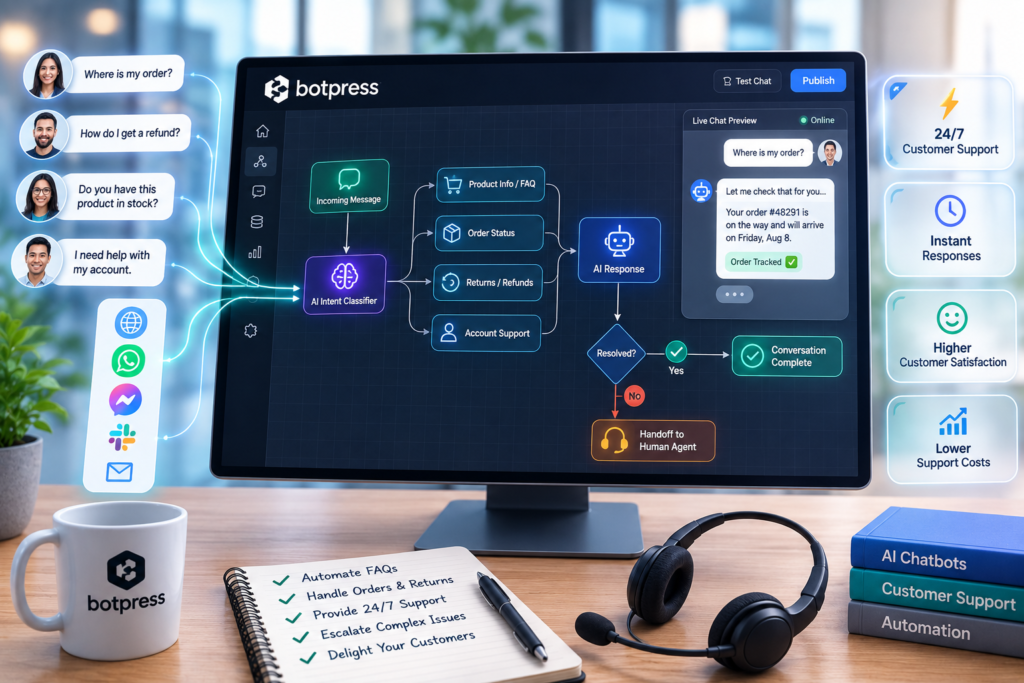
Your support inbox probably isn’t overloaded because customers are asking “hard” questions. It’s overloaded because the same small set of questions arrives all day—password resets, pricing details, order status, return policies, basic troubleshooting—and agents still have to read, interpret, reply, and route each one. That’s exactly where an AI Customer Support Workflow can save time without compromising customer experience.
This guide shows you how to build a narrow, reliable customer support automation workflow using Botpress: intake → knowledge lookup → guarded answers → escalation to a human when needed → measurement and continuous improvement.
Quick Answer (40–60 words): To build an AI Customer Support Workflow with Botpress, start with one high-volume support use case, create a bot in Botpress Studio, add a curated knowledge base as your single source of truth, define clear escalation rules (low confidence, billing/refunds, angry sentiment), then publish and embed the bot using Webchat. Test internally before launch and track deflection and response-time metrics.
What You’ll Build (A Practical Support Workflow, Not “Just a Chatbot”)
Many small businesses launch a chatbot and hope it “reduces tickets.” In practice, support automation works when you build a workflow—a controlled process with scope, rules, and outcomes.
In this tutorial, the target workflow looks like this:
- Customer asks a question in website chat (Botpress Webchat).
- Bot collects minimal context (what they need, optional email/order ID if relevant).
- Bot checks the knowledge base (approved support content).
- Bot answers if confidence is acceptable and the question is in-scope.
- Bot escalates to a human when the request is risky or uncertain (billing/refunds, angry customer, low confidence, missing KB content).
- You review failures weekly and expand the KB and flows based on real conversations.
The goal isn’t to eliminate agents. It’s to remove repetitive work (FAQ replies and basic triage) so humans spend time on issues that require judgment.
Why Botpress for Customer Support Automation (And Where It Fits)
Botpress is a platform for building, testing, and deploying customer-facing bots. The documented “quickstart” path is straightforward: create a bot in Studio, add a knowledge base, publish, and embed it using Webchat. That makes it a good fit when you want a webchat-first support workflow without rebuilding your whole help desk.
Best-fit scenarios
- SaaS support teams with repetitive “how do I…” product questions.
- Ecommerce stores with policy questions (shipping, returns) and basic order-status intent capture.
- Small businesses where manual triage consumes time and replies are inconsistent.
Where Botpress usually isn’t enough on its own
- If you need a complete ticketing suite (queues, SLAs, assignment rules, agent consoles). Botpress is commonly the conversational layer; your help desk still manages tickets.
- If you need regulated-topic handling (e.g., medical or legal advice) without strict governance. You’ll want tight scope and aggressive escalation.
Business-First AI Insight: The fastest way to get value from AI support is to automate the workflow bottleneck, not to “add AI.” For most small teams, the bottleneck is repetitive questions + manual triage. If you design intake and escalation well, even a simple knowledge-based bot can create meaningful time savings—without taking risky actions.
Before You Touch Botpress: Pick One Narrow Use Case
The most common failure pattern is trying to automate the whole help desk on day one. Instead, start with a narrow, high-volume use case that has three traits:
- Repetitive: it shows up daily.
- Low risk: a wrong answer won’t cause financial or compliance damage.
- Documentable: you can write a clear, stable KB article for it.
A simple “what to automate first” decision matrix
| Support Use Case | Automation Difficulty | Risk Level | Best First Step |
|---|---|---|---|
| FAQ / policy questions (hours, pricing basics, shipping, return policy) | Low | Low–Medium | Start here for most small businesses |
| Basic troubleshooting (known issues with fixed steps) | Low–Medium | Medium | Good second workflow after FAQs |
| Ticket triage (collect details, categorize, route) | Medium | Medium | High value if agents spend time sorting tickets |
| Order status / account lookups | Medium | Medium–High | Do after you confirm identity/data access approach |
| Billing, refunds, cancellations | Medium | High | Escalate by default early on |
Recommendation for this tutorial: start with FAQ automation + guarded escalation. It’s the fastest way to deploy something helpful while keeping risk low.
Prerequisites (What You Need Ready)
You can build a basic bot quickly, but the workflow quality depends on preparation. Before building, make sure you have:
- A short list of the top 20–50 questions your team answers repeatedly (from tickets, chat logs, or inbox labels).
- Draft answers you’re willing to stand behind (clear policies, up-to-date product steps).
- An escalation destination (shared inbox, help desk, or on-call email) and a basic SLA expectation (e.g., “human reply within 1 business day”).
- Support tone guidelines (friendly, concise, no overpromising, when to apologize, what not to say).
Note on integrations: Botpress documentation commonly references API/webhook-oriented approaches, but exact help desk integrations vary by setup and aren’t confirmed here. Plan for a simple handoff method first (email, form, or help desk intake) and upgrade later.
Step-by-Step: Build the AI Customer Support Workflow in Botpress
This section follows the core documented path: create a bot in Studio → add a knowledge base → publish and embed Webchat. Then we add the workflow layer: scope, instructions, escalation, and testing.
Step 1: Create a new bot in Botpress Studio
- Log in to Botpress and open Studio.
- Create a new bot (name it after the use case, e.g., “Website Support FAQ Bot”).
- Set a clear description like: “Answers shipping/returns and basic product FAQs; escalates billing and account issues to human support.”
Why this matters: naming and describing scope sounds trivial, but it prevents “scope creep” later when multiple people edit the bot.
Step 2: Define your bot’s scope and agent instructions (guardrails)
Your bot needs explicit instructions so it knows what it should do and, more importantly, what it must not do.
Write simple instructions your team would give a junior support rep:
- Supported topics: list the 3–8 topics you’re automating first.
- Unsupported topics: billing/refunds, account access, legal/medical advice, custom discounts, etc.
- Answering rules: “Use the knowledge base; if unsure, escalate. Don’t guess.”
- Tone: concise, polite, confirm understanding, avoid jargon.
- Handoff rule: “If user is upset, or asks for a human, escalate immediately.”
Consultant Insight: Small businesses often treat AI failures as a “model problem.” In support, most failures are actually policy problems: unclear scope, outdated KB articles, and vague escalation rules. Tight instructions reduce messy edge cases more than adding new features.
Step 3: Build your knowledge base (your single source of truth)
A support bot without a curated knowledge base tends to create more work—agents end up cleaning up incorrect answers and rebuilding customer trust. The knowledge base is what keeps answers consistent as you grow.
In Botpress, add and organize your knowledge base content (following the platform’s knowledge base workflow). Use short, explicit articles rather than one long document.
A practical KB structure for a first rollout
- Category: Shipping
- Shipping options & delivery times
- How to change a delivery address (and when you can’t)
- International shipping policy
- Category: Returns
- Return window and conditions
- How to start a return
- Refund timelines (and what affects them)
- Category: Product / How-to
- Getting started steps
- Common errors and fixes
- Where to find account settings (without handling account access requests)
- Category: Escalation
- Billing/refund exception process (escalate)
- Account access issues (escalate)
Implementation note: If your policies live across emails, PDFs, and internal docs, consolidate them before launch. Otherwise, the bot will be “consistent” but wrong.
Step 4: Create the intake flow (triage-lite)
Even for FAQ automation, you need a minimal intake step so the bot can route correctly and your team can follow up if the conversation escalates.
Design the first bot turn like this:
- Confirm the user’s goal: “What can I help you with today?”
- Offer 3–5 quick options aligned to your KB categories (shipping, returns, product setup, talk to a human).
- If the user types freely, classify the intent loosely: match to a category or escalate.
Trade-off: More intake questions can improve routing, but it can also annoy customers. Start with the minimum you need to answer accurately or escalate cleanly.
Step 5: Configure knowledge lookup and answering behavior
Set the bot to answer using your knowledge base and keep answers grounded in that content. Your primary goal is safe, consistent support—so design for:
- Short answers first (2–5 sentences)
- Step-by-step instructions when relevant
- A confirmation question (“Did that solve it?”) to detect failure quickly
- A clear escalation path when the KB doesn’t cover the topic
Important: Avoid letting the bot invent answers when the knowledge base is incomplete. If Botpress provides confidence or relevance signals in your setup, use them as triggers to escalate when answers are uncertain. If you can’t reliably detect uncertainty in your configuration, default to escalation more often during your pilot.
Step 6: Add escalation rules (human-in-the-loop by design)
Escalation is the safety system in your AI help desk workflow. It protects customers, protects your brand, and protects your agents from cleanup work.
Escalation triggers to implement first
- User asks for a human (“agent,” “representative,” “call me”).
- High-risk topics (billing, refunds, cancellations, account access).
- Angry or frustrated messages (swearing, “this is unacceptable,” “I’m going to cancel”).
- Low-confidence answers (if your setup can detect weak KB matches).
- Looping: user asks the same thing twice or says “that didn’t help.”
A simple escalation decision tree (use this even if you don’t automate it yet)
| Situation | Bot Action | Why |
|---|---|---|
| Question is clearly in KB and low risk | Answer from KB + confirm resolution | Maximizes deflection safely |
| Topic is billing/refund/account access | Escalate immediately | Reduces financial and security risk |
| User is angry or requests a human | Escalate immediately | Protects customer experience and retention |
| Bot can’t find a strong KB match | Ask one clarifying question, then escalate | Prevents guesswork and hallucinations |
| User says “that didn’t help” | Escalate + pass conversation context | Stops chat loops and reduces repeat contacts |
Handoff content: When escalating, capture: the customer’s question, category, any provided identifiers (email/order ID), and the conversation transcript. If you can’t integrate directly into your help desk yet, send this to a shared support inbox as a structured message.
Step 7: Publish and deploy using Botpress Webchat
Once your bot can answer your narrow use case and escalate reliably, publish it and deploy it on your website using Webchat (the embedded widget documented in Botpress getting-started materials).
Deployment tips for small businesses:
- Start with one high-traffic page (Help/Support page or pricing page), not your entire site.
- Set expectations in the greeting: “I can help with shipping, returns, and basic setup. For billing/account issues, I’ll connect you to a human.”
- Make escalation visible (a “Talk to a person” option).
Testing Before Launch (How to Avoid a Public Failure)
Most teams test chatbots by asking a few obvious questions. That’s not enough. You need to test failure modes: ambiguity, frustration, missing KB content, and edge cases.
Internal testing checklist (practical and fast)
- Coverage test: Ask the top 20 questions exactly as customers phrase them.
- Paraphrase test: Re-ask each question 2–3 different ways.
- Out-of-scope test: Ask billing/refund/account access questions and confirm it escalates.
- Frustration test: Include “this didn’t work” and confirm escalation happens quickly.
- Loop test: Ask the same question twice; ensure it doesn’t stall.
- Transcript review: Have an agent review 20–50 test conversations for tone and policy accuracy.
Pilot rollout (recommended sequence)
- Week 1: Internal-only testing and KB patches.
- Week 2: Soft launch to a subset of visitors (or only on the support page).
- Week 3: Expand placement after you see stable escalation behavior and acceptable answer quality.
Why phased rollout matters: Multiple implementation guides (including major platform guidance) consistently recommend starting small, monitoring, and expanding only after quality is stable. Support is a customer trust function—mistakes cost more than they save.
Measuring Results (What to Track in a Real AI Help Desk Workflow)
If you only measure “chat volume,” you’ll miss the business outcomes. A high-volume bot can still be a net negative if it causes repeat contacts or escalates poorly.
Core KPIs for an AI Customer Support Workflow
- First response time: how quickly customers get a first helpful answer.
- Deflection rate: percentage of conversations resolved without human intervention (define “resolved” clearly).
- Escalation rate: how often the bot hands off to a human (too high may mean KB gaps; too low may mean risky behavior).
- Repeat-contact rate: customers returning because the first interaction didn’t solve the problem.
- Resolution time (for escalated cases): does the bot reduce time by collecting better intake details?
- CSAT (if you collect it): short post-chat feedback can reveal trust issues quickly.
Weekly improvement loop (lightweight but powerful)
- Pull the week’s failed/escaped conversations (where the bot didn’t help or escalated late).
- Tag each failure: missing KB content, unclear policy, bad phrasing, wrong scope, or missing escalation trigger.
- Patch the KB or update rules.
- Re-test the top 10 failure prompts.
Consultant Insight: The best way to “train” a support bot is often not model tuning—it’s operational hygiene. Each week you convert a handful of solved tickets into KB updates, your bot becomes more accurate and your team becomes less dependent on tribal knowledge.
Common Mistakes (And How to Avoid Them)
Mistake 1: Automating too much before your knowledge base is ready
Why it happens: teams want immediate ticket reduction.
What it causes: invented or inconsistent answers, more escalations, and customer frustration.
Better approach: narrow scope, publish only what’s documented, and add content as you see real conversations.
Mistake 2: No escalation policy (or escalation that’s hard to access)
Why it happens: teams focus on “deflection” as the only success metric.
What it causes: unhappy customers stuck in loops, and agents receiving angry follow-ups.
Better approach: add clear triggers (billing/refunds, angry sentiment, “talk to a human,” low confidence). Make handoff obvious.
Mistake 3: Measuring activity instead of outcomes
Why it happens: chat volume is easy to see.
What it causes: you scale a bot that increases repeat contacts.
Better approach: prioritize first response time, deflection quality, repeat-contact rate, and time saved on triage.
Mistake 4: Treating the bot like a one-time project
Why it happens: “We launched it—done.”
What it causes: KB drifts out of date, policies change, accuracy drops.
Better approach: assign an owner and run a weekly review/patch cycle.
Implementation Priority: Start Today → Improve Next → Scale Later
Start Today (1–2 hours)
- Pick one use case (FAQ/policies is usually best).
- List your top 20 repetitive questions and draft approved answers.
- Write your escalation policy in plain English (what always escalates).
Improve Next (next 30 days)
- Build and structure your Botpress knowledge base as a single source of truth.
- Deploy Webchat to one page and run a controlled pilot.
- Establish weekly transcript review and KB patching.
Scale Later (after the first workflow is stable)
- Add ticket triage: better intake data, categories, priority hints.
- Expand to a second workflow (common troubleshooting or onboarding guidance).
- Explore deeper integrations (help desk routing, order/account lookups) once identity and risk controls are defined.
FAQ: Botpress Customer Support Automation
What is an AI customer support workflow?
An AI customer support workflow is a defined process where AI helps handle support requests—typically by answering common questions, collecting intake details, routing requests, and escalating to humans when the issue is risky or unclear.
What should I automate first in customer support?
Start with high-volume, low-risk topics like FAQs and policy questions (shipping, returns, hours, basic “how-to” steps). These are easier to document, safer to automate, and usually deliver faster time savings than complex workflows.
Why use Botpress for an AI chatbot workflow?
Botpress provides a documented quickstart path to build a bot in Studio, attach a knowledge base, and deploy it on your site via Webchat. That makes it practical for webchat-first customer support automation, especially when you want guardrails and a phased rollout.
Can Botpress replace my help desk?
Based on the available information here, Botpress is best viewed as the conversational layer (intake and answers), while a help desk still manages tickets, queues, and agent workflows. Many teams pair a bot with their existing support platform rather than replacing it.
How do I stop the bot from giving wrong answers?
Limit scope, rely on a curated knowledge base as the source of truth, and escalate whenever the bot is uncertain or the topic is high risk (billing/refunds/account access). Also review failed conversations weekly and patch missing content quickly.
How do I connect Botpress to my website?
Botpress supports website deployment through Webchat. The general approach is to publish your bot and embed the Webchat widget on your site. Follow Botpress’s official Webchat embed instructions to match your website stack and deployment method.
How do I design escalation to a human in an AI help desk?
Start with a simple rule set: escalate on billing/refunds, account access issues, angry sentiment, repeated “this didn’t help,” low-confidence answers (if available), or anytime the user requests a human. Make escalation easy to access and pass the conversation transcript to reduce agent rework.
What metrics prove customer support automation is working?
Track first response time, deflection rate (with a clear “resolved” definition), escalation rate, repeat-contact rate, and resolution time for escalated cases. These metrics tie directly to workload reduction and customer experience.
How long does it take to build a basic workflow?
A basic Botpress workflow can be set up in hours to a few days depending on how ready your knowledge base is. The build is often faster than the content work; most of the time goes into drafting and validating support articles and escalation rules.
Conclusion: The Workflow Is the Product
The most useful way to think about an AI Customer Support Workflow is not “a bot that answers questions.” It’s a repeatable operational system: a narrow use case, a curated knowledge base, clear escalation rules, and a measurement loop that steadily improves quality.
If you do that well, Botpress becomes a practical front door to support—handling repetitive questions instantly while your team stays focused on complex cases and customer trust.
Next steps
- Choose your first narrow use case and draft the first 20 KB answers.
- Build the Botpress bot, add the knowledge base, and implement escalation rules before you chase higher deflection.
- Run a two-week pilot, measure outcomes (not just volume), and expand only after quality is stable.
If you want a faster rollout, prepare a simple “support workflow audit” for your team: top ticket themes, current escalation paths, and the minimum KB content needed for a safe pilot. That groundwork is often the difference between a bot that reduces workload and a bot that creates cleanup work.