
How to Automate Invoice Processing with AI (Step-by-Step Guide)
If your team is still copying invoice totals into QuickBooks or Xero, chasing approvals in email threads, and fixing duplicate payments after the fact, you don’t have an “AI problem”—you have a workflow problem that AI can help fix. AI Invoice Automation is most valuable when it removes repetitive handling (download, rename, type, re-check, re-route) while keeping your accounting controls intact.
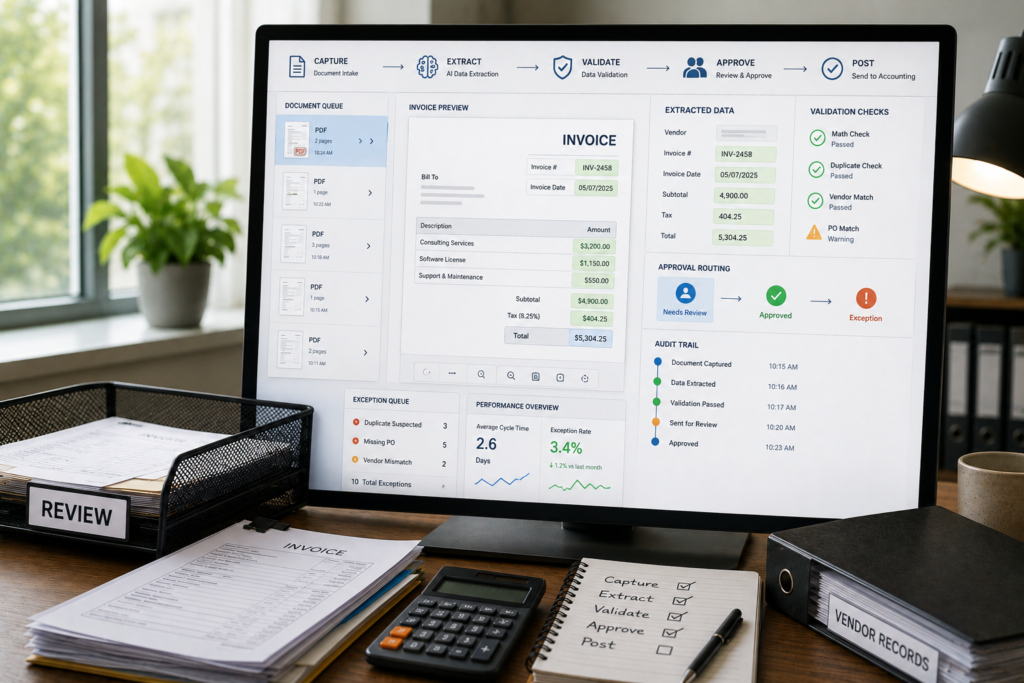
This guide walks you through an implementation you can actually run: capture → extract → validate → approve → post → monitor, with human review for exceptions.
Quick Answer (40–60 words): AI invoice automation combines document capture (email/PDF/scans), OCR and AI field extraction, validation rules (totals, duplicates, vendor match, PO checks), approval routing, and posting into your accounting system. Start with one invoice type or vendor group, measure accuracy and exception rate, then scale once the workflow is stable.
What is AI invoice automation (and what it isn’t)
AI invoice automation is the use of document automation (OCR + AI extraction) and workflow automation (routing + integrations) to process invoices with less manual data entry and fewer handoffs.
In practical terms, it usually means:
- Capture: collect invoices from email, uploads, scans, portals, or EDI.
- Extract: read invoice fields (vendor, invoice #, date, totals, line items, taxes, payment terms).
- Validate: check math, detect duplicates, match vendor records, optionally match POs/receipts.
- Route + approve: send to the right approver based on rules (amount, department, vendor).
- Post: create the bill/invoice record in your accounting/ERP system via API or connector.
- Monitor: track exceptions, cycle time, and bottlenecks so the process improves over time.
What it isn’t: a replacement for accounting policy, approval rules, vendor master data hygiene, segregation of duties, or audit trails. Those controls still need to be designed; AI should sit inside them.
Why invoice processing automation matters for small businesses
Invoice work looks “simple” until volume, variability, and exceptions pile up. Small businesses feel the pain quickly because the same person often handles AP, reconciliations, vendor questions, and month-end close.
Invoice processing automation typically targets four bottlenecks:
- Manual data entry: time-consuming and error-prone.
- Format chaos: invoices arrive as PDFs, scans, emails, portal downloads—rarely consistent.
- Exceptions: missing fields, mismatched totals, duplicate invoices, PO discrepancies.
- Approval delays: stuck in inboxes, reducing cash-flow visibility and discount capture.
Business-First AI Framework™: design the workflow before you choose tools
Most invoice automation projects succeed or fail before any AI model is selected. Use this sequence to keep the project grounded in business outcomes:
- Business Problem: What’s breaking today—data entry time, errors, slow approvals, lack of visibility, PO mismatches?
- Workflow Improvement: Standardize intake, approval rules, and exception handling first.
- Choose the Right Solution: Pick the tool category that fits your reality (AP suite vs document AI vs workflow automation).
- Implement with Human Oversight: Humans handle exceptions and high-risk approvals.
- Measure Business Outcomes: cycle time, exception rate, accuracy, straight-through processing.
- Standardize and Scale: expand vendor groups and complexity only after stability.
Business-First AI Insight: In SMB finance, workflow quality often matters more than model quality. Clean vendor data, clear approval thresholds, and well-defined exceptions can outperform “fancier AI” bolted onto a messy process.
How AI invoice processing works (end-to-end workflow)
Competitor tutorials often talk about “invoice AI” as one feature. In reality, it’s an end-to-end pipeline with multiple failure points. Treat these as separate modules so you can improve them independently.
1) Capture: where invoices enter your business
Common invoice intake channels include:
- Shared inbox: ap@company.com (most common SMB starting point)
- PDF upload: a folder, portal, or form submission
- Scans: paper invoices converted to images/PDFs
- Supplier portals / EDI: more structured but often harder to standardize across vendors
Capture is where you can reduce chaos quickly by enforcing simple rules: one inbox, one upload location, consistent naming, and minimum invoice requirements.
2) Extraction: OCR + AI field detection
Invoices can be:
- Text-based PDFs: easier—text can be extracted without heavy OCR.
- Image-based PDFs / scans: require OCR (Optical Character Recognition) to convert pixels into text.
Then AI extraction maps that text to fields you care about (vendor, invoice number, date, totals, line items, tax, payment terms). This is where document automation delivers the biggest “no more typing” benefit—when it’s reliable enough and your downstream validations catch mistakes.
3) Validation: the control layer (where most ROI is protected)
Validation is what makes automation safe. Typical checks include:
- Math checks: subtotal + tax = total; line items sum correctly.
- Duplicate detection: vendor + invoice # + amount (plus date windows) to avoid double-paying.
- Vendor identity match: link extracted vendor name to your vendor master record.
- PO matching (optional): compare invoice to PO and receiving data (two-way or three-way matching).
- Policy checks: approval thresholds, restricted vendors, unusual terms, high-value invoices.
AI can help classify exceptions, but your business rules define what “good” looks like.
4) Approval routing: stop chasing approvals in inbox threads
Routing rules commonly depend on:
- Amount thresholds: e.g., manager approval above a certain amount
- Department / cost center: based on vendor or line item categories
- Vendor: certain vendors always require specific oversight
- PO vs non-PO: separate approval paths
Automation should also include reminders/escalations for stalled approvals—otherwise you just move the bottleneck from “data entry” to “waiting.”
5) Posting: create the record in your accounting system
Posting is where invoice processing automation becomes real business automation. After approval, you typically create a bill (AP) or invoice record in your accounting/ERP system via a connector or API, attaching the original document and the extracted structured data.
Common destinations include QuickBooks, Xero, NetSuite, SAP, and internal ERPs. The exact steps differ, but the principle is the same: post only validated, approved invoices, and keep an audit trail.
6) Monitoring: exceptions, throughput, and bottlenecks
Once invoices start flowing automatically, you’ll want visibility into:
- How many invoices were processed straight-through (no human changes)
- Where exceptions happen most (vendors, formats, missing fields)
- Approval cycle time (who/where it stalls)
- Rework causes (duplicate logic, vendor matching, PO mismatches)
This is how you turn a pilot into a scalable AI accounting workflow.
Step-by-step: How to implement AI invoice automation safely
This tutorial assumes you want a practical, tool-agnostic implementation. You can execute it with a Microsoft-first stack (Power Automate + AI Builder), a flexible workflow stack (n8n + document AI/OCR + accounting API), or an AP automation platform. The steps stay largely the same.
Step 1: Map your current process (baseline reality)
Before you automate anything, document the “as-is” flow for one representative invoice type (ideally a high-volume, low-complexity vendor group). Capture:
- Where invoices arrive (channels and formats)
- Who opens them, saves them, and where
- What fields get typed and where they go
- How approvals happen today (email, Slack, paper, accounting system)
- What exceptions occur (missing PO, wrong totals, duplicates)
- Where the invoice ends up (accounting system + storage)
Why this matters: automation will amplify whatever workflow you already have—good or bad. Mapping makes hidden work visible (especially “approval chasing” and “fixing data after posting”).
Step 2: Standardize invoice intake (capture rules)
Pick one intake path for your pilot. For many SMBs, the simplest is a shared AP inbox.
Minimum viable intake standardization:
- Route supplier invoices to one inbox or one upload form
- Require PDFs when possible (avoid photos taken from phones)
- Create a rule: one invoice per email attachment when feasible
- Define file retention and where originals are stored (SharePoint/Drive/S3, etc.)
Consultant Insight: If you don’t control intake, you’ll end up “automating inbox cleanup” instead of invoice processing. Start with a single channel even if it’s not perfect.
Step 3: Define your extraction schema (what fields you will trust)
A common failure mode is trying to extract everything on day one. Start with the fields that enable posting and controls:
- Vendor name (and/or vendor ID if you can map it reliably)
- Invoice number
- Invoice date
- Due date / payment terms
- Subtotal, tax, total
- Currency (if relevant)
- Line items (optional in the pilot; depends on your accounting detail requirements)
Then define a structured output format (often JSON) so downstream steps don’t break when an invoice looks different.
Implementation note: Schema validation (checking that required fields exist and match expected types) often improves reliability more than switching AI models.
Step 4: Choose your automation pattern (three practical architectures)
Most SMB implementations fall into one of these patterns:
| Pattern | Best For | What You Build | Main Trade-off |
|---|---|---|---|
| AP automation platform | Teams that want end-to-end AP workflow quickly | Configuration inside one platform (capture → approval → posting) | Less flexibility; vendor lock-in risk; fit depends on your accounting stack |
| Document AI + workflow automation | SMBs that want control and integration flexibility | Workflow in Power Automate or n8n + OCR/extraction + accounting connector/API | More design/maintenance effort; you own more moving parts |
| Rules-first workflow + AI extraction | Teams with simple approval rules and moderate volume | Rules for approvals/validation; AI used mainly for capture/extraction | May not handle complex exceptions or matching without later upgrades |
Step 5: Implement extraction (OCR + AI)
Your goal is consistent field extraction across common invoice layouts.
Practical setup checklist:
- Confirm OCR quality on scans (low resolution and skewed scans increase errors)
- Test on a small set of real invoices (20–50 is often enough to reveal patterns)
- Make vendor names match your vendor master (aliases matter: “ABC Ltd” vs “ABC Limited”)
- Decide how you’ll handle multi-page invoices and credit notes
When you should not rely on extraction alone: if a mistake could cause duplicate payments, incorrect GL coding, or policy violations. That’s why validation and approvals exist.
Step 6: Build validation rules (your safety net)
Start with rules that catch the most expensive errors:
- Required fields present: vendor, invoice #, total
- Total sanity checks: total > 0, currency present when relevant
- Duplicate check: same vendor + invoice # already exists in accounting system
- Vendor match confidence: if vendor mapping is uncertain, route to review
- PO check (if applicable): if PO is required for that vendor, route as exception when missing
Define an “exception taxonomy” (a short list of exception types) so the team resolves issues consistently and you can measure them.
Step 7: Add human-in-the-loop review (where it actually matters)
Human review is not a failure of automation—it’s how you keep controls while still saving time. Common review triggers:
- High-value invoices above a threshold
- Extraction confidence is low (missing or ambiguous fields)
- Duplicate suspicion
- PO mismatch or missing receiving confirmation
- New vendor not in the master list
Practical tip: Make the review screen/task show: the original invoice, extracted fields, validation results, and the single action needed (approve/correct/reject/escalate). If reviewers have to “hunt,” cycle time will stay slow.
Step 8: Automate approval routing (rules before AI)
Approval routing should be mostly deterministic. Define:
- Approval tiers by amount
- Backup approvers for vacations
- Reminders at fixed intervals
- Escalation rules when approvals stall
Where AI helps: classification (e.g., department inference based on vendor/line items) and exception categorization. But don’t let AI decide policy.
Step 9: Post to accounting software (with audit trail)
Posting design decisions you should make explicitly:
- When to create the bill: after approval, or create a draft then finalize after approval
- What to attach: store the original invoice file and link it to the posted record
- How to handle edits: if a human changes fields, log the change reason
- How to handle failures: retries, error queues, and notifications
This is where business automation becomes measurable: fewer manual entries and fewer “where is this invoice?” questions.
Step 10: Monitor, measure, and improve (turn the pilot into a system)
Set up a simple dashboard or weekly report. Track:
- Invoice cycle time (received → approved → posted)
- Extraction accuracy (how often humans had to correct key fields)
- Exception rate (what percentage required human intervention)
- Straight-through processing rate (no touch)
- Approval turnaround time (biggest bottleneck in many teams)
Use those insights to decide what to fix next: vendor aliases, missing fields, approval tier confusion, or better duplicate logic.
Tool categories for AI invoice automation (and how to choose)
Because this is a tutorial-first article, the goal here isn’t to overwhelm you with tools—it’s to help you pick the right category for your environment.
Option A: Microsoft Power Automate + AI Builder (Microsoft-first teams)
Best fit: If your invoices arrive in Outlook, you store files in SharePoint/OneDrive, and your team already uses Microsoft 365, Power Automate and Microsoft AI Builder can be a practical starting point.
Implementation reality: You’ll typically build an inbox trigger, extract invoice fields, write results to a structured store (Dataverse/Excel/SharePoint list), route approvals, and then post to your accounting system via connector/API (depending on what you use).
Main trade-off: Excellent ecosystem fit, but cross-system complexity still requires careful flow design—especially if you’re integrating non-Microsoft accounting tools.
Option B: n8n (flexible workflow automation for custom pipelines)
Best fit: Technical SMBs, ops teams, or firms that want a customizable pipeline (including calling OCR services, LLMs, and accounting APIs).
Implementation reality: n8n is powerful for building “glue” workflows: email ingestion, file handling, extraction calls, JSON structuring, routing to Slack/Teams, and posting to accounting systems via APIs.
Main trade-off: More flexible than many no-code tools, but you’ll need stronger technical ownership (testing, monitoring, credential management, error handling).
Option C: AP automation platforms (purpose-built suites)
Best fit: Teams that want a more packaged end-to-end AP flow and are willing to evaluate platform fit, integrations, and costs.
Examples discussed in the research include Rossum, Tipalti, and HighRadius (more enterprise-leaning). These tools are typically designed around the full AP lifecycle, not just extraction.
Main trade-off: Faster time-to-workflow in many cases, but you need to confirm integration depth with your accounting system, your approval complexity, and your required controls.
Business impact comparison table (practical selection)
| Tool Category / Example | Best For | Ease of Use | Time to Value | Business Size | Notes |
|---|---|---|---|---|---|
| Power Automate + AI Builder | Microsoft 365 finance teams automating shared inbox intake | Medium | Fast for a basic pilot | Small to mid-size | Strong ecosystem fit; validate accounting connectors early |
| n8n (workflow automation) | Custom invoice pipelines, API-first integrations, flexible exception routing | Medium to Hard | Medium (depends on integrations) | Small to mid-size | Great flexibility; requires technical ownership |
| AP automation platforms (e.g., Rossum, Tipalti) | End-to-end AP workflow including approvals and posting | Medium | Medium to Fast (if integrations fit) | Growing SMB to mid-market | Confirm controls, integration depth, and exception workflows |
| Enterprise matching platforms (e.g., HighRadius) | Complex PO/three-way matching at scale | Hard | Slower (heavier implementation) | Mid-market to enterprise | Often overkill for SMB unless matching complexity is high |
Expert Verdict: which approach should most small businesses start with?
Expert Verdict: Most small businesses should start with document automation + a workflow platform (Power Automate if you’re Microsoft-first, or a flexible tool like n8n if you’re comfortable with more technical setup). It’s usually the best balance of speed, control, and cost discipline—then move to a full AP platform only when volumes and exception complexity justify it.
Decision matrix: AP platform vs document AI vs workflow automation
Use this quick decision aid to pick the right category without guesswork:
| Question | If “Yes” | If “No” |
|---|---|---|
| Do you already run most finance work in Microsoft 365 (Outlook, SharePoint, Teams)? | Power Automate + AI Builder is a natural starting point | Consider n8n or an AP platform |
| Do you need complex PO/three-way matching across systems? | Consider AP platforms / enterprise matching tools | Workflow automation + extraction may be enough |
| Do you have technical ownership for integrations, APIs, and monitoring? | n8n/custom pipelines can be a strong fit | Prefer Power Automate templates or AP platforms |
| Is your biggest pain approvals and exception routing (not extraction)? | AP platform can deliver faster end-to-end wins | Start with extraction + validation + posting |
| Are invoices highly variable (many suppliers, many formats, lots of scans)? | Invest more in document AI + validation early | Rules-first + basic extraction often works |
Pilot plan: the safest way to start (and actually prove value)
A pilot should be designed to answer one question: “Can we achieve reliable straight-through processing on a defined invoice subset without weakening controls?”
Pilot scope recommendations
- Start with one vendor group (e.g., recurring utilities, subscriptions, or a handful of regular suppliers)
- Or start with one invoice type (non-PO invoices under a threshold)
- Keep the approval path simple at first
Invoice Automation Readiness Checklist (pilot edition)
- We have a single intake channel for the pilot (inbox or upload folder)
- We can reliably identify vendors (vendor master is clean enough or we have an alias list)
- We defined required fields and what happens when they’re missing
- We defined duplicate detection rules and where we check duplicates
- We have approval thresholds and backup approvers
- We have an exception queue and an owner for each exception type
- We can post to accounting software in a controlled way (draft → approve → finalize, or post-after-approval)
- We agreed on pilot KPIs and how we’ll measure them weekly
Common pilot mistake to avoid
Don’t pilot on the messiest invoices. A pilot is meant to prove the workflow and control design first. Once your pipeline works on simple, high-volume invoices, you’ll have a stable foundation to handle complex matching and edge cases.
KPIs and ROI: how to measure AI accounting workflow impact
You don’t need industry benchmarks to evaluate your own automation. You need baseline measurements and consistent tracking.
Recommended KPIs
- Invoice cycle time: received → approved → posted
- Extraction accuracy: percent of invoices where key fields required no correction
- Exception rate: percent of invoices requiring human intervention
- Straight-through processing rate: percent processed without manual changes
- Approval turnaround time: time spent waiting for approvals
- Duplicate prevention: number of duplicates caught before payment (track qualitatively if needed)
A simple ROI calculator you can use in a spreadsheet
Estimate monthly time savings conservatively:
- Invoices per month × minutes saved per invoice = total minutes saved
- Total minutes saved ÷ 60 = hours saved per month
- Hours saved × fully loaded hourly cost = estimated monthly labor value
Then adjust for reality:
- Subtract time spent on exception handling and review
- Add back time saved from fewer rework cycles (corrections, vendor follow-ups, duplicate investigations)
- Optionally quantify benefits like faster close readiness and better cash-flow visibility (often real, but harder to price)
Consultant Insight: In many SMBs, the first measurable win isn’t “perfect extraction.” It’s fewer handoffs: less downloading, renaming, forwarding, chasing approvals, and re-entering the same data in multiple places.
Common mistakes in invoice processing automation (and how to avoid them)
Mistake 1: Automating before cleaning vendor master data
Why it happens: teams assume AI will “figure out vendors.”
What it causes: false matches, duplicate vendors, wrong payment details, inconsistent coding.
Better approach: create a vendor alias list, merge duplicates, and standardize vendor naming for your pilot vendors first.
Mistake 2: Trying to automate every edge case immediately
Why it happens: pressure to “fully automate AP.”
What it causes: complex rules, fragile flows, low trust in the system.
Better approach: optimize for straight-through processing on simple invoices, then expand exception coverage in iterations.
Mistake 3: Treating approvals as an afterthought
Why it happens: focus on OCR/extraction because it looks like the “AI part.”
What it causes: invoices still stall, cycle time doesn’t improve, team blames the automation.
Better approach: define approval tiers, backup approvers, and escalation rules early. Approval routing is often where the biggest cycle-time gains come from.
Mistake 4: No exception queue (errors disappear into email)
Why it happens: teams rely on ad-hoc messages to resolve problems.
What it causes: lost invoices, unclear ownership, poor auditability.
Better approach: create one exception queue with categories (missing PO, duplicate suspicion, vendor mismatch, math error), owners, and resolution notes.
Mistake 5: Posting automatically without controls
Why it happens: desire for “full automation.”
What it causes: incorrect postings, policy violations, painful cleanup.
Better approach: post only after validation + approval, or post to a draft state that requires final review for high-risk invoices.
Start Today / Improve Next / Scale Later (implementation priority)
Start Today (low effort)
- Centralize invoice intake into one inbox or one upload folder
- Pick one pilot invoice subset (vendor group or invoice type)
- Define required fields and a basic duplicate rule
Improve Next (next 30 days)
- Implement extraction + validation + an exception queue
- Automate approval routing with reminders and escalation
- Track baseline KPIs weekly (cycle time, exception rate, accuracy)
Scale Later (after the workflow is stable)
- Add PO/two-way or three-way matching for relevant categories
- Add GL coding suggestions with human review
- Expand to more vendors and more invoice formats
- Build dashboards for AP aging and bottleneck monitoring
FAQs (AI invoice automation)
How does AI invoice processing work?
Invoices are captured (email/upload/scan), read using OCR when needed, key fields are extracted by AI, results are validated with business rules (totals, duplicates, vendor match, PO checks), routed for approval, and then posted into accounting software. Exceptions are escalated to humans for review.
Can AI read scanned invoices and image PDFs?
Yes. OCR-based workflows are specifically designed to convert scanned invoices into machine-readable text, then AI extraction maps the text to invoice fields. Accuracy depends heavily on scan quality, consistent layouts, and strong validation rules.
What fields can AI extract from invoices?
Common fields include vendor name, invoice number, invoice date, due date or payment terms, subtotal, tax, total amount, currency, and sometimes line items. Most teams start with core header totals and add line items later if needed.
Does AI invoice automation replace AP staff?
It typically reduces repetitive work (data entry, sorting, forwarding) while keeping humans responsible for approvals, exception handling, and controls. The most successful setups use human-in-the-loop review for high-risk invoices and unclear extractions.
How do you integrate AI invoice automation with QuickBooks or Xero?
Most implementations post approved invoices by creating a bill/invoice record via a connector or API integration. The practical requirement is consistent structured data (often JSON) plus an audit trail that links the original document to the posted transaction. Exact connector availability varies, so verify integration options in official documentation.
What is three-way matching, and when do you need it?
Three-way matching compares the invoice to the purchase order (PO) and the goods receipt (proof of delivery/receiving). It’s most valuable when you buy physical goods or have strict receiving controls. For many service invoices or subscriptions, it may add complexity without proportional benefit.
What’s the safest way to start with invoice processing automation?
Start with a limited pilot: one vendor group or one invoice type, a single intake channel, basic extraction, strong validation, and human review for exceptions. Measure cycle time, exception rate, and corrections weekly before expanding scope.
What are the biggest risks in AI accounting workflows?
The biggest risks are weak controls (posting without validation/approval), messy vendor master data causing misclassification or duplicates, and “silent failures” where exceptions get lost. Mitigate these with validation rules, an exception queue, audit logs, and clear ownership.
Related Intelligent AI Lab resources (suggested internal links)
- invoice automation software — for readers comparing AP platforms and document AI options
- Power Automate invoice workflow — for a Microsoft-first implementation walkthrough
- document automation workflow — for broader document intake and extraction patterns
- AI agents for AP — for teams exploring agentic exception triage and orchestration
- AI automation ROI — for measuring value beyond “time saved”
- AI accounting workflow — for additional finance automations beyond invoices
Conclusion: automate the workflow layer, not just the document
The most practical way to think about AI Invoice Automation is as a workflow upgrade: capture consistently, extract into a structured schema, validate with business rules, route approvals automatically, post only when controlled, and learn from exceptions. That’s how you save time without trading away financial control.
If you want a strong next step, don’t start by shopping tools. Start by selecting one pilot slice of invoices and writing down your validation and exception rules. Once those are clear, choosing between Power Automate, n8n, or an AP platform becomes a straightforward business decision—not a guessing game.
Next step (helpful CTA): If you’d like a structured way to identify the best pilot scope and design your exception rules, request an invoice workflow assessment. The goal is a small, measurable pilot that your team can trust—then scale only after it’s stable.