
OpenAI Agents SDK Review (2026): Features, Architecture, Pricing & Is It Worth Building AI Agents with OpenAI?
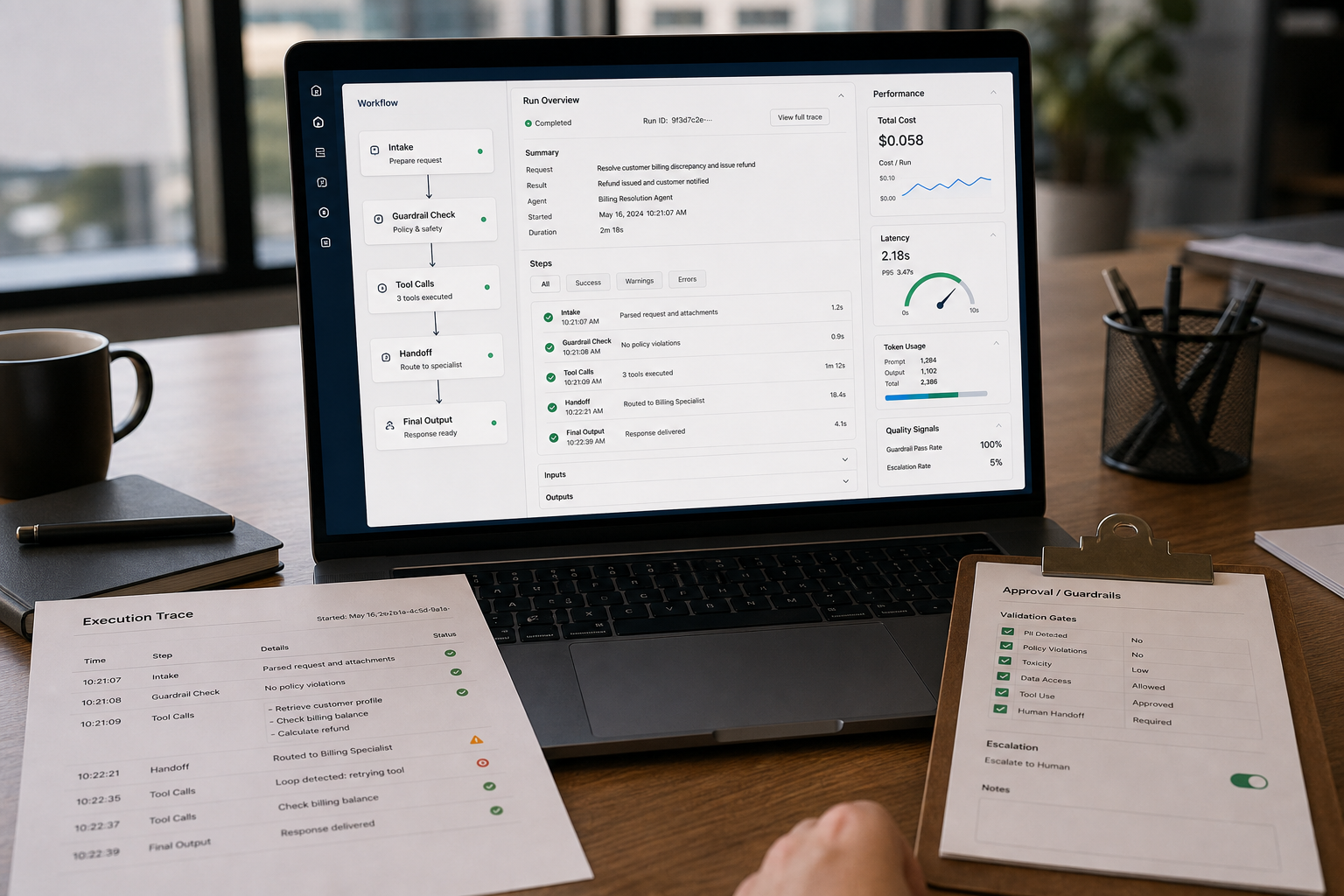
You can build an AI agent in a weekend. Shipping one that stays reliable, debuggable, and affordable in production is the hard part. This OpenAI Agents SDK Review focuses on that gap: the features and architecture that reduce orchestration work (tool loops, routing, tracing, guardrails) and the costs and trade-offs that show up after the demo.
Quick Answer (40–60 words): The OpenAI Agents SDK is a free, open-source, OpenAI-first framework that’s most worth it when you want production-oriented agent primitives (tracing, sessions, guardrails, handoffs) and plan to use OpenAI’s hosted tools and Responses API. It’s less ideal when you need provider neutrality or highly custom graph control.
What this review is (and isn’t)
This is a commercial-investigation review for developers, technical founders, and CTOs evaluating whether to standardize agent development on the OpenAI Agents SDK in 2026. It covers:
- What it is and how it differs from “rolling your own” orchestration
- Architecture: core primitives and how they fit into real systems
- Production features that matter (tracing, guardrails, sessions, sandboxed execution)
- Pricing: why the SDK can be “free” and still become expensive
- Comparisons: OpenAI Agents SDK vs LangGraph vs CrewAI (and when each wins)
- Decision framework: choose the right tool based on workflow reality, not hype
It does not attempt to list every API method or replicate vendor docs. For exact, current pricing and feature availability, verify against OpenAI’s official documentation and pricing pages (details can change).
The business problem the OpenAI Agents SDK is trying to solve
Most teams don’t struggle with “calling an LLM.” They struggle with everything around it:
- Manual orchestration: tool-calling loops, retries, timeouts, routing, and state handling
- Debugging blind spots: multi-step runs fail in non-obvious ways without tracing
- Safety and compliance exposure: unvalidated inputs/outputs, data leakage, risky tool usage
- Workflow fragmentation: multi-step tasks sprawl across scripts, queues, and ad-hoc memory
- Cost uncertainty: agent loops and tool calls can silently inflate runtime spend
The OpenAI Agents SDK addresses these with built-in primitives: agents, handoffs, guardrails, sessions, and tracing, plus OpenAI-native integration patterns (notably around the Responses API and hosted tools).
What is the OpenAI Agents SDK?
The OpenAI Agents SDK is an open-source framework for building OpenAI AI Agents—systems that can plan, call tools, delegate tasks, and produce structured outcomes across multiple steps. Conceptually, it’s an AI Agent Framework that reduces the plumbing you’d otherwise write yourself: orchestration, tool calling, routing, session context, safety checks, and observability.
From a platform strategy perspective, it’s “OpenAI-first.” That’s a feature if your stack is already committed to OpenAI models and hosted tools. It’s a trade-off if your strategy requires provider neutrality or deep customization of control flow.
How the architecture works (plain-English mental model)
If you’re evaluating any OpenAI Agent Framework, you want a mental model you can explain to both engineers and business stakeholders. Here’s the simplest useful model for the Agents SDK:
- Session starts: you establish context you want to persist across runs (within whatever boundaries your system defines).
- Agent receives a task: the agent is configured with instructions, available tools, and expected output patterns.
- Guardrails validate: inputs and/or outputs are validated against rules (format, safety constraints, allowed actions).
- Tool calls happen: the agent uses tools (search, file retrieval, code execution, external APIs via connectors) to complete the task.
- Handoffs delegate: if the task requires specialized behavior, the workflow hands off to another agent with a narrower role.
- Tracing records: each step is captured for debugging, QA, and cost investigation.
- Result returns: the system returns a final answer or structured output, often with logs/metadata for monitoring.
This architecture matters because production agents are less about a single “smart answer” and more about repeatable, inspectable task completion under cost and safety constraints.
Key primitives and why they matter
- Agents: the core runtime that executes a task, calls tools, and produces outputs. Why it matters: it standardizes your agent loop so each team doesn’t reinvent it slightly differently.
- Handoffs: agent-to-agent delegation. Why it matters: it enables specialization (e.g., “triage agent” → “billing agent” → “policy agent”) without writing a custom router from scratch.
- Guardrails: validation gates for inputs/outputs. Why it matters: most production failures are predictable—wrong format, unsafe output, unwanted tool usage, or policy violations.
- Sessions: persistent context. Why it matters: it reduces glue code for multi-turn workflows, but it also increases the need for governance around what you store and for how long.
- Tracing: observability of steps, tool calls, intermediate outputs, and failures. Why it matters: without traces, debugging becomes “guess-and-regenerate,” which is slow and expensive.
- Sandboxed execution: isolated environments for certain tool or code workflows (often described as a production safety feature). Why it matters: it reduces blast radius when an agent is allowed to execute code or handle files.
Core features that matter in production (what’s actually valuable)
Many agent frameworks can “do tools.” The differentiator is how quickly you can ship something that stays stable after the first month. These are the capabilities that typically drive real ROI for teams.
1) Built-in tracing: the difference between demos and operations
Tracing is not a “nice-to-have” for agentic systems. It’s how you answer questions like:
- Why did the agent call a tool five times?
- Where did it lose the thread and repeat itself?
- Which step caused the failure?
- Which tool calls are driving cost?
Trade-off: the more you trace, the more you must treat traces as sensitive operational data. That can mean additional policies, redaction rules, retention limits, and access controls.
2) Guardrails: safer automation with fewer “surprises”
Guardrails are most useful when you’re turning agent outputs into actions (tickets, refunds, CRM updates, document generation). They help you enforce:
- Format: strict schemas / structured outputs
- Content policies: disallowed topics, sensitive data handling
- Action boundaries: what tools can be used, and when escalation is required
When guardrails help most: workflows with compliance, safety, or reputational risk (finance ops, healthcare intake, legal support, customer service).
When guardrails can hurt: exploratory research tasks where over-restricting outputs reduces usefulness. In those cases, use lighter validation and stronger human review.
3) Handoffs: multi-agent workflows without building your own router
Handoffs are a practical way to break up complexity:
- A front-door agent handles intake, clarifies requirements, and chooses a route
- Specialist agents handle domain-specific tasks with narrower tool permissions
- A final agent packages results into user-facing output or a structured payload
Implementation note: multi-agent design is easy to overuse. Every handoff introduces additional model calls, more context passing, and more failure points. Use handoffs only when specialization meaningfully improves accuracy or safety.
4) Sessions: useful memory, but also a governance obligation
Sessions help maintain conversation context across runs. This is valuable for:
- Long-running support threads
- Multi-step onboarding or intake workflows
- Internal assistants that need continuity within a process window
Business trade-off: sessions can become accidental data stores. Decide upfront:
- What gets persisted vs summarized
- Retention period and deletion guarantees
- How sensitive data is filtered or redacted
5) Sandboxed execution: enabling more powerful agents with less risk
Sandbox-oriented execution is often positioned as a production feature because it reduces the risk of agents interacting with files or executing code in unsafe environments.
Reality check: sandboxing doesn’t eliminate risk; it changes it. You still need policies for what code can run, what data can enter the sandbox, what can leave it, and how outputs are validated.
OpenAI Agents SDK pricing explained (what you really pay for)
The SDK itself is free and open source. In practice, the budget impact comes from usage-based runtime costs across models and hosted tools.
The three-layer cost model (use this for planning)
| Cost Layer | What Drives It | Why It Surprises Teams | What to Control |
|---|---|---|---|
| 1) Model usage | Tokens, number of calls, context size, retries | Agent loops multiply calls; context grows over time | Hard limits, summarization, smaller contexts, early exits |
| 2) Hosted tools | File search, storage, queries; code execution sessions; other platform tools | Tools feel “free” in prototypes, then become recurring operational spend | Cache results, reduce tool frequency, set budgets, restrict tools by role |
| 3) Orchestration overhead | Long-horizon workflows, multi-agent handoffs, tracing volume | More steps = more calls, more logs, more failure-handling | Keep workflows narrow, evaluate step ROI, tighten termination rules |
Hidden cost pattern: “free SDK” + uncontrolled autonomy
The most common cost mistake is evaluating only the license (free) and ignoring runtime inflation:
- Agents re-checking the same tool repeatedly
- Long conversation histories being resent each step
- Overbuilt multi-agent designs that add delegation without improving outcomes
- Tool use for tasks that could be solved with a deterministic rule or a database query
Practical recommendation: treat cost like a first-class acceptance criterion in your pilot. If you can’t estimate “cost per completed task,” you’re not ready to scale, even if accuracy looks good.
OpenAI Agents SDK vs LangGraph vs CrewAI (2026 comparison)
Most teams aren’t choosing between “good” and “bad.” They’re choosing between speed-to-production, control, and portability.
| Tool | Best For | Ease of Use | Time to Value | Business Size | Notes |
|---|---|---|---|---|---|
| OpenAI Agents SDK | OpenAI-native production agents with tracing/guardrails/sessions | Medium | Fast | SMB → Mid-market → Enterprise teams on OpenAI | Strong if you want OpenAI-hosted tools and built-in observability; more lock-in risk |
| LangGraph | Complex, stateful workflows needing custom control flow and determinism | Lower | Medium | Mid-market → Enterprise | More engineering overhead; often preferred when graph control is the product |
| CrewAI | Role-based multi-agent collaboration patterns (research/content/task teams) | Medium | Medium | Solo → SMB → Agencies | Intuitive role concepts; may be less native to OpenAI’s stack than the Agents SDK |
How to decide (instead of debating frameworks)
- If your priority is shipping OpenAI-based agents into production quickly with built-in tracing and guardrails, the OpenAI Agents SDK is usually the most direct path.
- If your priority is precise orchestration with custom branching where the workflow graph is central, LangGraph often fits better.
- If your priority is role-based multi-agent collaboration for team-style task decomposition, CrewAI can be a cleaner mental model.
Is the OpenAI Agents SDK production-ready in 2026?
Based on the positioning highlighted in the research, the SDK is designed as a production-oriented framework—especially for teams building within the OpenAI ecosystem. The strongest production signals are:
- Tracing as a built-in first-class capability
- Guardrails for validation and safer outputs
- Sessions for stateful workflows
- Sandboxed execution patterns for isolating risky tool operations
But “production-ready” isn’t only a framework property. It’s an operating model: monitoring, evaluation, escalation paths, and budget controls.
Production readiness checklist (use this before you commit)
- Cost controls: per-run budget limits, tool-call caps, termination rules, retry policies
- Observability: traces are reviewed, failures are categorized, regressions are caught early
- Safety: guardrails for format, policy, sensitive data handling, and tool permissions
- Human oversight: clear escalation rules and auditability for high-risk actions
- Evaluation: you can measure task completion rate and error modes over time
- Data governance: session retention rules, redaction strategy, access controls
Best use cases (where the SDK tends to pay off)
The SDK is most valuable when you’re building agents that must work repeatedly under operational constraints, not just produce clever responses.
1) Customer support triage agent
Workflow: ingest ticket → classify intent/priority → apply guardrails → handoff to specialist agent (billing/tech/support) → log trace → create/update ticket.
Why the SDK helps: handoffs for specialization, tracing for debugging misroutes, guardrails for safe outputs.
Key trade-off: tool usage and long threads can drive costs; you need summarization and strict tool limits.
2) Sales research agent for SDR/AE enablement
Workflow: gather account context (approved sources) → summarize → generate outreach brief → log trace for review.
Why the SDK helps: tool calling + traceability so you can audit sources and improve prompts/guardrails.
Key trade-off: “web research” workflows can sprawl. Keep it narrow: specific outputs, fixed number of sources, and clear stop conditions.
3) Internal knowledge assistant (SOP/policy lookup)
Workflow: user asks question → file search retrieval → generate answer with citations → guardrails enforce “cite sources or escalate” → trace for QA.
Why the SDK helps: hosted retrieval tools (where applicable), guardrails for citation behavior, sessions for continuity.
Key trade-off: data governance and document permissions matter more than the agent code.
4) Document processing agent (structured extraction)
Workflow: upload document → parse/extract → validate schema → write structured output to downstream system → trace errors.
Why the SDK helps: guardrails + structured outputs patterns; sandboxed execution can reduce risk in file-handling pipelines.
Key trade-off: the business value comes from exception handling and QA, not just extraction accuracy.
When you should choose a different framework
The OpenAI Agents SDK is not the best default for every agent initiative. Consider alternatives when:
- You need provider neutrality as a strategy (multi-vendor risk management, on-prem constraints, or strict procurement rules).
- Your workflow requires complex graph control (deep branching, deterministic state transitions, or enterprise-grade orchestration patterns where the graph is core IP).
- You’re building a platform for others (and your customers will demand multiple model providers and pluggable orchestration).
- Your “agent” is actually a workflow problem best solved with deterministic automation plus a small AI component (classification, extraction, summarization).
Business-First AI Insight: If you can’t describe the workflow in plain steps and define what “done” means, an agent framework won’t save you. Agents amplify unclear processes: they run longer, cost more, and fail in more creative ways. Tighten the workflow first, then choose the framework.
Decision tree: should you build with the OpenAI Agents SDK?
- Are you primarily shipping on OpenAI models and OpenAI-hosted tools?
- If yes → continue.
- If no → strongly consider a more provider-neutral framework first.
- Do you need built-in tracing and guardrails for production reliability?
- If yes → OpenAI Agents SDK becomes more attractive.
- If no (prototype only) → you may not need an agent framework yet.
- Is your workflow mostly linear with occasional delegation?
- If yes → the SDK is a good fit.
- If no, it’s a complex branching graph → evaluate LangGraph-style approaches.
- Is cost-per-task a hard requirement?
- If yes → choose the framework that makes cost controls easiest to enforce in your environment, and design strict budgets from day one.
- If no → you’re likely to regret it later.
Common implementation mistakes (and how to avoid them)
Mistake 1: Treating “free SDK” as “cheap production”
Why it happens: licensing is obvious; usage-based runtime is not.
Consequence: a successful pilot becomes an unaffordable rollout.
Better approach: define a cost-per-completed-task target, cap tool calls, and measure spend from the first week.
Mistake 2: Building multi-agent systems by default
Why it happens: handoffs feel elegant and “agentic.”
Consequence: more latency, more cost, more debugging complexity.
Better approach: start with one agent and introduce handoffs only where specialization improves outcomes (accuracy, safety, or speed).
Mistake 3: No escalation policy (agents are left to improvise)
Why it happens: teams want full automation and postpone human-in-the-loop design.
Consequence: incorrect actions, compliance exposure, user trust erosion.
Better approach: define clear escalation triggers: low confidence, missing sources, policy conflicts, or high-impact actions.
Mistake 4: Choosing the framework before defining the workflow
Why it happens: engineers evaluate frameworks like libraries, not operating models.
Consequence: tool-first architecture that doesn’t map to measurable business outcomes.
Better approach: follow a business-first sequence: problem → workflow → success metrics → controls → then framework selection.
Is it worth it? (Expert verdict for 2026)
For most teams building inside the OpenAI ecosystem, the OpenAI Agents SDK is worth serious consideration because it bundles the parts that usually slow down production delivery: agent orchestration primitives plus observability (tracing) and safety (guardrails).
Where it’s clearly a strong choice: when you want to move fast on OpenAI models, you plan to use OpenAI-hosted tools, and you want built-in tracing to reduce debugging time on multi-step workflows.
Where I’d hesitate: if your roadmap requires provider neutrality, if the workflow is fundamentally graph-first and highly customized, or if you can’t commit to cost controls and governance from day one.
Expert Verdict: Choose the OpenAI Agents SDK when you’re optimizing for OpenAI-native production speed with guardrails and tracing. Choose a graph-first or provider-neutral framework when your competitive advantage depends on orchestration flexibility or multi-provider portability more than OpenAI platform integration.
Implementation priorities (what to do first, next, and later)
Start today (low effort, high clarity)
- Pick one narrow workflow (e.g., ticket triage, SOP lookup, document extraction).
- Define done: structured output, success criteria, and escalation conditions.
- Set initial budgets: max tool calls, max steps, and a cost-per-task target.
Improve next (next 30 days)
- Add guardrails for format and safe-action boundaries.
- Use tracing to categorize failures (prompt issues vs retrieval issues vs tool errors).
- Introduce handoffs only for proven specialist tasks.
Scale later (after measurable success)
- Standardize an agent operating model: evaluation, monitoring, incident response, and change management.
- Harden data governance: session retention, access controls, redaction policies.
- Expand to adjacent workflows only after the first one is stable and cost-predictable.
FAQs
Is the OpenAI Agents SDK free?
Yes. The SDK itself is free and open source. Your costs come from usage: model calls (tokens) and any hosted tools you use (for example, retrieval/file search or code execution). Always confirm current pricing on OpenAI’s official pricing pages.
What is the OpenAI Agents SDK used for?
It’s used for AI Agent Development: building single-agent and multi-agent workflows that can call tools, maintain session context, apply guardrails, and generate traces for debugging and monitoring.
Is the OpenAI Agents SDK production-ready?
It’s positioned as production-oriented, especially for OpenAI-centric teams, because it emphasizes tracing, sessions, guardrails, and controlled execution patterns. Production readiness still depends on your governance: cost limits, evaluation, escalation policies, and data handling.
What are the biggest hidden costs of the OpenAI Agents SDK?
The hidden costs are rarely the SDK itself. They’re usually (1) multi-step model calls that multiply token usage, (2) frequent tool calls (retrieval/search/code execution), and (3) long contexts being resent repeatedly. Cost control is primarily a workflow and architecture discipline problem.
Does OpenAI Agents SDK support multi-agent workflows?
Yes. Handoffs enable agent-to-agent delegation for specialized tasks. The key is to use multi-agent patterns selectively, because every handoff can increase latency, cost, and operational complexity.
Does it support models beyond OpenAI?
Some sources describe using adapters or third-party layers to work with multiple models, but the SDK is OpenAI-first in practice. If provider neutrality is a hard requirement, validate your integration path early and consider a more provider-agnostic framework.
OpenAI Agents SDK vs LangGraph: which should I choose?
Choose the OpenAI Agents SDK when OpenAI-native integration, tracing, and production primitives matter most. Choose LangGraph when you need deep, custom workflow graphs and deterministic control flow that’s central to your product or enterprise orchestration needs.
OpenAI Agents SDK vs CrewAI: which should I choose?
CrewAI can be a good fit when your team prefers a role-based “agent team” mental model for task delegation. OpenAI Agents SDK tends to be the stronger choice when you want OpenAI-native production features like integrated tracing and guardrails as core primitives.
How do I estimate the cost of an agent built with the SDK?
Estimate cost per completed task by modeling: number of model calls per run, average context size, tool-call frequency, and worst-case retries/loops. Then validate with a pilot using tracing and strict caps. The goal is predictable unit economics, not just a working demo.
Final recommendation for developers and CTOs
If your organization is already betting on OpenAI and you want a framework that reduces orchestration code while improving debuggability and safety, the OpenAI Agents SDK is a pragmatic choice in 2026. It aligns well with teams that want prototypes to graduate into production without rebuilding their agent loop, tracing, and guardrails from scratch.
The strategic test is simple: can you run your target workflow repeatedly, within a defined budget, with traceable failure modes and safe escalation? If the answer is yes, the SDK can help you standardize and scale. If the answer is no, focus less on frameworks and more on tightening the workflow, controls, and measurement—because that’s what makes agents pay off in real businesses.
Next step: pick one high-volume workflow, define success metrics (completion rate, escalation rate, cost per task, trace time-to-debug), and run a two-week pilot with strict tool and step limits. That will tell you more than any feature list ever will.