
AI Agents Explained: What They Are and How They Work in 2026
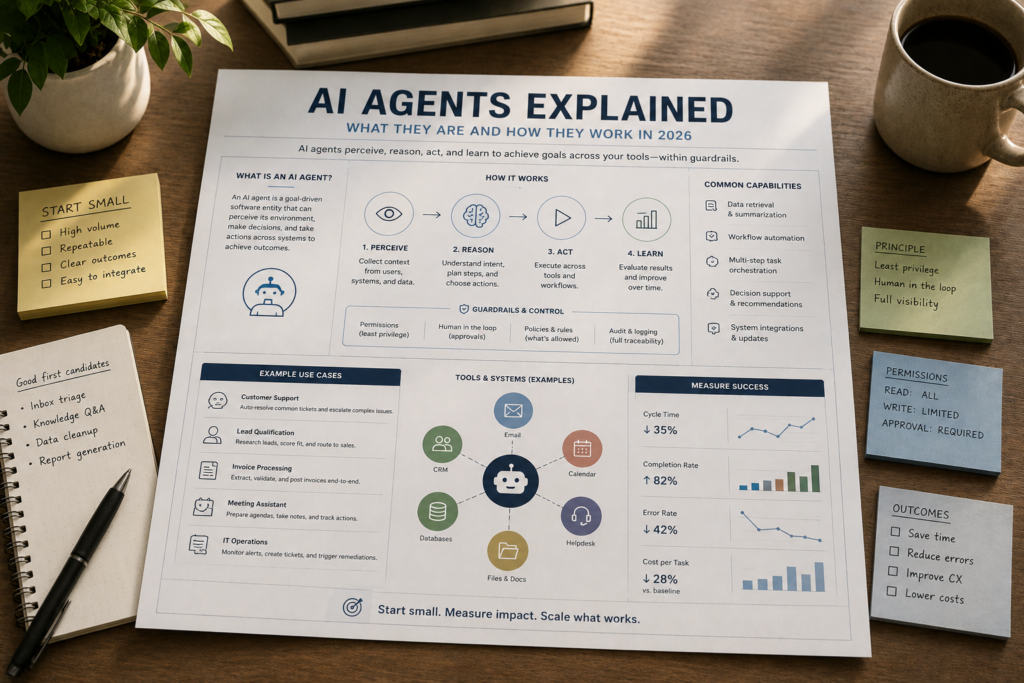
Most small businesses don’t struggle because they lack ideas. They struggle because the work is scattered across email, spreadsheets, CRMs, calendars, and ticketing tools—and someone has to constantly decide what to do next. In 2026, AI Agents matter because they shift AI from “help me write this” to “handle this workflow,” with the ability to take actions across apps (with guardrails).
Quick Answer (2026): AI agents are goal-directed software systems that can perceive information, plan steps, use tools (like email, CRM, calendars, and APIs), and take actions to complete multi-step tasks with limited human input. They’re most valuable in bounded business processes with clear rules and human oversight—not in vague, high-risk, or heavily regulated work.
What Is an AI Agent?
An AI agent is a software system designed to pursue a goal by figuring out the next steps and taking actions using tools and permissions you give it.
That definition sounds simple, but the business implication is big: an agent isn’t just generating text like a typical Generative AI chat tool. It’s coordinating work across your systems—closer to a digital worker than a writing assistant.
In practical terms, an AI agent typically has:
- A goal (e.g., “triage new support tickets” or “qualify inbound leads”).
- Context inputs (ticket text, customer history, product docs, CRM records).
- Tool access (helpdesk, email, CRM, calendar, knowledge base, browser, internal database, APIs).
- Decision rules (what it can do automatically, when it must ask for approval, when to escalate).
- Logging/observability (so you can audit what happened and improve it).
Key point: “Autonomy” in business shouldn’t mean “do anything.” In production, autonomy should mean “do the approved things, inside a box, with receipts.”
How AI Agents Work (The Core Loop)
Most real-world agents follow a repeating loop often described as:
- Perceive: read inputs (an email, a form submission, a ticket, a spreadsheet row).
- Reason: interpret what’s happening and what outcome is needed.
- Act: use tools to take the next step (search, update a record, send a message, create a task).
- Observe: check results (did the CRM update succeed? did the email bounce? did the user reply?).
Many modern systems extend this with planning (break goal into steps) and sometimes reflection/learning (evaluate what worked and adjust). You don’t need the buzzwords to make the right decision as a business owner. What matters is whether the agent can reliably complete a workflow end-to-end under real constraints.
A concrete example: support ticket triage
Here’s what “perceive → reason → act → observe” can look like in a small business helpdesk workflow:
- Perceive: new ticket arrives with subject + message + customer email.
- Reason: classify category (billing, technical, shipping), detect urgency, identify sentiment, check if it matches known issues.
- Act: pull customer context, draft response, tag ticket, route to the right queue, request missing info, or suggest a refund path.
- Observe: verify tags applied, confirm message sent, check if customer replies or if the ticket is reopened.
This is where agents differ from simpler AI assistants: the value isn’t only the drafted reply. The value is reducing handoffs—less “who owns this?” and less “what do I do next?”
AI Agents vs Chatbots vs Automation (What’s Actually Different?)
A lot of market confusion comes from vendors labeling everything “agentic.” A reliable way to think about it is: chatbots respond, automation follows rules, and agents decide next actions within boundaries.
| Approach | Best For | How It Behaves | Where It Breaks | Business Watch-Out |
|---|---|---|---|---|
| AI Assistants (chat-based) | Drafting, summarizing, brainstorming, internal Q&A | Responds to prompts; usually doesn’t execute across apps | When you need consistent execution and system updates | Looks productive but often shifts work to humans (copy/paste, manual updates) |
| Workflow Automation (rule-based) | Repeatable steps with stable rules | If X happens, do Y (deterministic) | When inputs are messy (free-form emails) or decisions require interpretation | Can become brittle if the business process changes often |
| AI Agents | Multi-step workflows across tools with judgment inside guardrails | Interprets context, plans steps, uses tools, checks results | When the goal is vague, risk is high, or tool permissions are uncontrolled | Requires governance: approvals, logging, error handling, and measurable KPIs |
Expert Verdict
If your workflow is already well-defined and stable, automation is often the fastest and safest win. If your workflow requires interpreting messy inputs (emails, tickets, form text) and then taking a sequence of actions across apps, AI agents become the better fit—but only when you can bound the process and add oversight.
What AI Agents Can Do for Small Businesses (Without the Hype)
Small businesses usually don’t need “general intelligence.” They need dependable execution in the most frequent, repetitive workflows.
In 2026, the practical shift is from chatting with AI to delegating work to AI systems that can execute multi-step tasks—especially when the process is constrained by rules and success criteria.
Common high-value outcomes
- Less context switching: fewer manual jumps between email, CRM, spreadsheets, and ticketing tools.
- Faster response times: first-touch replies and follow-ups don’t wait for a human to notice.
- Standardized execution: routine steps happen the same way each time (with consistent escalation).
- Scalable operations: volume can grow without immediately growing headcount for repetitive tasks.
What they typically do in practice
- Research and summarize (then file the result in the right place).
- Route work (classify, prioritize, assign, request missing info).
- Draft + execute (prepare a response and send it under approved conditions).
- Update systems (create tasks, update CRM fields, log notes, generate a report).
- Follow up (schedule reminders, send nudges, detect no-response states).
Where AI Agents Work Best (And Where They Don’t)
Agents succeed when the business process is clear enough to measure and constrain. They struggle when humans can’t agree on what “done” looks like.
Best-fit workflow traits
- High frequency: it happens many times per week (or day).
- Clear start and end: trigger → steps → completed state.
- Defined rules and escalation: what the agent can do alone vs when it must ask.
- Accessible data: the agent can fetch required context from a knowledge base or system of record.
- Measurable outcomes: time-to-first-response, completion rate, error rate, escalation rate.
“Don’t start here” workflows (early-stage agent projects)
- Vague strategic work where the goal is unclear (e.g., “fix our marketing” with no plan or constraints).
- High-risk actions (sending legal notices, making final payroll changes, issuing refunds without review).
- Heavily regulated data flows where you haven’t validated privacy, retention, and access controls.
- Processes with constant exceptions and no standardized policies.
Business-First AI Insight: The biggest ROI from AI agents rarely comes from “smarter answers.” It comes from removing handoffs—the invisible delays caused by routing, prioritizing, copying data between systems, and waiting for the next decision. If your workflow has too many handoffs, an agent can help. If it doesn’t, an agent may be unnecessary complexity.
Realistic Business Use Cases (By Workflow, Not Buzzwords)
Below are five practical use cases that consistently show up in small business operations because they combine messy inputs with repeatable steps.
1) Support ticket triage (faster first response without losing control)
- Trigger: ticket arrives via email or form.
- Agent actions: classify issue, pull customer context, draft response, route to the right queue, request missing info.
- Human oversight: approvals for refunds, policy exceptions, or sensitive replies.
- KPIs: time to first response, backlog size, escalation rate, reopen rate.
2) Lead qualification (speed-to-lead and cleaner pipelines)
- Trigger: inbound lead form, website chat, or email inquiry.
- Agent actions: enrich details (where allowed), score fit against your criteria, draft outreach, assign to rep, create follow-up tasks.
- Human oversight: review for high-value accounts, final outreach tone, disqualifications.
- KPIs: lead response time, contact rate, qualified rate, sales cycle handoff time.
3) Internal research assistant (turn scattered web info into decisions)
- Trigger: a defined research question (competitor list, vendor options, market changes).
- Agent actions: browse sources, extract key points, summarize, and flag uncertainty or missing info.
- Human oversight: verify important claims, approve final recommendations.
- KPIs: time-to-brief, number of usable insights, rework rate due to missing context.
4) Invoice or document intake (reduce data entry, increase consistency)
- Trigger: invoice or document arrives via email/upload.
- Agent actions: extract fields, validate against rules, update accounting/ERP, flag exceptions.
- Human oversight: approvals for mismatches, vendor setup, unusual amounts.
- KPIs: processing time per document, exception rate, error rate, late payment rate (if applicable).
5) Employee onboarding coordination (less “where do I find…?”)
- Trigger: new hire starts.
- Agent actions: assign tasks, answer FAQs from a knowledge base, track completion, coordinate access requests.
- Human oversight: approvals for access, final policy acknowledgements.
- KPIs: onboarding completion time, HR interruptions, missed steps, access delays.
Risks, Limits, and Guardrails (What Responsible “Autonomy” Looks Like)
AI agents can create real value, but they also introduce a new failure mode: software that takes action based on probabilistic reasoning. That’s why guardrails are not optional.
Key risks to plan for
- Incorrect actions: wrong updates in a CRM, wrong routing, wrong replies.
- Data exposure: sending sensitive info to the wrong place or user.
- Unbounded tool access: an agent with broad permissions can do broad damage.
- Silent failures: steps fail but no one notices (especially across multiple apps).
- “Confident wrong” outputs: agents may sound certain even when context is incomplete.
Guardrails that matter in small business deployments
- Permission controls: least-privilege access; separate read vs write permissions.
- Approval gates: require human review for risky actions (refunds, contract language, sensitive emails).
- Clear escalation rules: define what conditions force a handoff to a human.
- Logging and audit trails: record actions taken, tools used, and outputs generated.
- Observability: dashboards/alerts for failures, high exception rates, or unusual behavior.
- Bounded scope: define exactly which workflows and systems the agent can touch.
Consultant Insight
The most common early mistake is giving an agent “end-to-end control” before you’ve proven it can handle the messy middle. A safer pattern is: recommend → draft → queue for approval, then gradually move to auto-execute only for low-risk, high-confidence steps.
How Small Businesses Should Start with AI Agents (A Practical 2026 Pilot Plan)
Because the dominant goal is operational value (time saved, faster response, fewer errors), the best way to start is not choosing a platform first. Start by choosing one workflow where you can measure outcomes and add guardrails.
Step 1: Pick a single bounded workflow
Use this shortlist to find a good first candidate:
- It happens at least weekly (daily is better).
- It spans at least two systems (email + CRM, helpdesk + knowledge base, forms + spreadsheet).
- It has clear rules (routing logic, qualification criteria, response templates).
- It’s low-to-medium risk (you can add approvals where needed).
Step 2: Map the workflow in plain English
Keep it simple: trigger, steps, exceptions, and what “done” means.
- Trigger: what starts the work?
- Inputs: what data is needed to decide?
- Actions: what systems get updated or messaged?
- Exceptions: what causes escalation?
- Completion: how do you know it worked?
Step 3: Decide what the agent is allowed to do (autonomy levels)
Think in levels:
- Level 0: draft and suggest next steps only.
- Level 1: take low-risk actions (tag, route, create tasks) + draft messages for approval.
- Level 2: auto-send routine responses under strict rules + escalate edge cases.
Many small businesses get the best reliability at Level 1 early on.
Step 4: Define success metrics before you build
If you can’t measure it, you can’t govern it or justify expanding it. Operational KPIs usually work better than “the AI seems smart.”
- Turnaround time (e.g., first response time)
- Task completion rate
- Escalation rate
- Error rate (wrong updates, wrong routing)
- Human approval rate (how often humans intervene)
Step 5: Pilot, review logs, then expand permissions slowly
In many small business contexts, a first bounded pilot can be implemented in a few weeks, but timelines vary widely depending on integrations, data cleanliness, and guardrail requirements. Treat that variability as a planning constraint: don’t promise outcomes until you’ve run a real pilot with logging enabled.
A Simple Decision Matrix: Assistant, Automation, or Agent?
If you’re unsure whether you need an agent at all, use this quick matrix.
| If your workflow is… | Start With | Why |
|---|---|---|
| Mostly writing/summarizing and a human still does the actions | AI Assistant | Fastest time to value; minimal risk; improves output speed |
| Stable rules, structured inputs, same steps every time | Automation | More predictable; easier to test; typically lower governance burden |
| Messy inputs + multi-step process across tools + decisions needed | AI Agent | Reduces handoffs and “what next?” decisions while still staying bounded |
Common Mistakes Small Businesses Make with AI Agents
- Starting with a tool instead of a workflow: leads to a “demo that doesn’t ship” because it’s not tied to a measurable process.
- Going too broad too early: “handle all customer support” is usually too big for a first pilot; start with one category or queue.
- Skipping guardrails: no approvals, no logs, and wide permissions turn small errors into big incidents.
- Using agents when automation is enough: you pay an autonomy tax (oversight, testing, reliability work) without getting extra value.
- No KPI baseline: if you don’t measure current time-to-response or completion time, you can’t prove improvement.
Implementation Priority: Start Today, Improve Next, Scale Later
Start Today (low effort)
- Pick one workflow (support triage, lead qualification, or document intake).
- Write the “done” definition and escalation rules on one page.
- List the systems involved and identify the system of record (where truth lives).
Improve Next (next 30 days)
- Create a small set of templates/policies the agent can follow (responses, routing rules, qualification criteria).
- Set 3–5 KPIs and capture a baseline for two weeks.
- Design approval gates for high-risk actions and define permission scopes.
Scale Later (once the pilot is stable)
- Add more categories/queues or a second workflow only after the first is consistently measurable.
- Introduce deeper observability (alerts, anomaly detection, periodic audits).
- Standardize the rollout: documentation, training, and a change process for updating rules.
FAQ: AI Agents for Small Business (2026)
What is an AI agent in simple terms?
An AI agent is software that can work toward a goal by interpreting inputs, deciding next steps, and using tools (like email, CRM, calendars, or databases) to take actions. Unlike a typical chat tool, an agent can execute multi-step workflows—ideally with guardrails and human approvals.
How do AI agents differ from AI assistants?
AI assistants mainly help you create or understand content (drafting, summarizing, Q&A). AI agents go further by taking actions across systems—routing tickets, updating records, triggering follow-ups—based on rules and context. Assistants are usually “in the chat.” Agents are “in the workflow.”
Are AI agents the same as workflow automation?
No. Automation follows predefined rules and usually behaves predictably. AI agents can interpret messy inputs and choose next actions inside boundaries. In many businesses, the best solution is a hybrid: automation for stable steps and an agent for interpretation and decision points.
Do AI agents work without human input?
They can run with limited human input, but responsible business use typically includes human oversight—especially for sensitive actions. Many deployments start with the agent drafting and queuing actions for approval, then expand to auto-execution only for low-risk tasks.
What tools do AI agents need to be useful?
They usually need access to your business systems (email, CRM, ticketing, calendar, files/knowledge base) and a way to log actions. The exact tool stack varies by workflow, and you should verify current capabilities in official vendor documentation because platforms change quickly.
What’s the best first AI agent use case for a small business?
Start with a frequent, measurable, low-risk workflow such as support ticket triage, lead qualification routing, internal research briefs, or document intake. These are valuable because they reduce handoffs and decisions while allowing clear escalation rules.
What’s the biggest risk with AI agents?
The biggest risk is uncontrolled actions—an agent taking the wrong step in a sensitive workflow without permissions, approvals, or logging. If you can’t audit what happened, you can’t govern it. Build guardrails first, then expand autonomy gradually.
How do you measure ROI from AI agents?
Measure operational outcomes: time to first response, task completion time, throughput per employee, escalation rate, error rate, and rework. Avoid relying on vague metrics like “the agent seems smart.” If the workflow isn’t measurable, the ROI conversation becomes guesswork.
Conclusion: The 2026 Way to Think About AI Agents
In 2026, the practical promise of AI agents isn’t that they’ll “think like a human.” It’s that they can carry work across the gaps between your tools—handling the repeatable decisions and steps that slow small teams down.
If you want agents to create business value, anchor the project in a single workflow, define success metrics, and treat autonomy as something you earn through guardrails. The businesses that win with AI agents won’t be the ones with the most tools. They’ll be the ones that standardize one measurable workflow at a time—and only then scale.
Next step: choose one workflow you’d love to “delegate,” write the rules and escalation paths in plain English, and decide which steps must stay human-approved. That’s the foundation of a safe, ROI-driven agent pilot.