
WhatsApp Customer Support Automation: Complete Guide
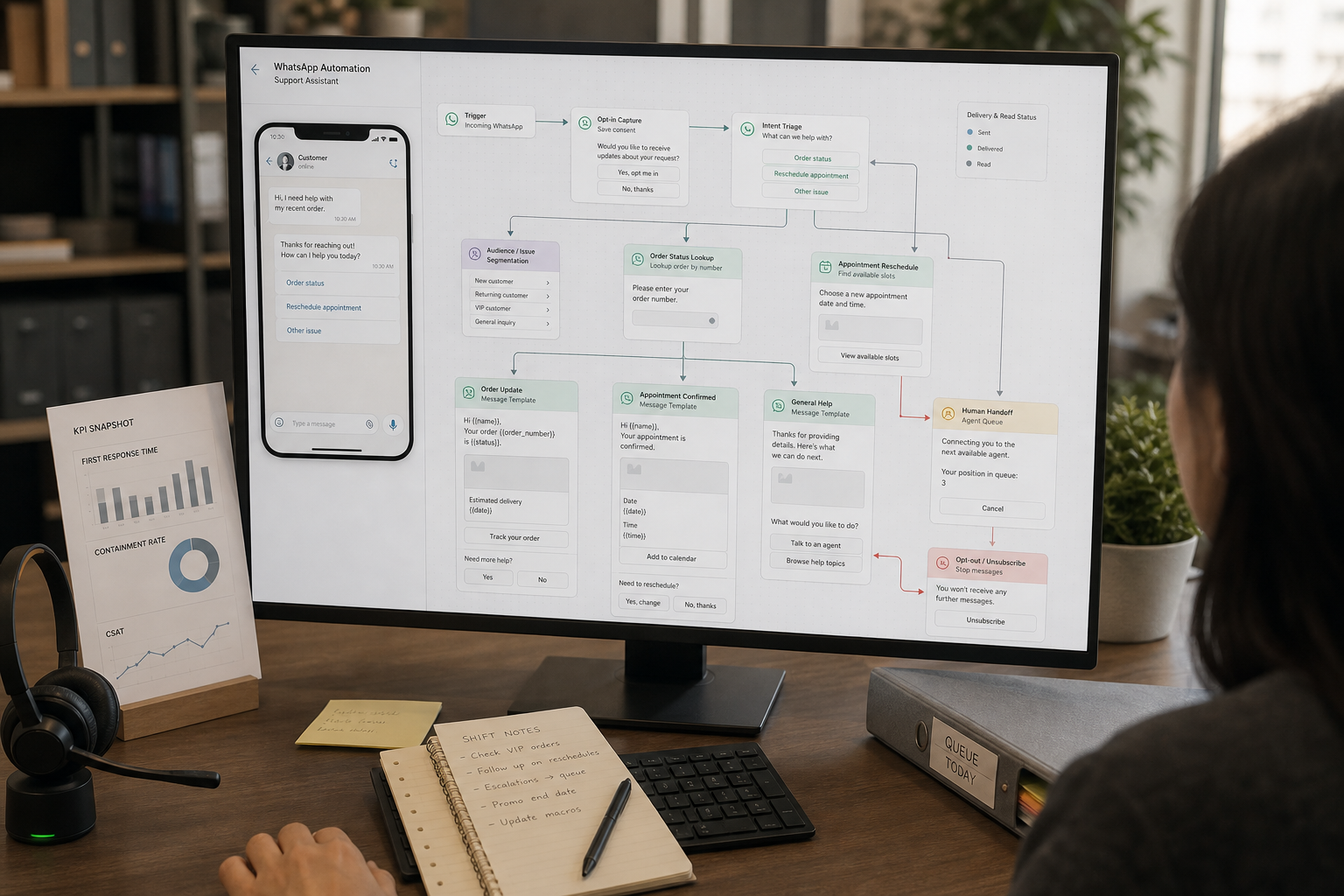
If your team supports customers on WhatsApp, you’ve probably felt the same pressure: the channel is convenient for customers, but it can turn into a nonstop stream of “Where’s my order?”, “How do I reset my password?”, and “Can I reschedule?” messages. WhatsApp Customer Support Automation is how small businesses and SaaS teams handle those repetitive requests faster—without pushing customers into a frustrating bot maze.
The trick is business-first: start with the support problem (volume, speed, routing, after-hours coverage), then design a WhatsApp support workflow that uses automation and AI only where it’s reliable—and hands off to humans when it’s not.
Quick Answer (40–60 words): WhatsApp customer support automation uses the WhatsApp Business app or WhatsApp Business API plus chatbots, routing rules, and AI triage to answer FAQs, retrieve simple data (like order status), and escalate exceptions to agents. Start by auditing your top questions, automate the first-response and routing steps, and measure containment, resolution, and CSAT.
What is WhatsApp customer support automation?
WhatsApp customer support automation is the use of WhatsApp Business tools (app or API), chatbots, AI customer support capabilities (like intent detection), routing rules, and human handoff workflows to handle common support requests quickly and consistently.
In practice, automation usually covers:
- First response: greetings, business hours expectations, and collecting key details
- FAQ answers: returns policy, pricing basics, account steps, shipping timelines
- Routing: sending conversations to the right team or queue based on intent
- Data lookup: order status, booking confirmation, account status (when integrated)
- Escalation: clean handoff to a human for sensitive, complex, or high-risk issues
Why this matters: WhatsApp is a high-expectation channel. Customers message there because they expect fast, simple answers. Automation is valuable when it reduces waiting and repetition—not when it blocks real help.
Start with the business problem (not “AI customer support”)
Most teams approach WhatsApp automation backwards: they pick a chatbot platform first, then try to force their support process into it. A more reliable approach is to identify what’s actually creating support load and customer frustration.
Here are the most common support problems WhatsApp automation can solve well:
- High-volume FAQs that consume agent time (shipping, returns, basic troubleshooting)
- Slow first responses, especially outside business hours
- Manual triage where every message must be read and categorized
- Fragmented handoffs (single inbox chaos, wrong person replies, missed escalations)
- Lack of visibility into what customers ask, what gets resolved, and what drops off
Business-First AI Insight: The best ROI usually comes from automating the first 60 seconds of the WhatsApp support journey—greeting, expectation setting, intent capture, and routing—because it reduces delays and triage workload even when a human ultimately resolves the issue.
WhatsApp Business app vs WhatsApp Business API: which one do you need?
Choosing between the WhatsApp Business app and the WhatsApp Business API is less about “features” and more about how your support operation actually works: number of agents, need for a shared inbox, integration needs, and whether you need automation beyond basic messages.
WhatsApp Business app: best for simple, low-volume automation
The WhatsApp Business app is the lowest-friction way to start. It supports basic automation such as greeting messages, away messages, and quick replies.
Use the app when:
- You’re a solo operator or a very small team
- Your goal is basic time-saving (template replies, after-hours message)
- You don’t need multi-agent access to the same number
Avoid relying on the app when:
- You need multiple agents working simultaneously
- You need routing, tagging, or queueing
- You want integrations (CRM, helpdesk, order system) to provide real-time answers
WhatsApp Business API: best for shared inbox + routing + integrations
The WhatsApp Business API is the common path when you need multi-operator support, shared inbox tooling, routing rules, chatbots, and deeper automation. Many businesses access the API through a provider (often called a Business Solution Provider, or BSP), because provider tooling can simplify onboarding and operations.
Use the API when:
- You need a shared team inbox for one WhatsApp number
- You want automation flows beyond basic replies
- You need integrations to retrieve order, account, or booking data
- You want reporting and operational visibility (queues, agent performance, containment)
Trade-offs to plan for:
- Setup complexity: vendor/provider selection and configuration takes time
- Ongoing maintenance: flows, templates, and knowledge content need regular review
- Governance: permissions, handoff rules, and auditability matter more with automation
Quick decision table: app vs API
| Option | Best For | Ease of Setup | Time to Value | Team Fit | Notes |
|---|---|---|---|---|---|
| WhatsApp Business app | Basic FAQ replies, greetings, away messages | Easy | Fast | Solo / micro-business | Great starting point, limited multi-agent workflows |
| WhatsApp Business API (often via BSP) | Shared inbox, routing, chatbots, integrations, reporting | Medium–High | Medium | SMBs, SaaS, support teams | Best foundation for scalable support automation |
For official information about WhatsApp Business products, messaging capabilities, and business solutions, see the WhatsApp Business resources from Meta.
What to automate first: the highest-ROI WhatsApp customer support automation workflows
If you automate the wrong thing first, you’ll get the worst of both worlds: setup work and unhappy customers. A practical sequencing approach is to audit your top 5–20 customer questions and group them into a small number of intents (request types). Then build one clear flow per intent.
1) FAQ handling (containment with safe fallback)
Why it matters: FAQs create repetitive load. They’re predictable, and your answers should be consistent.
Good FAQ automation topics:
- Shipping timelines and costs
- Return and exchange steps
- Basic troubleshooting (known issues)
- Pricing basics (with a path to sales for edge cases)
- Account access steps (without exposing sensitive details)
Implementation tip: Keep automated answers short and clear. For common FAQs, a 2–3 sentence answer plus one or two buttons (e.g., “Talk to an agent”, “Track order”) usually beats a long paragraph.
2) Triage + routing (the “front desk” workflow)
Why it matters: Manual triage is pure overhead—an agent reads the message just to decide who should handle it.
Automation can:
- Ask what the customer needs (“Order status”, “Returns”, “Account help”, “Talk to support”)
- Tag and route conversations to the right queue/team
- Set expectations (response time, business hours)
When not to over-automate: If customers often send complex, multi-part messages, forcing them into rigid menus can increase frustration. Use routing prompts, but keep a “Describe your issue” free-text option with a human handoff path.
3) Order/status lookup (automation that feels like “real support”)
Why it matters: “Where is my order?” is one of the most common high-volume requests in retail and ecommerce—and it’s also one of the easiest to answer accurately when your WhatsApp flow can retrieve the right data.
A typical WhatsApp support workflow:
- Confirm the user’s intent (“Track my order”)
- Collect identifier (order number, email, phone—whatever your system requires)
- Query your order system
- Return a clear status update and next step
- Offer escalation if something looks wrong (“It’s delayed”, “I didn’t receive it”)
Trade-off: Without integration to your order system, you can only provide generic guidance—which customers quickly recognize as unhelpful. Data retrieval is where WhatsApp automation moves from “deflection” to “resolution.”
4) Appointment scheduling (reduce back-and-forth)
Why it matters: Scheduling is often a long chat thread. Automating the collection of preferred times and confirming bookings saves time on both sides.
Best for:
- Clinics (with strict oversight and privacy-safe design)
- Professional services
- Salons, repair services, on-site appointments
Implementation note: Scheduling automation is only as good as the calendar integration and the rules (time zones, buffers, cancellations). Start with “request an appointment” routing and confirmation, then expand to full slot selection once the basics are stable.
5) Escalation routing (when automation prevents mistakes)
Why it matters: Many support failures aren’t about the answer—they’re about the handoff. Customers get bounced between people, repeat themselves, or wait while the request sits in the wrong place.
Common escalation triggers to automate:
- Customer says “complaint”, “refund”, “angry”, “cancel”, “legal”, “chargeback”
- Customer repeats the issue after an automated answer
- Bot confidence is low or the request doesn’t match a known intent
- High-value customers or priority segments (if you can identify them safely)
Automated WhatsApp Notifications
WhatsApp support automation should not only respond when customers ask questions. It can also proactively send useful notifications when a business event occurs.
These event-triggered notifications can keep customers informed, set expectations, and reduce repetitive support questions before they reach an agent.
Common WhatsApp notification types for customer support
Useful support-focused notifications include:
- Order status updates — Notify customers when an order is confirmed, shipped, delivered, or its status changes.
- Delivery delay notifications — Let customers know about delays and provide an updated delivery expectation.
- Appointment reminders — Remind customers about upcoming appointments and provide options to confirm or reschedule.
- Booking confirmations — Confirm a booking and provide the relevant date, time, location, or instructions.
- Ticket status updates — Inform customers when a support request has been received, assigned, updated, or resolved.
- Service outage notifications — Proactively notify affected customers when a service disruption occurs and provide updates as the situation changes.
- Support request confirmations — Confirm that a customer’s request was received and explain when they can expect a response.
For example:
Support request received: Thanks for contacting support. We’ve received your request and a member of our team will respond within two hours.
These notifications can reduce repetitive questions such as “Where is my order?”, “Did you receive my request?”, or “What’s happening with my ticket?”
Event-triggered automation vs. conversational chatbot automation
These are two complementary forms of WhatsApp customer support automation:
| Conversational automation | Event-triggered notifications |
|---|---|
| Triggered by a customer message | Triggered by a business event |
| Handles inbound requests | Sends proactive updates |
| Answers questions and collects information | Keeps customers informed |
| Can resolve or route support requests | Can prevent unnecessary support requests |
| Example: “Where is my order?” → check order status | Example: order delayed → automatically notify customer |
A strong support operation uses both:
- Conversational automation to handle inbound customer requests efficiently
- Notifications to proactively provide information before customers need to ask
When designing your workflows, ask:
Which events, if communicated proactively, could prevent our most common support questions?
Those events are often the best candidates for notification automation.
Automated Follow-Ups on WhatsApp
Automated follow-ups on WhatsApp are triggered after a support interaction or another key event to confirm resolution, collect feedback, or help customers complete an unfinished process.
Unlike notifications, which primarily provide information, follow-ups are designed to close the support loop and verify what happens next.
A simple follow-up workflow looks like this:
Support interaction → resolution or closure → wait period → follow-up message → customer response → reopen or escalate if necessary
Common automated follow-up use cases
Useful follow-up workflows for customer support include:
- Check whether an issue was resolved — After an automated answer or agent interaction, ask the customer whether they still need help.
- Follow up after a support ticket is closed — Give customers an opportunity to report if the problem is still occurring.
- Follow up on an unresolved conversation — Re-engage customers who stopped responding before their issue was resolved.
- Complete an unfinished support process — Remind customers who started a workflow, such as a booking, return, or service request, but did not complete it.
- Collect CSAT feedback — Ask customers to rate their support experience after an issue is resolved.
- Follow up on appointments or service requests — Remind customers about upcoming actions or confirm that a scheduled service was completed.
For example:
Ticket resolved → wait 24 hours → WhatsApp follow-up → customer replies “No” → reopen or escalate the case
Why follow-ups matter for support automation
A support ticket being marked closed does not always mean the customer’s problem is actually solved. Automated follow-ups can help your team:
- Verify real resolution rather than relying only on ticket status
- Identify customers whose issues remain unresolved
- Re-engage customers who abandon a support workflow
- Collect structured customer feedback
- Trigger reopening or escalation when a problem continues
- Identify gaps in your automation and support processes
This makes follow-ups an important part of WhatsApp customer support automation because the workflow continues beyond the initial customer message and helps ensure that support cases reach a meaningful outcome.
How AI fits into WhatsApp support (and where it should not)
AI customer support on WhatsApp is most useful when it improves classification, routing, and retrieval—not when it improvises in high-risk situations.
High-confidence AI use cases
- Intent detection: classify what the customer wants so routing is automatic
- FAQ answers: respond from an approved knowledge base
- Information extraction: pull out order numbers, product names, dates, and key details from messages
- Agent assist: draft replies for agents (with human review)
Why these work: the outputs can be constrained. You can design guardrails so the AI is selecting from known intents, known policies, and known data sources instead of inventing an answer.
Where AI should not be unsupervised
- Payment disputes or chargebacks
- Unresolved complaints where tone and nuance matter
- Legal, medical, or sensitive topics without strict policies and human oversight
- Any case where a wrong answer creates real business risk (refund policy exceptions, compliance, account security)
Trade-off to understand: AI can reduce workload, but it can also produce confident-sounding mistakes. Your workflow should assume that ambiguous or sensitive requests will be escalated—not “handled better by a smarter model.”
Design principle: “Real answers” beat “smart answers”
Many WhatsApp bots fail because they answer with plausible text instead of accurate information. If you want customers to trust automation, prioritize integrating the bot with structured data (orders, bookings, account records) and a maintained knowledge base.
Core components of a reliable WhatsApp support workflow
Regardless of the tools you choose, strong WhatsApp support automation usually includes the same building blocks.
1) Intent map (your top request categories)
This is your operational foundation: a small list of intents that cover the majority of inbound messages. Examples:
- Order status
- Returns / refund
- Appointment scheduling
- Pricing / pre-sales question
- Account help
- Speak to an agent
Implementation detail: keep the first version small. You can expand after you see real chat logs.
2) Short, structured responses (plus buttons)
Automated messages should be easy to skim. Use:
- 2–3 sentence answers for common questions
- Buttons/quick replies to keep the customer moving
- One clear next step per message whenever possible
3) Human handoff rules (non-negotiable)
Human handoff is not a “failure state.” It’s a safety and quality feature. Build handoff into every major flow.
At minimum, include:
- Explicit opt-out: “Talk to an agent” option
- Fallback routing: when the request doesn’t match known intents
- Confidence thresholds: escalate when AI isn’t sure
- Risk triggers: complaints, disputes, sensitive topics
4) Data integration (so the bot can resolve, not just deflect)
Automation is strongest when it can look up real customer context. Common integrations include:
- CRM or helpdesk (customer profile, ticket status)
- Order system (status, tracking link, delivery exceptions)
- Calendar/booking system (appointments, reschedules)
- Knowledge base (approved policies and troubleshooting steps)
5) Measurement loop (weekly improvements)
The fastest way to improve results is to review chat logs weekly, find what the automation missed, and add or refine intents, answers, and handoff rules.
WhatsApp CRM Integration for Customer Support
WhatsApp CRM integration connects your WhatsApp Business workflows with a customer relationship management (CRM) system so customer conversations, profiles, support tickets, and follow-up activities can stay connected. A CRM for WhatsApp turns the messaging channel into a structured support workflow instead of leaving agents to manage conversations in isolation.
For customer support teams, the goal isn’t simply to store WhatsApp conversations in a CRM. The integration should help your team identify customers, route requests, provide context to agents, automate follow-ups, and measure support outcomes.
What does WhatsApp CRM integration do?
A typical WhatsApp CRM integration can:
- Match customers: Connect a WhatsApp phone number with an existing CRM contact or create a new customer record when appropriate.
- Log conversations: Store WhatsApp conversations or relevant interaction data against the customer record.
- Create or update tickets: Turn support requests into tickets when human intervention is required.
- Enrich routing: Use CRM information such as customer segment, plan, region, or account owner to route conversations.
- Trigger follow-ups: Start tasks, reminders, or customer follow-ups based on conversation outcomes.
- Support reporting: Connect WhatsApp activity with customer, ticket, and service data for better reporting.
This moves WhatsApp automation beyond generic FAQ responses toward personalized, data-connected customer support.
What customer information can be synchronized?
Depending on the CRM and integration setup, useful information can include:
- Contact details: name, phone number, email, and company
- Conversation information: interaction history, timestamps, assigned agent, and relevant conversation context
- Intent and tags: order status, refund request, billing issue, technical support, and other support categories
- Custom fields: order ID, subscription tier, region, product, or account type
- Ticket information: status, priority, assigned team, SLA information, and resolution notes
Only collect and synchronize the information your support workflow actually needs. Your CRM integration should follow your organization’s privacy, access-control, and data-retention requirements.
How WhatsApp conversations create or update CRM records
A typical workflow looks like this:
- A customer sends a message to your WhatsApp Business number.
- The automation checks whether the phone number matches an existing CRM contact.
- If there is no matching record, the workflow can create a new contact when appropriate.
- The conversation or relevant interaction data is associated with the customer record.
- The workflow can capture useful information such as intent, order number, or issue category.
- That information can then be used for routing, ticket creation, or follow-up.
The result is a more complete customer record instead of a conversation that exists only inside a WhatsApp inbox.
How CRM integration supports WhatsApp ticketing
When a customer request requires human assistance, the WhatsApp workflow can pass the relevant information into a CRM or helpdesk system.
For example:
WhatsApp message → intent detection → ticket creation → category/priority → agent assignment → resolution → ticket closure
The ticket can include information such as:
- Customer identity
- WhatsApp conversation context
- Issue category
- Priority
- Order or account information
- Previous troubleshooting steps
- Assigned team or agent
This helps agents avoid asking customers to repeat information that has already been collected by the automation.
How CRM data improves routing
CRM data can make WhatsApp routing more useful than keyword-only rules.
For example:
- Customer tier: Priority customers can be routed to an appropriate support queue.
- Region or language: Conversations can be routed to the relevant team.
- Account owner: Account-specific requests can be directed to the appropriate person or team.
- Product or service: Customers can be routed to specialists familiar with the relevant product.
Routing rules should still include clear fallback and human-handoff paths when the available CRM information is incomplete or the request is ambiguous.
How CRM integration enables follow-ups
A CRM with WhatsApp can also support context-aware follow-up workflows.
Examples include:
- Sending a post-resolution satisfaction request
- Reminding customers about an incomplete support process
- Following up on an unresolved issue
- Checking whether a reported problem remains resolved
- Creating an agent task when a customer needs additional assistance
For example:
Ticket resolved → wait period → WhatsApp follow-up → customer response → close or reopen
This extends customer support automation beyond the initial conversation.
How WhatsApp CRM integration improves reporting
When WhatsApp activity is connected with CRM or helpdesk data, teams can analyze more than message volume.
Useful reporting areas include:
- WhatsApp conversation volume
- Support requests by customer segment
- Resolution and escalation rates
- Response and resolution times
- Common support intents
- Ticket volume by category or queue
- CSAT or other customer feedback
- Follow-up outcomes
This creates a feedback loop: conversation data → reporting → workflow improvements → better customer support automation.
CRM integration is not required for every business
A CRM isn’t necessary for basic WhatsApp automation. A small business may get significant value from simple FAQ responses, greeting messages, routing, and human handoff without connecting a CRM.
CRM integration becomes more valuable when you need:
- Customer-specific support
- Multiple agents or teams
- Ticket management
- Customer history
- Advanced routing
- Automated follow-ups
- Cross-channel customer records
- More detailed reporting
The principle is simple: add CRM integration when customer context improves the support workflow—not simply because the technology is available.
WhatsApp Helpdesk Integration
WhatsApp helpdesk integration connects your WhatsApp customer support workflows with a helpdesk or ticketing system. Instead of treating WhatsApp as a standalone chat channel, the integration allows support requests to be tracked, assigned, resolved, and measured as part of your broader support operation.
This is particularly useful when multiple agents handle WhatsApp conversations or when customer issues require investigation, escalation, or follow-up.
The WhatsApp → Helpdesk → Ticket → Agent → Resolution → Close Flow
A typical WhatsApp helpdesk workflow looks like this:
Customer message
↓
WhatsApp automation
↓
Intent detection
↓
Ticket creation or update
↓
Priority and category
↓
Agent assignment
↓
Human resolution
↓
Ticket closure
The key idea is that automation handles the initial interaction and determines what should happen next. When a request requires human assistance, the relevant conversation context can move into the helpdesk so an agent can take over without starting from scratch.
WhatsApp ticketing workflow
Ticketing gives support requests a structured lifecycle once human intervention is required.
The important mechanics are:
- Create or update a ticket when automation cannot safely or completely resolve the request.
- Categorize the issue so tickets can be grouped by type, product, or support function.
- Set priority based on urgency, customer impact, business rules, or escalation criteria.
- Assign ownership to the appropriate team or agent.
- Preserve context including the WhatsApp conversation and information already collected during automation.
- Track the case while the agent investigates and resolves the issue.
- Record the outcome when the ticket is resolved or closed.
- Reopen or escalate when necessary if the customer reports that the issue remains unresolved.
Not every WhatsApp conversation needs to become a ticket. Simple FAQs and routine requests can often be handled automatically. Ticketing is most valuable when an issue requires investigation, human judgment, multiple steps, or follow-up.
This lifecycle makes WhatsApp support more traceable, measurable, and accountable while allowing automation to handle routine requests and agents to focus on cases that require human involvement.
WhatsApp chatbot vs. WhatsApp helpdesk
A chatbot and a helpdesk serve different roles in an automated support operation.
| WhatsApp chatbot | WhatsApp helpdesk |
|---|---|
| Handles routine conversations | Manages support cases |
| Answers common questions | Tracks issues through resolution |
| Detects customer intent | Creates and manages tickets |
| Collects information | Assigns work to agents |
| Escalates complex requests | Tracks response and resolution |
| Automates repetitive work | Measures support performance |
The strongest WhatsApp customer support automation often combines the two: automation handles repetitive requests, while the helpdesk manages cases that require human attention.
This turns WhatsApp from simply another messaging channel into a structured and measurable part of the customer support operation.
This combination of automation and human support is at the core of effective WhatsApp customer support automation.
Step-by-step: how to implement WhatsApp customer support automation (business-first)
This WhatsApp customer support automation implementation sequence is designed for informational intent with real setup momentum. It doesn’t assume a specific vendor—because tool choice should follow the workflow design.
Step 1: Audit your support demand (top questions + volumes)
Collect 2–4 weeks of WhatsApp conversations (and, if relevant, tickets from email/live chat too). Categorize messages into 5–20 repeatable question types.
What you’re looking for:
- High volume + low complexity requests (prime for automation)
- Requests that require data lookup (order status, booking)
- Requests with high risk (prime for human handling)
Step 2: Choose your starting scope (one workflow, not “full automation”)
Pick one workflow to pilot. Good first pilots include:
- FAQ automation for 5–10 common questions
- Triage + routing with clear escalation
- Order status lookup (if your data is accessible)
Consultant Insight: The fastest pilots have a simple success definition: “Reduce agent time spent on X by handling Y% of those messages automatically, while keeping CSAT stable.” If you can’t define success, you’ll end up arguing about whether the bot is “good.”
Step 3: Decide: Business app, API platform, or custom workflow build
Use this decision matrix to choose the right implementation approach.
| Need | Best Starting Option | Why | Main Trade-off |
|---|---|---|---|
| Solo/micro team, basic replies | WhatsApp Business app | Fastest setup; greeting/away/quick replies cover a lot | Limited multi-agent support and advanced automation |
| Multi-agent support, shared inbox, routing | WhatsApp Business API via a BSP/platform | Operationally scalable; better reporting and workflow control | More setup complexity; vendor selection matters |
| Highly custom logic, internal control, advanced routing | DIY automation (e.g., workflow builder with webhooks + AI + database) | Maximum flexibility for unique workflows and systems | Higher technical effort and ongoing maintenance |
Review the WhatsApp Business Platform documentation
Before implementing API-based workflows, review the official WhatsApp Business Platform documentation to understand available capabilities, requirements, messaging policies, and implementation considerations.
Step 4: Design each WhatsApp support workflow as a flow (not a script)
Write each flow as a short decision path:
- Intent entry: how the user selects or is classified
- Minimum data capture: what you must collect to resolve
- Resolution action: answer from KB or retrieve from a system
- Confirmation: “Did this solve it?” button
- Escalation: agent handoff with context included
This avoids the common mistake of writing long bot scripts that don’t handle exceptions.
Step 5: Build automation content: knowledge base + templates + approved messages
Two practical realities shape WhatsApp automation quality:
- Your knowledge base must be current. Outdated policies and steps create avoidable escalations.
- Approved messaging matters. Many businesses use templates and pre-approved message formats depending on the ecosystem and provider workflows.
Operational recommendation: assign ownership. If nobody owns knowledge updates, automation quality will decay.
Step 6: Implement human handoff (experience + operations)
Design handoff from both angles:
- Customer experience: clear language (“I’m connecting you to a specialist”), set expectations, avoid repeat questions
- Agent operations: pass context (intent, collected fields, previous steps attempted)
What to avoid: making customers start over because the agent can’t see what the bot already collected.
Step 7: Test with a small group before full rollout
Test with internal staff and a small subset of real customers if possible. You’re looking for:
- Confusing prompts
- Unrecognized intents
- Broken data lookups
- Handoff failures
- Unexpected customer language (“Where’s my stuff?” instead of “Track order”)
Step 8: Launch, monitor daily, improve weekly
For the first week, monitor conversations daily. Then shift to a weekly improvement rhythm based on chat logs and KPIs.
Tooling options (what to look for without getting tool-led)
There are three common implementation stacks for WhatsApp customer support automation. The best choice depends on your team size, need for integrations, and how customized your workflows must be.
Option A: WhatsApp Business app only (basic automation)
Best for: very small businesses that need quick replies, greeting messages, and away-hour expectations.
Main trade-off: limited scalability for multi-agent support and limited automation depth.
Option B: WhatsApp Business API + BSP/platform (most SMBs scaling support)
Best for: SMBs, SaaS companies, and teams that need a shared inbox, routing rules, chatbot flows, and integrations.
Main trade-offs: vendor selection complexity and ongoing operational ownership (flows, templates, reporting).
Option C: Custom workflow automation layer (for technical teams)
Best for: technical founders and automation teams that want custom routing, advanced logic, and tighter control over data flows.
Main trade-off: build and maintenance overhead. You’re effectively becoming the owner of an internal support automation system.
Business impact comparison table (high-level)
| Approach | Best For | Ease of Use | Time to Value | Business Size | Notes |
|---|---|---|---|---|---|
| Business app automation | Basic automation, solo support | High | Fast | Micro | Great starter; limited reporting and routing |
| API via BSP/platform | Shared inbox, routing, scalable workflows | Medium | Medium | SMB to mid-market | Most common “scale support” path |
| Custom automation layer | Complex logic + unique systems | Low–Medium | Slower | SMB with technical resources | Most flexible; highest maintenance |
What to look for in a WhatsApp support automation platform
When evaluating a WhatsApp support automation platform, focus on whether it can support your end-to-end customer support workflows, not simply whether it can send and receive WhatsApp messages.
Key capabilities to evaluate include:
- WhatsApp Business/API connectivity — Check how the platform connects to WhatsApp and whether it supports the messaging capabilities your workflows require.
- Shared inbox — Allow multiple agents to manage conversations, assignments, and queues from one workspace.
- Chatbot and flow builder — Support structured flows, menus, buttons, data collection, and free-text customer messages.
- Routing — Route requests based on intent, issue type, language, region, customer segment, or team.
- CRM integration — Connect customer profiles and relevant CRM data to WhatsApp conversations and workflows.
- Helpdesk and ticketing — Create, update, assign, and track support cases when human intervention is required.
- Automation triggers — Start workflows from customer messages or business events such as order, ticket, booking, or service-status changes.
- Notifications and follow-ups — Support proactive customer notifications and automated follow-ups after support interactions.
- AI capabilities — Look for useful capabilities such as intent detection, knowledge-based answers, conversation summarization, and agent assistance, with appropriate human oversight.
- Human handoff — Provide clear escalation paths and pass conversation context to agents when automation cannot safely resolve the request.
- Analytics and reporting — Measure response time, resolution, containment, escalation, reopen rate, CSAT, and other support outcomes.
- Webhooks and APIs — Provide integration options for connecting WhatsApp workflows with internal systems and business applications.
- Permissions and auditability — Support appropriate user permissions, activity tracking, and controls for managing workflows and customer data.
You do not need every capability on day one. For an initial implementation, prioritize reliable WhatsApp connectivity, shared inbox capabilities, basic automation flows, routing, human handoff, and one important integration such as a CRM or helpdesk.
As your support operation matures, you can add more advanced AI, notifications, follow-ups, integrations, and analytics.
KPIs to measure WhatsApp support automation success
If you don’t measure outcomes, you’ll default to subjective debates (“Customers hate bots” vs “This is saving time”). Track a small set of operational and customer metrics from day one.
Core KPIs (start here)
- First-response time: how quickly customers get an initial meaningful reply
- Containment rate: % of conversations resolved without human involvement
- Resolution rate: % of conversations fully resolved (with or without humans)
- Escalation rate: how often automation hands off to agents (and why)
- CSAT (or feedback score): customer satisfaction after resolution
The goal of these metrics is to determine whether your WhatsApp customer support automation is actually improving customer experience and reducing support workload.
Helpful diagnostic metrics
- Conversation drop-off: where customers abandon the flow
- Unrecognized intent rate: messages that don’t match known categories
- Reopen rate: customers returning with the same issue shortly after resolution
How to use KPIs to make decisions
A few practical interpretations:
- Containment low + CSAT high: your automation may be polite but not solving; add data lookup or tighten FAQs
- Containment high + CSAT dropping: you’re over-automating; improve handoff and reduce rigid menus
- Escalation high + first-response time improved: still valuable—automation is acting as triage and expectation setting
Common mistakes (and how to avoid them)
Mistake 1: Automating before you know what customers actually ask
Why it happens: teams want quick wins and pick a chatbot template. This often results in WhatsApp customer support automation that reflects the tool’s capabilities rather than the customer’s actual needs.
Consequence: the bot answers the wrong things and escalations spike.
Better approach: audit the top 5–20 questions first, then automate those intents.
Mistake 2: No clear handoff path
Why it happens: teams treat handoff as a last resort instead of a workflow step.
Consequence: customers feel trapped and repeat themselves.
Better approach: include “Talk to an agent” and automatic escalation for low confidence and risk triggers.
Mistake 3: Using AI where the business risk is high
Why it happens: AI feels like it can “handle anything.”
Consequence: wrong answers in disputes or sensitive cases create brand and operational damage.
Better approach: use AI for triage, FAQs, and retrieval; escalate ambiguous and sensitive cases.
Mistake 4: Answers are too long (or too generic)
Why it happens: teams paste policy documents into bot responses.
Consequence: customers miss the next step; drop-off increases.
Better approach: short answers + buttons + optional “More details” follow-up.
Mistake 5: No weekly improvement loop
Why it happens: automation is treated as a one-time project.
Consequence: knowledge gets stale; containment drops; escalations increase.
Better approach: review logs weekly and maintain a backlog of new intents and content updates.
Industry examples: what WhatsApp support automation looks like in the real world
These scenarios show how WhatsApp customer support automation can be scoped to repeatable work while preserving human support for nuance.
Retail / ecommerce
- Order status lookup
- Returns initiation and policy FAQs
- Delivery exception escalation (“delivered but not received”)
Healthcare (with strict oversight)
- Appointment scheduling and reminders
- Basic clinic FAQs (hours, location, preparation)
- Immediate handoff for anything clinical or sensitive
SaaS companies
- Account access and onboarding FAQs
- Incident status updates (with clear escalation)
- Lead qualification routing to sales vs support
Professional services (accounting, legal, consulting)
- Document collection reminders and checklists
- Consultation scheduling
- Client routing based on service line
30-day implementation plan (pilot one workflow)
If you want momentum without risking customer experience, treat your first WhatsApp customer support automation workflow as a 30-day pilot.
Week 1: Workflow discovery + scope
- Audit chat logs and categorize top intents
- Pick one pilot workflow (FAQ, routing, order status, booking)
- Define success metrics (first-response time, containment, CSAT, escalation reasons)
Week 2: Build the flow + handoff + content
- Write short answers and quick replies/buttons
- Implement escalation and fallback paths
- Prepare knowledge base ownership and update process
Week 3: Integrations + testing
- Connect CRM/helpdesk/order/calendar data if needed
- Test with internal users and a small customer segment
- Fix gaps: unrecognized intents, broken lookups, unclear prompts
Week 4: Launch + measurement + iteration
- Roll out to full WhatsApp audience
- Monitor daily for the first week
- Run a weekly chat-log review and update backlog
Launch checklist (use this before you turn it on)
Use this checklist to verify that your WhatsApp customer support automation is ready for customer-facing use.
- Greeting and away-hour messages are accurate and set expectations
- Top intents are covered with clear, short responses
- Buttons/quick replies reduce typing and confusion
- Fallback path exists for unknown requests
- “Talk to an agent” is available and works
- Handoff passes context to agents (intent + collected data)
- High-risk topics escalate immediately
- Knowledge base owner and update cadence are assigned
- KPIs are defined and tracked from day one
Implementation priorities: Start Today → Improve Next → Scale Later
Start Today (low effort, immediate impact)
- Set greeting and away messages with clear response expectations
- Create quick replies for the top 10 repetitive questions
- Draft your top 5–10 intents as a simple list
Improve Next (next 30 days)
- Implement triage + routing (buttons/quick replies + tags/queues)
- Add a structured FAQ flow with human handoff
- Start tracking first-response time, containment, escalation reasons, and CSAT
Scale Later (after you’ve proven one workflow)
- Add order status or booking integrations for real-time answers
- Introduce AI intent detection to reduce manual triage
- Build a weekly optimization process (log review + knowledge updates)
FAQs
What is WhatsApp customer support automation?
WhatsApp customer support automation is the use of WhatsApp Business tools (app or API), chatbots, AI triage, routing rules, and human handoff workflows to respond to common customer requests faster. It’s typically used for FAQs, routing, order/status updates, scheduling, and escalation to human agents.
Do I need the WhatsApp Business API to automate support?
Not always. The WhatsApp Business app can handle basic automation like greetings, away messages, and quick replies. You typically need the WhatsApp Business API when you require multi-agent support on one number, shared inbox workflows, advanced routing, or integrations with systems like CRM, helpdesk, orders, or calendars.
Can AI answer all customer questions on WhatsApp?
No. AI works best for FAQs, intent detection, routing, and retrieval from a maintained knowledge base or connected systems. Sensitive, ambiguous, or high-risk issues (complaints, disputes, security/account issues) should be escalated to a human with clear handoff rules.
What support tasks should I automate first on WhatsApp?
Start with high-volume, repeatable tasks: FAQs, greeting/away-hour expectations, triage and routing, and simple lookups like order status or booking confirmation. These usually reduce manual workload quickly without increasing risk.
How do I keep WhatsApp automation from feeling robotic?
Keep messages short, use buttons/quick replies to reduce effort, personalize where appropriate (like using a name if available), and provide an obvious “Talk to an agent” option. Also, avoid over-automating complex requests—clean escalation often feels more human than a long bot exchange.
How do I measure whether WhatsApp support automation is working?
Track first-response time, containment rate (resolved without humans), resolution rate, escalation rate and reasons, and customer satisfaction (CSAT). Add diagnostic metrics like drop-off points and unrecognized intent rate to identify where the workflow needs improvement.
What’s the biggest mistake teams make with support automation?
Automating too early without mapping real support demand. If you don’t audit what customers ask and define handoff rules, you’ll build flows that miss common intents, frustrate customers, and create extra escalations. Start with volume analysis and a single pilot workflow.
Do I need integrations for WhatsApp automation to be useful?
Not for basic wins like FAQs and routing. But integrations become important when you want automation to resolve requests (order status, account checks, booking confirmations) instead of providing generic guidance. Data-connected workflows usually produce higher customer satisfaction and better ROI.
Conclusion: automate repeatable work, protect the moments that need a human
The goal of WhatsApp customer support automation isn’t to replace your support team—it’s to remove the repetitive friction that slows them down and frustrates customers. The best implementations are problem-led: they start with your highest-volume questions, automate the first response and routing, connect to the systems that hold real answers, and escalate exceptions quickly.
If you want one guiding principle to remember: automate what’s repeatable, and design handoff for everything else. That’s how you get faster response times and lower support load without turning WhatsApp into a dead-end bot channel.
Next steps: Audit your last few weeks of WhatsApp conversations, identify your top support intents, and choose one workflow to pilot—such as FAQ handling, routing, order status, or scheduling. Define 3–5 KPIs and run the pilot for 30 days, reviewing results weekly. If you want to validate the workflow before investing in tools or development, a WhatsApp support automation assessment can help you identify the right scope, handoff rules, integrations, and success metrics.