
Business Process Automation: A Beginner’s Guide for Small Businesses

Most small businesses don’t have a “time problem.” They have a repeat work problem: copying data between systems, chasing approvals, sending the same follow-ups, and fixing avoidable mistakes. Business Process Automation (BPA) solves that by helping businesses automate business processes, run repetitive rule-based tasks, and coordinate multi-step workflows with less manual effort—so your team can focus on sales, service, and exceptions instead of admin.
Quick Answer (40–60 words): Business process automation is the use of software to handle repetitive, rule-based tasks and multi-step workflows with less manual work. For beginners, the safest approach is to pick one painful, high-volume process, map it end-to-end, automate the predictable steps, keep humans in the loop for exceptions, and measure outcomes like cycle time, error rate, and response speed.
Key takeaways (for busy owners)
- Start with one process problem, not a tool: pick something frequent, rule-based, and measurable (lead follow-up, invoice reminders, scheduling, intake routing).
- Map first, automate second: document inputs, handoffs, exceptions, and “what good looks like” before you build anything.
- Workflow automation is often enough for early wins; AI automation is most useful when text and unstructured inputs are involved (triage, summarising, drafting, classification).
- Pilot small, then standardise: one reliable automation beats five fragile ones.
- Measure ROI with operational KPIs you can actually track: cycle time, response time, manual hours saved, error rate, completion rate, backlog.
What is Business Process Automation (BPA)?
Business process automation is the use of software to run repetitive, rule-based business tasks and multi-step workflows with less manual effort. The key idea is “process,” not “task.”
A task is “send an email.” A process is “capture lead → validate details → create CRM record → assign owner → send confirmation → schedule follow-up → log activity.” BPA focuses on making that whole flow happen consistently, with fewer handoffs and fewer opportunities for human error.
Why this definition matters for small businesses
- It prevents tool sprawl: if you buy tools before defining the process, you’ll accumulate apps and still rely on manual work.
- It makes ROI measurable: processes have cycle times, error rates, and outcomes; isolated tasks often don’t.
- It supports scaling: consistency matters more as volume grows. Automation helps you deliver the same service quality without matching headcount.
Why BPA matters for small businesses (the real problems it fixes)
Business process automation benefits are most visible when your team is doing “invisible labor” all day—work that keeps the business running but doesn’t directly create customer value.
Common pain points BPA can reduce
- Manual data entry and copy-paste that slows work and increases errors.
- Repetitive approvals and handoffs that create bottlenecks across sales, operations, finance, and support.
- Inconsistent execution (different people following different steps) that makes quality hard to standardise.
- Missed follow-ups and delayed responses that can reduce revenue and hurt customer satisfaction.
- Limited visibility into performance (you can’t improve what you can’t see).
Consultant Insight: The best early automation projects aren’t the “cool” ones. They’re the boring, repetitive, high-frequency workflows where the business impact is obvious and the exceptions are rare. That’s how you build momentum without creating fragile systems.
Business processes small businesses should automate first
If you’re new to process automation, you’ll get the fastest and safest wins by choosing workflows that are:
- High volume: happen daily/weekly.
- Rule-based: clear triggers and conditions.
- Low exception rate: most cases follow the same path.
- Easy to measure: you can track response time, cycle time, or completion rate.
- Connected to revenue or customer experience: where delays have real cost.
Top beginner-friendly automation candidates
- Lead capture → CRM creation → assignment → follow-up (reduce missed leads and slow response).
- Invoice reminders and escalation (reduce manual chasing and missed reminders).
- Client intake and routing (centralize requests, route to the right person, confirm receipt).
- Meeting scheduling and confirmations (reduce back-and-forth and no-shows).
- Internal task routing and notifications (reduce “who’s doing this?” confusion).
A simple “first process” scoring model
Use this lightweight scorecard to choose your first business process automation project. Score each process from 1 (low) to 5 (high):
| Criteria | What to look for | Why it matters |
|---|---|---|
| Frequency | How often it happens | High-frequency work creates fast time savings |
| Rule clarity | Clear if/then logic | Rule-based steps are easier to automate safely |
| Exception rate | How often unusual or exceptional cases appear | Fewer exceptions = fewer breakages and escalations |
| Business impact | Revenue, customer experience, cash flow | Prioritize what protects growth |
| Measurability | Can you measure cycle time/errors? | Without metrics, you can’t prove ROI |
| System access | Apps integrate cleanly | Integrations often matter more than features |
When Should You NOT Automate a Business Process?
Business process automation can save time and reduce errors, but automation is not the right solution for every workflow. Automating the wrong process can create unnecessary costs, hide problems, and make mistakes happen faster. Business process automation should support a clear business outcome rather than become an automation project for its own sake.
Avoid automating a process when:
- It happens very infrequently. If a task occurs only a few times a year, building, testing, and maintaining an automation may take more time than performing it manually. A simple checklist or template may be more practical.
- The process is still changing. If your team is frequently changing the steps, approval rules, systems, or desired outcomes, wait until the workflow becomes reasonably stable. Otherwise, you may need to rebuild the automation repeatedly.
- No one clearly owns it. Every automation needs someone responsible for monitoring failures, updating rules, handling exceptions, and approving changes. Without clear ownership, problems can remain unnoticed.
- Most cases are exceptions. Automation works best when the normal path covers most situations. If every customer, order, request, or transaction requires special treatment, a standard workflow may be too rigid and frustrating to maintain.
- The underlying data is incomplete or unreliable. Missing fields, duplicate records, inconsistent naming, and inaccurate information can cause incorrect routing, notifications, or decisions. Improve data quality before automating downstream actions.
- The process involves high-risk decisions. Hiring, lending, refunds, legal matters, medical issues, disciplinary action, eligibility, and other sensitive decisions may require context, empathy, professional expertise, or accountability. Automation may assist with information gathering or recommendations, but a qualified person should retain meaningful control.
- The cost exceeds the value. Consider subscription fees, implementation time, integrations, maintenance, training, security reviews, and the cost of potential errors—not just the minutes saved. A manual process may be the better choice when its volume and impact are low.
The rule: Don’t automate a process simply because you can. Automate when the process is stable, measurable, valuable, and safe enough to automate.
BPA vs Workflow Automation vs RPA vs BPM vs AI-Assisted Automation
These terms are often used interchangeably, but they describe different levels or approaches to automation. Understanding the difference can help small businesses choose the right approach without overcomplicating their workflows.
Understanding how business process automation differs from workflow automation, RPA, BPM, and AI-assisted automation helps small businesses choose the right approach without overengineering the solution.
| Term | What it means | Simple example |
|---|---|---|
| Task automation | Automating one isolated activity | Send a confirmation email |
| Workflow automation | Connecting steps between systems and triggering actions | Form → CRM → notification |
| Business Process Automation (BPA) | Automating a broader business process involving multiple steps, systems, people, and rules | Customer intake → routing → fulfilment |
| Robotic Process Automation (RPA) | Using software bots to perform repetitive, rules-based actions, often through user interfaces | Copy data between two systems |
| Business Process Management (BPM) | Analysing, improving, governing, and continuously managing business processes | Redesign and improve invoice approval |
| AI-assisted automation | Using AI for bounded tasks such as classification, extraction, summarization, drafting, or recommendations | Classify incoming support emails |
The simplest way to think about these terms is: task automation handles one activity, workflow automation connects several steps, and BPA applies automation to a broader business process. RPA uses software bots to perform repetitive, rules-based actions in applications, often through the user interface when a suitable API or integration is unavailable. BPM focuses on analysing, improving, governing, and continuously managing the process itself. AI-assisted automation adds AI to specific steps where classification, extraction, summarisation, drafting, or recommendations are useful.
In short, BPA is about automating the process, BPM is about managing and improving the process, and RPA is one technology that can automate parts of a process. RPA can be particularly useful for older systems that lack suitable integrations, although UI-based automation can be more fragile when application screens, login processes, or workflows change.
Do you need AI for BPA?
No. Many high-ROI automations are rule-based. AI workflow automation is particularly useful when a business process includes emails, documents, free-text requests, or other unstructured information that traditional rule-based automation cannot easily interpret.
- Classification: tagging requests by type, urgency, or department.
- Summarization: turning long threads into action items.
- Drafting: creating first-draft replies, reminders, or status updates.
- Routing support: recommending where something should go (with human review).
The safe beginner move is: automate the predictable steps first, then add AI where it removes friction without becoming a black box.
Using AI Safely in Business Automation
AI can make automation more useful when workflows involve emails, documents, free-text requests, or other unstructured information. However, not every AI-powered workflow should act independently.
AI business process automation combines traditional workflow rules with AI capabilities such as classification, extraction, summarization, drafting, and recommendations.
It helps to distinguish three levels of AI involvement:
- AI-assisted automation: AI suggests a classification, summary, reply, or next step for a person to review.
- AI-triggered automation: An AI output starts a predefined workflow, such as routing a support request based on its category.
- Autonomous automation: AI makes a decision and completes an external action without human approval.
For beginners, start with AI-assisted automation. Require human approval before high-impact actions, such as issuing refunds, changing account access, sending sensitive customer communications, or taking financial or legal action.
Use these safeguards:
- Log AI decisions: Record the relevant AI input, output, confidence information where available, and final human decision.
- Allow human override: Give an authorised person the ability to correct or reject the AI’s recommendation.
- Test edge cases: Test incomplete, ambiguous, unusual, and contradictory inputs before launch.
- Review results periodically: Look for inconsistent classifications, inappropriate wording, or unexpected recommendations.
- Define human-review categories: Route urgent complaints, suspected fraud, sensitive personal data, and other high-risk cases to a person.
- Maintain a manual fallback: Have a way to continue the process if the AI is unavailable, uncertain, or incorrect.
Human oversight should be meaningful, not just a routine approval click. The reviewer should have enough context to understand the recommendation and enough authority to reject or change it. AI should reduce repetitive work while keeping responsibility for important decisions with accountable people.
The safest approach to AI process automation is to keep predictable business rules deterministic and use AI only where interpretation or unstructured information is involved.
How a Business Automation Works
Most BPA workflows contain seven building blocks:
- Trigger: The event that starts the workflow, such as a form submission, new email, payment, or changed CRM status.
- Data source: The system where the information originates, such as a website, spreadsheet, accounting platform, or helpdesk.
- Logic: Rules that determine what happens next—for example, “if invoice is overdue by seven days, send reminder.”
- Actions: Tasks performed by the automation, such as creating a record, sending a message, or assigning an owner.
- Human checkpoints: Steps requiring approval, judgment, or exception handling.
- Logs and alerts: Records showing what happened and notifications when something fails.
- KPI review: Review metrics and outcomes to improve continuously.
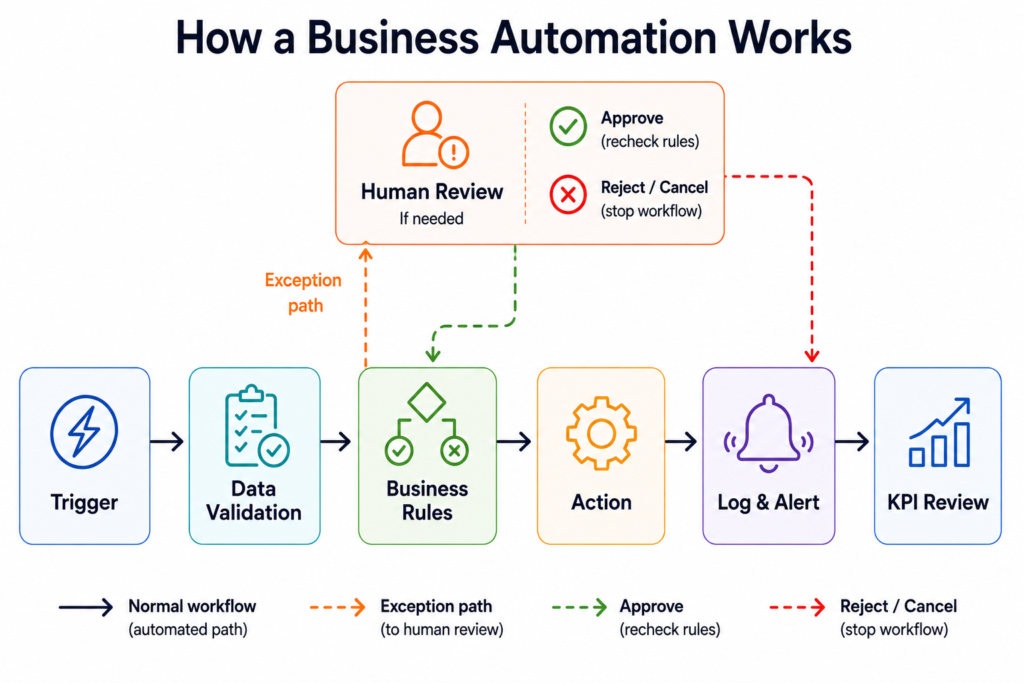
Example:
New website form submission → validate email → check for duplicate → create CRM record → assign salesperson → send acknowledgement → create follow-up task → alert a manager if no action occurs within one business day.
Is Your Process Ready for Automation?
Before choosing a tool for business process automation, check whether the process is ready to automate. Assess five areas:
- Process readiness: Is the current workflow documented and reasonably stable?
- Data readiness: Are required fields complete, consistent, and accessible?
- Technology readiness: Can the relevant systems connect through integrations, APIs, webhooks, or exports?
- People readiness: Does someone own the process and have time to maintain it?
- Risk readiness: Have you identified privacy, security, financial, customer, and compliance risks?
If most answers are yes, the process is a good candidate for a small automation pilot. If several answers are no, fix those gaps before automating.
How Business Systems Connect
Business process automation works by moving information between the applications your business already uses. For example, a new website enquiry may need to create a CRM record, notify a salesperson, and schedule a follow-up task. The connection method affects how reliably and quickly that information moves.
Common connection methods include:
- Native integrations: Built-in connections provided by software vendors. These are usually the easiest starting point because setup, authentication, and common actions are already supported.
- APIs: Structured communication methods that allow one application to request or send data to another. APIs are useful when you need more control or when a native integration does not provide a required action.
- Webhooks: Real-time notifications sent when an event occurs. For example, a form can send a webhook to an automation platform immediately after a customer submits it.
- Spreadsheets and CSV files: Data can be transferred through scheduled spreadsheet updates or file imports and exports. This can work for simple batch processes, but it may create delays, duplicates, or version-control problems if several people edit the same file.
- Email parsing: Automation software can read structured information from incoming emails, such as order numbers, sender details, or invoice data. This is useful when email is the only available input, but inconsistent email formats can cause errors.
- RPA or browser automation: Software bots imitate actions such as opening a website, copying information, and clicking buttons. This can connect older systems without modern integrations, but it is often more fragile because changes to screens, layouts, or login processes can break the workflow.
As a general starting point, usually prefer a native integration or API when one meets your needs. Webhooks can be useful for real-time events, while file- or email-based transfers may suit simple batch workflows. RPA or browser automation can fill gaps when other options are unavailable. However, the best method depends on the workflow’s reliability, data sensitivity, timing, technical requirements, and maintenance needs.
How to build your first automation (beginner-safe, step-by-step)
This section is the heart of any practical business automation guide: not “click here,” but how to set up workflow automation that survives real operations.
For many small businesses, business workflow automation is the simplest starting point because it connects existing applications and removes repetitive handoffs without requiring a complete process redesign.
Step 1: Define the business problem in one sentence
Good examples:
- “Leads from our website don’t get followed up within 1 business hour.”
- “Invoice reminders are inconsistent and depend on one person.”
- “Client intake requests come through email, DMs, and forms, and we lose track.”
If you can’t define the problem clearly, you’ll struggle to measure improvement later.
Step 2: Map the workflow (current state) before you automate
Before automating a business workflow, document the trigger, inputs, handoffs, exceptions, and expected outcome.
Document the process on one page. Include:
- Trigger: what starts it (form submission, new invoice, new email).
- Inputs: what data you need (name, email, invoice amount, due date).
- Steps: what happens next and who does it.
- Handoffs: where work moves from one person/system to another.
- Exceptions: what breaks the “normal path.”
- Output: what “done” looks like (record created, customer notified, task assigned).
This mapping step is where many small businesses skip ahead—and later wonder why the automation is fragile.
Step 3: Simplify before automating (remove obvious waste)
Before you build anything, ask:
- Are we collecting fields we don’t use?
- Are two people doing the same check?
- Could we standardise names/statuses (e.g., lead stages) to avoid messy routing?
Automation amplifies your process. If the process is broken, automation can make the brokenness happen faster.
Step 4: Choose the right automation approach
The right business process automation approach depends on how predictable the workflow is, how much interpretation it requires, and how much human oversight is appropriate.
Use this decision matrix:
| Approach | Choose it when | Avoid it when | Trade-offs |
|---|---|---|---|
| Rule-based automation | Steps are consistent and predictable | You need interpretation of messy text | Fast, reliable; limited for unstructured work |
| AI-assisted automation | You need classification, drafting, summarising, routing suggestions | Errors have high risk and can’t be reviewed | More flexible; requires oversight and testing |
| Human-led process | Low volume or high nuance | It’s repetitive and clearly defined | Highest control; doesn’t scale as volume grows |
Step 5: Build a pilot with human-in-the-loop handling
For your first automation, design for safety:
- Start with a narrow scope: one channel, one team, one region, or one product line.
- Add an exception path: when something doesn’t match rules, assign it to a person.
- Log key steps: track what happened (created record, sent email, assigned owner).
- Use templates where possible: prebuilt workflows reduce beginner setup time.
Business-First AI Insight: Treat automation like improving your operating system, not buying a new gadget. The goal is a better workflow (fewer handoffs, fewer delays, clearer ownership). Tools are just the delivery mechanism.
Step 6: Define “done” and the KPIs before launch
Pick 2–3 metrics you can track without creating more admin. Common KPIs include:
- Cycle time: time from trigger to completion.
- Response time: time to first response (leads/support).
- Error rate: missing fields, wrong assignments, duplicate records.
- Manual hours saved: estimate time removed from repeat tasks.
- Completion rate: % of cases that finish without human intervention.
- Backlog: number of pending items waiting for action.
Step 7: Monitor and iterate after launch
BPA is not “set and forget.” After launch, watch for:
- New failure modes: missing permissions, changed app fields, inconsistent naming.
- Exception patterns: repeated exceptions are signals your rules need refinement.
- Adoption gaps: if the team works around the automation, find out why.
Testing, Reliability & Exception Handling
Before launching an automation, test more than the normal “happy path.” A workflow may work with clean sample data but fail when a field is missing, an application is unavailable, or the same event is received twice.
Reliable business process automation requires testing beyond the normal “happy path,” because real workflows contain missing data, duplicate events, application failures, and unexpected exceptions.
Test before going live
- Test a normal submission from start to finish.
- Test missing or invalid data, such as blank fields or incorrect email addresses.
- Test duplicate records and repeated form submissions.
- Test unusual amounts, dates, categories, and file formats.
- Test permission failures, expired credentials, and disconnected integrations.
- Test temporary downtime or timeouts in connected applications.
- Test failed actions, escalation rules, alerts, and notifications.
- Confirm that sensitive information is not exposed in emails, prompts, messages, or workflow logs.
- Ask a real employee to complete the process and explain what they should do when an exception appears.
- Document how to pause or disable the automation and complete the process manually.
Use separate test accounts, sample records, or a sandbox environment where possible. For example, do not test an invoice-reminder workflow by sending messages to real customers.
Make failures visible and recoverable
Configure retries for temporary failures, but do not retry every action automatically. Repeating a harmless data lookup may be safe; repeating a payment or sending the same customer message may not be.
Prevent duplicate actions by designing the workflow so that retrying a failed step does not accidentally create duplicate records, send duplicate messages, or process the same payment twice. This principle is often called idempotency: repeating the same request should produce the same result rather than create another side effect. AWS: Making retries safe with idempotent APIs
Add alerts for failed runs, assign someone to investigate them, and retain enough execution history to understand what happened. Where the platform allows it, make failed workflows easy to replay after the underlying problem is fixed.
Finally, maintain a manual fallback. Automation should support business continuity—not become the only way work can be completed. Review failure patterns after launch: repeated exceptions may indicate unclear rules, poor data quality, or a process that needs redesign.
Business Process Automation Security, Privacy and Compliance
Because business process automation can connect customer, financial, and operational systems, security and access controls should be considered before moving workflows into production.
Automation often connects email, customer, financial, and support systems. Protect those connections before moving a workflow into production.
BPA security checklist
- Use least-privilege access: Give each connected application only the permissions it needs. An automation that sends emails may not need permission to delete records.
- Enable multi-factor authentication: Protect automation-platform accounts, administrator accounts, email systems, CRM tools, and other connected services with MFA.
- Secure credentials and API keys: Store passwords, tokens, and keys in the platform’s secure credential manager or an approved secrets manager. Do not place them in spreadsheets, prompts, workflow notes, or code shared with the team.
- Minimise data: Pass only the information required for the workflow. Avoid putting passwords, payment details, health information, or unnecessary personal data into AI prompts, messages, or execution logs.
- Control workflow permissions: Restrict who can create, edit, publish, pause, or delete live workflows. Keep a record of important changes.
- Separate testing and production: Use test accounts, sample records, and separate credentials where possible. This reduces the risk of sending test emails to real customers or changing live financial records.
- Review integrations and vendors: Before connecting customer or financial data, check the provider’s security documentation, data-processing terms, subprocessors, retention practices, breach-notification terms, and data-storage locations.
- Manage logs and retention: Logs should help you investigate failures, but they may contain personal or confidential information. Retain them only for as long as operational, legal, or compliance requirements justify.
- Remove access promptly: Disable accounts, tokens, and workflow permissions when employees or contractors leave or change roles.
- Prepare for failure: Maintain backups where appropriate, define a manual fallback, and document who responds to failed runs, suspected breaches, or incorrect automated actions.
These practices align with core small-business cybersecurity guidance from NIST, including restricting access, using MFA, maintaining backups, and preparing for response and recovery. NIST Small Business Cybersecurity Quick-Start Guides
India-specific note
Businesses should assess the privacy, security, tax, employment, contractual, consumer-protection, and sector-specific requirements that apply to their workflows. Depending on the systems, data, industry, and role of the organization, this may include India’s Digital Personal Data Protection framework, CERT-In directions, contractual obligations, or sector-specific rules.
This guide provides operational guidance, not legal advice. Consult a qualified professional when automation handles sensitive personal data, financial transactions, employment decisions, regulated services, or high-impact customer decisions.
Authoritative external resources
- NIST Cybersecurity Framework 2.0: Small Business Quick-Start Guide
- NIST Cybersecurity Basics
- NIST Multi-Factor Authentication Guidance
Three Business Process Automation Examples for Small Businesses
Below are realistic starter workflows that show how process automation works end-to-end—not just single actions.
Example 1: Lead capture → CRM → instant acknowledgement (beginner)
Business problem: Leads arrive via forms/email and are entered manually; follow-ups are inconsistent.
Workflow:
- New lead form submission arrives.
- Validate required fields (name, email, service interest).
- Create or update lead in CRM.
- Assign owner based on rules (territory/service line/round-robin).
- Send acknowledgement email to lead.
- Create a follow-up task for the owner.
Where AI automation can help (optional): classify “service interest” from free-text fields, but keep owner assignment rules human-auditable.
KPIs: lead response time, % of leads with owner assigned, duplicate lead rate.
Example 2: Invoice reminders with escalation (beginner → intermediate)
Business problem: Reminders are manual and inconsistent; overdue invoices slip.
Workflow:
- Daily check: invoices due in X days or overdue by Y days.
- Send reminder email (friendly tone) for due-soon.
- Send overdue reminder and notify internal owner.
- Escalate after a threshold (e.g., create a task for a call).
Where AI automation can help (optional): draft reminder messages tailored to invoice context, but require approval for sensitive accounts.
KPIs: reminder consistency, overdue backlog, time spent on chasing payments.
Example 3: Support inbox triage (intermediate, AI-assisted)
Business problem: Support messages need sorting; urgent issues get missed.
Workflow:
- New support email/message arrives.
- AI classifies category (billing, technical, scheduling) and urgency (low/medium/high).
- Route to the right queue/owner.
- Send a receipt confirmation with expected response window.
- Human reviews AI classification for high-urgency tickets.
Why human-in-the-loop matters here: AI misclassification can create real customer impact, so you want review paths for sensitive categories.
KPIs: time to first response, misrouted ticket rate, backlog by category.
Beginner-Friendly Business Process Automation Tools to Consider
Small businesses can choose business process automation software based on the applications they already use, workflow complexity, technical skills, and maintenance requirements. The right business process automation solutions depend on your existing applications, workflow complexity, security requirements, ownership model, and expected volume.
At the beginner stage, the best small business automation tool is usually the one that integrates cleanly with your current stack and is simple enough that your team will actually maintain it.
These are commonly used options that can fit different small-business automation needs (note: pricing and exact capabilities change frequently; verify current details on official vendor pages).
| Tool | Best for | Ease of use | Time to value | Business size fit | Notes |
|---|---|---|---|---|---|
| Zapier | Quick app-to-app automations and templates | High | Fast | Solo to SMB | Great beginner starting point; can feel limiting for complex logic and may get costly at scale |
| Make | More flexible multi-step workflows with branching | Medium | Fast to moderate | SMB | More visual control; can be more complex than basic trigger-action setups |
| n8n | Advanced, custom, data-heavy workflows; self-host options | Low to medium | Moderate | Technical teams / agencies | Powerful and flexible; requires more technical setup and ongoing maintenance |
| Activepieces | Small-business oriented workflow automation | High | Fast | Small teams | Positioned for everyday admin automation; verify current integrations and limits via official sources |
| Jotform Workflows | Form-led workflows and approvals | High | Fast | Small to SMB | Strong when forms are the starting point (intake, approvals, requests) |
How to choose: a practical selection checklist
- Your systems: does it connect to your email, forms, CRM, accounting, calendar, and helpdesk?
- Your process complexity: simple trigger-action vs multi-step branching vs custom logic.
- Ownership: who will maintain it when something changes?
- Security and access: can you control permissions and audit changes?
- Reliability needs: what happens if a step fails—does it retry, alert, or silently drop?
Expert Verdict: Many small businesses can start with a beginner-friendly workflow automation platform such as Zapier or Make, but the right choice depends on integrations, workflow complexity, ownership, security requirements, usage volume, and total cost. Consider tools like Jotform Workflows when forms and approvals are central to the process. Move toward more technical platforms like n8n when you have developer support, need custom logic, or want more control over infrastructure and data handling.
Ownership, Adoption & Maintenance
BPA is not “set and forget.” Every live automation needs clear ownership, basic documentation, and a review routine so it continues working as the business, team, and connected software change.
Who owns the automation?
Assign these responsibilities, even if one person performs several roles:
- Process owner: Defines the desired outcome, approves process changes, and confirms that the automation still supports the business.
- Automation owner or builder: Maintains the workflow, integrations, rules, credentials, and technical configuration.
- Exception owner: Handles cases the automation cannot complete and ensures they do not remain stuck.
- Change approver: Reviews and approves significant changes before they reach the live workflow.
- Failure monitor: Checks alerts and failed runs, investigates problems, and coordinates recovery.
For a small business, these roles may belong to the owner, operations manager, or an external specialist. What matters is that responsibility is explicit rather than assumed.
How to maintain it
Create a short SOP or automation record containing the workflow’s purpose, trigger, systems used, key rules, owner, exception path, connected accounts, and manual fallback procedure. Record important changes, including what changed, who approved it, and when it was tested.
Set a review schedule based on risk and volume. For example:
- Check critical failures and alerts as they occur.
- Review usage, costs, and exceptions monthly.
- Test important workflows after major changes to connected applications.
- Reconfirm permissions and business rules periodically.
- Remove unused workflows, credentials, and integrations.
When an employee or contractor leaves, transfer ownership and remove their account access, tokens, and administrative permissions promptly.
Make sure the team actually uses it
Train employees on what the automation does, what they are still responsible for, and how to handle exceptions. Ask users for feedback during the pilot and after launch.
If employees create workarounds, bypass required fields, or continue using old spreadsheets, treat that as useful feedback—not simply resistance. The workflow may be confusing, too rigid, poorly timed, or failing to solve the original problem.
The goal is not merely to keep an automation running. It is to keep the underlying process reliable, understandable, and useful.
Common mistakes to avoid (and what to do instead)
Most BPA failures in small businesses aren’t “technology” problems. They’re process and rollout problems.
Mistake 1: Automating a broken process
Why it happens: automation feels like a shortcut.
What it causes: faster chaos, faster errors, more rework.
Better approach: simplify the workflow first (remove unnecessary steps and standardise inputs) before you automate.
Mistake 2: Choosing tools before defining the workflow
Why it happens: marketing makes tools look like the solution.
What it causes: tool sprawl, partial automations, inconsistent operations.
Better approach: write the process requirements (trigger, steps, exceptions, KPIs), then choose the tool that fits.
Mistake 3: Ignoring exceptions and edge cases
Why it happens: demos show the “happy path.”
What it causes: stuck workflows, lost tasks, customer frustration.
Better approach: build explicit exception routing to a person and add alerts for failures.
Mistake 4: Skipping a pilot and rolling out to everyone
Why it happens: pressure to move fast.
What it causes: business disruption and loss of trust.
Better approach: pilot with a narrow scope, validate, then scale.
Mistake 5: Not monitoring after launch
Why it happens: “set it and forget it” expectations.
What it causes: silent failures when apps change fields, permissions, or APIs.
Better approach: set a weekly check for logs/alerts and a monthly improvement review.
What Does Business Process Automation Really Cost?
The value of automation is not limited to the minutes it saves. Before approving a workflow, estimate both its expected benefits and its total cost of ownership—the cost to build, operate, secure, maintain, and eventually change or replace it.
The cost of business process automation should therefore be evaluated against the business value created, not simply against the number of employee hours removed.
Costs to consider
- Platform subscription: Monthly or annual fees for the automation platform, CRM, accounting system, helpdesk, or other connected tools.
- Usage-based charges: Costs based on tasks, operations, credits, workflow executions, API calls, storage, or overage usage.
- AI model usage: Charges for classification, document extraction, summarisation, drafting, or other AI steps. AI usage can increase as workflow volume grows.
- Implementation time: Time spent mapping the process, configuring integrations, writing rules, testing scenarios, and moving the workflow into production.
- Maintenance and troubleshooting: Ongoing work to update workflows when apps, fields, permissions, business rules, or APIs change.
- Custom development: Costs for scripts, middleware, API development, data transformation, or specialist implementation support.
- Security and privacy reviews: Time or professional fees for reviewing permissions, vendors, data flows, credentials, retention, and compliance requirements.
- Training and documentation: The cost of teaching employees how the workflow operates and what to do when an exception or failure occurs.
- Data storage and log retention: Fees for storing records, files, execution history, audit logs, or backups.
- Errors and failed runs: Duplicate records, incorrect messages, missed tasks, delayed orders, or incorrect financial actions can create rework and customer-impact costs.
- Vendor lock-in and migration: A workflow that depends heavily on one platform may be expensive to rebuild if pricing changes, integrations are discontinued, or you move to another provider.
Usage-based pricing makes this review especially important because the cost of an automation may rise with transaction volume, workflow steps, or AI activity. Platforms may measure usage through tasks, operations, credits, or executions rather than a simple flat fee.
Hours saved are not automatically cash saved
If an automation saves 20 employee hours per month, payroll does not necessarily fall by the value of those 20 hours. The business may use that capacity to respond to more customers, follow up with more leads, process additional orders, reduce overtime, improve service quality, make fewer errors, or postpone hiring.
A simple way to estimate ongoing business value is:
Net monthly value = Value created − Monthly operating cost
Then compare that figure with one-time implementation costs and likely maintenance effort. The strongest business case usually combines measurable time savings with improvements in revenue capacity, customer response speed, accuracy, cash flow, or scalability.
How to measure BPA ROI with simple metrics
For beginners, ROI measurement should be simple enough that you’ll actually do it. A business process automation project should be judged by measurable improvements in time, accuracy, response speed, capacity, or other business outcomes. Choose metrics you can track with existing tools.
Start with a baseline (before automation)
- How long does the process take end-to-end (cycle time)?
- How many times per week/month does it run (volume)?
- How much time is spent on repeat admin per instance (manual minutes)?
- What’s the error/rework rate (wrong fields, missing steps)?
Then measure after launch (2–4 weeks later)
- Cycle time reduction: is the process moving faster?
- Manual touchpoints removed: how many steps no longer require a person?
- Quality improvements: fewer missing fields, fewer missed follow-ups.
- Customer-impact metrics: faster responses, fewer delays, better consistency.
A lightweight ROI formula you can use today
You don’t need perfect precision to make good decisions. A practical estimate is:
- Monthly hours saved = (volume per month) × (minutes saved per instance) ÷ 60
- Value of time saved = monthly hours saved × blended hourly cost (or the value of redeploying that time)
Treat saved hours as released capacity unless the business can directly reduce overtime, contractor usage, working hours, or future hiring.
Also consider non-time benefits that matter in real operations: fewer missed leads, fewer delayed invoices, fewer errors that trigger customer complaints.
30-day beginner rollout plan (so you don’t stall)
Start Today (0–2 hours)
- List your top 5 repetitive processes.
- Pick 1 using the scorecard (high-frequency, rule-based, measurable).
- Write the “one-sentence problem” and choose 2 KPIs.
Improve Next (next 30 days)
- Map the current workflow on one page (trigger → steps → exceptions → done).
- Simplify inputs and standardise naming (statuses, categories, owners).
- Build a pilot automation with exception routing and logging.
- Train the team on the new process ownership: who watches alerts and who fixes failures.
Scale Later (after you prove it works)
- Standardise the pattern across similar workflows (e.g., all intake forms follow the same routing rules).
- Add AI automation only where it clearly reduces unstructured work (triage, summarization) and is reviewable.
- Create a quarterly automation review to prune, update, and improve workflows.
FAQ: Business Process Automation for small businesses
What is business process automation?
Business process automation is the use of software to handle repetitive, rule-based business tasks and multi-step workflows with less manual effort. It focuses on end-to-end processes (with handoffs and rules), not just isolated tasks.
Which processes should I automate first?
Start with high-volume, repetitive, rule-based workflows like lead follow-up, invoice reminders, scheduling, and intake routing. These are easier to automate safely and easier to measure for ROI.
What’s the difference between BPA and workflow automation?
Workflow automation often connects apps and triggers actions (for example, “new form submission → create a CRM record”). BPA typically covers broader multi-step processes that include routing, approvals, exceptions, and monitoring across a full business workflow.
Do I need AI automation for BPA?
No. Many small-business wins are simple rule-based automations. AI is most useful when the workflow includes unstructured inputs like emails or documents and you need classification, drafting, or summarization—with appropriate human oversight for sensitive cases.
What are the best beginner tools for business process automation?
Beginner-friendly options often include no-code workflow automation platforms (such as Zapier or Make) and form-led workflow tools (such as Jotform Workflows). The best choice depends on your existing apps, integration needs, and how complex your process logic is.
How do I avoid breaking operations when I automate?
Run a small pilot first, keep a human-in-the-loop for exceptions, and add logging/alerts so failures are visible. Don’t roll out broadly until the workflow performs reliably under real conditions.
How do I measure automation ROI?
Track a small set of operational KPIs like cycle time, response time, manual hours saved, error rate, and completion rate. Establish a baseline before automation and compare results 2–4 weeks after launch.
Is business process automation secure?
It can be, but automation often touches customer and financial data. Make sure access controls, permissions, and monitoring are configured properly, and limit who can edit live workflows.
Conclusion: automate the process, not the chaos
Business process automation works best when you treat it as an operational discipline: choose one painful process, map it, simplify it, automate repetitive tasks and predictable steps, and measure business outcomes. Tools matter—but not as much as clear ownership, exception handling, and ongoing monitoring.
If you take one strategic lesson from this guide, make it this: your first automation is less about saving time today and more about building a repeatable way to improve how your business runs. Once you have that pattern, scaling automation (and adding AI where it truly fits) becomes far easier—and far safer.
The best business process automation initiatives start small, prove value, and then expand to other repeatable workflows.
Next step: Pick one workflow this week (lead follow-up, invoice reminders, intake routing), map it on one page, and identify two KPIs. If you want help prioritizing or designing a safe pilot, consider booking a business process automation assessment or requesting a workflow mapping checklist.