
WhatsApp Business Automation: Complete Beginner’s Guide (2026)
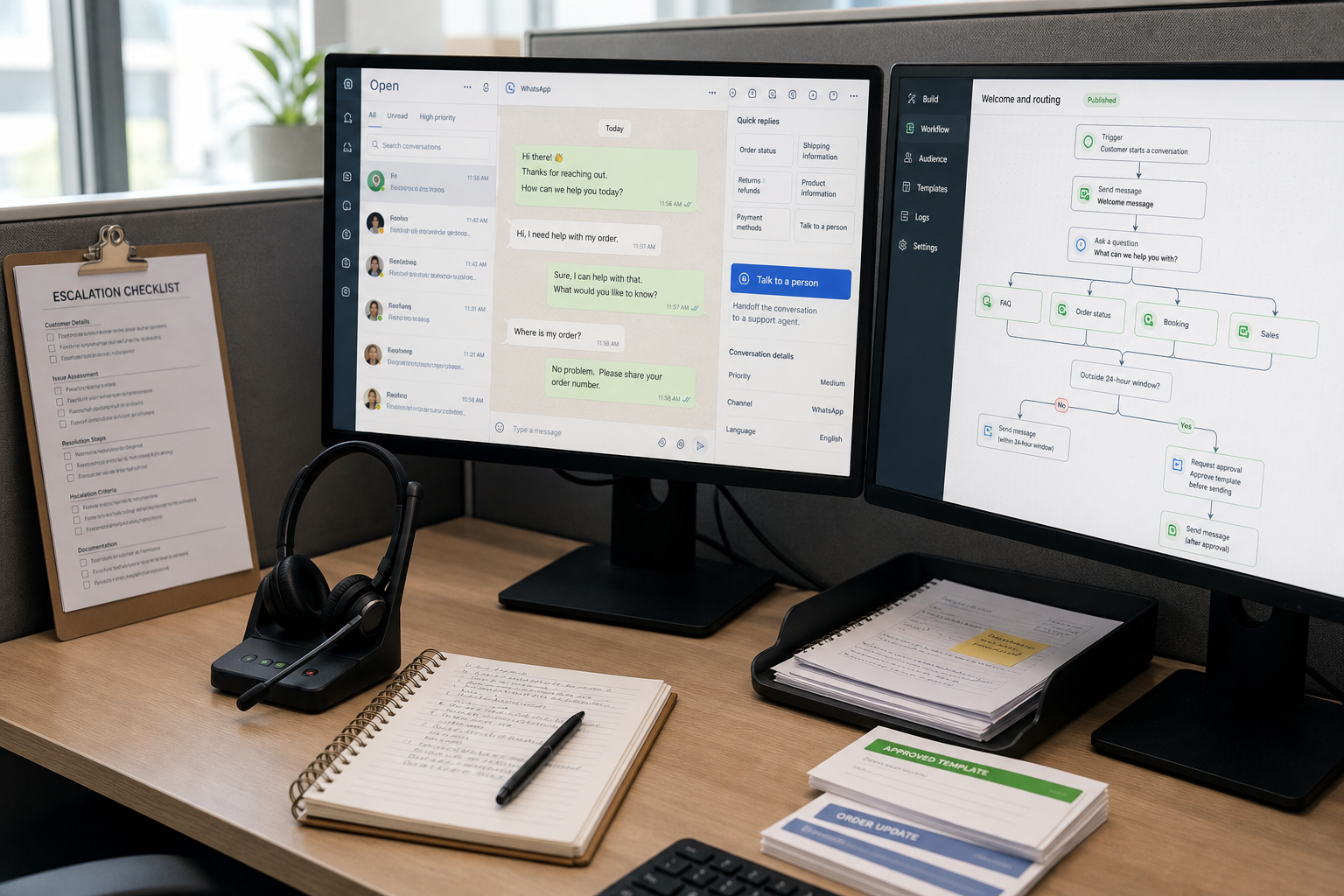
If WhatsApp has become your “unofficial help desk,” you’ve probably hit the same wall: customers expect instant replies, but your team can’t keep typing the same answers all day. That’s exactly what WhatsApp Business Automation is for—reducing repetitive messaging while keeping conversations personal and compliant.
This guide is written for small businesses in 2026 that want practical WhatsApp automation for support and lead handling, without jumping straight into complex enterprise setups.
Quick Answer (beginner-friendly): WhatsApp Business Automation means using built-in WhatsApp Business features or official WhatsApp Cloud API tools to automatically greet customers, answer FAQs, collect lead details, send reminders, and route chats to the right person. Start with the WhatsApp Business App for simple auto-replies. Move to Cloud API when you need team inboxes, integrations, analytics, or proactive messages using approved templates.
What WhatsApp Business Automation means (and what it doesn’t)
WhatsApp automation isn’t one tool. It’s a spectrum of options—from basic auto-replies in the WhatsApp Business App to Cloud API-based workflows and AI-assisted customer support.
WhatsApp Business Automation typically includes:
- Instant replies (welcome messages, away messages)
- Saved replies (quick replies for FAQs)
- Structured chat flows (lead qualification, booking)
- Notifications (order updates, reminders)
- Routing (send specific topics to the right team)
- Integrations (CRM, calendar, help desk, e-commerce)
- AI assistance (answer common questions with guardrails, escalate to humans)
What it doesn’t mean (and what often goes wrong):
- It’s not “set and forget.” You’ll maintain templates, flows, and escalation rules.
- It’s not a replacement for human support. You need clear handoff paths for exceptions.
- It’s not automatically “marketing automation.” The fastest ROI for beginners is usually support and operations, not promotions.
Why small businesses automate WhatsApp (the real business problems)
Before tools and APIs, start with the business pain. Most small businesses automate WhatsApp because of a handful of predictable operational issues:
- Slow response times during peak hours or after hours
- High repetition (pricing, hours, address, availability, order status)
- Missed leads when customers don’t get quick replies
- Support overload in small teams
- Copy-paste workflows between WhatsApp and CRM/calendar/help desk
- Inconsistent answers across staff members
Automation matters because WhatsApp is conversational. Customers don’t want a ticket number—they want a useful reply right now. The goal is to remove repetitive manual work while keeping the “human” parts where they matter.
Business-First AI Insight: The best WhatsApp automations don’t try to “sound smart.” They reduce friction in one specific workflow (like booking, status updates, or lead qualification), then hand off edge cases to a human. Narrow, purpose-built flows usually outperform broad chatbots in reliability and compliance.
WhatsApp Business App vs WhatsApp Business Platform (Cloud API): what beginners must understand
Most beginner confusion comes from treating these as interchangeable. They’re not.
| Option | Best for | Ease of setup | Automation depth | Team & integrations | Notes |
|---|---|---|---|---|---|
| WhatsApp Business App | Very small teams, low volume | Easy | Basic (auto/quick replies) | Limited | Great starting point; common first step |
| WhatsApp Business Platform / Cloud API | Growing SMBs, support teams, scalable workflows | Medium to high | Advanced (templates, bots, routing) | Strong (BSPs, webhooks, CRM/help desk) | Usage-based costs vary by country/category; verify current pricing in official sources |
Practical rule of thumb: If you’re mostly answering messages manually and need only simple “first response” automation, the App is fine. If you need a shared team inbox, integrations, proactive notifications, analytics, or structured automation at scale, Cloud API is where automation becomes “real.”
Some guides cite the App as ideal up to roughly a couple dozen daily messages as a general guideline (not an official Meta limit). Treat it as a signal: once your message volume and workflow complexity increase, the App starts to feel cramped.
How WhatsApp automation works in practice (the mental model)
Beginners often jump straight into building a bot. A better starting point is the underlying workflow:
Inbound message → classify intent → respond or collect info → trigger an action → log the outcome → escalate when needed
Examples of “trigger an action” might include:
- Create/update a CRM lead
- Book a calendar slot
- Create a help desk ticket
- Check an order status in your e-commerce system
- Notify a staff member in a team channel
The 24-hour customer service window (why it changes everything)
A central concept in official WhatsApp automation setups is the 24-hour customer service window. In many guides, this is described as the period after a customer messages you when you can generally respond freely in a normal conversational way. Outside that window, proactive outbound messaging typically relies on approved message templates.
Why this matters for small businesses:
- Your automation design should prioritize resolving issues within that window.
- Follow-ups, reminders, and re-engagement often require template planning and approval.
- If you ignore this, “simple” automations can fail at launch.
Note: Policies and details can change; always confirm current requirements in Meta’s official WhatsApp Business Platform documentation.
What you can automate (high-ROI workflows for beginners)
If you’re new to WhatsApp workflows, start with the repetitive conversations that don’t require deep judgment. These are common first wins:
| Workflow | What gets automated | Why it’s a good first project | Human handoff trigger |
|---|---|---|---|
| Welcome + routing | Greeting, menu of topics, collect basic info | Improves first response time immediately | Customer chooses “Talk to a person” or repeats the same question |
| FAQ auto-responder | Hours, location, pricing range, policies | Reduces repetitive typing fast | Question not recognized or customer says it didn’t help |
| Lead qualification | Collect needs, budget range, timeline, contact details | Improves consistency and reduces missed leads | High-value lead signals, complex questions, negotiation |
| Appointment reminders | Send reminders, confirm/reschedule | Clear operational ROI; simple logic | Reschedule requests beyond rules |
| Order/status updates | Fetch order status, shipping updates | Common high-volume request in retail | Status mismatch, complaint, refund request |
A beginner-friendly decision tree: App vs Cloud API vs “AI agent”
Not every business needs the same automation tier. Use this simple decision logic:
- Start with the WhatsApp Business App if you have low message volume, one phone/number, and you mainly need quick replies and basic auto-messages.
- Move to Cloud API-based automation if you need a shared team inbox, integrations (CRM/calendar/help desk), analytics, or template-based proactive messaging.
- Consider AI-assisted automation when you have stable workflows, a well-defined knowledge base (FAQs/policies), and clear escalation rules. AI is most useful when it’s constrained to specific topics and backed by human oversight.
Where beginners get stuck is jumping from “no automation” straight to “AI chatbot that answers everything.” In real operations, that tends to increase risk (wrong answers, policy issues, frustrated customers) and delays launch.
Step-by-step: how to set up WhatsApp Business Automation (practical roadmap)
The exact steps vary by tool and whether you use the App or Cloud API. But the implementation sequence that works for most small businesses looks like this.
Step 1: Choose one workflow and define success
Pick one high-volume, repetitive workflow (welcome + routing, FAQs, booking, status updates). Then decide what “better” means in business terms.
Beginner-friendly KPIs:
- First response time
- Automation containment rate (percent resolved without human)
- Handoff rate (how often humans take over)
- Lead qualification completion rate (if using a form/flow)
- Conversion outcome (booked appointment, qualified lead, resolved issue)
Step 2: Map the conversation (keep it narrow)
Write the flow as a simple script. For example, for lead qualification:
- Greet + confirm what they need help with
- Ask 2–4 qualifying questions
- Offer next step (book a call, get a quote, talk to sales)
- Escalate to a human when answers indicate complexity or high value
Implementation trade-off: longer flows collect better data but reduce completion. Beginners should prefer fewer steps and earlier handoff.
Step 3: Decide the automation tier (App or Cloud API)
- If the workflow is mostly “reply with saved answers,” the App may be enough.
- If the workflow needs integrations, templates, or team collaboration, Cloud API will be required.
Step 4: Build templates early (if you’ll message outside the 24-hour window)
If your workflow includes reminders, re-engagement, or proactive notifications, plan for template approval. Many beginner projects fail because the business builds the bot first and thinks about templates later.
What tends to get templates approved more smoothly (based on common guidance):
- Clear purpose (reminder, update, confirmation)
- Simple language
- Not overly promotional
- Aligned with the user’s opt-in expectations
Step 5: Set up human handoff (required in practice)
Every automation should include at least one of these handoff paths:
- A “Talk to a person” option
- Automatic escalation when confidence is low (AI) or intent is unclear
- Escalation based on keywords (refund, complaint, urgent)
- Escalation when the customer repeats the question or says it didn’t help
Why it matters: this is your safety valve for quality control, policy compliance, and customer satisfaction.
Step 6: Integrate one system (don’t integrate everything at once)
Integrations unlock the biggest value, but they also add complexity. Start with one:
- CRM: capture leads and conversation outcomes
- Calendar: appointment booking and reminders
- Help desk: ticketing and routing
- E-commerce: order status and delivery updates
Trade-off: deeper integrations increase time-to-value. Start with the system that removes the most copy-paste work.
Step 7: Launch small, measure, and improve weekly
Many guides recommend measuring conversation patterns for a period (some suggest exporting roughly 90 days of chats) before committing to complex automation. The practical principle is sound: use your real message data to prioritize what to automate.
Weekly optimization checklist:
- Which questions are still reaching humans most often?
- Where do customers abandon the flow?
- Which template messages get the best responses?
- Are handoffs happening early enough for sensitive issues?
Best WhatsApp automation tools for beginners (2026)
The “best” tool depends on your workflow and your team’s technical comfort. Pricing and features change frequently, so use vendor documentation and pricing pages to verify details before buying.
| Tool / option | Best for | Ease of use | Time to value | Business size | Notes |
|---|---|---|---|---|---|
| WhatsApp Business App | Basic automation (welcome/away/quick replies) | High | Fast (hours) | Solo to very small teams | Limited scaling; good place to start |
| WhatsApp Cloud API (via BSP) | Templates, integrations, team workflows | Medium | Days to weeks | Growing SMBs | Usage-based costs vary; compliance and setup effort required |
| ManyChat | Beginner-friendly flow building for lead capture and simple automations | High | Fast to moderate | SMBs, marketing teams | Can become complex as flows grow |
| Twilio | Developer-led programmable messaging | Low to medium | Moderate | Technical teams | Powerful, but more technical than most beginners want |
| MessageBird | Omnichannel customer messaging | Medium | Moderate | SMBs needing multiple channels | May be more platform than a WhatsApp-only starter needs |
| 360dialog | WhatsApp-focused API access via a BSP | Medium | Moderate | Teams prioritizing WhatsApp | Good when you want WhatsApp-first rather than a suite |
| Infobip | Broader messaging + notifications at scale | Medium | Moderate | Scaling SMBs / mid-market | Heavier than many beginner implementations |
| Freshworks WhatsApp automation | Support workflows in a service suite | Medium | Moderate | Support teams | Most valuable if you already run Freshworks |
| Kommo | CRM-first WhatsApp automation for sales | Medium | Moderate | Sales-led SMBs | Great for pipeline workflows; less ideal for complex support |
Expert Verdict: what most beginners should pick first
Most small businesses should start with the WhatsApp Business App to standardize quick replies and basic routing, then move to Cloud API via a beginner-friendly platform or BSP once they need shared inbox collaboration, integrations, and template-driven proactive messaging. AI should be added only after the workflow is stable and the handoff process is proven.
Compliance, consent, and template rules (the beginner-safe approach)
WhatsApp automation can go wrong quickly if you treat it like email marketing. A safe baseline for small businesses:
1) Get clear opt-in for outbound messages
Outbound use cases (reminders, re-engagement, promos) should be tied to explicit consent and clear expectations. This is especially important for marketing content.
2) Respect the 24-hour window and use approved templates
Design your workflow so most “free-form” back-and-forth happens inside the customer service window. Plan templates for anything that occurs outside it (like reminders or follow-ups).
3) Keep promotional messaging limited and value-driven
Many guides caution that broadcasts and promotional messaging should be used carefully and sparingly. Operational messaging (support, status updates, reminders) is usually the safer starting point.
4) Always include a human fallback
Beyond customer experience, escalation paths are a governance tool. They help you avoid policy violations, reduce wrong answers, and prevent customers from being trapped in loops.
Common mistakes beginners make (and how to avoid them)
- Mistake: Starting with a tool before mapping the workflow. Better: Choose one high-volume workflow, then select the simplest tool that supports it.
- Mistake: Building a “do everything” chatbot. Better: Build narrow flows that solve one job (booking, FAQs, routing).
- Mistake: Forgetting templates until the end. Better: If you’ll message outside the 24-hour window, plan templates early.
- Mistake: No escalation. Better: Add explicit “Talk to a person” plus automatic triggers for sensitive topics.
- Mistake: Automating without measurement. Better: Track response time, containment, handoffs, and outcomes from day one.
Realistic small business scenarios (what this looks like in the real world)
Retail: order status + FAQs
A small online retailer gets constant “Where is my order?” messages. Automation handles status lookups and standard shipping FAQs. Complaints, refunds, and address changes go straight to a human.
Healthcare clinic: appointment reminders + intake routing
A clinic uses WhatsApp workflows to confirm appointments and route intake questions. The automation is intentionally conservative, with early escalation for anything sensitive or unclear. (Clinics should verify local compliance requirements and internal policies.)
Professional services: lead qualification + booking
A consulting or accounting practice uses WhatsApp automation to collect basic needs and book an intro call. The goal isn’t to “close in chat,” but to stop losing leads after hours and standardize intake quality.
Implementation priority: Start today, improve next, scale later
Start Today (low effort)
- Identify the top 10–20 repetitive questions your team answers weekly.
- Create quick replies for those FAQs (even if you stay fully manual for now).
- Add a welcome message that sets expectations (hours, response time, key options).
Improve Next (next 30 days)
- Build one structured workflow (lead qualification or booking or order status).
- Define handoff rules and test them with your team.
- Start tracking response time and handoff rate weekly.
Scale Later (after you’ve proven ROI)
- Move to Cloud API if you need templates, a shared inbox, or integrations.
- Add CRM/calendar/help desk integration (one at a time).
- Introduce AI only when your knowledge base and escalation logic are reliable.
FAQs: WhatsApp Business Automation (beginner questions)
What is WhatsApp Business Automation?
WhatsApp Business Automation is using software to handle repetitive WhatsApp tasks—like greetings, FAQ replies, lead capture, reminders, and routing—so customers get faster responses and your team spends less time on copy-paste work.
Is WhatsApp automation allowed?
Automation is allowed when it follows WhatsApp/Meta policies, especially around consent and template messaging. Businesses should verify current rules in official documentation and avoid unofficial automation methods that may violate terms.
What’s the difference between WhatsApp Business App and WhatsApp Cloud API?
The WhatsApp Business App supports basic automation (welcome/away messages, quick replies) and is easiest for beginners. The Cloud API supports scalable automation with templates, integrations, team inboxes, and more advanced workflows—but requires more setup and compliance work.
Do I need approved templates for automated messages?
In most common setups, proactive outbound messages outside the customer service window typically use approved templates. This is why template planning is a key part of WhatsApp automation projects.
Can AI answer WhatsApp messages for customer support?
Yes, AI can help answer common questions and route conversations, but it should be constrained with clear guardrails and a human handoff path. Beginners usually get better results starting with structured flows before deploying open-ended AI chat.
Do I need a BSP to use the WhatsApp API?
Many small businesses use a Business Solution Provider (BSP) to simplify API setup, verification steps, and integrations. Whether you need one depends on your chosen platform and implementation approach.
What are the best first WhatsApp workflows to automate?
Common first wins are welcome messages with routing, FAQs, lead qualification, appointment reminders, and order status updates. These are repetitive, measurable, and easy to design with safe escalation paths.
How do I measure if WhatsApp automation is working?
Track first response time, automation containment rate, human handoff rate, completion rate for flows (like lead qualification), and business outcomes (appointments booked, qualified leads, resolved issues). Review weekly and refine where customers drop off or escalate.
Conclusion: the beginner strategy that works in 2026
The most reliable path to WhatsApp Business Automation isn’t picking the “best tool.” It’s choosing one high-volume business problem, designing a simple workflow that solves it, and only then selecting the automation tier (App vs Cloud API) that fits your operational reality.
If you remember one strategic lesson: WhatsApp automation succeeds when it removes repetitive work while protecting the moments that need human judgment. Build narrow flows, measure outcomes, and scale only after you can prove the workflow is working.
Next step: Audit your last few weeks of WhatsApp conversations and list the top repetitive topics. Choose one workflow to automate first, define success metrics, and design your handoff rules before you touch any tool settings. If you want help validating the right tier and rollout plan, consider a structured WhatsApp workflow audit and compliance review.