
Running a small business has never been more challenging—or more exciting.
Customers expect instant responses, personalized experiences, and seamless service across every channel. Meanwhile, business owners must balance marketing, sales, customer support, finance, operations, hiring, and strategic planning—often with limited staff and tight budgets.
The good news is that Artificial Intelligence (AI) has matured into a practical business tool. What once required enterprise-level budgets is now accessible to startups and small businesses through affordable cloud-based AI platforms.
Instead of replacing people, AI automation eliminates repetitive work, allowing business owners and employees to focus on creativity, customer relationships, and strategic growth.
According to research from organizations such as McKinsey, Deloitte, and Gartner, companies adopting AI-enabled automation often improve operational efficiency, reduce costs, and enhance customer satisfaction when implementations are aligned with clear business goals.
In this comprehensive guide, you’ll discover the 10 AI automations every small business should implement in 2026, including practical use cases, recommended tools, expected business impact, implementation complexity, and best practices.
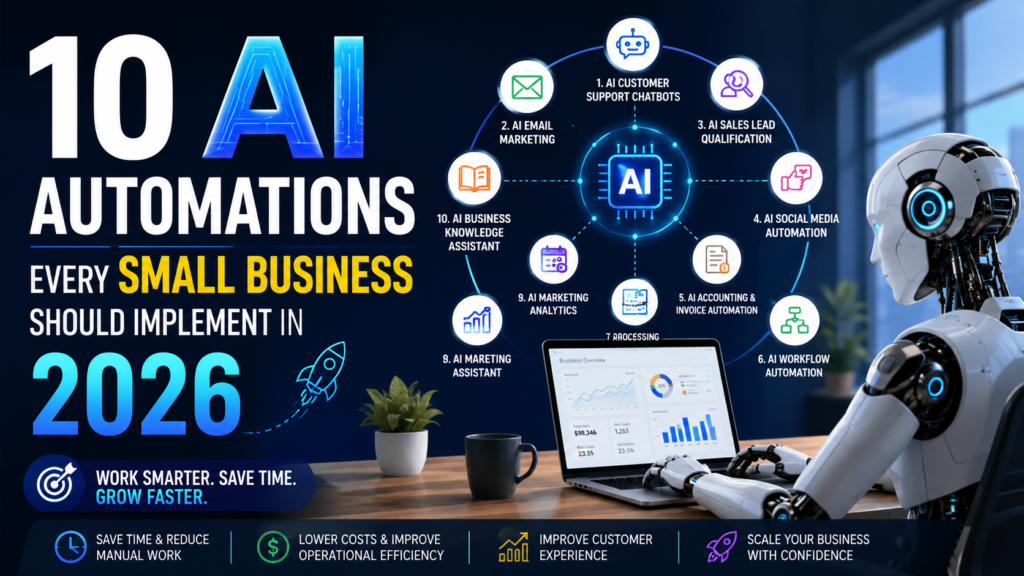
Why AI Automation Matters for Small Businesses
Every growing business eventually encounters the same challenge:
There are more tasks than people available to complete them.
Most employees spend a significant portion of their day performing repetitive activities such as:
- Answering common customer questions
- Scheduling appointments
- Sending follow-up emails
- Processing invoices
- Updating CRM records
- Managing spreadsheets
- Posting on social media
- Preparing reports
These tasks are essential—but they rarely create competitive advantage.
AI automation enables businesses to:
- Save hundreds of work hours each year
- Reduce operational costs
- Increase employee productivity
- Deliver faster customer service
- Improve decision-making using real-time insights
- Scale operations without proportionally increasing headcount
Instead of working harder, businesses begin working smarter.
The 10 AI Automations Every Small Business Should Implement
1. AI Customer Support Chatbots
What It Is
Modern AI chatbots provide human-like conversations across websites, WhatsApp, Facebook Messenger, and mobile applications.
Unlike older rule-based bots, today’s AI assistants understand natural language, remember context within a conversation, and can answer a broad range of customer questions.
Business Problems Solved
- Long customer wait times
- Limited support staff
- Repetitive customer inquiries
- Lost sales outside business hours
Tasks Automated
- Frequently asked questions (FAQs)
- Order tracking
- Appointment scheduling
- Product recommendations
- Lead qualification
- Ticket creation
- Refund policy guidance
Benefits
- 24/7 customer support
- Reduced support costs
- Faster response times
- Higher customer satisfaction
- Increased lead generation
Recommended Tools
| Tool | Best For |
|---|---|
| ChatGPT | AI-powered customer assistants |
| Intercom Fin | Customer support |
| Zendesk AI | Enterprise help desk |
| Tidio AI | Small businesses |
| Drift AI | Sales conversations |
Implementation Difficulty
⭐⭐☆☆☆ (Easy to Moderate)
Expected ROI
Businesses often see support teams spending less time on routine questions, allowing staff to focus on complex customer issues.
2. AI Email Marketing Automation
Email marketing continues to deliver one of the highest returns on investment across digital marketing channels.
AI enhances email campaigns by automatically personalizing content for every customer.
AI Can Automate
- Welcome emails
- Abandoned cart recovery
- Product recommendations
- Personalized newsletters
- Customer segmentation
- Subject line optimization
- Send-time optimization
Benefits
- Higher open rates
- Better click-through rates
- Increased conversions
- Less manual work
Recommended Tools
- Mailchimp AI
- ActiveCampaign
- HubSpot AI
- Brevo
- Klaviyo
Best Practice
Use AI to draft and personalize emails, but review campaigns to ensure messaging aligns with your brand and audience.
3. AI Sales Lead Qualification
Sales teams often spend valuable time pursuing prospects who are unlikely to convert.
AI analyzes customer behavior and prioritizes the most promising opportunities.
AI Evaluates
- Website visits
- Email engagement
- Company size
- Purchase intent
- CRM history
- Buying signals
Benefits
- Higher sales productivity
- Better conversion rates
- Faster follow-up
- Improved sales forecasting
Recommended Tools
| Tool | Feature |
|---|---|
| HubSpot AI | Lead scoring |
| Salesforce Einstein | Predictive sales |
| Zoho CRM AI | Sales assistant |
| Freshsales Freddy AI | Smart lead ranking |
4. AI Social Media Automation
Maintaining an active social media presence requires continuous effort.
AI can streamline much of the content creation and publishing workflow.
AI Can Generate
- Social media posts
- Captions
- Hashtags
- Images
- Content calendars
- Publishing schedules
Recommended Tools
- ChatGPT
- Canva Magic Write
- Buffer AI
- Hootsuite AI
- SocialBee
Benefits
- Consistent posting
- Faster content production
- Better audience engagement
- Time savings
Tip: Always review AI-generated content before publishing to ensure accuracy and consistency with your brand voice.
5. AI Accounting and Invoice Automation
Financial administration is one of the most time-consuming responsibilities for small businesses.
AI simplifies accounting by automating repetitive bookkeeping tasks.
AI Can Automate
- Invoice creation
- Receipt scanning
- Expense categorization
- Payment reminders
- Cash flow forecasting
- Financial reporting
Benefits
- Reduced manual errors
- Faster invoicing
- Better financial visibility
- Improved cash flow management
Recommended Tools
- QuickBooks AI
- Xero
- FreshBooks
- Zoho Books
6. AI Workflow Automation
Every business uses multiple software applications.
Without automation, employees manually transfer information between systems.
AI workflow automation connects these tools and eliminates repetitive data entry.
Example Workflow
Website Form
      │
      ▼
CRM
      │
      ▼
Send Welcome Email
      │
      ▼
Notify Sales Team
      │
      ▼
Create Follow-Up Task
Common Automations
- Website lead → CRM
- CRM → Email campaign
- Purchase → Invoice
- Form submission → Slack notification
- Email attachment → Cloud storage
Recommended Platforms
| Platform | Best For |
|---|---|
| n8n | Open-source automation |
| Zapier | No-code automation |
| Make | Visual workflows |
| Pabbly Connect | Cost-effective automation |
| Microsoft Power Automate | Microsoft ecosystem |
Business Impact
⭐⭐⭐⭐⭐ Very High
7. AI Document Processing
Many businesses process hundreds or thousands of documents each year.
Instead of manually entering information, AI extracts structured data automatically.
Supported Documents
- Invoices
- Contracts
- Purchase Orders
- Receipts
- Tax Documents
- HR Forms
Benefits
- Faster processing
- Reduced errors
- Improved compliance
- Better searchability
Recommended Tools
- Google Document AI
- Microsoft AI Builder
- Rossum
- ABBYY
8. AI Meeting Assistants
Meetings generate valuable information—but taking notes manually is inefficient.
AI meeting assistants automatically capture and summarize discussions.
AI Can
- Record meetings
- Generate summaries
- Identify action items
- Create follow-up emails
- Assign tasks
- Search previous meetings
Recommended Tools
- Otter.ai
- Fireflies.ai
- Fathom AI
- Microsoft Copilot
- Google Gemini
Benefits
- Better documentation
- Improved accountability
- Reduced administrative work
9. AI Marketing Analytics
Businesses collect data from multiple platforms.
AI consolidates this information into actionable insights.
AI Can Analyze
- Website traffic
- Advertising campaigns
- Email performance
- Customer journeys
- Sales funnels
- Conversion rates
Benefits
- Faster reporting
- Better campaign optimization
- Improved ROI
- Smarter business decisions
Recommended Tools
| Tool | Purpose |
|---|---|
| Looker Studio | Dashboards |
| Power BI Copilot | Business intelligence |
| Tableau AI | Data visualization |
| HubSpot AI | Marketing analytics |
10. AI Business Knowledge Assistant
Every organization accumulates valuable internal knowledge.
Instead of searching through folders and documents, employees can ask AI questions in natural language.
Example Questions
- “What is our refund policy?”
- “Show the employee onboarding process.”
- “Find our contract with ABC Company.”
- “What is our pricing model?”
Recommended Platforms
- ChatGPT Enterprise
- Microsoft Copilot
- Notion AI
- Google NotebookLM
- Glean
Benefits
- Faster information retrieval
- Improved employee productivity
- Better knowledge sharing
- Reduced onboarding time
AI Automation Implementation Roadmap
Instead of implementing all automations simultaneously, follow a phased approach.
| Phase | Automation | Business Impact | Complexity |
|---|---|---|---|
| Phase 1 | Customer Support Chatbot | ⭐⭐⭐⭐⭐ | Medium |
| Phase 1 | Workflow Automation | ⭐⭐⭐⭐⭐ | Medium |
| Phase 1 | Email Marketing | ⭐⭐⭐⭐☆ | Easy |
| Phase 2 | Sales Lead Qualification | ⭐⭐⭐⭐☆ | Medium |
| Phase 2 | Accounting Automation | ⭐⭐⭐⭐☆ | Medium |
| Phase 2 | Meeting Assistant | ⭐⭐⭐☆☆ | Easy |
| Phase 3 | Social Media Automation | ⭐⭐⭐☆☆ | Easy |
| Phase 3 | Document Processing | ⭐⭐⭐⭐☆ | Medium |
| Phase 3 | Marketing Analytics | ⭐⭐⭐⭐☆ | Medium |
| Phase 3 | Knowledge Assistant | ⭐⭐⭐⭐⭐ | Medium |
Common AI Automation Mistakes
Avoid these common pitfalls when implementing AI:
- Trying to automate every process at once.
- Choosing tools without defining business goals.
- Ignoring data quality.
- Skipping employee training.
- Expecting AI to operate without human oversight.
- Measuring success only by technology adoption instead of business outcomes.
Future Trends in AI Automation
The next generation of AI automation will include:
- Autonomous AI agents
- Multi-agent business workflows
- Voice-enabled business assistants
- Predictive customer service
- Hyper-personalized marketing
- AI-powered business forecasting
- Autonomous inventory management
- Multimodal AI capable of understanding text, images, audio, and video together
Businesses that begin adopting AI thoughtfully today will be better prepared for these advancements.
How to Choose the Right AI Automation
Before investing in any AI solution, evaluate the following factors:
| Question | Why It Matters |
|---|---|
| Does it solve a real business problem? | Avoid adopting AI for its own sake. |
| Can it integrate with existing software? | Reduces implementation effort. |
| Is the pricing scalable? | Supports future growth. |
| Does it provide measurable ROI? | Helps justify investment. |
| Is customer support available? | Ensures smoother adoption. |
Final Thoughts
AI automation is no longer reserved for large enterprises. In 2026, small businesses have access to powerful, affordable tools that can automate repetitive work, improve customer experiences, and unlock new opportunities for growth.
The key to success is to start small, focus on high-impact processes, measure results, and expand gradually. Whether you begin with a customer support chatbot, workflow automation, or AI-powered email marketing, each successful implementation builds momentum for broader digital transformation.
Businesses that thoughtfully combine AI with human expertise will be better positioned to adapt, innovate, and compete in an increasingly AI-driven economy.
Frequently Asked Questions (FAQs)
1. What is AI automation for small businesses?
AI automation uses artificial intelligence to perform repetitive business tasks—such as customer support, marketing, invoicing, scheduling, and workflow management—with minimal human intervention.
2. Is AI automation expensive?
Not necessarily. Many AI platforms offer free plans or affordable subscription tiers designed specifically for startups and small businesses.
3. Which AI automation should I implement first?
For most small businesses, the best starting points are:
- AI customer support chatbots
- Workflow automation
- Email marketing automation
These solutions typically provide strong business value while being relatively straightforward to implement.
4. Will AI replace employees?
In most small business environments, AI is designed to augment employees rather than replace them. It automates repetitive tasks, allowing people to focus on strategic thinking, creativity, customer relationships, and complex decision-making.
5. How can I measure the success of AI automation?
Track metrics such as:
- Time saved
- Cost reduction
- Customer satisfaction (CSAT)
- Response times
- Lead conversion rates
- Revenue growth
- Employee productivity
- Error reduction
Comparing these metrics before and after implementation helps quantify the business impact of your AI investments.